
SiteGround CDN: Easy Steps to Configure Your Setup
Last Updated on December 24, 2025
Are you looking for a simple way to make your website faster for visitors across the globe? A slow website can hurt your user experience and search rankings.
The SiteGround CDN is an excellent solution built directly into your hosting, featuring smart defaults for optimal configuration.
This in-house CDN provider is designed for easy setup and powerful results.
With a straightforward CDN activation process, you can boost your site’s speed without needing any technical expertise. Let’s explore how you can configure it for optimal performance.

Ready to sign up with SiteGround? Click here to get a SiteGround discount and get up to 83% off, plus a free domain name.
Key Highlights
- SiteGround CDN is an in-house content delivery network designed to improve your website speed.
- The CDN activation process is simple and can be done with a single click in your Site Tools.
- SiteGround offers both a free and a premium CDN plan to fit different hosting plans and website needs.
- This CDN provider works by caching your site’s content on servers around the world, closer to your visitors.
- The service is fully integrated with SiteGround hosting, ensuring seamless performance and easy management.
Understanding SiteGround CDN Service
The SiteGround CDN is a custom-built service created specifically to enhance the website performance of SiteGround customers.
As an integrated CDN provider, it removes the complexity often associated with third-party services and related services.
You can manage everything directly from the CDN section in your Site Tools, making it incredibly user-friendly.
This service is designed to work seamlessly with SiteGround’s hosting services. It speeds up your site by storing copies of your content in multiple locations worldwide.
This means when someone visits your site, the content is delivered from a server nearest to them, significantly reducing load times.

What Is a CDN and How SiteGround CDN Works
A Content Delivery Network, or CDN, is a network of servers distributed globally. Its main purpose is to deliver web content to users based on their geographic location.
Instead of every visitor having to connect to your website’s single origin host server, a CDN provides a much closer connection point.
The SiteGround CDN caches your website’s static content—like images, CSS, and JavaScript files—on its network of CDN edge servers.
When a user visits your site, these files are served from the closest edge server, which drastically reduces the physical distance the data has to travel.
What makes the SiteGround new CDN service exceptionally fast is its use of a private network between its CDN locations and the main hosting servers.
This flawless integration ensures that content is replicated and served with minimal latency, giving your visitors a blazing-fast experience.
Key Benefits of Using SiteGround CDN for Your Website
Using the SiteGround CDN offers a host of advantages that directly impact your website’s success.
The most significant benefit is a dramatic improvement in website speed, which is crucial for retaining visitors and improving your search engine ranking.
A faster site creates a much better user experience.
This speed boost comes from SiteGround’s strategically placed data centers and CDN edge servers.
By serving content from a location near your visitor, your site loads quickly, no matter where they are.
In addition to static content, the premium version of the SiteGround CDN also offers advanced dynamic caching.
Here are some of the key benefits you can expect:
- Faster Loading Speed: Content is delivered from CDN edge servers close to your visitors.
- Improved User Experience: A quick and responsive website keeps visitors engaged.
- Simple Management: Enable and manage the CDN with just a few clicks in Site Tools.
- Enhanced Reliability: The “Always Online” premium feature keeps your site available even if the origin server has issues.
Related: SiteGround website builder review
SiteGround CDN Pricing and Plans
SiteGround understands that different websites have different needs, which is why the SiteGround CDN is available in two distinct plans.
All hosting plans come with a free CDN version that offers a great starting point for boosting your site’s speed. It’s perfect for smaller websites or those just getting started.
For those who need more power, a premium CDN service is available as an upgrade. T
This plan unlocks a full suite of premium features designed for high-traffic websites and online businesses that demand the best performance, including delivering cached copies of the dynamically generated pages of your site.
Let’s look at what each of these plans offers.
Overview of SiteGround Free CDN Features
The free CDN plan included with SiteGround’s hosting services provides a powerful performance boost right out of the box.
It is designed to be incredibly easy to use, allowing you to activate it with a single click without any complex configuration. This plan is ideal for caching your website’s static and dynamic content.
However, the free plan does have certain limitations. The primary drawback is the 10 GB monthly bandwidth limit for CDN traffic.
If your site exceeds this limit, the CDN will be automatically disabled for the rest of the month. It also only caches static content, not dynamic pages.
Here’s what the free SiteGround CDN plan includes:
- Static Content Caching: Caches images, CSS, and JS files on CDN servers.
- 10 GB Monthly Bandwidth: Sufficient for most small to medium-sized websites.
- Development Mode: Lets you temporarily bypass the cache to see live changes.
What You Get With SiteGround CDN Premium
Upgrading to the premium CDN tool plan unlocks the full potential of SiteGround’s CDN technology.
This plan is built for websites that require top-tier performance, reliability, and flexibility. It includes all the features of the free plan and adds several advanced capabilities.
With the premium CDN plan, you get unlimited CDN traffic, so you never have to worry about hitting a bandwidth cap.
One of the most powerful premium features is advanced dynamic caching, which caches the actual HTML of your pages for incredible speed.
You also gain more control with custom TTL (Time to Live) settings and an “Always Online” feature that serves a cached version of your site if the origin server goes down, allowing you to check the latest website changes effectively.
| Feature | Free CDN Plan | Premium CDN Plan |
|---|---|---|
| Static Content Caching | Yes | Yes |
| Bandwidth | 10 GB/month | Unlimited |
| Dynamic Caching | No | Yes |
| “Always Online” Feature | No | Yes |
| Custom Cache TTL | No | Yes |
| Subdomain/Parked Domain Support | No | Yes |
Comparing SiteGround CDN Cloudflare Integration
Many website owners are familiar with Cloudflare CDN, a popular third-party service. If you’re currently using it, you might wonder how it compares to the native SiteGround CDN.
It’s important to know that you cannot use both CDNs at the same time, as this can lead to DNS resolution errors and other compatibility issues.
The good news is that SiteGround makes it easy to choose which service you want to use.
You can manage your CDN settings and switch between the SiteGround CDN and Cloudflare directly from your Site Tools dashboard, giving you full control over your site’s performance.
Switching Between SiteGround CDN and Cloudflare
Yes, you can use Cloudflare CDN instead of the SiteGround CDN, but you must choose one or the other to avoid compatibility issues.
To use the SiteGround CDN, your domain must point to SiteGround’s name servers, which enables the centralized DNS management needed for the service to function correctly.
If you are currently using the Cloudflare integration provided through SiteGround, switching is incredibly simple.
The Site Tools interface has built-in checkers that will detect if another CDN is active and guide you through the process.
Here’s how to make the switch:
- Navigate to Site Tools > Speed > CDN.
- Click Activate for the SiteGround CDN.
- If you’re using Cloudflare through SiteGround, you’ll see a prompt to authorize the switch. Click Continue, and the system will handle the rest.
Performance Comparison: SiteGround CDN vs Cloudflare
When comparing SiteGround CDN to Cloudflare, the biggest advantage of SiteGround’s solution is its deep integration.
Since it’s built in-house, it is designed to work perfectly with the hosting environment, providing superior native server performance.
This seamless connection helps optimize your website’s loading speed more effectively.
The SiteGround CDN leverages a super-fast private network between its CDN locations and hosting servers, based on the Google Cloud infrastructure.
This setup ensures minimal latency when fetching content from the origin, a benefit that third-party solutions like Cloudflare can’t match as easily.
While both are excellent services, the choice comes down to your specific needs.
SiteGround offers a more integrated, “one-click” experience, whereas Cloudflare provides a broader range of security features that some users might prioritize.
| Aspect | SiteGround CDN | Cloudflare CDN |
|---|---|---|
| Integration | Native, built-in with SiteGround hosting | Third-party, requires separate management |
| Setup | Single-click activation in Site Tools | Requires DNS and configuration changes |
| Network | Uses a private network for low latency | Uses the public internet |
| Support | Handled by SiteGround’s support team | Managed through Cloudflare’s support |
SiteGround CDN Locations and Coverage
A key factor in a CDN’s effectiveness is its geographic distribution. The SiteGround CDN boasts an impressive global network of CDN servers to ensure your website loads quickly for everyone, everywhere.
This extensive network reach is designed to minimize the distance between your website visitors and the content they are requesting.
With global data centers spread across multiple continents, SiteGround can deliver your website’s assets from a location that’s physically closer to each user.
This reduces latency and provides a faster, more reliable experience, which is especially important if you have an international audience.
Global Data Centers and Network Reach
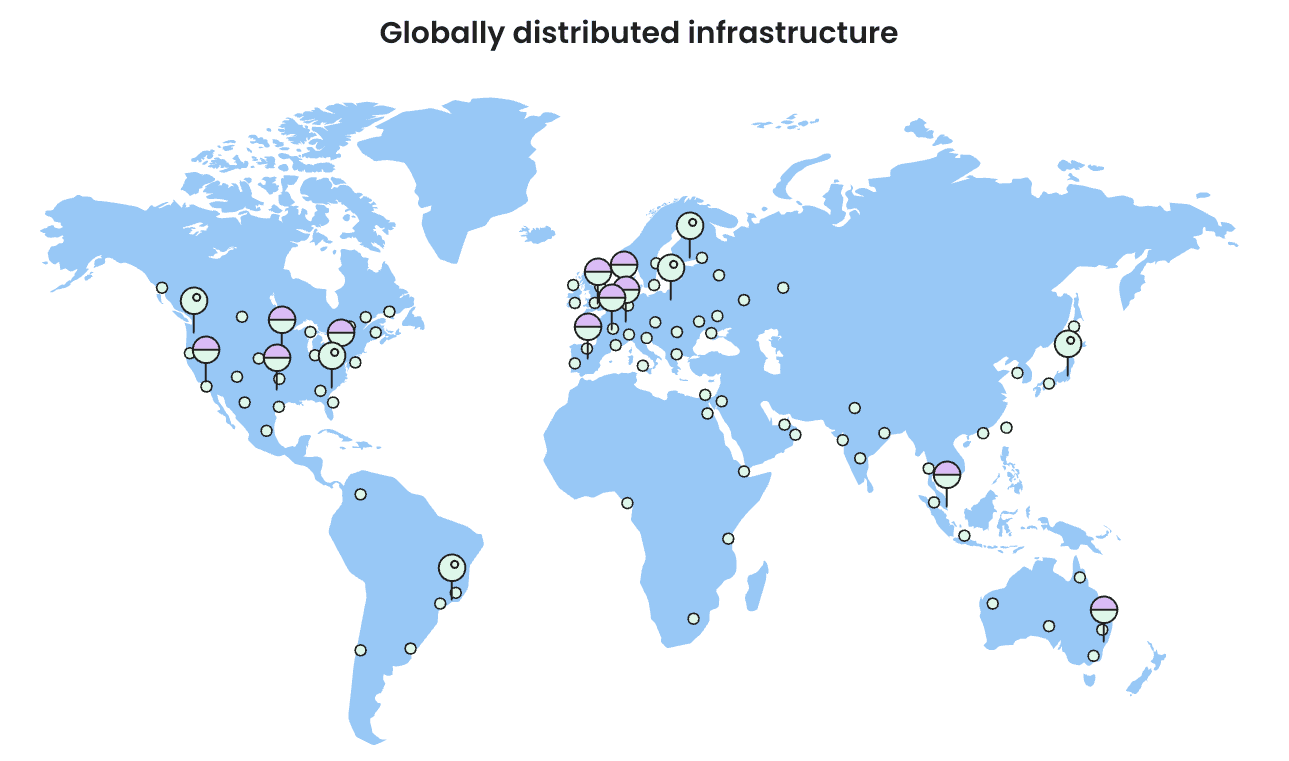
The SiteGround CDN’s network reach is truly global, ensuring your content is always close to your site visitors.
The service utilizes CDN edge servers in 14 different locations, spread across four continents: North America, Europe, Asia, and Australia.
This wide distribution is fundamental to how the CDN accelerates your website.
When a visitor accesses your site, their request is automatically routed to the nearest of these global data centers.
This server then delivers the cached content, resulting in significantly faster response times. For some websites, this has led to a speed improvement of up to 10 times for international visitors.
The expanding network includes locations such as:
- Multiple servers across the United States and Europe.
- Key locations in Asia and Australia.
- Newer CDN locations in São Paulo, Brazil, and Madrid, Spain.
Related: SiteGround data centers & server locations
How SiteGround CDN Improves Speed in the United States
Even if your audience is primarily in one country, a CDN can still offer a major boost to your website speed.
Let’s take the United States as an example. SiteGround’s main US data center is in Iowa. For site visitors in central states, the connection is relatively fast.
However, a visitor from New York or California would experience higher latency because their data request has to travel much farther.
This is where SiteGround’s network of US-based CDN servers comes in. By having multiple CDN edge servers across the country, the distance is dramatically reduced.
A visitor from the West Coast will connect to a server nearby, just as a visitor from the East Coast will.
This ensures minimal latency and a consistently fast experience for all your domestic site visitors, regardless of where they are located.
How to Enable and Configure SiteGround CDN Setup
Getting started with the SiteGround CDN is remarkably easy.
Unlike many other CDN solutions that require complex technical steps, SiteGround has streamlined the entire process, ensuring that every layer of your system is user-friendly.
You can enable and configure your CDN setup with just a few clicks directly from your hosting account.
All the necessary tools are located in the CDN section within your Site Tools dashboard.
From here, you can activate the service, purge the cache, and manage other CDN settings without ever needing to leave your SiteGround account.
The following sections will walk you through the exact steps.
Step-By-Step Guide to Activating SiteGround CDN in Site Tools
Activating the SiteGround CDN from your client area is a quick and painless process.
The entire CDN activation process is designed for a single-click setup, so you can start speeding up your site in minutes.
Before you begin, make sure your domain name is pointing to SiteGround’s name servers.
Keep in mind that only the account owner can activate the CDN. A team member with collaborator access will not see the CDN option in their Site Tools panel.
Here is the simple step-by-step guide:
- Log in to your SiteGround account.
- Go to Websites and click Site Tools for the desired site.
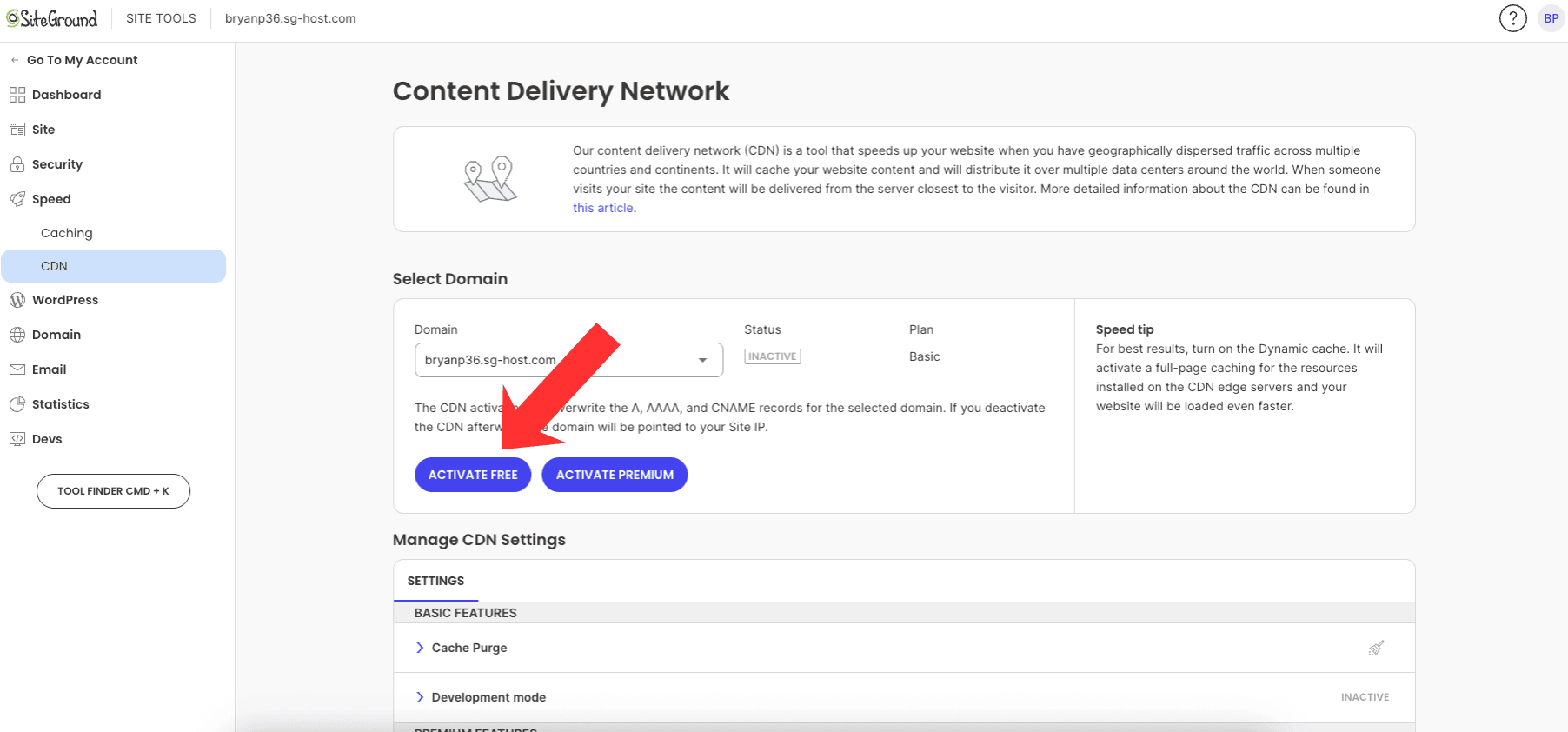
- In the left-hand menu, navigate to Speed > CDN.
- You will see a list of your domains. Click the Activate button next to the primary domain name you want to use the CDN for.
- That’s it! The CDN will be enabled for your site.
Managing CDN Settings, Headers, and Advanced Options
Once the SiteGround CDN is active, you have several options for managing its behavior.
The CDN settings menu in Site Tools provides access to essential functions like purging the cache and enabling Development Mode, which lets you bypass caching temporarily to see live changes.
For more advanced control, the premium CDN plan allows you to set a custom TTL (Time to Live) and choose the desired cache time for your content.
This lets you decide how long you want your content cached on the CDN servers.
Beyond the Site Tools interface, the SiteGround CDN also respects standard cache-control headers sent by your application.
This means you can manage caching behavior directly from your site’s code or .htaccess file if needed.
If you use WordPress, the SiteGround Optimizer plugin simplifies this even further.
It automatically handles many technical settings and cache flushing, ensuring your CDN and website caching work together perfectly.
Managing Cache and SiteGround CDN Review
Effective cache management is vital to ensure your visitors always see the most up-to-date version of your site, especially on checkout pages.
With the SiteGround CDN, you have full control over your cached content. You can define the cache time for your resources and easily purge the cache whenever you make important updates.
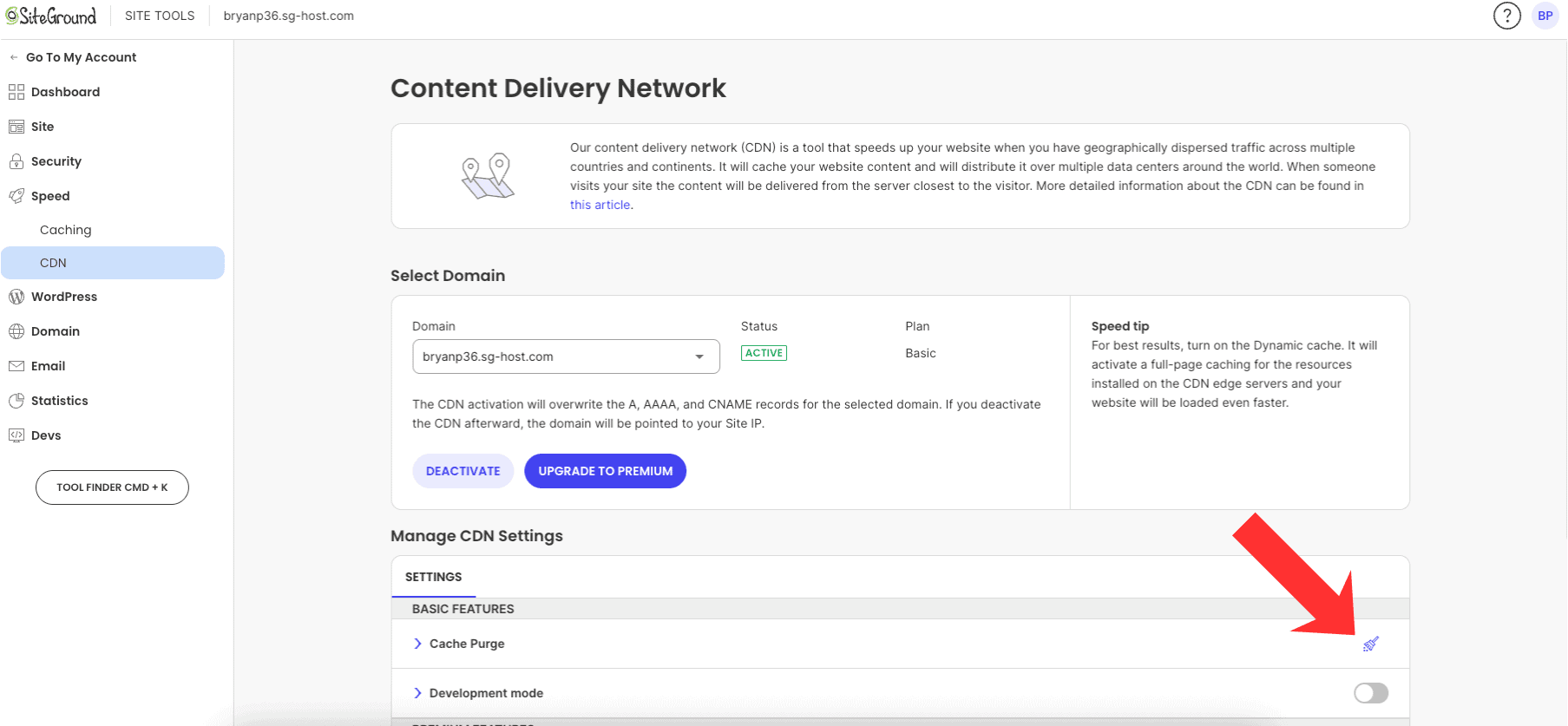
There are two primary ways to clear your CDN cache. You can manually trigger a purge cache from your Site Tools dashboard, or if you have a WordPress site, the SiteGround Optimizer plugin can handle it automatically.
Let’s look at how to perform this essential task.
How to Purge or Clear Cache Using SiteGround CDN
When you update your website, you need to clear the old cached content from the CDN so it can fetch the new version from your origin server.
This process is known as a cache purge. SiteGround provides simple ways to do this.
The purge process is almost immediate, though it can sometimes take up to 30 seconds to complete across all global CDN servers.
For WordPress users, the SiteGround Optimizer plugin makes this effortless by automatically initiating a purge of all cached resources when you update a post, theme, or plugin.
Here’s how you can purge the cache:
- Manual Purge in Site Tools: Go to Speed > CDN in Site Tools and click the Purge Cache button.
- Automatic Purge with SG Optimizer: The plugin detects changes on your WordPress site and auto-purges the relevant URLs.
- Manual Purge in WordPress: You can also trigger a full cache purge from the SiteGround Optimizer plugin’s dashboard in WordPress.
Final Thoughts
In conclusion, configuring your SiteGround CDN setup can significantly enhance your website’s performance and reliability.
By leveraging the benefits of SiteGround’s CDN service, you ensure that your content is delivered quickly and efficiently to users around the globe.
With a user-friendly interface for managing settings and cache, you can easily optimize your website for speed and responsiveness.
As you implement these steps, remember that a well-configured CDN not only improves loading times but also boosts user satisfaction and SEO rankings.
If you’re ready to take your website’s performance to the next level, don’t hesitate to reach out and get started with SiteGround today!
Frequently Asked Questions
Is SiteGround CDN Suitable for WordPress Websites?
Absolutely. The SiteGround CDN is perfect for WordPress websites, as it was designed to avoid compatibility issues. It works seamlessly with the SiteGround Optimizer plugin, which automates cache purging when you update content. For the best results, the premium version offers dynamic cache to speed up your entire site.
Are There Limitations With the Free Version of SiteGround CDN?
Yes, the free CDN plan has some limitations. It includes a 10 GB monthly bandwidth limit for cached content and does not offer dynamic cache for your pages. Subdomains are also not covered. Upgrading to the premium plan removes these limitations, offering unlimited bandwidth and full-site caching.
What Do Users Say? SiteGround CDN Review Highlights
During its beta period, the SiteGround CDN received overwhelmingly positive feedback from thousands of users. People praised its ease of use and the significant boost in website speed. The improved user experience and the ability to deliver a fast cached version of their sites worldwide are among the most celebrated highlights.
Here are some related posts that you might find helpful:
- is SiteGround Domain Privacy worth it?
- is SiteGround Site Scanner worth it?
- SiteGround Black Friday deal
- SiteGround payment methods
- SiteGround free trial
- SiteGround money-back guarantee
- SiteGround GrowBig plan review
- SiteGround GoGeek plan review
- who owns SiteGround?
- SiteGround Email Marketing Guide
- SiteGround Cloud Hosting review
- SiteGround Reseller Hosting review
- SiteGround free SSL Certificate
- how to migrate website to SiteGround
- how to install WordPress on SiteGround

- Shopify vs WordPress (2026): Which Is Better for Your Website? - September 15, 2026
- Shopify SEO for Beginners: Complete Guide (2026) - September 17, 2026
- Shopify vs WooCommerce (2026): Which Is Better? - September 17, 2026

Leave a Reply
Want to join the discussion?Feel free to contribute!