
SiteGround Website Builder: Your Guide to Easy Creation
Last Updated on December 24, 2025
Are you dreaming of launching a professional website but feel overwhelmed by the technical details? You’re not alone.
Many entrepreneurs and small business owners find that website creation can be a major hurdle. What if you could build a beautiful, functional site without writing a single line of code?
SiteGround’s Website Builder, integrated directly into its powerful hosting platform, is designed to make this a reality. It empowers you to bring your vision online quickly and effortlessly.
Related: SiteGround coupon code
Key Highlights
- The SiteGround site builder is a free tool included with every hosting plan, designed for incredible ease of use.
- Achieve professional website creation in minutes with intuitive drag-and-drop tools and pre-made templates.
- This builder is perfect for beginners, removing the technical barriers that often slow down new projects.
- While evolving, the platform provides a solid foundation for your online presence, with future plans for online store functionality.
- Your website is backed by SiteGround’s powerful hosting and award-winning 24/7 customer support.

Overview of SiteGround Website Builder
For years, SiteGround has provided a top-tier hosting platform, helping millions bring their projects to life with services like SiteGround’s cloud hosting.
Now, they’ve introduced a tool that simplifies the website setup process even further: the SiteGround Website Builder. This addition makes creating a site builder website more accessible than ever.
Whether you’re a small business owner or a creative individual, this tool is designed for you.
It removes the complexities often associated with building a site, allowing you to focus on what truly matters—your content and your brand.
What Is SiteGround Website Builder?
The SiteGround Website Builder is an all-in-one solution that comes free with all SiteGround hosting plans.
It’s designed specifically for users who want a professional online presence without needing any technical knowledge.
Unlike traditional WordPress hosting, which can have a steeper learning curve, this site builder simplifies the entire process.
For business owners, this tool is a game-changer. It eliminates the need to hire expensive developers or spend weeks learning complex systems.
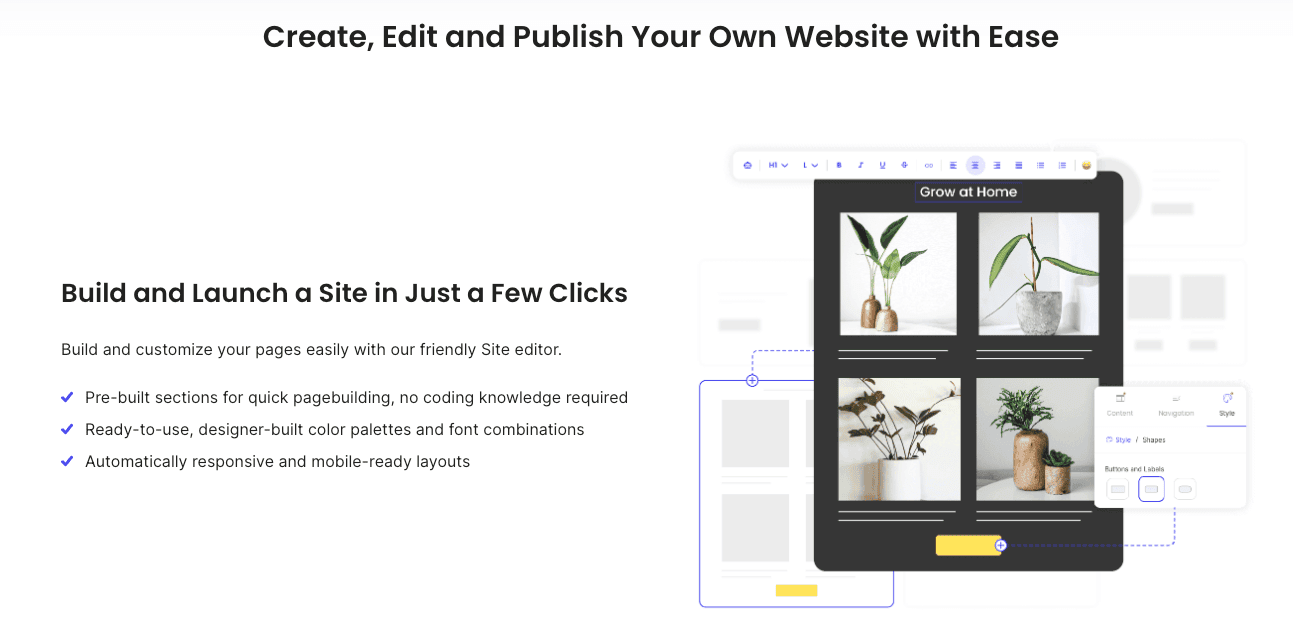
The builder provides everything you need to start your website creation journey, from professionally designed templates to intuitive editing tools.
Your goal is to get a functional site online quickly, and that’s precisely what this tool helps you accomplish.
You choose a design, add your content using a simple drag-and-drop interface, and publish your site for the world to see. It’s a straightforward path to a polished web presence.
Related: what is SiteGround used for?
How SiteGround Page Builder Works
Getting started with the SiteGround page builder is incredibly simple. The tool is integrated directly into your hosting platform, which you can manage through the Site Tools dashboard.
When you set up a new website in your account, you’ll have the option to use the builder, making activation seamless.
The entire process of creation is built around ease of use. Forget about confusing dashboards and technical jargon.
The site builder offers a visual, what-you-see-is-what-you-get interface. You can drag elements, edit text directly on the page, and see your changes happen in real time.
This approach strips away the complexities that often frustrate users.
SiteGround handles the technical backend—like mobile responsiveness and performance—so you can focus purely on the design and content of your website. It’s a refreshingly simple way to build a website.
Who Should Use SiteGround Website Builder?
The SiteGround Website Builder is a perfect fit for anyone who values simplicity and speed in their website creation process.
If you want a professional-looking website without the headache of coding or complex configurations, this tool is designed for you. It’s especially ideal for users who don’t require deep, advanced functionality.
Are you one of these people? This builder is great for:
- Small business owners who need a polished online brochure for their services.
- Freelancers, professionals, and content writers looking to create a portfolio or personal brand website.
- Beginners who are new to website building and want a straightforward, guided experience.
While developers or a team member needing extensive customization might prefer a more complex platform, this builder excels at helping non-technical users get online fast.
It empowers you to create and manage your site independently, reflecting your professionalism without the steep learning curve.
Starting Your First Website with SiteGround
Ready to launch your new website? The journey with SiteGround is designed to be smooth from the very beginning.
Related: free website migration with SiteGround
The website setup process starts with choosing a hosting plan and registering your domain name. From there, SiteGround clients are guided through a simple wizard to get their site up and running.
This streamlined approach ensures you won’t get lost in technical details.
Let’s explore the specific steps to activate the builder, create your first pages, and navigate the user-friendly dashboard.
Activating SiteGround Website Builder
Activating the SiteGround Website Builder is a straightforward part of creating a new site. Once you have a hosting plan, you can begin the process directly from your Client Area.
You don’t need to install anything extra; the option is presented to you during the initial setup.
To get started, simply follow these steps:
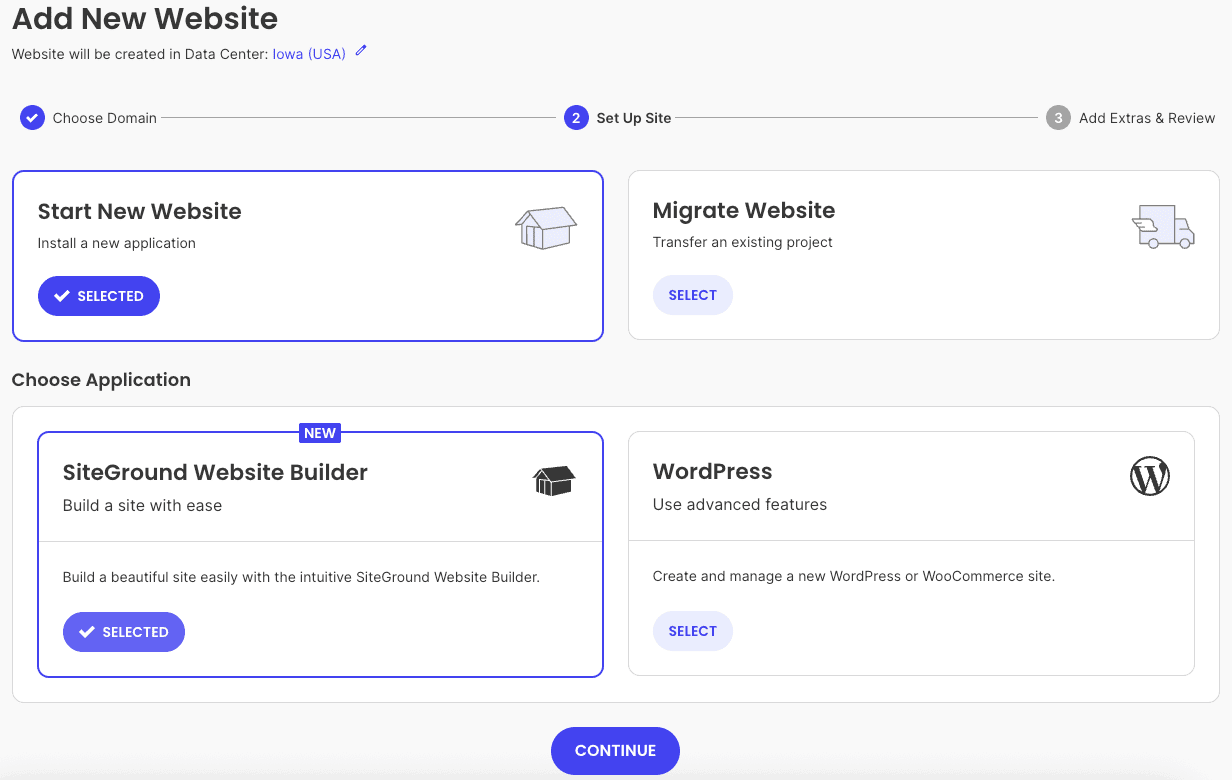
- Log in to your SiteGround Client Area and navigate to the “Websites” tab.
- Click “New Website” and choose your domain (or a temporary one).
- When prompted to “Start New Website,” select the “SiteGround Site Builder” option.
The builder is included for free in every hosting plan, whether you’re on a shared plan or using SiteGround’s cloud hosting.
This integration means you can go from sign-up to building in just a few clicks. The system handles all the backend configurations, so you can dive right into designing your site.
Step-by-Step Guide to Creating a Site
Once you’ve activated the builder, the process of creation is designed to be intuitive and quick.
The website setup process guides you from a blank slate to a fully functional site in no time, all powered by SiteGround’s reliable cloud hosting infrastructure.
Here’s a quick guide to building your site:
- Choose a Template: Browse a gallery of professionally designed templates and pick one that fits your vision.
- Customize Your Design: Use the drag-and-drop editor to add, remove, or rearrange sections.
- Add Your Content: Click on any text or image block to replace the sample content with your own.
- Publish: Once you’re happy with your site, hit the publish button to make it live.
The entire experience is managed through a simple interface, avoiding the complexity of traditional Site Tools or control panels. You can build and launch a complete website in an afternoon, even with no prior experience.
Accessing and Navigating the Builder Dashboard
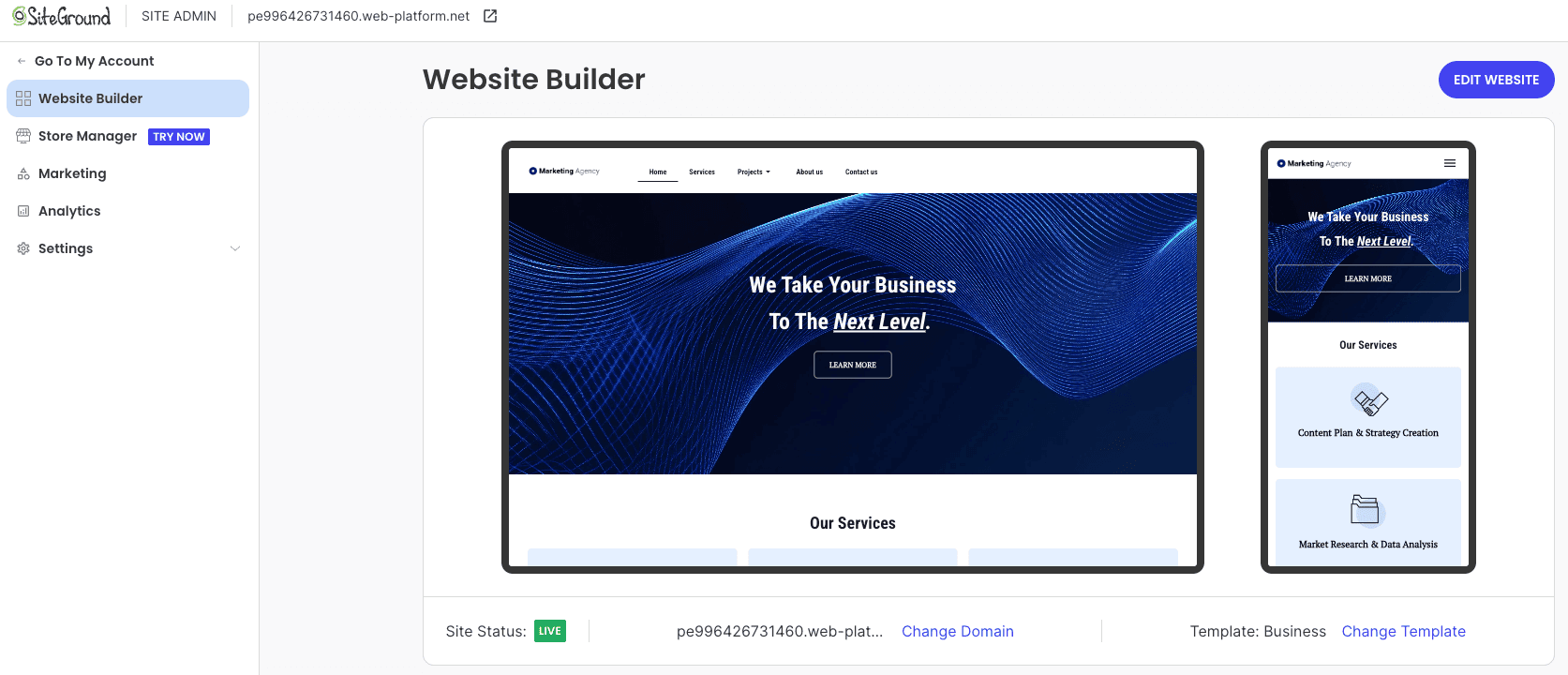
After the initial setup, you can access your site builder dashboard anytime from your SiteGround Client Area.
Instead of navigating complex Site Tools, you’ll find a dedicated entry point that takes you directly to the editor for your website. This makes ongoing updates and edits incredibly convenient.
The dashboard itself is clean and user-friendly. All the customization options are clearly laid out, allowing you to change fonts, colors, and layouts with just a few clicks.
You can easily add new pages, create sections, and manage your site’s structure without feeling overwhelmed.
This simple navigation ensures that you can make quick changes to your live site whenever you need to.
Whether you’re updating your services based on client feedback or adding a new blog post, the builder’s dashboard keeps the process simple and stress-free.
Essential Features of SiteGround Page Builder
The SiteGround site builder isn’t just about simplicity; it’s also packed with tons of features to help you create a beautiful and effective website.
These tools are designed to give you ample customization options while maintaining a high standard of ease of use.
Every feature is built to work seamlessly with the hosting platform, ensuring excellent website speed and reliability.
Let’s look at the core features that make this builder a powerful choice for your next project.
Drag-and-Drop Design Tools
The heart of the SiteGround site builder is its intuitive drag-and-drop interface. This feature revolutionizes the website creation experience by allowing you to visually construct your pages.
You can simply click on an element, drag it to a new location, and drop it into place. No coding is required.
This functionality gives you incredible customization options without a steep learning curve. You can:
- Rearrange pre-built sections to structure your page.
- Add new elements like text boxes, images, buttons, and contact forms.
- Adjust spacing and alignment to get the perfect layout.
This visual approach demystifies web design, making it accessible to everyone.
The drag-and-drop tool empowers you to take control of your site’s appearance and create a unique design that matches your brand identity. It’s one of the key features that make this builder so user-friendly.

Pre-Made Templates and Themes
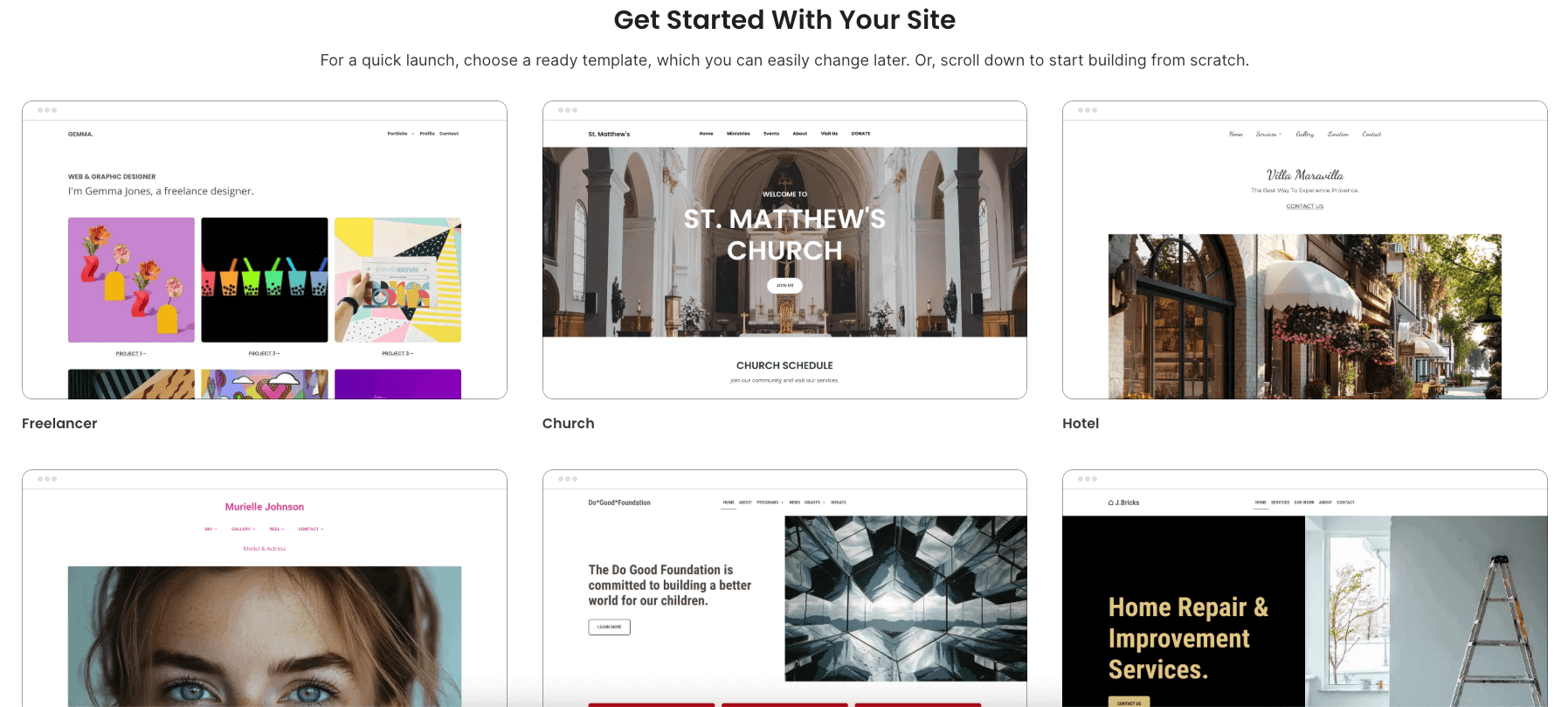
Starting with a blank page can be intimidating. That’s why the SiteGround site builder comes with a gallery of pre-made templates.
These professionally designed themes give you a fantastic starting point for your website creation, helping you achieve the look of a creative digital agency without the high cost.
Each template is fully customizable. You can use a design as-is or completely transform it to fit your brand.
The customization options allow you to change colors, fonts, images, and layouts, ensuring your website doesn’t look like a generic copy.
The templates are also pre-populated with sample content, making it easier to visualize the final result.
These templates are more than just pretty designs; they are functional frameworks built with specific industries and business needs in mind.
By choosing a relevant template, you can save hours of work and launch a polished, professional website much faster.
Editing and Customizing Your Pages
Beyond the initial setup, the SiteGround site builder makes ongoing editing and customization a breeze. You can update your content at any time through the same intuitive interface.
This ensures your website can evolve with your business without needing technical assistance.
The customization options are extensive and easy to access. You can:
- Edit text directly on the page, just like in a word processor.
- Swap out images and access a free gallery of stunning visuals.
- Change global styles like fonts and color palettes to maintain brand consistency across your site.
You can preview all your changes before pushing them to the live site, giving you full confidence in your edits.
This level of control makes it simple to maintain a functional site that always looks professional and up-to-date.

Comparing SiteGround Website Builder vs. WordPress
When choosing a platform, many people wonder how the SiteGround Website Builder compares to creating a WordPress site.
While WordPress is famous for its power and advanced functionality, it also comes with a steeper learning curve. The SiteGround site builder offers a different path.
As a more focused, limited CMS, the builder prioritizes simplicity and integration with your hosting plan.
It’s a trade-off: you get unparalleled ease of use in exchange for some of the endless flexibility that WordPress offers.
Related: how to install WordPress on SiteGround
Let’s break down the key differences.
Related: WordPress hosting coupons
User Experience and Simplicity
When it comes to ease of use, the SiteGround Website Builder is the clear winner for beginners.
It was created specifically for users with little to no technical knowledge, offering a guided, visual experience from start to finish.
In contrast, building a WordPress site often requires learning about themes, plugins, and settings, which can be overwhelming.
The builder streamlines everything. You don’t have to worry about finding and installing plugins for basic features or updating your software.
It’s all handled for you within your hosting plan, ensuring great website speed without manual optimization.
Here’s a simple comparison of the user experience:
| Feature | SiteGround Website Builder | WordPress |
|---|---|---|
| Ease of Use | Highly intuitive, no code required | Steeper learning curve, requires configuration |
| Setup | One-click activation during site creation | Manual installation and setup of themes/plugins |
| Maintenance | Fully managed by SiteGround | User is responsible for all updates |
| Learning Curve | Minimal, can build a site in hours | Moderate to high, requires ongoing learning |
Performance and Flexibility
Performance is a critical factor for any website, and this is where the builder’s integration with SiteGround’s cloud hosting truly shines.
Because the tool was developed in-house, it is perfectly optimized for the underlying infrastructure, which runs on the powerful Google Cloud Platform. This results in excellent website speed right out of the box.
In terms of flexibility, WordPress offers nearly limitless advanced functionality through its vast library of plugins. You can add almost any feature imaginable to a WordPress site.
The SiteGround builder is more focused, providing the essential tools needed for most business and portfolio websites without the overwhelming options.
While it may not have every niche feature, the builder provides enough customization to create a unique and professional live site.
It strikes a balance between flexibility and simplicity, ensuring your site performs well without requiring you to become a technical expert.
Related: SiteGround CDN review
Maintenance and Updates
One of the biggest differences between the two platforms is maintenance. With a WordPress site, you are responsible for keeping the core software, themes, and plugins updated.
Neglecting this can lead to security vulnerabilities and compatibility issues. The SiteGround builder, however, is a fully managed solution. All updates and security patches are handled automatically by SiteGround.
Related: SiteGround Site Scanner review
This hands-off approach to maintenance provides extra peace of mind. Your hosting plan includes this service, so you can focus on your business instead of worrying about technical upkeep.
Furthermore, SiteGround creates daily backup copies of your site, regardless of the platform you use.
For sites built with the builder, you can even request a professional restore for free, as outlined in the terms of service.
This commitment to security and support makes the builder an incredibly low-maintenance option for any user.
Building an Online Store with SiteGround Website Builder
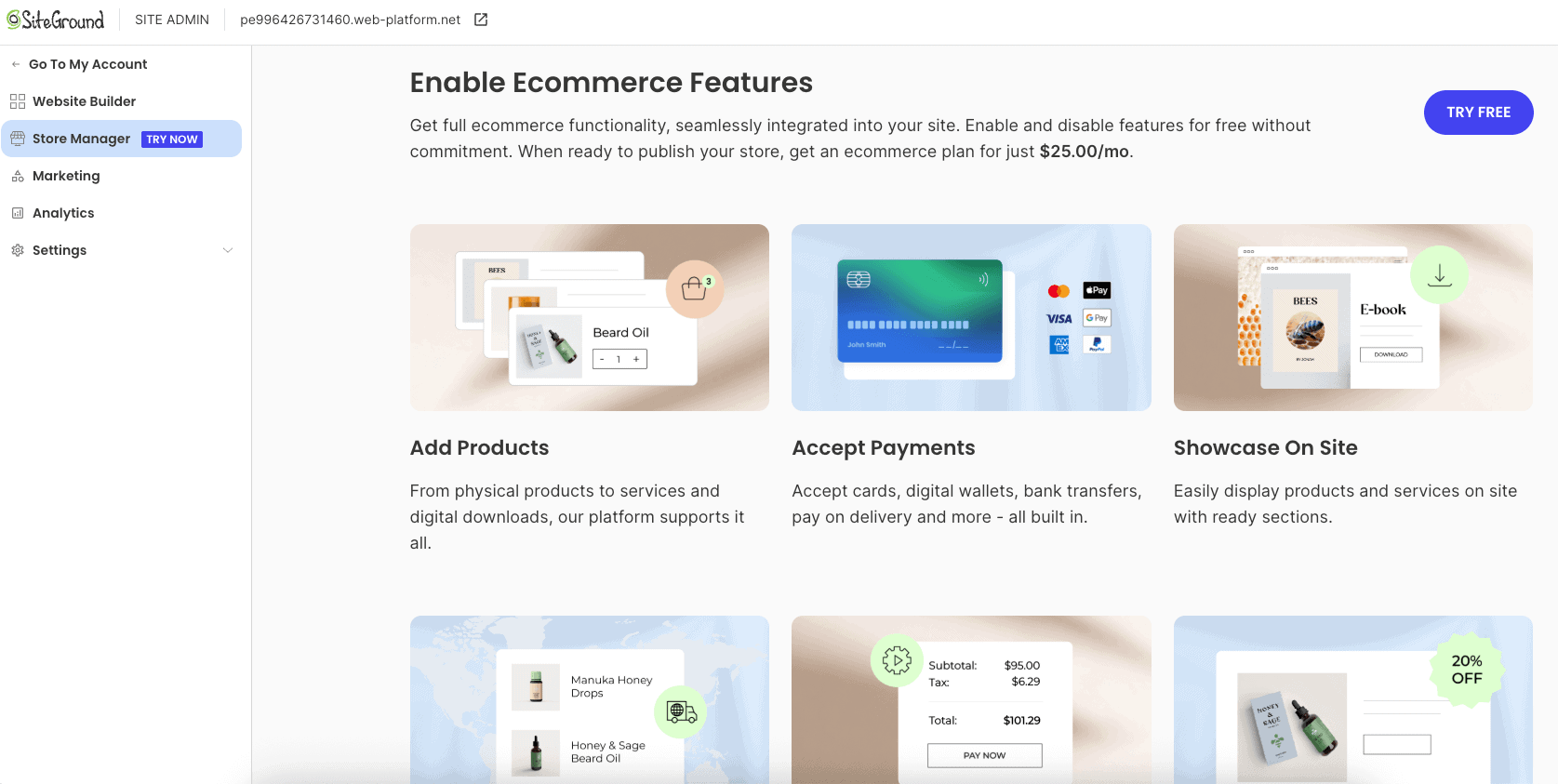
Thinking about selling products online? Creating an online store is a major step for many businesses, and the SiteGround platform provides robust solutions to help you succeed in e-commerce.
While the site builder website is continuously evolving, SiteGround’s ecosystem is fully equipped for your sales needs.
The combination of a user-friendly interface for website creation and powerful backend hosting makes it a great environment to launch your online store.
Let’s explore how SiteGround supports e-commerce and the features that help you manage and secure your business.
E-commerce Integration Options
When you’re ready to build a full-featured online shop, SiteGround offers powerful e-commerce solutions.
The most popular option is integrating WooCommerce with a WordPress hosting plan, a combination that powers millions of online stores worldwide. SiteGround makes this incredibly easy.
Your hosting plan can include:
- A free installation of WooCommerce to get you started.
- Professionally designed themes built for e-commerce.
- All the server resources needed to run a busy online store smoothly.
While the SiteGround site builder is currently focused on providing a simple, no-code solution for professional websites, e-commerce functionality is a frequently requested feature that is on the development roadmap.
For now, the best path to a powerful online shop on the platform is through their optimized WordPress and WooCommerce hosting.
Related: is SiteGround good for eCommerce?
Managing Products and Payments
A successful online shop requires easy management of products and secure handling of payments. The SiteGround hosting platform provides the ideal foundation for this.
When using an e-commerce solution like WooCommerce, you get access to a comprehensive dashboard for all your operational needs.
You can easily manage key aspects of your business, such as:
- Adding and editing products, including descriptions, prices, and images.
- Tracking inventory to avoid overselling popular items.
- Configuring secure payment gateways like Stripe and PayPal.
Your domain name is secured, and the hosting platform is optimized to handle transaction-heavy traffic, ensuring your customers have a smooth checkout experience.
SiteGround provides the reliable backbone needed to manage a growing online business, letting you focus on your products and customers.
Related: SiteGround payment methods accepted
Security Features for Online Stores
Security is non-negotiable for an online store. Customers need to trust that their personal and payment information is safe.
SiteGround excels in this area, offering multiple layers of security for every website it hosts, giving you and your customers extra peace of mind.
Every SiteGround plan comes with free SSL certificates from Let’s Encrypt.
A free SSL encrypts the data transferred between your customers and your website, which is essential for protecting sensitive information and building trust.
This is indicated by the padlock icon in the browser’s address bar.
In addition to SSL, SiteGround performs daily backup copies of your site and protects it with a custom web application firewall (WAF).
This proactive approach to security helps block threats before they can harm your store, ensuring your business stays safe and operational.
Support and Reliability for SiteGround Builder Users
One of SiteGround’s most celebrated features is its excellent customer support, and this extends to everyone using the new website builder.
When you choose a SiteGround hosting plan, you’re not just getting tools; you’re getting a dedicated support team ready to help you 24/7.
This level of service is a huge benefit for all SiteGround clients.
Whether you have a question about the builder or your hosting performance, help is always just a few clicks away.
Let’s look at the available support channels and the reliability that underpins the entire platform.

Related: SiteGround money-back guarantee
SiteGround’s Customer Service Channels
SiteGround is renowned for its fast, friendly, and proficient customer support.
If you ever run into an issue with your live site or have a question about the builder, the support team is available around the clock to assist you.
This ensures that you’re never left struggling on your own.
SiteGround clients have access to several support channels:
- 24/7 Live Chat for instant help with technical questions.
- Ticket-based help for more complex issues.
- An extensive Knowledge Base with helpful articles and tutorials.
Beyond direct support, SiteGround also offers helpful tools like the free email migrator to make transitioning your services easier.
The support team is trained to handle a wide range of issues, ensuring you receive expert assistance whether you’re a beginner or an experienced user.
Speed, Reliability, and Hosting Performance
A great website builder is only as good as the hosting it runs on. Fortunately, SiteGround’s hosting platform is one of the best in the industry.
Websites built with the builder benefit from the same high-performance infrastructure that powers all sites on SiteGround, ensuring fantastic website speed and reliability.
The platform is built on the premium Google Cloud network, which means your site is hosted on some of the fastest and most reliable hardware available.
Even on the affordable shared hosting plans, SiteGround includes features like a free CDN and custom caching technology to make your pages load incredibly fast for visitors around the world.
This commitment to performance is why many consider SiteGround to offer the best web hosting available.
When you use the SiteGround Website Builder, you can be confident that your site is not only easy to create but also fast, secure, and dependable.
Final Thoughts
In conclusion, SiteGround Website Builder offers a user-friendly and efficient way to create stunning websites, whether you’re a beginner or an experienced web designer.
With its drag-and-drop tools, pre-made templates, and robust e-commerce features, you can easily bring your vision to life.
The platform’s reliable performance and excellent customer support further enhance the experience, ensuring you have the assistance needed every step of the way.
If you’re ready to take the plunge into website creation with ease and confidence, don’t hesitate to start your journey with SiteGround today.
Get started now for a seamless web-building experience!
Frequently Asked Questions
Is SiteGround Website Builder suitable for beginners?
Yes, absolutely. The SiteGround site builder is designed with beginners in mind. Its incredible ease of use, drag-and-drop interface, and pre-made templates allow anyone to start their website creation journey without any prior technical knowledge. It’s included in every hosting plan, making it a perfect starting point.
What are the limitations of SiteGround Page Builder?
The main limitation is that it’s a limited CMS compared to more complex platforms like WordPress. This means it has less advanced functionality and customization for developers. However, this simplicity is also its greatest strength, as it streamlines the website setup process for its target users.
How does SiteGround website builder compare to other builders?
The SiteGround website builder stands out because it’s fully integrated with a top-tier hosting platform. Unlike standalone builders, it benefits directly from SiteGround’s cloud hosting speed and security. It offers a simpler alternative to a WordPress site while still providing great customization options and superior performance.
Here are related SiteGround posts you might find helpful:
- who owns SiteGround?
- SiteGround Black Friday deal
- does SiteGround offer a free trial
- SiteGround Reseller hosting review
- is SiteGround domain privacy worth it?
- SiteGround monthly payments
- SiteGround data centers
- SiteGround GrowBig plan review
- SiteGround GoGeek plan review
- SiteGround Email Marketing

- Shopify vs WordPress (2026): Which Is Better for Your Website? - September 15, 2026
- Shopify SEO for Beginners: Complete Guide (2026) - September 17, 2026
- Shopify vs WooCommerce (2026): Which Is Better? - September 17, 2026

Leave a Reply
Want to join the discussion?Feel free to contribute!