

Beginner’s Guide to SiteGround Email Marketing Success
Last Updated on December 24, 2025
Are you ready to grow your business and connect with your audience in a more personal way?
Starting with email marketing can feel like a huge step, but it doesn’t have to be complicated.
This guide is here to show you how the SiteGround email marketing service makes the process simple and effective.
With an intuitive email builder and powerful features, you can launch successful campaigns from day one.
Let’s explore how you can achieve your marketing goals.

Ready to sign up for SiteGround? Click here, and you’ll get up to 83% off plus a free domain name!
Key Highlights
- Discover how the SiteGround email marketing service simplifies creating your first email campaign.
- Learn to use the no-code email builder and AI tools to design professional marketing campaigns effortlessly.
- Understand how to build and segment your email list for more targeted and effective communication.
- Explore seamless integration with WordPress and popular plugins to automate lead generation.
- Master the steps to schedule, automate, and track your emails for optimal performance and growth.
- Get started with a beginner-friendly platform designed to make email marketing accessible to everyone.
Understanding Email Marketing and SiteGround
Email marketing is a powerful strategy for reaching customers directly. When you choose the right tools, it becomes one of the most effective marketing methods available.
The SiteGround email marketing platform offers everything you need to get started, from building your audience to sending beautiful emails.
Even if you’re working alone or with a small team, this platform is designed for you. Let’s look closer at what email marketing involves and why SiteGround is an excellent choice for your business needs.

What Is Email Marketing?
Email marketing is a form of direct communication where you send messages to a list of subscribers to promote your brand, sell products, or share updates.
Unlike social media, your message lands directly in your audience’s inbox, creating a personal connection that’s hard to replicate. It is one of the most cost-effective ways to run marketing campaigns.
The content of the email can be anything from promotional offers and newsletters to lead nurturing messages and company announcements.
There are various types of emails you can send, including welcome series for new subscribers, re-engagement campaigns for inactive users, and transactional emails for order confirmations.
Each of these has a unique purpose designed to guide your customer through their journey with your brand.
Getting started is simpler than you might think. With a platform like SiteGround, you can easily set up your email marketing by choosing a plan, creating your first list, and designing your email.
The tools are there to help you every step of the way.
Why Choose SiteGround for Email Marketing?
Choosing the right platform is your first step toward success, and the SiteGround email marketing service stands out for its simplicity and power. If you’re a beginner, you’ll find the platform incredibly user-friendly.
There is virtually no learning curve, so you can start creating and sending campaigns almost immediately without needing any technical skills.
The SiteGround email marketing platform is designed to cater to your unique needs, whether you’re just starting or looking to scale.
It offers flexible plans based on the number of contacts you have, ensuring you only pay for what you need. This makes it an affordable and scalable solution for businesses of all sizes.
For anyone new to this type of marketing, the platform’s intuitive interface and smart AI integrations remove the usual complexities.
You can design beautiful emails, manage your subscribers, and automate messages with ease, making it a perfect choice for beginners who want professional results without the hassle.
Related: migrate website to SiteGround
Key Advantages of Email Marketing for Businesses in the United States
Email marketing offers significant benefits that directly contribute to your business goals. It’s one of the most direct and reliable marketing methods for reaching your audience.
Unlike other channels, you own your email list, giving you a direct line of communication with your customers that isn’t controlled by algorithms.
This direct access helps you build trust and nurture relationships over time.
This marketing strategy is also incredibly effective for growth. You can use it to promote lead magnets, drive traffic to your website, and guide potential customers through your sales funnel.
The return on investment is often higher than other marketing channels, as you can send personalized and targeted messages that resonate with your audience, leading to higher conversion rates.
Here are some key advantages:
- High ROI: Email marketing generates an impressive return, making it a cost-effective strategy.
- Build Customer Relationships: Regular communication helps nurture leads and retain existing customers.
- Measurable Results: Track campaign performance easily through your client area to optimize your strategy.
- Targeted Messaging: Segment your audience to send relevant content that boosts engagement and sales.
Features of SiteGround Email Marketing Platform
The SiteGround email marketing platform is packed with features designed to make your campaigns successful and your workflow efficient.
This email marketing service gives you everything you need in one place, from creating beautiful emails with an intuitive email builder to automating your outreach.
You can save time, connect with your audience, and grow your business without needing any special skills. Let’s explore the specific tools that will help you design, manage, and automate your marketing efforts.
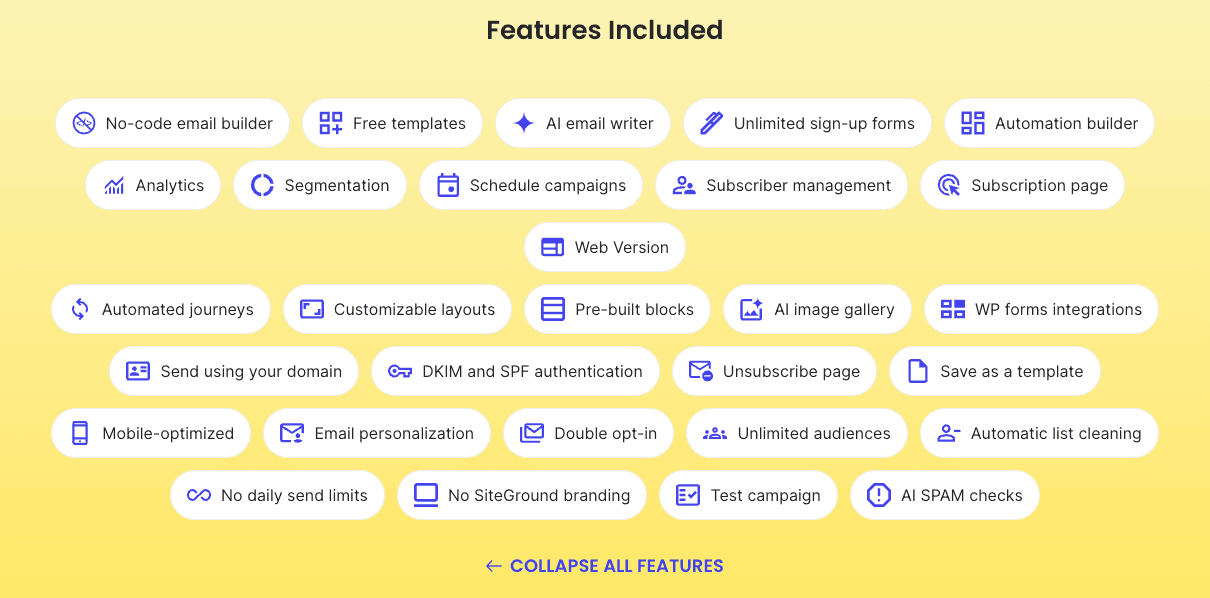
Built-in Tools for Campaign Creation
Creating a new campaign email is a breeze with SiteGround’s built-in tools. The platform offers a powerful, no-code email builder that lets you design professional-looking emails in minutes.
You can easily add and rearrange content blocks with a simple click, giving you full control over the layout without touching a single line of code. For those who prefer coding, a code email builder is also an option.
To help you get started even faster, you can choose from a variety of professionally designed templates.
Whether you are creating a newsletter or a promotional offer, you can find a template that fits your needs under the design tab.
The AI email writer is another fantastic feature, generating engaging email content for you in seconds directly within the builder.
Here’s what you get for campaign creation:
- No-Code Email Builder: Design beautiful emails with an easy-to-use drag-and-drop interface.
- Free Templates: Start with pre-made, customizable templates for any occasion.
- AI Email Writer: Let artificial intelligence craft compelling copy to save you time and effort.
List Management and Segmentation Features
Managing your email list is fundamental to your marketing success, and SiteGround makes it simple. You can easily add, organize, and update your subscriber list all in one place.
The platform also includes features like automatic list cleaning, which removes invalid or bounced email addresses to protect your sender reputation and improve deliverability.
What truly elevates your campaigns is segmentation. This feature allows you to group subscribers based on specific criteria, such as how they signed up or their interaction with past emails.
For example, you can create a segment of users who opened your last email but didn’t click any links.
By using segmentation, you can send highly targeted messages that speak directly to your target audience.
This personalized approach increases engagement, builds stronger relationships, and ultimately drives better results.
Creating an email campaign starts with building this targeted list, ensuring your message reaches the right people.
Integration Capabilities with WordPress and Plugins
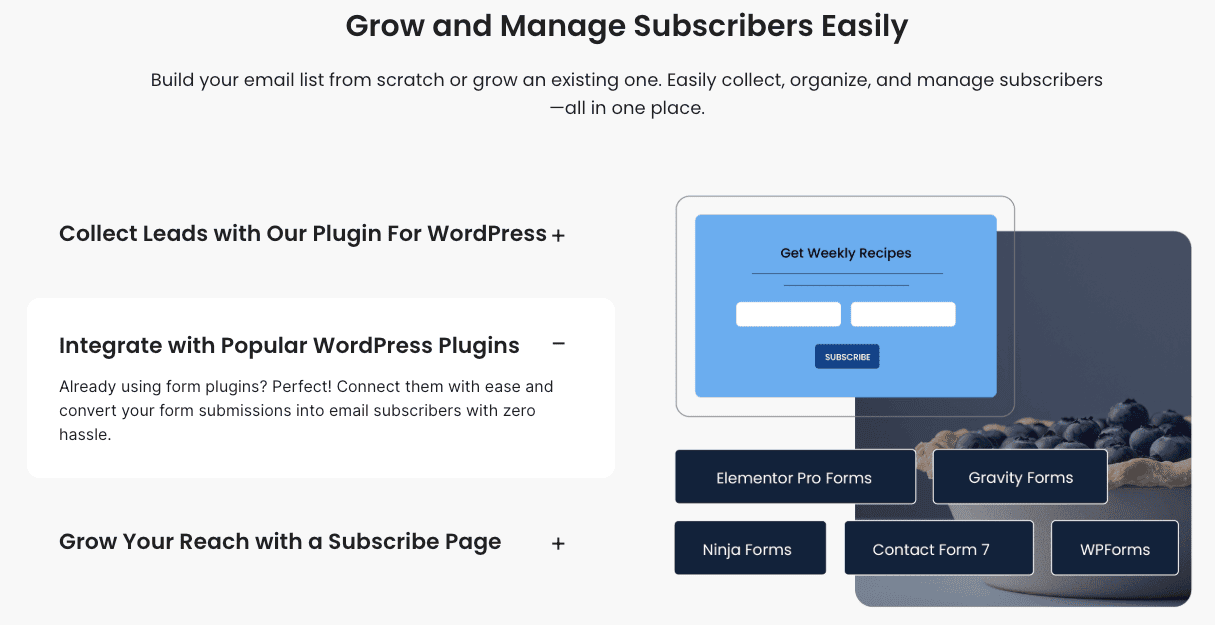
Yes, you can absolutely use SiteGround’s email marketing service with your WordPress website. The integration is seamless and designed to help you grow your email list automatically.
SiteGround offers its own lead generation plugin for WordPress, which allows you to create and embed unlimited sign-up forms directly on your site.
When visitors fill out these forms, they are automatically added to your contact list.
This powerful integration doesn’t stop there. If you are already using other popular form plugins on your WordPress website, you can easily connect them to the SiteGround email marketing service.
Related: how to set up WordPress on SiteGround
This means you can continue using your favorite tools while still taking advantage of SiteGround’s robust email features.
Here are some of the plugins that integrate with SiteGround:
- WPForms
- Elementor Pro Forms
- Contact Form 7
- Ninja Forms
- Gravity Forms
Automation Options for Efficient Campaigns
Email automation is a game-changer for saving time and nurturing leads effectively.
With SiteGround’s email marketing tool, you can set up automated email sequences that engage your audience without manual effort.
A visual automation builder gives you a clear overview of every step your subscribers will take, making it easy to create complex journeys.
You can automate all kinds of messages, from welcome emails for new subscribers to personalized journeys that guide leads toward a purchase.
For example, you can create a series of automated emails that deliver a lead magnet, introduce your brand, and then present a special offer over several days.
This allows you to connect with your subscribers at the perfect time with the right message.
Setting up automated journeys turns initial interest into long-term engagement and sales, helping you grow your business on autopilot. It’s an efficient way to ensure no lead falls through the cracks.

Getting Started with SiteGround Email Marketing (Beginner’s Guide)
Ready to begin your email marketing journey? The SiteGround email marketing service is designed to be straightforward, even if you’ve never sent a campaign before.
You don’t need a large team or technical expertise to achieve professional results.
This beginner’s guide will walk you through the essential first steps, from setting up your account to connecting it with your website for a seamless marketing workflow.
Let’s get you up and running.
What You Need to Begin: Accounts, Access, and Basic Resources
Before you can send your first email, you’ll need a few basic things in place. The process is simple and starts with your SiteGround account.
From your client area, you can access all the tools you need, including the email marketing dashboard, where you will manage your campaigns.
A key component is your domain name. Sending emails from your own domain (e.g., you@yourbusiness.com) helps build brand trust and improves deliverability, ensuring your messages land in the inbox, not the spam folder.
SiteGround helps you set up authentication like DKIM and SPF to enhance security.
To get started, you will need:
- A SiteGround account to access the email marketing platform.
- A domain name to send professional, branded emails.
- A willingness to explore! Consider starting with the free trial, which lets you test the features with up to 500 contacts.
Setting Up Your SiteGround Email Service
Activating your SiteGround email marketing service is a quick and easy first step. Once you’ve logged into your SiteGround account, you can navigate to the email marketing tool and choose a plan that suits your needs.
The platform offers a 30-day free trial, which is perfect for testing the waters.
From the email marketing dashboard, you can begin setting everything up. This central hub is where you will create contact lists, design your emails, and launch your campaigns.
The interface is designed to be intuitive, so you can find your way around without any trouble.
If you ever have questions, a helpful team member is just a chat away. The setup process is designed to be user-friendly, allowing you to move from activation to creating your first campaign in no time.
The focus is on simplicity, so you can concentrate on your marketing goals.
Connecting SiteGround with WordPress for Seamless Marketing
Integrating the SiteGround email marketing platform with your WordPress site is a crucial step for automating lead collection.
This connection allows you to automatically add new subscribers from your website directly into your email lists, streamlining your workflow.
The primary tool for this is SiteGround’s own Lead Generation plugin, which you can install on your WordPress site.
Once the plugin is installed and connected, you can create and embed sign-up forms anywhere on your website.
This seamless integration ensures that every new lead from your site is captured and ready for your marketing campaigns. It’s the fastest way to grow your email list from day one.
In addition to its own plugin, the SiteGround email marketing service also supports integration with other popular form builders. This flexibility means you can keep using the tools you already love.
| Plugin Name | Integration Support |
|---|---|
| WPForms | Supported |
| Elementor Pro Forms | Supported |
| Contact Form 7 | Supported |
| Ninja Forms | Supported |
| Gravity Forms | Supported |
Step-by-Step Guide to Creating Your First Email Campaign with SiteGround
Now for the exciting part: creating your very first email campaign. The SiteGround email marketing platform makes this process incredibly straightforward.
From the main dashboard, you’ll find a clearly marked “new campaign” button that gets you started on the right foot.
This guide will break down the process into six simple steps, from building your audience to hitting the send button.
Whether you’re a complete beginner or just new to SiteGround, you’ll be launching professional campaigns in no time.
Step 1: Building and Importing Your Email List
Your email list is the foundation of your campaign, so the first step is to build it. If you’re starting from scratch, you can use SiteGround’s Lead Generation plugin for WordPress to create sign-up forms.
Place these forms on your website to start collecting contact details from visitors. Offering valuable lead magnets, like a free ebook or a discount, is a great way to encourage sign-ups.
If you already have a subscriber list from another service, you can easily import it into SiteGround.
The platform allows you to upload a CSV file with your contacts’ information, so you can bring your existing audience with you without any hassle.
Once your list is in place, you can start organizing your subscribers. This initial step of building and managing your email list is crucial for ensuring your messages reach an engaged audience that is interested in what you have to offer.
Step 2: Designing Your Email Using Templates and Customization Options
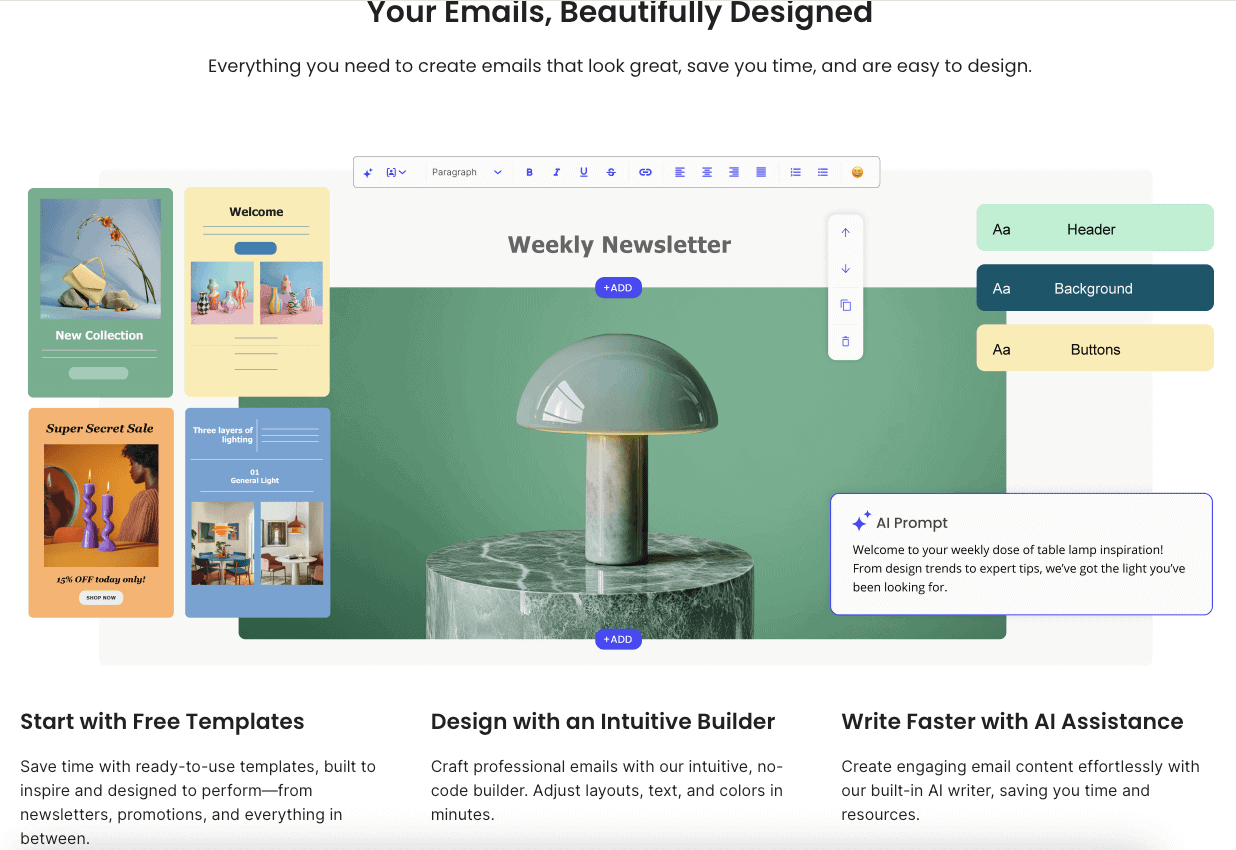
With your list ready, it’s time to focus on the email design. SiteGround’s email builder gives you complete freedom to create stunning emails.
You can start with a professionally designed template or build your own layout from scratch. The intuitive interface lets you customize everything with just a few clicks.
You have full control over the look and feel of your email. Adjust the text color, fonts, and layouts to match your brand’s identity perfectly.
The platform even includes an AI image generator, providing access to a gallery of free, high-quality images to make your emails visually appealing without extra cost.
Here are some customization options available:
- Pre-built Content Blocks: Speed up creation with ready-made blocks for different layouts.
- Customizable Layouts: Adjust the structure of your email for optimal engagement.
- AI-Powered Tools: Use the AI writer for your subject line and body content, and the AI image generator for visuals.
Step 3: Segmenting Audiences for Targeted Outreach
Sending the same email to everyone on your list is rarely the most effective strategy. This is where segmentation comes in.
SiteGround allows you to divide your subscribers into smaller groups based on specific criteria. This could be based on their sign-up source, their engagement with previous emails, or their purchase history.
By creating segments, you can tailor your marketing campaigns to be more relevant to each part of your target audience.
For example, you can send a special offer to your most loyal customers or a welcome series to new subscribers who haven’t made a purchase yet.
This targeted approach makes your emails feel more personal and valuable, which significantly boosts open rates, click-through rates, and conversions.
It’s a powerful feature that helps you connect more meaningfully with your subscribers and achieve better results from your efforts.
Step 4: Integrating Contact Form 7 and Other WordPress Plugins
A key part of growing your list is capturing contact details from your WordPress website, and SiteGround makes this incredibly easy.
The platform offers seamless integration with many popular form plugins, including Contact Form 7. This allows you to automatically sync new submissions from your forms directly to your SiteGround email marketing lists.
To set this up, all you need to do is connect your chosen lead generation plugin to your SiteGround account.
Once the integration is active, anyone who fills out your Contact Form 7 form will be added as a subscriber. This automates the list-building process and ensures no potential lead is lost.
This integration works with several other popular plugins, too:
- WPForms
- Elementor Pro Forms
- Gravity Forms
- Ninja Forms
This flexibility ensures you can keep using the tools you are comfortable with while still benefiting from SiteGround’s powerful email marketing features.
Step 5: Scheduling and Automating Your Email Sends
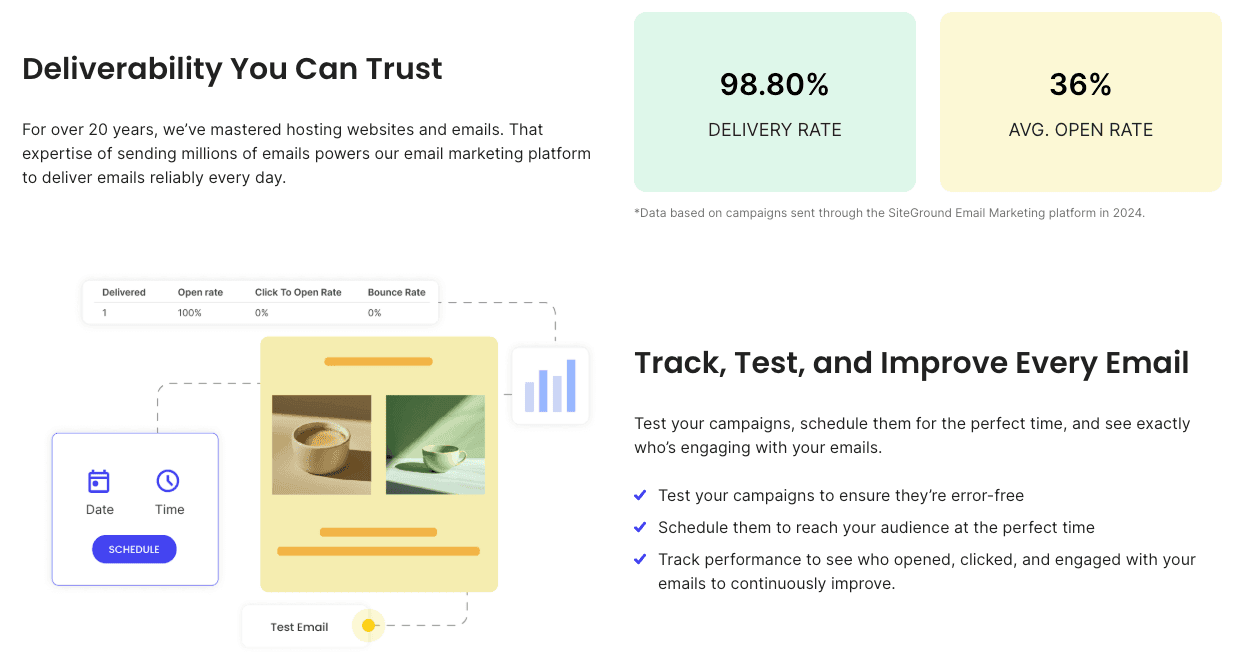
Timing is everything in email marketing. SiteGround allows you to schedule your campaigns in advance, so your emails are sent at the perfect time to reach your audience when they are most likely to engage.
You can plan your entire content calendar ahead and let the platform handle the rest.
Beyond scheduling single campaigns, you can leverage email automation to create entire customer journeys. Set up automated email sequences to nurture leads, welcome new subscribers, or re-engage inactive ones.
The visual automation builder makes it easy to map out these sequences and see exactly what your subscribers will experience.
You can even use the AI email writer to help generate content for these automated journeys, saving you even more time.
Automation ensures you’re consistently communicating with your audience, building relationships, and driving results without having to manually send every single email.
Step 6: Reviewing, Testing, and Sending Your Campaign
Before you send your new campaign email to your entire list, it’s crucial to review and test it thoroughly. SiteGround provides tools to help you do just that.
You can send a test email to yourself or a team member to check for any formatting issues, broken links, or typos. This ensures your email looks perfect on both desktop and mobile devices.
The platform also includes AI-powered SPAM checks that scan your email for potential triggers that could land it in the spam folder.
This review helps protect your deliverability and ensures your message reaches the inbox. Proper testing is one of the most important marketing methods for improving open rates.
Once you’re satisfied with your email, you’re ready to send it.
- Preview your email on different devices.
- Send a test campaign to check all links and content.
- Use the built-in AI SPAM check to ensure high deliverability.
After this final check, you can confidently hit “send” or schedule your campaign for later.
Related: is SiteGround Site Scanner worth it?
Best Practices for SiteGround Email Marketing Success
Now that you know how to create and send campaigns, let’s talk about making them truly successful.
The SiteGround email marketing service gives you the tools, but applying best practices is what will help you achieve your business goals.
Effective marketing campaigns are about more than just sending emails; they’re about sending the right emails.
From writing engaging content to analyzing your results, these tips will help you optimize your strategy for maximum impact.
Crafting Engaging Subject Lines and Content
Your subject line is the first thing your subscribers see, so it needs to be compelling. Keep it short, relevant, and personalized to grab their attention.
A great subject line should create curiosity or highlight the value inside the email, encouraging people to open it.
Once they’ve opened your email, the email content needs to deliver on that promise. Keep your message concise and focused on your audience’s needs.
Use a clear and friendly tone, and break up text with images and headings to make it easy to read. The email design should be clean and consistent with your brand.
SiteGround’s AI email writer can help you brainstorm and craft both your subject line and email content, taking the guesswork out of writing.
Remember, the goal is to provide value quickly and clearly, so your subscribers look forward to hearing from you.
Ensuring Email Deliverability and Compliance
Great content is useless if your emails don’t reach the inbox. Ensuring high deliverability is a critical part of email marketing. SiteGround helps with this by providing tools to set up DKIM and SPF authentication.
These security measures prove your emails are legitimate and reduce the chances of them being marked as spam.
Compliance with regulations like GDPR is another key consideration.
SiteGround’s platform is designed with compliance in mind, offering features like a built-in unsubscribe page and double opt-in to ensure you’re only emailing people who have given explicit consent.
This protects you legally and helps maintain a healthy, engaged list.
Users appreciate these built-in features because they take the complexity out of deliverability and compliance.
By using these responsible marketing methods, you build a trustworthy reputation with both subscribers and email providers, which is essential for long-term success.
Monitoring Performance and Optimizing Campaigns
Your work isn’t done once an email is sent. Monitoring the performance of your marketing campaigns is essential for understanding what works and what doesn’t.
SiteGround provides built-in analytics that track key metrics like open rates, click-through rates, and engagement. These insights tell you exactly how your audience is interacting with your emails.
By analyzing this data, you can identify trends and make informed decisions to optimize future campaigns.
For example, if you notice a certain type of subject line leads to higher open rates, you can use that knowledge in your next send. This continuous improvement cycle is key to achieving your business goals.
Many users find the analytics clear and actionable, allowing them to refine their strategies effectively.
You can even generate a web version of your email to share on social media, expanding your reach and gathering even more data on what resonates with your audience.
Related: SiteGround CDN Review
Final Thoughts
In summary, mastering SiteGround email marketing can significantly enhance your business outreach and engagement.
With a user-friendly platform that offers robust features—from built-in tools for campaign creation to seamless integrations with WordPress—you can easily craft effective email strategies.
Remember, the key lies in understanding your audience, segmenting your lists, and continually optimizing your campaigns for better performance.
As you embark on this journey, don’t hesitate to leverage all the resources at your disposal.
If you’re ready to take your email marketing efforts to the next level, get a free trial today and discover how SiteGround can help you succeed!
Frequently Asked Questions
Is SiteGround email marketing beginner-friendly?
Absolutely. The SiteGround email marketing service is designed for beginners. With a minimal learning curve, intuitive tools, and helpful support from a team member, your first step into email marketing is simple. The platform is flexible to meet your unique needs as you grow, making it the perfect starting point.
How do I automate emails using SiteGround?
SiteGround makes email automation easy with its visual journey builder. You can create automated email sequences for your marketing campaigns, such as welcome series or lead nurturing flows. The platform helps you send messages at the perfect time, and you can even use the AI email writer to generate content for your automations.
Can SiteGround integrate with my WordPress website and plugins?
Yes, the SiteGround email marketing platform offers seamless integration with your WordPress website. You can use its dedicated plugin or connect other popular form plugins like Contact Form 7 and WPForms. This allows you to automatically capture leads from your site and add them to your email lists.
Does SiteGround email marketing help grow my business?
Yes, the SiteGround email marketing service is a powerful tool for achieving your business goals. It helps you run effective marketing campaigns, nurture leads, and build customer loyalty. By simplifying the process of email marketing, it empowers you to connect directly with your audience and drive sustainable growth.
Here are some related posts that you might find helpful:
- SiteGround Data Centers and Server Locations
- is SiteGround Domain Privacy worth it?
- SiteGround Black Friday deal
- SiteGround payment methods
- SiteGround money-back guarantee
- SiteGround GrowBig plan review
- SiteGround GoGeek plan review
- Exploring SiteGround Site Tools
- who owns SiteGround?
- SiteGround Cloud Hosting review
- SiteGround Reseller Hosting review
- SiteGround free SSL Certificate
- SiteGround website builder review

- How to Install WordPress on SiteGround: A Complete Guide - December 24, 2025
- How to Migrate Website to SiteGround: A Beginner’s Guide - December 24, 2025
- SiteGround Website Builder: Your Guide to Easy Creation - December 24, 2025
Leave a Reply
Want to join the discussion?Feel free to contribute!