
SiteGround Reseller Hosting: An In-Depth Review
Last Updated on December 25, 2025
Are you looking for a way to expand your web design or development business? Offering website hosting to your clients can be a profitable next step, but managing servers is a complex task.
That’s where reseller hosting comes in. With a trusted hosting provider like SiteGround, you can sell hosting services under your own brand without needing to own or maintain the physical hardware.
This guide will walk you through everything you need to know to choose the right SiteGround reseller hosting plan for your needs.

Key Highlights
- SiteGround reseller hosting allows you to buy web hosting resources in bulk and sell them to your own clients.
- It’s designed for web developers, designers, and agencies who want to offer a complete service package.
- All reseller hosting plans come with essential features like a free SSL certificate and daily backups for security.
- You can manage all your clients from a single, user-friendly hosting account dashboard.
- SiteGround provides the infrastructure, so you can focus on your business without managing hardware.
- This model lets you create your own branded hosting provider business with reliable support.
Understanding SiteGround Reseller Hosting
Before you can decide if it’s right for you, it’s important to understand what SiteGround reseller hosting truly is.
In simple terms, it’s a service that lets you purchase web hosting resources from SiteGround and then resell them to your own customers as if you were the hosting company.
You get to set your own prices and package the hosting services however you see fit.
SiteGround handles all the backend server management, so you can concentrate on building your client relationships and growing your business.
Let’s explore what this means for you and how it works.

What Is SiteGround Reseller Hosting and Who Is It For?
SiteGround reseller hosting is a service where you buy hosting plans at a wholesale rate and then sell them to your clients.
Think of it as being a hosting provider without the headache of managing servers. You are essentially renting a portion of SiteGround’s server infrastructure and rebranding it as your own.
This type of website hosting is perfect for web developers, freelance designers, and digital agencies that already have a base of clients.
If you build websites for others, they will inevitably need hosting. By offering it yourself, you provide a one-stop shop solution, which can increase client loyalty and create a new revenue stream for your business.
Ultimately, it helps you keep all of your clients’ needs under one roof.
Instead of sending them to another company for hosting, you can offer some of the best reseller hosting directly, strengthening your business relationship and simplifying project management.
How SiteGround Reseller Hosting Works
The process is surprisingly straightforward. You start by purchasing a reseller hosting account from SiteGround, which comes with a specific amount of storage space and bandwidth.
This gives you access to a control panel where you can divide these resources into smaller, individual hosting packages.
From your main dashboard, you can create and manage separate client accounts. You decide how much disk space and bandwidth to allocate to each client, effectively creating your own custom hosting packages.
You are in charge of billing your clients and providing first-line customer and technical support.
Your clients get a reliable and secure hosting environment for their websites, but they interact with you, not SiteGround.
This allows you to build a branded experience while SiteGround works silently in the background, ensuring the hosting services are always running smoothly and securely.
How SiteGround Reseller Plan Differs from Standard Hosting Plans
It’s easy to get confused between the different types of hosting plans available. A reseller plan is fundamentally different from standard options like shared, cloud, or dedicated hosting because its primary purpose is to let you sell hosting to others.
Standard hosting plans are meant for you to host your own websites. With a shared hosting plan, for instance, you share server resources with other users but can’t create separate, sellable accounts for clients.
Reseller hosting, on the other hand, is specifically designed for this purpose, giving you the tools to manage multiple, isolated client accounts.
Here’s how it breaks down:
- Shared Hosting: You host your own sites on a server with others. It’s affordable but not for reselling.
- Cloud Hosting: Offers more power and scalability for your own high-traffic sites, but isn’t structured for reselling.
- Reseller Hosting: Provides a dashboard to create and manage individual hosting accounts that you can sell to your clients.
Signing Up for SiteGround Reseller Hosting
Getting started with SiteGround as your reseller hosting company is a simple process.
The sign-up and enrollment are designed to be user-friendly, even if you’re new to the world of reselling. It all begins with creating a SiteGround account and choosing the plan that best fits your business goals.
Before you jump in, it’s helpful to understand the steps involved and what information you’ll need on hand.
Proper preparation can make the process of signing up even smoother. The following sections will guide you through creating your account and what to expect during enrollment.
Steps to Create Your SiteGround Account
Creating your main hosting account is the first step toward becoming a reseller. The process is designed to be quick and intuitive, getting you into your dashboard in just a few minutes. You’ll start by visiting the SiteGround website and navigating to their reseller hosting page.
Once there, you’ll be presented with the available reseller plans. After you’ve reviewed the features and selected the one that suits your needs, you’ll proceed to the checkout and account creation page.
This is where you will provide your personal and payment information to establish your account.
Here are the basic steps you’ll follow:
- Visit the SiteGround website and choose a reseller hosting plan.
- Register a new domain or use an existing one for your primary account.
- Fill out your account details and payment information to complete the purchase. After you finish, you’ll gain access to the SiteGround client area, your central hub for managing your services.
Navigating the SiteGround Reseller Program Enrollment
After you’ve created your primary SiteGround account, you can begin setting up your reseller business.
The enrollment is integrated into the plan you purchase, so there aren’t extra hoops to jump through. Your client area will contain all the tools you need to start creating reseller packages for your customers.
This is where you’ll define the web hosting plans you want to offer. You can decide on the resource allocations, such as storage and bandwidth, for each package.
SiteGround’s dashboard makes it easy to create and customize these plans, giving you full control over what you sell.
Remember, as a reseller, you are the face of the hosting company to your clients. This means you will handle customer service inquiries and billing.
The SiteGround dashboard provides tools to help you manage these responsibilities, but it’s important to be prepared to support your clients directly.
Key Info Needed Before Getting Started
Before you finalize your sign-up, having a clear plan will set you up for success.
While you don’t need to be a server expert, some basic technical knowledge is beneficial for managing your clients’ sites and answering their questions. Familiarizing yourself with SiteGround’s Site Tools will be a huge help.
You should also have a business strategy in mind. Think about your target audience—are they small businesses, bloggers, or e-commerce stores?
This will help you determine your pricing and the types of hosting packages you should create. A little planning goes a long way in turning a profit.
Here’s a quick checklist of what to consider:
- Your business domain name: You’ll need one for your own business.
- Pricing strategy: Decide how much you will charge for your hosting plans.
- Support plan: Determine how you will handle customer support requests.
SiteGround Reseller Plan Features and Tools
One of the best things about using SiteGround for reseller hosting is the robust set of features and tools that come with every plan.
These tools are designed to give you everything you need to manage your clients’ websites efficiently, ensuring a smooth user experience for both you and your customers.
From security essentials to client management options, SiteGround equips you for success.
Let’s look at the core features included in the reseller plans and how they help you run your business.
Core Features Included in Every SiteGround Reseller Plan
Every SiteGround reseller plan is packed with essential features to ensure top-notch performance and security for your clients.
You don’t have to worry about the basics, as SiteGround includes them right out of the box. This allows you to offer premium hosting services without any hidden costs.
For example, security is a top priority. Every website you host under your reseller plan can get a free SSL certificate, which is crucial for building trust and protecting data.
Additionally, SiteGround performs daily backups of all accounts, so you and your clients can have peace of mind knowing their data is safe.
Here are some of the key features you can expect:
- A generous amount of GB storage to accommodate your clients’ sites.
- Unlimited bandwidth, so you don’t have to worry about traffic spikes.
- Free SSL certificate for every site.
- Free daily backups for data protection and easy restores.
White-Labeling and Client Management Tools
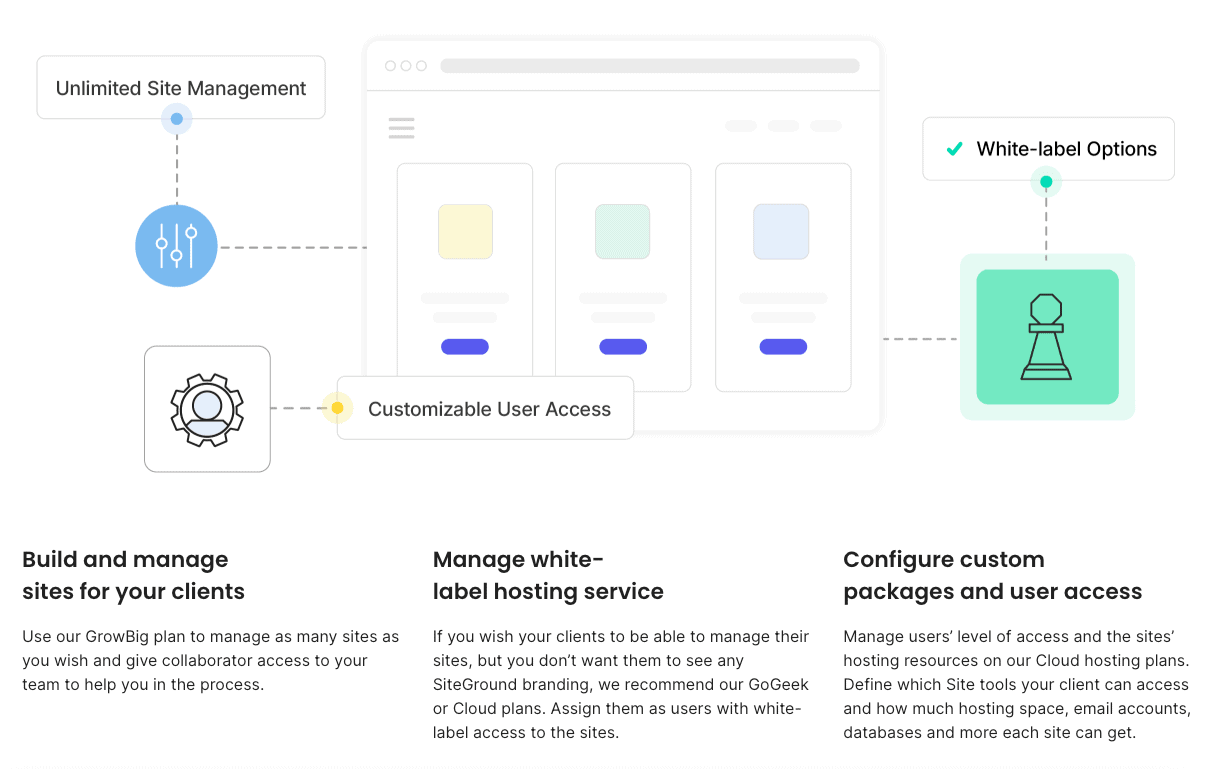
A key advantage of SiteGround’s reseller hosting is the ability to offer a white-label service. This means you can present the hosting service to your clients under your own brand name.
They will see your logo and company name, not SiteGround’s, which helps you build a professional and cohesive brand identity.
Managing your client accounts is also made simple. You can create separate, isolated accounts for each client from a single dashboard.
For even greater flexibility, you can grant collaborator access to your clients or team members, allowing them to manage their own sites without accessing your main reseller account.
While SiteGround provides the hosting management tools, you’ll want to consider your own billing software to handle invoices and payments. Key management features include:
- White-label branding: Present the hosting as your own service.
- Client account management: Easily create and manage individual accounts.
- Collaborator access: Allow clients or team members to manage sites securely.

Site Management and Security Options
SiteGround provides a powerful and intuitive control panel known as Site Tools.
This dashboard is where you and your clients will manage all aspects of their websites, from creating email accounts to managing databases. It’s designed to be user-friendly, so even clients with little technical skill can handle basic tasks.
Security is a major focus, and SiteGround automates many of the most important security measures.
Every site you host can be secured with a free SSL certificate, encrypting data and boosting visitor trust. The platform also includes a custom web application firewall (WAF) to protect against common threats.
In addition to the firewall, SiteGround performs automatic daily backups of all your client accounts.
If anything goes wrong, you can easily restore a previous version of a site with just a few clicks in Site Tools. This combination of easy-to-use site management and robust security makes for a reliable hosting experience.

Related: is SiteGround Site Scanner worth it?
Pricing and Discounts for SiteGround Reseller Hosting
Understanding the pricing structure is crucial when choosing a reseller hosting plan. SiteGround is known for its affordable and transparent pricing, offering great value without a lot of extra costs.
Their reseller packages are designed to be accessible for beginners while also providing options for growth.
As you compare plans, it’s important to look at both the introductory pricing and the renewal rates.
We’ll break down the costs, potential discounts, and payment terms so you can make a financially sound decision for your business.
Overview of SiteGround Reseller Plan Costs
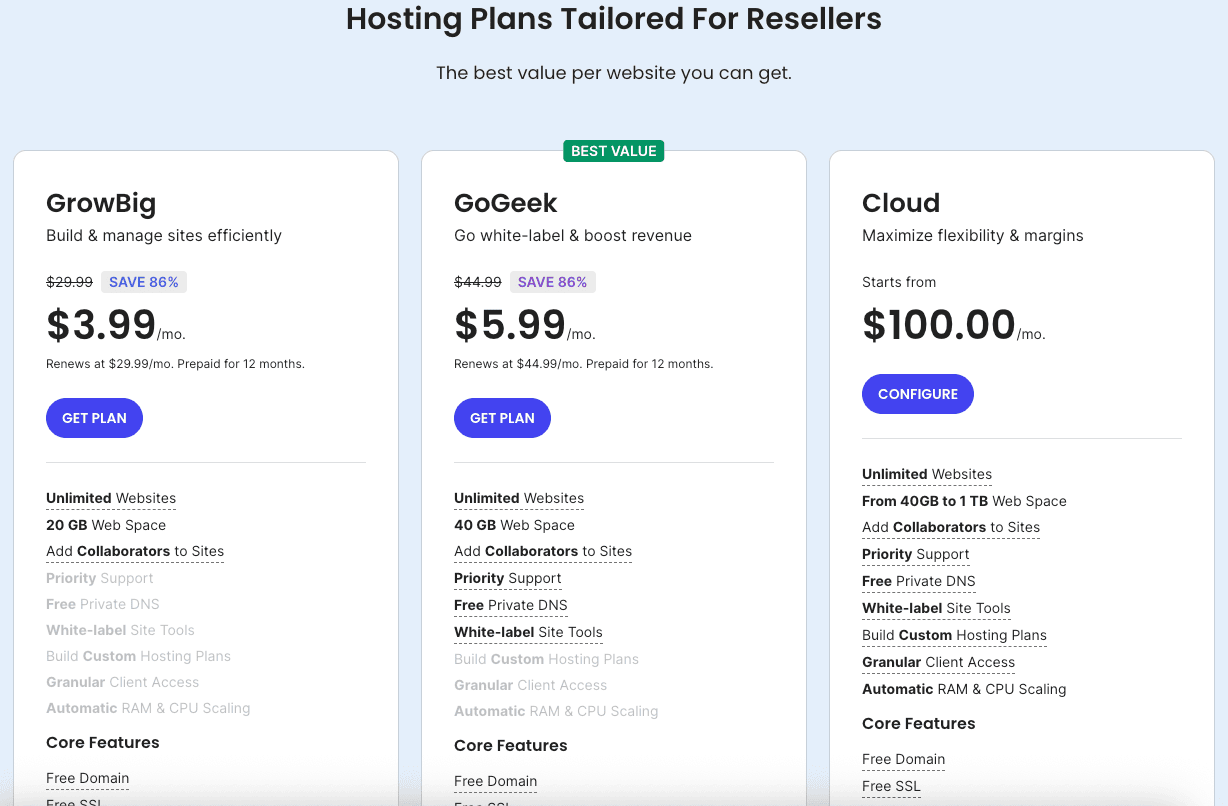
SiteGround offers reseller hosting through its GrowBig, GoGeek, and Cloud plans.
| Plan | Price | Features |
|---|---|---|
| GrowBig | $3.99/mo | – 20 GB Web Space – Unmetered Traffic – Free Daily Backup – Unlimited Email Accounts – Free SSL Certificate |
| GoGeek | $5.99/mo | – 40 GB Web Space – Unmetered Traffic – Free Daily Backup – Unlimited Email Accounts – Free SSL Certificate – Priority Support |
| Cloud | $100.00/mo | – 40 GB to 1 TB Web Space – Unmetered Traffic – Free Daily Backup – Unlimited Email Accounts – Free SSL Certificate – Scalable Resources – Managed Security |
The GoGeek plan is often the starting point for many resellers, providing a generous allocation of resources at an affordable price.
It’s designed to host an unlimited number of websites within its resource limits, making it a great value.
The cost is based on “credits,” where one credit equals one year of hosting for a single account. You can buy these credits in bulk, and the more you buy, the lower the price per credit becomes.
This model gives you flexibility in how you manage and sell your hosting plans. You can allocate one credit to a client for a full year of hosting.
Here is a simplified look at what you get with a typical entry-level reseller plan:
| Feature | Allocation |
|---|---|
| Storage Space | 40 GB |
| Suitable for | ~400,000 Monthly Visits |
| Number of Websites | Unlimited |
| GB Bandwidth | Unmetered |
| White-Label Access | Yes |
Volume Discounts and Special Offers
One of the most attractive aspects of SiteGround’s reseller program is the opportunity for volume discounts.
The pricing model is built on credits, and SiteGround rewards you for purchasing more credits at once. This means that as your business grows and you need to host more clients, your cost per client can actually decrease.
These bulk discounts make it easier to scale your hosting services profitably. You can start with a smaller block of credits and purchase more as your client base expands.
You can manage all your credits and client accounts from your main client area, making it easy to see your usage and plan for future purchases.
To maximize your savings, consider the following:
- Buy credits in bulk: The price per credit drops significantly when you buy 11 or more credits.
- Look for promotions: SiteGround occasionally runs special offers on its hosting plans, which can provide additional savings.
- Commit to a longer term: Annual plans often provide better value than paying month-to-month.
Payment Terms and Renewal Pricing
When you first sign up with a hosting provider, you’ll often receive a promotional or introductory rate. SiteGround is no different, offering very attractive prices to get you started.
It’s important to be aware of the payment terms and what the renewal pricing will be after your initial term ends.
Typically, the biggest discounts are for the first invoice. When it’s time for renewal, the price will revert to the standard rate. This is a common practice across the hosting industry.
Make sure you factor the regular price into your long-term business plan to avoid any surprises and ensure your reseller business remains profitable.
Before you commit, review the terms of service to understand the renewal costs and cancellation policy.
This will help you avoid any unexpected extra costs and allow you to set your own client pricing accordingly. Being informed about the full cost of your hosting plan is key to running a sustainable business.
Related: SiteGround money-back guarantee
Comparing SiteGround Reseller Hosting to Other SiteGround Plans
SiteGround offers a variety of hosting plans, including shared hosting and powerful cloud plans. To make the right choice, it’s helpful to see how reseller hosting stacks up against these other options.
Each type of plan is designed for a different purpose, and understanding those differences is key.
While they all run on the same reliable infrastructure, the features, management tools, and intended use cases vary significantly.
Let’s compare reseller hosting with shared and cloud hosting to see which one aligns with your specific goals.
Shared vs. Reseller Hosting: Key Differences
The most significant difference between shared and reseller hosting lies in their intended use.
Shared hosting is designed for individuals or businesses that want to host their own websites. You get an account on a server that you share with other users, but you can’t create and sell separate accounts to others.
Reseller hosting, on the other hand, is built specifically for that purpose. It gives you a master account with a large pool of resources that you can divide and sell to your clients.
You become the hosting provider for your customers, managing their accounts from your dashboard.
Here are the main distinctions:
- Purpose: Shared hosting is for your own sites; reseller hosting is for selling hosting to others.
- Account Management: Reseller plans let you create multiple, isolated client accounts. Shared plans do not.
- Tools: Reseller hosting includes tools for branding and client management that are not available with shared hosting.
Cloud Hosting vs. SiteGround Reseller Plan
SiteGround’s cloud hosting is a significant step up in power and flexibility from shared hosting.
Built on the premium Google Cloud infrastructure, it provides dedicated resources and is highly scalable. This makes it ideal for large, high-traffic websites, e-commerce stores, or applications that require a lot of processing power.
While you could technically host client sites on a cloud plan, it’s not designed for reselling in the same way a reseller plan is.
Cloud plans give you one powerful account that you can configure as you wish. Reseller hosting, however, is structured to let you create and manage dozens of separate, smaller accounts for your clients easily.
Key differences to note:
- Resource Model: Cloud hosting offers guaranteed, dedicated resources. Reseller hosting provides a pool of resources to be shared among your clients.
- Management: Reseller plans have tools for creating and managing separate client accounts. Cloud plans are managed as a single, powerful server.
- Cost: Cloud plans are generally more expensive due to the dedicated resources provided.
Unique Advantages of the Reseller Option
Choosing the reseller hosting option from SiteGround comes with several unique advantages that make it the best reseller choice for many agencies and freelancers.
The most obvious benefit is the ability to create a new, recurring revenue stream for your business. By offering hosting, you add more value to your services.
This model also allows you to maintain full control over your client’s projects.
You won’t have to deal with a third-party host’s limitations or slow support when a client’s site has an issue. You can manage everything yourself or assign a team member, ensuring a higher level of service.
The key advantages include:
- New Revenue Stream: Earn recurring income by selling hosting plans.
- Enhanced Client Relationships: Offer a complete, all-in-one solution to your clients.
- Peace of Mind: Rely on SiteGround’s powerful infrastructure while you focus on your customers.
Benefits of Using SiteGround Reseller Hosting
When you choose SiteGround as your reseller hosting provider, you’re not just getting server space; you’re getting a suite of benefits that can help your business thrive.
The combination of a powerful hosting environment, excellent customer support, and scalable options makes it a smart choice.
These benefits translate directly to a better experience for both you and your clients.
From reliable performance to opportunities for growth, SiteGround provides a solid foundation for your reseller hosting account.
Let’s look at some of the most significant advantages.
Performance and Reliability for Clients
Your reputation as a reseller depends on the quality of the web hosting you provide. With SiteGround, you can be confident that your clients’ websites will be fast and reliable.
SiteGround builds its platform on the premium Google Cloud infrastructure, which is known for its speed and stability.
This powerful foundation is enhanced by a range of performance optimization features. SiteGround has multiple data centers around the world, so you can host client sites closer to their audience for faster loading times.
They also provide a free Content Delivery Network (CDN) to speed up content delivery globally.
Your clients will benefit from:
- Fast Speeds: Thanks to the Google Cloud infrastructure and built-in caching.
- High Uptime: Reliable servers ensure their websites are always online.
- Global Reach: Multiple data centers and a free CDN improve performance worldwide.

Support, Resources, and U.S.-Based Service
Even though you are the first point of contact for your clients, there will be times when you need help yourself.
SiteGround is famous for its exceptional customer support. As a reseller, you get access to priority support, which means your inquiries are handled quickly by experienced agents.
Beyond direct support, SiteGround offers an extensive knowledge base filled with helpful articles and tutorials.
This resource is invaluable for troubleshooting common issues or learning how to make the most of the platform’s features. The quality of customer service can make a huge difference in your experience as a reseller.
Here’s what you can expect from SiteGround’s support:
- 24/7 Priority Support: Get fast help from expert technicians whenever you need it.
- Extensive Knowledge Base: Find answers to common questions and detailed guides.
- Award-Winning Customer Service: Rely on a team known for being helpful and friendly.

Scalability and Growth Opportunities
As your business grows, your hosting needs will change. SiteGround’s reseller hosting is built with scalability in mind.
You can start with a smaller plan and easily upgrade as you attract more clients. This flexibility ensures you’re only paying for the resources you actually need.
The credit-based system makes scaling simple. When you need more accounts, you can just purchase more credits.
If your clients’ websites start to require more power, you can seamlessly transition to one of SiteGround’s more robust cloud hosting solutions without a complicated migration.
Growth opportunities include:
- Easy Upgrades: Scale your plan or purchase more credits as your client base grows.
- Unlimited Websites: Host as many client sites as your plan’s resources allow.
- Flexible Resource Management: Adjust GB storage and other resources as needed.
Practical Considerations and Limitations
While SiteGround offers a fantastic reseller program, it’s important to have a realistic understanding of its practical considerations and limitations.
Every hosting plan has policies regarding resource usage, and being aware of these can help you manage your clients’ accounts effectively.
Knowing these details upfront will prevent surprises down the road and help you set the right expectations with your customers.
Let’s look at account limitations and the process of migrating clients to your new reseller platform.
Account Limitations and Resource Usage Policies
Like all hosting providers, SiteGround has account limitations to ensure server stability for everyone.
These policies govern resource usage, such as CPU time, disk space, and the number of files (inodes). While reseller plans are generous, they are not infinite.
The main limitations are tied to the total storage space and the processing power allocated to your plan.
For example, the GoGeek plan comes with 40 GB of storage space. You must divide this among all your client accounts. While you get unmetered GB bandwidth, there are fair use policies in place to prevent abuse.
Be aware of these key limitations:
- Total Disk Space: Your plan has a fixed amount of storage space to be shared by all clients.
- CPU and RAM Limits: Fair use policies prevent any single account from monopolizing server resources.
- Inode Limits: There’s a cap on the total number of files and folders you can store.
Migrating Clients to SiteGround Reseller Hosting Efficiently
If you have existing clients with another hosting company, you’ll need to migrate their websites to your new SiteGround reseller account.
SiteGround makes this process as painless as possible with their user-friendly Site Tools and helpful migration options.
For a WordPress site, the process is particularly simple. SiteGround offers a free automated migrator plugin that allows you or your client to transfer their site with just a few clicks.
You just install the plugin on the old site, enter a token generated in Site Tools, and the plugin handles the rest.
Here are your options for migration:
- Free WordPress Migrator Plugin: An easy, automated way to transfer WordPress sites.
- Professional Migration Service: For a fee, you can have SiteGround’s experts handle the migration for you.
- Manual Migration: If you have the technical skills, you can always migrate the files and database manually.
What Real Users Say about SiteGround Reseller Hosting
Reading marketing materials is one thing, but hearing from real users provides a different level of insight.
The general consensus online suggests that SiteGround is a top contender for the best reseller hosting, praised for its reliability and excellent user experience.
Many users highlight the quality of customer support and the easy-to-use platform as key reasons for their satisfaction.
Let’s explore some common themes from online reviews and success stories to get a better picture of what it’s like to use SiteGround as your hosting provider.
Insights from Online Reviews and Reddit Discussions
When you browse through online reviews and Reddit threads about SiteGround, a few common themes emerge.
Users frequently praise the speed and performance of the hosting, often noting that their clients’ sites load much faster after moving to SiteGround.
The positive user experience with the Site Tools control panel is another recurring point.
Of all the features, the high quality of customer service is mentioned most often.
Many reviews on platforms like Reddit tell stories of SiteGround’s support team going above and beyond to solve complex problems, which gives resellers confidence in the platform.
Common points from user reviews include:
- Excellent Performance: Users consistently report fast loading times and reliable uptime.
- Superior Customer Service: The support team is often described as knowledgeable, fast, and helpful.
- Intuitive Platform: The Site Tools dashboard is considered a major improvement over traditional cPanel.
Common Success Stories from SiteGround Reseller Users
The success stories shared by SiteGround resellers often revolve around business growth and simplification.
Many freelancers and small agencies report that offering hosting has allowed them to create a stable, recurring revenue stream, making their income more predictable.
Another common story is the peace of mind that comes from using a reliable platform. Resellers appreciate not having to worry about server maintenance, security, or downtime.
This allows them to focus on what they do best: designing and developing websites for their clients. The ability to manage all client accounts from one place is a frequently cited benefit.
Typical success stories highlight:
- Increased Revenue: Adding hosting packages created a profitable new income source.
- Streamlined Workflow: Managing all client sites from a single dashboard saved time and effort.
- Happier Clients: Providing fast, secure hosting led to greater client satisfaction and retention.
Final Thoughts
In conclusion, choosing SiteGround reseller hosting is a strategic decision that can significantly enhance your web hosting services.
By understanding the unique features and benefits of SiteGround’s offerings, you can make an informed choice that aligns with your business goals.
From white-labeling options to robust client management tools, SiteGround provides the resources necessary for success in the competitive hosting market.
Don’t forget to consider the scalability and support options available, as these will be crucial as your business grows.
Take the time to evaluate your needs and leverage the advantages of SiteGround reseller hosting to deliver exceptional service to your clients.
For more personalized advice, feel free to book a free demo with us!
Frequently Asked Questions
Are there setup fees for SiteGround reseller plans?
No, SiteGround does not charge setup fees for its reseller hosting plans. You simply pay for the hosting plan or the block of reseller credits you choose. This makes it a cost-effective way to start your reseller web hosting business without worrying about hidden upfront costs from your hosting provider.
Can I upgrade my SiteGround reseller plan later?
Yes, you can easily upgrade your SiteGround reseller hosting plan as your business grows. If you need more resources or want to move to a more powerful solution like cloud hosting, SiteGround makes the upgrade process seamless. This scalability ensures your hosting packages can grow with your client base.
How many client accounts can I manage with a SiteGround reseller plan?
SiteGround’s reseller hosting plans allow you to host an unlimited number of websites and create unlimited client accounts. The only practical limit is the total storage and server resources included in your plan. As long as you stay within your overall account limitations, you can add as many clients as you need.
Here are some related posts that you might find helpful:
- is SiteGround Domain Privacy worth it?
- SiteGround Black Friday deal
- who owns SiteGround?
- what is SiteGround used for?
- does SiteGround offer a free trial?
- SiteGround Email Marketing Guide
- does SiteGround accept monthly payments?
- SiteGround free domain name
- installing WordPress on SiteGround
- SiteGround website builder

- How to Install WordPress on SiteGround: A Complete Guide - December 24, 2025
- How to Migrate Website to SiteGround: A Beginner’s Guide - December 24, 2025
- SiteGround Website Builder: Your Guide to Easy Creation - December 24, 2025
Leave a Reply
Want to join the discussion?Feel free to contribute!