
Shopify Pricing: Plans, Fees, and Costs Explained (2026)
Last Updated on September 11, 2026
Shopify pricing for a complete online store starts at $39 per month for Basic when you pay monthly. Most beginners should choose Basic. It costs $29 per month when billed yearly and includes hosting, SSL, unlimited products, Shopify’s checkout, inventory tools, and the core features needed to launch an ecommerce website.
However, the subscription is only one part of the cost. Payment processing, third-party transaction fees, apps, themes, a custom domain, and optional point-of-sale tools can all affect what you actually spend.
In this guide, I’ll break down every major Shopify plan and fee so you can choose the right option without paying for features you don’t need.

Key Takeaways
- Shopify Basic costs $39 with monthly billing or $29 per month with annual billing and is the best plan for most beginners.
- Annual billing saves $120 on Basic, $312 on Grow, or $1,200 on Advanced compared with paying the standard monthly rate for a full year.
- Grow and Advanced cost more but provide additional staff accounts, lower payment rates, and features for larger or more complex businesses.
- Shopify includes ecommerce hosting, SSL, unlimited products, inventory tools, checkout, and core selling features with its full online-store plans.
- Payment processing, third-party transaction fees, apps, premium themes, a custom domain, and POS Pro can increase your total cost.
- New users can currently start with a three-day free trial and then pay $1 per month for three months on eligible plans.
- Start with Basic and upgrade only when added features or lower fees produce a measurable benefit for your business.
Pricing verified August 07, 2026, for U.S. merchants. Shopify prices, promotions, and payment rates can vary by country and may change. Always confirm the final amount on Shopify’s official pricing page before subscribing.
Shopify Pricing Overview
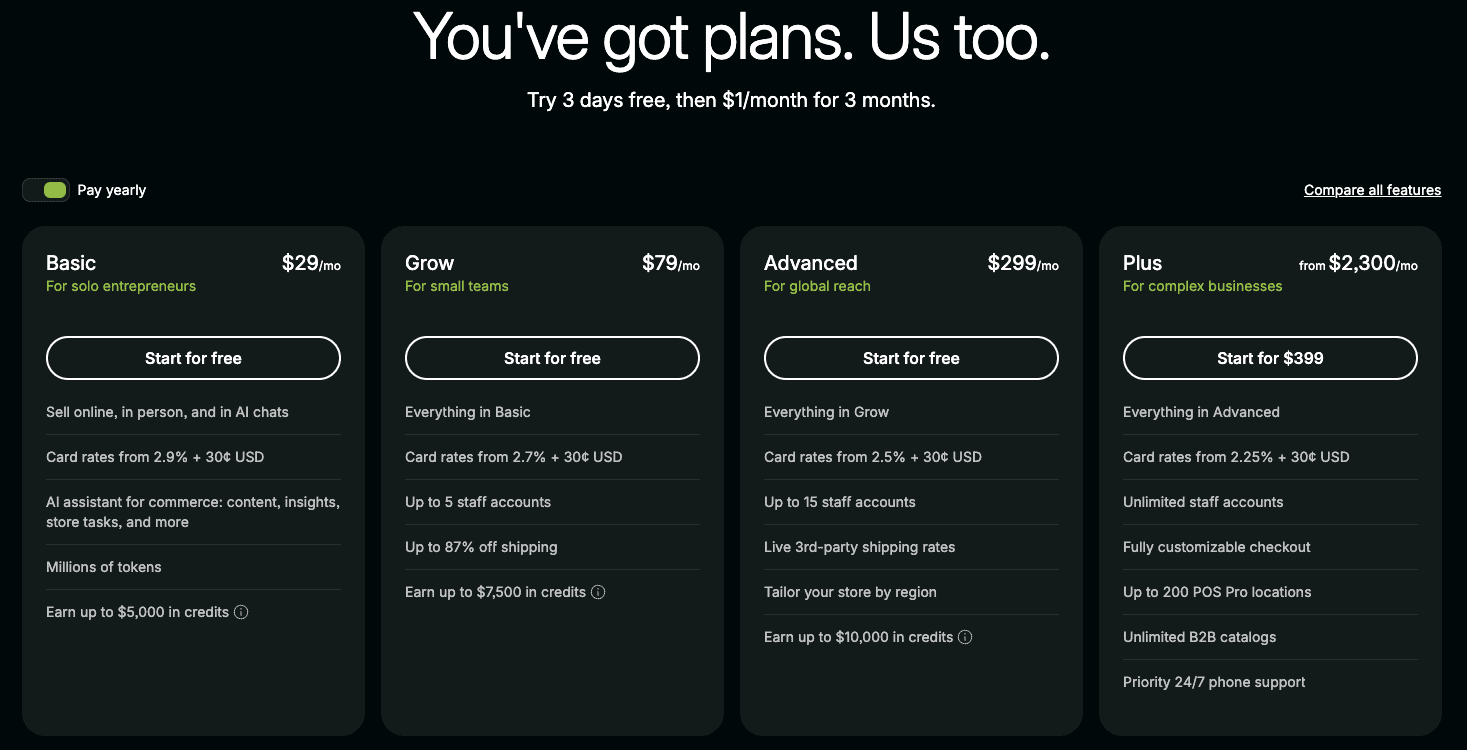
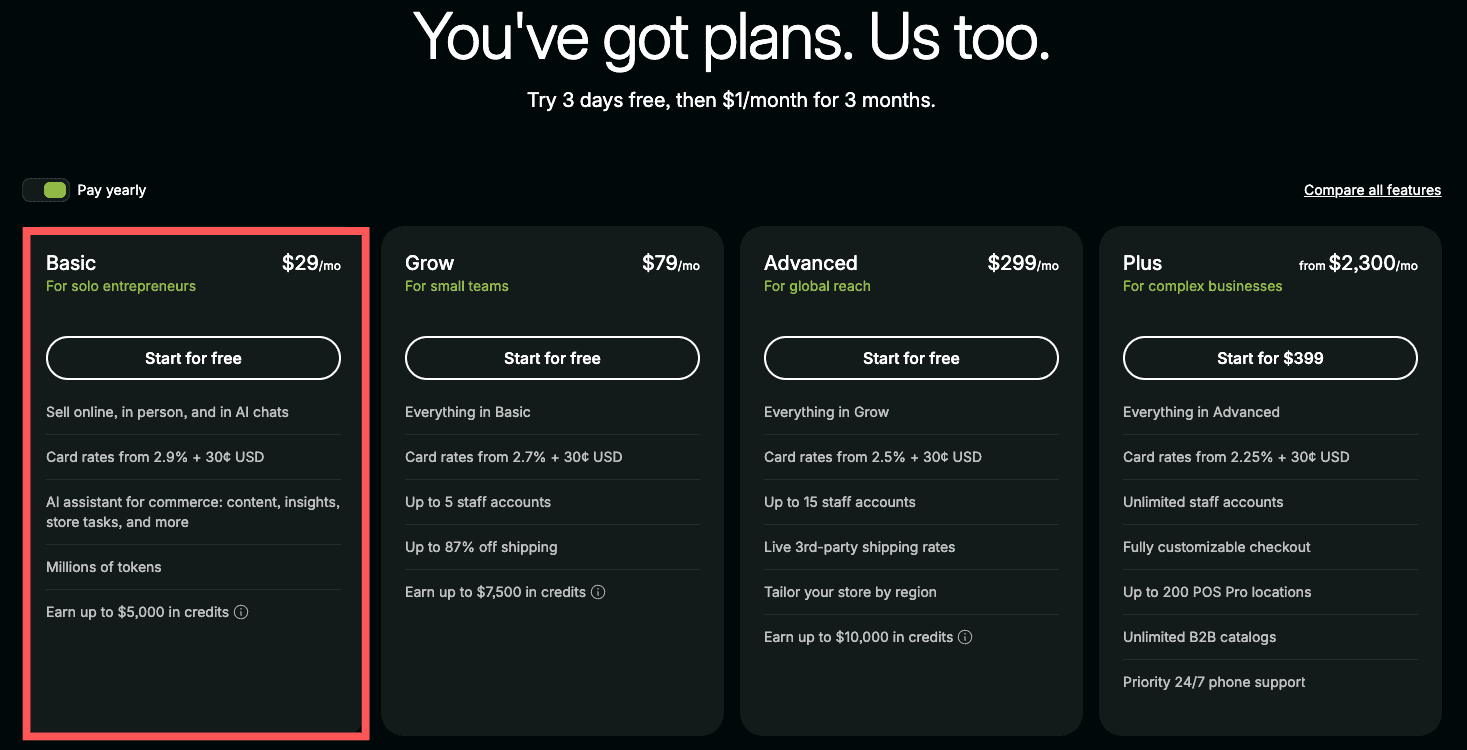
| Plan | Monthly Billing | Yearly Billing | Best For |
|---|---|---|---|
| Basic | $39/month | $29/month | New and solo ecommerce businesses |
| Grow | $105/month | $79/month | Growing stores with a small team |
| Advanced | $399/month | $299/month | High-volume or international stores |
| Plus | From $2,300/month | Contract-based | Large and complex businesses |
Basic is Shopify’s lowest-priced standard plan for building a complete online store. Grow and Advanced keep the same core ecommerce foundation while adding more staff access, lower payment rates, and tools for larger or more complex businesses. Plus is designed for enterprise operations that need advanced checkout, B2B, support, and scaling capabilities.
After testing Shopify while creating store-building tutorials, what I found is that the plan names can make the decision seem more complicated than it is. Most new sellers do not need to compare every advanced feature. The practical choice is usually Basic unless you already know that you need employee accounts, lower processing rates, or advanced international and shipping tools.
New users can currently try Shopify free for three days and then pay $1 per month for the first three months on eligible plans. The complete Shopify free trial guide explains how the current promotion works and what happens after the trial ends.
What Is Included With Every Full Shopify Plan?
Basic, Grow, Advanced, and Plus all provide the foundation required to run a complete ecommerce store. The higher plans mainly add capacity, team access, lower fees, and advanced business tools rather than changing Shopify’s core purpose.
Every full plan also provides Shopify’s basic search foundation, but the store owner must complete the optimization work. My Shopify SEO guide for beginners explains how to research keywords, improve important pages, build internal links, complete technical checks, and measure organic performance.
- Secure ecommerce hosting and unlimited bandwidth
- A free TLS/SSL certificate for connected domains
- A customizable online store with free and paid themes
- Unlimited products and inventory management
- Shopify’s secure checkout and Shopify Payments eligibility
- Sales through social media, marketplaces, in-person channels, and AI shopping experiences
- Discount codes, gift cards, customer accounts, and abandoned checkout recovery
- Reports, marketing tools, and access to Shopify apps
- Shopify’s AI website builder and Sidekick commerce assistant
- 24/7 support, with the support level varying by plan
To see what Shopify’s built-in AI tools can create before choosing a plan, read my Shopify AI Store Builder review. It explains how the prompt-based builder works, what it generates, how much customization is available, its limitations, and whether it provides a useful starting point for a real online store.
One thing I noticed while building a test store is that many features beginners assume require paid apps are already included. Before installing an app, check the Shopify dashboard and plan features first. Keeping the app list small makes the store easier to manage and prevents unnecessary monthly charges.
Monthly vs. Yearly Shopify Pricing
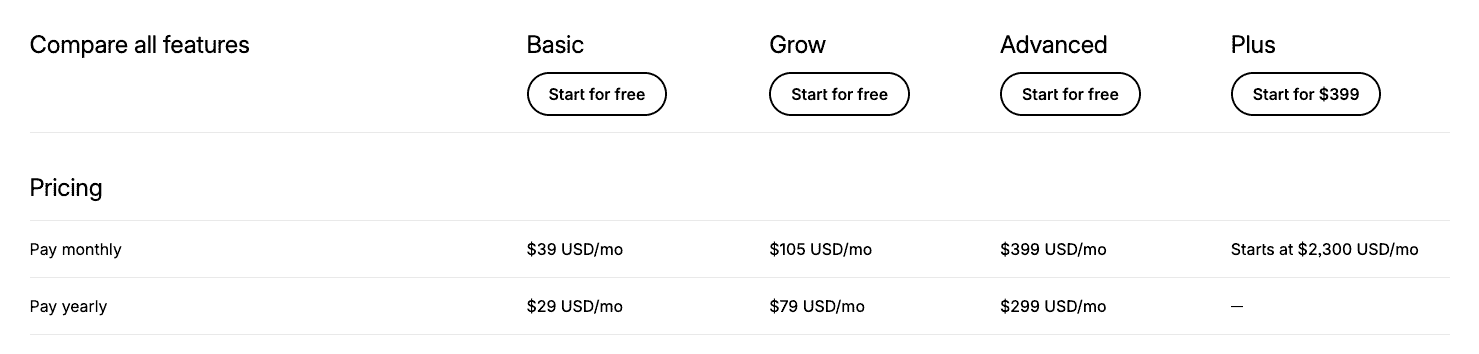
Shopify lets you pay monthly or commit to annual billing. Paying monthly costs more, but it gives a new business greater flexibility. Annual billing lowers the effective monthly price but requires a larger payment upfront.
| Plan | Cost Paid Monthly | Cost Paid Yearly | Annual Savings |
|---|---|---|---|
| Basic | $468/year | $348/year | $120 |
| Grow | $1,260/year | $948/year | $312 |
| Advanced | $4,788/year | $3,588/year | $1,200 |
In my experience, starting with monthly billing is the safer option when you are still validating your products or business idea. Once your store is making consistent sales and you know you want to continue, switching to annual billing can reduce your long-term cost.
Shopify Basic: $39 Monthly or $29 With Annual Billing
Shopify Basic is the best plan for most beginners. It includes a complete online store without charging for the team access and advanced features many new businesses do not yet need.
Important Basic features include:
- A customizable online store
- Unlimited products
- Secure ecommerce hosting and SSL
- Shopify’s checkout
- Inventory management across up to 10 locations
- Discount codes and gift cards
- Abandoned checkout recovery
- Sales through social platforms and marketplaces
- Built-in reports and analytics
- Shopify’s AI website builder and Sidekick assistant
For U.S. online transactions, Shopify currently lists a standard card rate starting at 2.9% plus 30 cents. If you use an outside payment provider instead of Shopify Payments, a 2% third-party transaction fee can also apply.
The main limitation is that Basic does not include additional staff accounts. Third-party calculated shipping is also unavailable as a standard feature. Solo store owners and very small businesses may not need either feature at the beginning.
When Basic Is the Right Starting Point
Basic is usually the right choice when one owner is building a first complete store and does not need separate staff logins. It provides the storefront, checkout, product management, inventory, discounts, reports, hosting, and security required to begin selling. The practical reason to upgrade is not simply that a store is growing; it is that a higher plan’s staff access, lower fees, shipping tools, or international features now save enough time or money to justify the price difference.
Shopify Grow: $105 Monthly or $79 With Annual Billing
Grow is intended for businesses that have moved beyond the solo stage. It includes everything in Basic while adding five staff accounts, broader data access for custom apps, and lower payment and third-party transaction fees.
Choose Grow when:
- Employees need their own Shopify logins
- Your monthly sales make the lower fees meaningful
- You need third-party calculated shipping as an add-on
- Your business needs fuller custom-app data access
Shopify lists online standard card rates starting at 2.7% plus 30 cents and a 1% third-party transaction fee for Grow. When billed yearly, Grow costs $50 more per month than Basic. A 0.2-percentage-point reduction in card processing alone offsets that $50 difference at roughly $25,000 in monthly card sales. The added staff access and other features can make Grow worthwhile sooner.
Shopify Advanced: $399 Monthly or $299 With Annual Billing
Advanced is built for established stores with higher sales volume, larger teams, or more complicated international operations. It includes 15 staff accounts, lower payment rates, third-party calculated shipping, expanded API capacity on select APIs, and regional selling tools.
Advanced is best for:
- High-volume ecommerce stores
- Businesses selling across multiple regions
- Teams that need more than five staff accounts
- Stores requiring live third-party shipping rates
- Companies that benefit substantially from lower processing fees
Shopify currently lists standard online card rates starting at 2.5% plus 30 cents and a 0.6% third-party transaction fee. Advanced costs $220 more per month than Grow when both are billed yearly. Based only on the 0.2-percentage-point difference in standard online card rates, a store would need roughly $110,000 in monthly card sales to offset that price difference. Other Advanced features may justify upgrading at a lower volume.
Shopify Plus: Starting at $2,300 per Month
Shopify Plus is the enterprise-level option for large and complex businesses. It adds unlimited staff accounts, extensive checkout customization, priority support, increased API capacity, expansion stores, high-volume checkout capabilities, and more advanced B2B tools.
Most readers starting their first store do not need Plus. Pricing and terms are contract-based, so established companies should speak with Shopify and compare the total platform cost against their technical, B2B, international, and checkout requirements.
Shopify Payment Processing and Transaction Fees
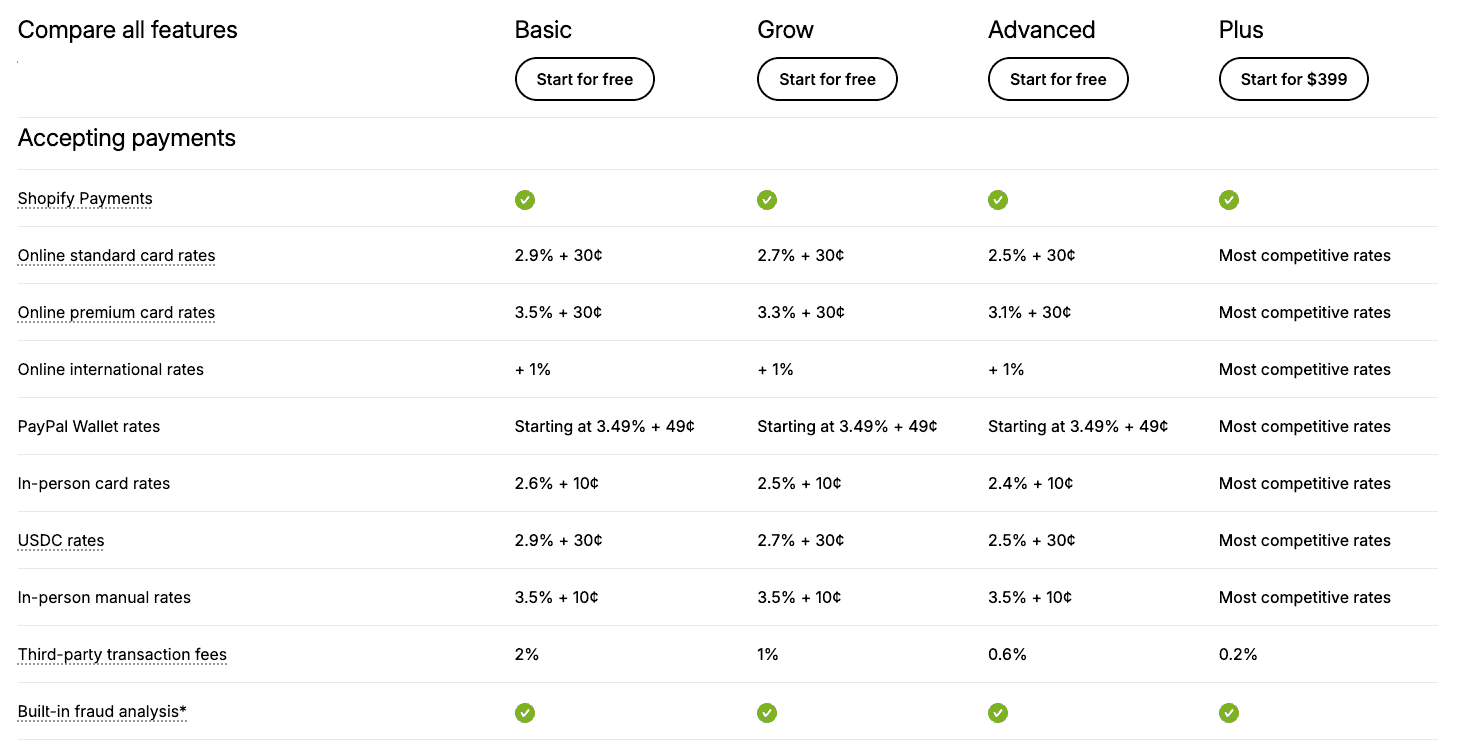
Shopify fees are easier to understand when you separate them into two categories.
Credit card processing fees
These fees cover payment processing when a customer pays by card. Shopify’s current starting U.S. online rates are:
| Plan | Standard Online Card Rate | In-Person Card Rate |
|---|---|---|
| Basic | 2.9% + 30¢ | 2.6% + 10¢ |
| Grow | 2.7% + 30¢ | 2.5% + 10¢ |
| Advanced | 2.5% + 30¢ | 2.4% + 10¢ |
Premium, international, PayPal, manual, cryptocurrency, and other payment types can have different rates. Your final rate can also depend on your country and the payment method.
Third-party transaction fees
Shopify can charge an additional fee when you use a third-party payment provider instead of Shopify Payments. The current listed rates are 2% on Basic, 1% on Grow, 0.6% on Advanced, and 0.2% on Plus.
When Shopify Payments is available and appropriate for your business, using it usually keeps the fee structure simpler because Shopify does not add a separate third-party transaction fee to eligible Shopify Payments orders. Your normal card processing rate still applies.
Shopify Hidden Costs and Additional Fees
Shopify does not charge a setup fee, and hosting and SSL are included. Still, several optional expenses can raise your total monthly or yearly cost.
Custom domain
Every store receives a free myshopify.com address, but most businesses should use a custom domain. You can purchase one through Shopify or connect a domain registered elsewhere. Domain pricing varies by extension and registrar.
Shopify apps
Many apps are free or offer limited free plans, while others charge monthly or based on usage. Reviews, subscriptions, advanced email marketing, upsells, product options, and specialized shipping tools can increase your bill quickly.
What I found while testing Shopify is that it is easy to install apps while experimenting and forget that several small monthly charges can eventually cost more than the Shopify plan itself. Install an app only when it solves a specific problem, and remove it when it no longer produces a clear benefit.
Premium themes
Shopify offers free themes that are more than capable of launching a professional store. Premium themes are an optional one-time purchase. Start free and upgrade only if a paid theme provides a feature or layout that would otherwise require custom development.
Before purchasing a premium theme, browse the 25 best Shopify store examples to see how effective stores use layout, navigation, product photography, product pages, branding, and trust. Focus on the features that improve the customer experience instead of assuming a paid theme will automatically create a better store.
POS Pro
Basic in-person selling is included with the main plans. Retail businesses that need advanced staff permissions, inventory tools, exchanges, pickup, and delivery features can add POS Pro for $89 per month per location. Shopify Plus includes a limited number of POS Pro locations under its current plan structure.
Email, marketing, and professional services
Your business may also spend money on email, advertising, product photography, design, development, bookkeeping, or outside help. These are not required Shopify subscription fees, but they belong in a realistic ecommerce budget.
A Realistic Shopify Budget for Beginners
A lean beginner can launch with Shopify Basic, a free theme, a custom domain, and no paid apps. That keeps the fixed platform cost close to the Basic subscription plus the domain. Payment processing is then charged as sales occur.
A practical first-year budget might include:
- Shopify Basic: $348 per year with annual billing
- Custom domain: variable yearly cost
- Theme: $0 by using a free theme
- Apps: $0 initially, adding only what produces a clear benefit
- Payment processing: charged as a percentage of each sale
The expensive part of ecommerce is often not the platform. Inventory, packaging, shipping, returns, and customer acquisition can cost far more. Keep the technology simple until your products begin generating consistent revenue.
My Shopify first-sale guide explains how to use a lean 30-day launch plan, test customer-acquisition methods, measure the buying funnel, and avoid increasing advertising expenses before the offer is proven.
Avoid turning an affordable Shopify plan into an expensive and complicated setup by reviewing these Shopify mistakes to avoid before purchasing apps, themes, or unnecessary services.
If you plan to sell made-to-order products, the Shopify print-on-demand guide explains how provider charges, shipping, app expenses, replacement allowances, and marketing costs affect each order.
Before You Pay for a Full Year
Build as much of your store as possible during the trial. Before removing your storefront password, use the complete Shopify store launch checklist to verify that the full customer and fulfillment experience works. Add products, customize a free theme, create your essential pages, configure shipping, and test the checkout. If you are still validating the business, choose monthly billing first. Move to annual billing after you know Shopify fits your needs.
To plan the complete business—not only the Shopify subscription—follow my step-by-step guide on how to start an online store. It covers product validation, startup costs, profit margins, Shopify setup, fulfillment, testing, launch, and marketing.
Which Shopify Plan Is Best?
| Your Situation | Recommended Plan | Why |
|---|---|---|
| You are building your first full store | Basic | Best balance of cost and ecommerce features |
| You need employee accounts | Grow | Includes up to five staff accounts |
| You have high sales or complex international needs | Advanced | Lower fees and stronger regional tools |
| You operate a large or complex company | Plus | Enterprise checkout, B2B, support, and scalability |
For most WP Cupid Blog readers, I recommend Basic. Upgrade based on real needs rather than choosing a more expensive plan because you hope the business will eventually grow into it.
Who Is Shopify Best For?
Shopify is best for individuals and businesses that want to sell products without assembling hosting, security, checkout software, inventory tools, and store management features from different providers.
Shopify is a strong choice for:
- Beginners launching their first ecommerce store
- Creators selling physical or digital products
- Print-on-demand and dropshipping businesses
- Retailers selling online and in person
- Businesses that value ease of use and an integrated checkout
- Growing brands that want to scale without migrating platforms
Shopify may not be the best choice if:
- You only need a blog or informational website
- You want complete control over your hosting environment and source code
- You sell very infrequently and cannot justify a recurring subscription
- You need highly specialized functionality that would require several expensive apps
- You prefer managing a self-hosted ecommerce system such as WooCommerce
After testing both hosted website builders and self-hosted WordPress setups, Shopify’s biggest advantage is convenience. The tradeoff is that you pay a recurring fee and work within Shopify’s platform. For a beginner who wants to focus on products and customers instead of website maintenance, that tradeoff is often worthwhile.
For a broader evaluation beyond price, read my complete Shopify review covering its features, ease of use, strengths, limitations, and overall value.
Shopify Pricing Pros and Cons
Pros
- Hosting and SSL are included
- No setup fee
- Free themes can keep startup costs low
- Plans support businesses from beginner to enterprise
- Annual billing offers meaningful savings
- Shopify Payments avoids eligible third-party transaction fees
Cons
- The subscription continues even during slow months
- Paid apps can increase costs quickly
- Third-party payment providers can trigger added fees
- Staff accounts require Grow or higher
- A custom domain is a separate expense
- Annual plans require more money upfront
How to Save Money on Shopify
- Use the trial first. Build your store before paying full price.
- Begin with Basic. Avoid Grow or Advanced until specific features or fee savings justify the upgrade.
- Choose a free theme. Shopify’s free themes are sufficient for most new businesses.
- Limit paid apps. Review every app charge and remove tools you no longer use.
- Consider Shopify Payments. When available and suitable, it can prevent additional third-party transaction fees on eligible orders.
- Switch to annual billing later. Make the longer commitment after validating your store.
If you are ready to build your store, follow my step-by-step Shopify store tutorial. It walks through products, themes, payments, shipping, pages, navigation, SEO, and launch preparation.
Shopify Alternatives to Consider
Shopify is not the only way to sell online. The right alternative depends on whether you prioritize control, simplicity, marketplace traffic, or a lower fixed cost.
- WooCommerce: Best for people who want a self-hosted WordPress store and greater control over hosting and customization.
- Wix: A beginner-friendly website builder for smaller stores that want drag-and-drop design tools.
- Squarespace: A strong option for visual brands, portfolios, and smaller product catalogs.
- Etsy: A marketplace rather than a standalone store builder, making it useful for reaching shoppers who already search Etsy for products.
Shopify is usually the strongest choice when your goal is to build an independent ecommerce brand with room to grow. Etsy can complement a Shopify store, while WooCommerce may be better for someone comfortable managing WordPress and web hosting.
Read my complete Shopify vs WooCommerce comparison to compare the total costs, setup requirements, payment and checkout systems, customization, security, maintenance, and long-term scalability.
For a closer look at the cost, selling fees, marketplace traffic, and business-model differences, read my Shopify vs Etsy comparison.
Frequently Asked Questions
How much does Shopify cost per month?
In the United States, Shopify currently costs $39 per month for Basic, $105 for Grow, and $399 for Advanced when billed monthly. Annual billing reduces the effective monthly prices to $29 for Basic, $79 for Grow, and $299 for Advanced. Shopify Plus starts at $2,300 per month and uses different terms.
What is the cheapest Shopify plan?
Basic is the cheapest standard Shopify plan for building a complete, customizable online store. It costs $39 with monthly billing or the equivalent of $29 per month when the full year is billed upfront.
Does Shopify charge a setup fee?
No. Shopify states that it does not charge setup fees on its plans. You still need to budget for the subscription, payment processing, a custom domain, and any optional apps, themes, or services.
Does Shopify include hosting?
Yes. Shopify plans include ecommerce hosting, unlimited bandwidth, and SSL security. You do not need to purchase a separate web hosting plan.
Does Shopify give you a free domain?
Shopify gives every store a free myshopify.com address. A custom domain such as yourstore.com must be purchased through Shopify or another domain registrar.
Does Shopify take a percentage of every sale?
Shopify charges payment processing fees when you accept card payments. It can also charge a third-party transaction fee when you use an outside payment provider. The exact percentage depends on your plan, country, and payment method.
Can I use Shopify without Shopify Payments?
Yes. Shopify supports third-party payment providers, but the payment provider can charge its own fees and Shopify may add a third-party transaction fee based on your plan.
Can I change my Shopify plan later?
Yes. You can upgrade or downgrade as your business changes. Review the effective date and billing impact in your Shopify admin before confirming a plan change.
Is Shopify Basic enough for beginners?
Yes. Basic includes the core storefront, product, checkout, payment, inventory, marketing, reporting, hosting, and security features most beginners need. Upgrade when you need staff accounts, lower fees, or advanced shipping and international tools.
Is Shopify worth the cost?
Shopify is worth the cost for businesses that want an all-in-one ecommerce platform and prefer not to manage hosting, security, software updates, and checkout technology separately. It may be less cost-effective if you only need a basic website or rarely sell products.
Final Verdict: Which Shopify Plan Should You Choose?
Shopify Basic is the best starting point for most new ecommerce businesses. It gives you a complete store without the higher price of features designed for teams and high-volume sellers. Grow becomes more attractive when you need employee accounts or the lower fees create meaningful savings. Advanced is best reserved for established stores with high sales, international requirements, or more complicated shipping needs.
Start Shopify’s free trial to build and test your store before committing. Keep your theme and app costs low, choose monthly billing while validating the idea, and upgrade only when the numbers support it.

- Shopify SEO for Beginners: Complete Guide (2026) - September 11, 2026
- Shopify vs WooCommerce (2026): Which Is Better? - September 11, 2026
- How to Get Your First Sale on Shopify (2026) - September 11, 2026

Leave a Reply
Want to join the discussion?Feel free to contribute!