Posts

Siteground Data Centers & Server Locations 2025

Ever wondered how SiteGround, one of the leading web hosting providers, manages to provide top-notch performance and reliability to its clients worldwide?

The secret lies in their strategically located SiteGround server locations and their partnership with Google Cloud.

In this blog post, we will delve into SiteGround’s data centers and SiteGround server locations, exploring the benefits of their global presence and the steps they take to ensure optimal performance for clientsโ€™ websites.

siteground-data-centers

Short Summary

  • SiteGround offers reliable hosting services with global data centers for optimized performance and improved user experience.

  • Leveraging Google Cloud, SiteGround provides fast connectivity, high redundancy & eco-friendly solutions with robust physical & digital security measures.

  • Clients can easily change their data center location through the Client Area to ensure optimal website performance based on target audience and requirements.

Related: SiteGround coupon code

SiteGround Data Centers Overview
siteground

SiteGround strives to offer high-speed and dependable hosting services to customers around the world by providing a global network of data centers.

These data centers ensure optimal server locations and maximum capacity, speed, and efficiency for SiteGround hosting networks.

With a 99.9% uptime guarantee for websites hosted on their SiteGround servers, SiteGround staff carefully monitor factors such as server facility, electricity outages, and on-site power generators to ensure their data centers adhere to the highest standards.

Related: what is SiteGround used for?

SiteGround’s Global Presence

To cater to clients from various regions, SiteGround has data centers located in 4 continents.

Here is the full list of the SiteGround data centers location:

  • Ashburn (Virginia, US)

  • Council Bluffs (Iowa, US)

  • Dallas (Texas, US)

  • Los Angeles (California)

  • London (UK)

  • Eemshaven (NL)

  • Frankfurt (DE)

  • Paris (FR)

  • Madrid (Spain)

  • Sydney (AU)

  • Singapore (SG)

By having data centers in multiple locations, SiteGround ensures superior performance for customers in various regions, including those with dedicated web server accounts.

This global presence allows SiteGround to provide the best server locations for clients, resulting in faster loading times and an improved user experience.

The Importance of Server Locations

Server location plays a critical role in website performance, as it directly impacts loading times and user experience.

Choosing the right data center located in the best region for your target audience is paramount for ensuring optimal website performance.

The closer the server location is to your website visitors, the faster the content will load, resulting in a better experience for your users.

SiteGroundโ€™s data centers, situated in various locations around the globe, cater to clients targeting audiences from different regions.

For example, clients targeting audiences in Europe can choose from SiteGroundโ€™s data centers in Eemshaven (Netherlands), London (UK), Frankfurt (Germany), or Paris (France) to provide the best possible user experience for their visitors.

SiteGround Data Center Locations

siteground-data-center-locations

SiteGround has eleven SiteGround data centers located in four major continents: the North America, Asia, Australia, and Europe.

Each data center location is strategically chosen to cater to clients from different regions, ensuring optimal performance and faster loading times for their websites.

By offering data center locations in various regions, SiteGround empowers clients to select the SiteGround server location that best aligns with their target audience, enhancing the user experience and boosting website performance.

In the United States, SiteGround has data centers in Ashburn (Virginia), Council Bluffs (Iowa), Dallas (Texas), and Los Angeles (California), with SiteGround servers located in these strategic data center locations to provide high-quality web hosting services to clients targeting audiences in the US and surrounding regions.

In addition to these data center locations, SiteGround is continuously expanding its global presence by adding new SiteGround server locations to better serve its clients worldwide.

USA: Iowa, Virginia, California, and Texas

siteground-us-server-locations

SiteGround has data centers in Iowa, Virginia, California, and Texas, which are optimally tailored for clients targeting audiences from North and South America, as well as Africa.

For example, SiteGroundโ€™s Iowa data center, located in Council Bluffs, is ideal for clients targeting audiences in the United States, Canada, and Latin America.

Similarly, SiteGroundโ€™s data centers in Virginia, California, and Texas provide top-notch web hosting services for clients targeting audiences in North America.

By offering data center locations across the United States, SiteGround ensures that clients can choose the server location that best suits their needs, resulting in improved website performance and a better user experience for their visitors.

Singapore: Singapore City

siteground-singapore-data-center

SiteGroundโ€™s Singapore City data center is strategically located to cater to clients in Asia, the Middle East, and the South Pacific.

This data center location serves countries such as India, Nepal, Pakistan, Sri Lanka, the Philippines, Japan, and the Gulf countries, ensuring optimal performance for clients targeting audiences in these regions.

When selecting a server location for a website with significant traffic from China, it is important to consider the proportion of the audience from China before choosing a server location.

If you want to find out which SiteGround data center your website is currently using, you can log in to your SiteGround account, navigate to your website’s settings or dashboard, and look for information regarding the server location or data center under hosting details.

If only a minor proportion of the audience is from China, a Singapore server may be a suitable option, providing faster loading times and an improved user experience for clients targeting audiences in the Asian region.

Australia: Sydney

siteground-australia-data-center

SiteGroundโ€™s Sydney data center is ideally situated to serve clients in Oceania and the surrounding regions, such as Australia and New Zealand.

By providing a superior user experience with rapid page loading and minimal latency, the Sydney data center ensures optimal performance for clients targeting audiences in these regions.

This proximity to Oceania makes SiteGroundโ€™s Sydney data center an ideal choice for those targeting audiences in Australia, New Zealand, and other countries in the region.

Europe: Eemshaven (Netherlands), London (UK), Frankfurt (Germany), and Paris (France)

siteground-europe-server-locations

In Europe, SiteGround has data centers in Eemshaven (Netherlands), London (UK), Frankfurt (Germany), and Paris (France).

These data centers cater to clients targeting audiences in European countries, ensuring optimal website performance for users in the region.

For instance, SiteGroundโ€™s London data center is best suited for websites targeting audiences from the United Kingdom and Russia, providing the best possible user experience for these visitors.

SiteGroundโ€™s Frankfurt data center, located in Germany, is most suitable for clients targeting audiences in Germany and other parts of Europe, especially countries in close proximity to Germany.

It also caters to the African continent and the Middle Eastern region, providing fast connectivity and an enhanced user experience for clients targeting audiences in these locations.

Spain: Madrid

SiteGroundโ€™s Madrid data center in Spain is optimally tailored for clients targeting audiences in Spain and Africa.

By providing fast connectivity and an improved user experience, the Madrid data center ensures that clients can effectively reach their target audience in these regions.

This results in better website performance and user satisfaction.

SiteGround’s Partnership with Google Cloud

siteground-google-cloud-integtation

Since 2020, SiteGround has partnered with Google Cloud, one of the most reliable cloud hosting companies available, to provide reliable and high-performance hosting services.

By leveraging Google Cloudโ€™s infrastructure, SiteGround is able to offer clients fast connectivity, increased redundancy, and environmentally-friendly hosting solutions.

This partnership ensures that when you choose SiteGround web hosting, your websites are hosted on a web hosting company server, specifically Google Cloud servers, providing you with the reliability and fast network you expect from a top-tier hosting provider.

Benefits of Google Cloud Integration

By integrating with Google Cloud Platform, SiteGround is able to provide clients with a host of benefits, including fast connectivity, high redundancy, and eco-friendly hosting solutions.

Fast connectivity ensures rapid page loading times, enhancing the user experience and improving website performance for clients targeting audiences around the world.

In addition to fast connectivity, Google Cloud integration provides high redundancy, allowing data to be stored in multiple locations and quickly recovered in the event of an outage.

This increased redundancy ensures the safety and security of clientsโ€™ data, providing peace of mind and a reliable hosting experience.

Furthermore, the integration with Google Cloud ensures eco-friendly hosting solutions, reducing energy consumption and carbon emissions.

Security Measures at SiteGround Data Centers

Security is of paramount importance at SiteGroundโ€™s data centers, ensuring clients receive a secure and reliable hosting experience.

SiteGround employs various physical and digital security measures to guarantee the safety of data and prevent unauthorized access.

By implementing these measures, SiteGround is able to provide clients with a hosting solution that prioritizes security and reliability, ensuring the best possible experience for website owners and visitors alike.

Physical Security

siteground-security

SiteGroundโ€™s data centers employ various physical security measures, including 24×7 human security, biometrics, access control mantraps, perimeter security, facility controls, computer room controls, and cabinet controls.

These measures ensure that only authorized personnel have access to the data centers and that the facilities are protected against unauthorized access and potential threats.

In addition to the security staff, SiteGround has implemented surveillance systems such as facility controls, computer room controls, and cabinet controls to monitor the data centers continuously.

These surveillance systems provide an additional layer of security, ensuring the safety and integrity of clientsโ€™ data at all times.

Related: SiteGround free SSL Certificate

Digital Security

siteground-security-plugin

SiteGround employs various digital security measures to protect clientsโ€™ data, including ModSecurity, a centralized security system, the SiteGround Security Plugin, and support for Two-Factor Authentication (2FA).

These measures ensure the digital security of the data centers and safeguard clientsโ€™ information from potential threats and unauthorized access.

ModSecurity functions as a web application firewall, monitoring and filtering incoming traffic to a website and blocking any suspicious requests.

The SiteGround Security Plugin, a WordPress plugin designed to help protect websites from malicious attacks, provides additional security measures such as two-factor authentication, malware scanning, and automatic updates.

Together, these digital security measures provide a robust and secure hosting environment for SiteGround clients.

Leveraging SiteGround CDN for Enhanced Performance

SiteGround has its very own Content Delivery Network, known as the SiteGround CDN. By providing its own in-house CDN service, SiteGround offers clients faster loading times and increased security for their websites.

SiteGround has over 170 CDN edge network locations that are part of the Google Cloud network.

SiteGround CDN is a fast content delivery network that enhances the security and reliability of websites and provides effective monitoring.

By leveraging Cloudflareโ€™s CDN network, SiteGround customers can have their website content cached for free, ensuring faster loading times and an improved user experience.

In addition to faster loading times, SiteGround CDN also offers various security features to protect clientsโ€™ websites from potential threats.

By offering its own CDN, SiteGround is able to provide a secure and high-performance hosting solution for clients, ensuring the best possible experience for website visitors.

Here is a complete list of SiteGround’s CDN locations:

  • Ashburn (Virginia, US)

  • Council Bluffs (Iowa, US)

  • Dallas (Texas, US)

  • Los Angeles (California, US)

  • Moncks Corner (South Carolina, US)

  • The Dalles (Oregon, US)

  • London (UK)

  • Madrid (Spain)

  • Eemshaven (Netherlands)

  • Frankfurt (Germany)

  • Paris (France)

  • Hamina (Finland)

  • Warsaw (Poland)

  • Sydney (Australia)

  • Tokyo (Japan)

  • Singapore (Singapore)

  • Sao Paulo (Brazil, South America)

Eco-Friendly Hosting Solutions

siteground-eco-friendly-hosting

SiteGround is committed to green hosting and sustainability, utilizing 100% renewable energy for its servers and reducing its carbon footprint.

By choosing an eco-friendly hosting solution, clients can support SiteGroundโ€™s efforts to promote sustainability and minimize the environmental impact of their hosting services.

This commitment to sustainability sets SiteGround apart from other hosting providers, making it a responsible choice for clients looking to minimize their environmental impact while still enjoying top-notch performance and reliability.

How to Change Your SiteGround Data Center Location

If you need to change your SiteGround data center location after choosing the wrong data center location, the process is simple and straightforward.

Clients can modify their SiteGround data center location through the Client Area. The relocation process can take up to 72 hours.

You can change the data center for all your sites in your SiteGround web hosting account.

To initiate the change, navigate to your SiteGround User Area and select Services > Hosting, and click manage next to the SiteGround hosting plan you want to relocate your SiteGround servers for.

Next, click the debar menu and select relocate. You can now choose the new SiteGround server location from the Select Your New Location drop-down.

Something to note: If you have the Startup, GrowBig, or GoGeek plan, you can change the server location of each of your websites separately.

To do this, go to your SiteGround Client Area > Websites and click All Site Options next to your website you want to relocate. Next, click on the kebab menu and select Relocate. Pick the new SiteGround data center you’d like for your site from the Select Your New Location. Confirm the relocation.

Something to note: The process can take up to 72 hours to complete, ensuring a smooth transition with minimal downtime for your website.

While the relocation of your SiteGround servers takes place, make sure not to make any changes to your site. Any changes made could be lost.

During the SiteGround server location transition, you might not be able to access any mailboxes and your sites by domain name due to the nameservers and IP changes.

Choosing the Right SiteGround Data Center for Your Needs

Selecting the right SiteGround data center location is crucial for ensuring optimal website performance and user experience.

To choose the best SiteGround server location, consider the geographical location of your target audience and the regions you wish to serve.

By choosing a data center location close to your visitors, you can ensure faster loading times and a better user experience for your website.

If youโ€™re unsure which SiteGround server location is best for your needs, consult SiteGroundโ€™s support team for guidance.

They can help you determine the most suitable data center location based on your target audience and website requirements, ensuring that your website is hosted in the best possible location for optimal performance and user satisfaction.

Final Thoughts

In conclusion, SiteGroundโ€™s global network of data centers and its partnership with Google Cloud provide clients with fast, reliable, and secure hosting solutions.

By strategically locating data centers around the world, SiteGround ensures optimal performance for clients targeting audiences in various regions.

With a strong focus on security and eco-friendly hosting practices, SiteGround sets itself apart as a responsible choice for clients looking for top-notch performance and reliability.

So choose SiteGround for your website hosting needs, and enjoy the benefits of their global data center network and commitment to sustainability.

Frequently Asked Questions

How many data centers does SiteGround have?

SiteGround has 11 data centers in 8 countries across 4 continents – the United States, the Netherlands, the UK, Germany, France, Spain, Australia, and Singapore.

Where is SiteGround headquartered?

SiteGround is headquartered in Stara Zagora, Bulgaria. The company was founded in Sofia, Bulgaria, and has offices in Sofia, Plovdiv, Stara Zagora, and Madrid.

Where is SiteGround CDN located?

SiteGround has expanded their list of CDNs and data centers all around the world, including Council Bluffs (Iowa, US), Dallas (Texas, US), Los Angeles (California, US), Moncks Corner (South Carolina, US), The Dalles (Oregon, US), London (UK), Madrid (Spain), Eemshaven (Netherlands), Frankfurt (Germany), Paris (France), Hamina (Finland), Warsaw (Poland), Sydney (Australia), Tokyo (Japan), and Singapore (Singapore).

This means that customers can now choose from a wide range of locations to host their websites, ensuring that their content is delivered quickly and reliably to their visitors.

With the addition of these new locations, SiteGround is now able to offer customers a truly global hosting experience.

What is the significance of server location for website performance?

Server location significantly affects website performance, as it directly influences loading times and user experience. Therefore, it is critical to select a data center located in the ideal region for your intended audience.

Choosing the right server location can be a daunting task, as there are many factors to consider. It is important to consider the geographical location of your target audience.

Is it worth changing SiteGround’s data center to the US?

Changing your SiteGround data center to the US can be worthwhile if your target audience is primarily located there. This adjustment can enhance website loading speed and improve user experience, ultimately leading to higher engagement and conversion rates. Evaluate your audience’s location before making this decision for optimal results.

Is there an extra cost to switch SiteGround data centers?

No, there is no extra cost, and it can be done within your SiteGround dashboard panel.

Here are some related server locations posts:

Here are some related SiteGround posts that you might find helpful:

What Is SiteGround Web Hosting? Why You Need Them?

So what is SiteGround? Why do you need SiteGround? What is SiteGround used for? People all around the world ask these three common questions when it comes to SiteGround.

In this post, I’ll go in-depth on what SiteGround hosting is and why you need SiteGround.

what-is-siteground-web-hosting

Related: SiteGround discount

What Is SiteGround?

If you aren’t familiar with SiteGround and you hear the name, you’re probably asking yourself just what is SiteGround?

SiteGround is one of the top web hosting and domain name providers around today. SiteGround offers services such as web hosting and domain name registrations.

The most popular hosting services SiteGround offers are Shared web hosting, Cloud hosting, WordPress hosting, WooCommerce hosting, Reseller hosting, and Web Hosting for Agencies.

siteground

SiteGround is known for its incredible customer support and fast site loading speeds compared to other hosting providers.

SiteGround is trusted by the owners of 2,000,000 domains worldwide.

Click here to take a look at Siteground’s site and take a look at their hosting plans.

What is SiteGround Used For?

So what is SiteGround used for? SiteGround is a web hosting provider that provides services for hosting websites, blogs, and e-commerce sites, and SiteGround is used for registering domain names online.

Click here to get started with SiteGround and receive up to 83% off web hosting.

Video Tutorial: What Is SiteGround Used For?

What Is SiteGround? What Is SiteGround Used For? Why You Need Them?!

Why Should You Choose SiteGround?

There are several reasons why we recommend SiteGround for building sites online. SiteGround has great hosting prices. You can get web hosting for your site for $2.99 a month.

siteground-plans

SiteGround is known for its site speed compared to other hosting providers. SiteGround’s platform is powered by Google Cloud. A great thing about this is that Google is known for maintaining one of the fastest and best-connected networks today.

With SiteGround hosting, you will get a fully-managed hosting service. SiteGround will take care of the hosting maintenance side of things so you can focus on your core business and not have to worry about maintenance for your site.

SiteGround provides expert support and support that is loved by people around the world. SiteGround is known for its top-rated support. With SiteGround, you will get help fast. SiteGround is one of the fastest when it comes to support.

SiteGround provides its customers with constant security monitoring. In fact, SiteGround has a team of dedicated security experts that is keeping track of daily software vulnerabilities on the server and website level.

SiteGround offers free website building tools such as WordPress and Weebly. You can create your site quickly and easily with either one of these site builders.

SiteGround is officially recommended by WordPress. WordPress is one of the most popular website and blog building platforms today.

siteground-recommended-by-wordpress.org

Related: how to install WordPress on SiteGround

Here are some other reasons why we recommend SiteGround:

  • 24/7 support via chat, phone, or ticket
  • Friendly customer service, always eager to help
  • Fast site speed compared to other hosting providers
  • Top-rated for customer satisfaction
  • Top-notch security
  • Easy site management
  • Ultra-fast sites
  • Free email addresses at your own domain
  • Free Let’s Encrypt SSL Certificate
  • Daily backups of your site
  • CDN service allowing your site to load faster for your site visitors
  • Powers 2,800,000 domains around the world

As you can see, SiteGround is a great choice when it comes to web hosting for your site’s needs.

Ready to get started and sign up with SiteGround? Click here to get started and get up to 83% off web hosting.

Need help signing up with SiteGround? Follow our step-by-step guide.

Want to know if SiteGround offers monthly payments? Find out now!

Final Thoughts

We hope this article helped you learn what SiteGround is and what SiteGround is used for.

Let us know in the comments below if you try them out! We would love to hear from you.

Here are some related SiteGround posts that you might find helpful:

How To Sign Up For SiteGround: A Step-by-Step Guide

SiteGround is one of the top web hosts today and is an excellent web hosting company to go with.

In this post, I’m going to show you step by step how to sign up with SiteGround hosting. Signing up with SiteGround will only take you a few minutes with our quick and easy SiteGround sign up tutorial.

Let’s get started.

siteground-sign-up-tutorial

Key Takeaways

  • Signing up for SiteGround only takes a few minutes, and this guide walks you step-by-step through the entire process โ€” from choosing a plan to completing checkout.
  • SiteGround offers multiple hosting plans and a free domain on annual terms, with pricing starting as low as $2.99/month with up to 83% off.
  • Youโ€™ll get high-value features included, such as free SSL, daily backups, fast performance, domain privacy options, and a 30-day money-back guarantee.

Related: SiteGround coupon code

About SiteGround

SiteGround is one of the top web hosting providers today, and they are the largest independently owned hosting company. They power over 2,800,000 domains around the world.

They provide 24/7 customer and technical support, and they offer a 30-day money-back guarantee. Not only is SiteGround affordable, but they are also known for their site speed, excellent technical support, and high performance powered by Google, compared to other web hosts.

siteground-top-rated-hosting-support

With SiteGround, you will get lots of features with your hosting plan, including SSD storage, free website migration, free website backups, a free Letโ€™s Encrypt SSL certificate, CDN, SuperCacher plugin, and intuitive site tools, including much more!

Related: what is SiteGround used for?

SiteGround is also recommended by one of the most popular website and blogging platforms, WordPress.org.

siteground-recommended-by-wordpress.org

Now, let’s get started with our SiteGround sign up tutorial on how to sign up with SiteGround hosting.

Video Tutorial: How To Sign Up WIth SiteGround Hosting

How To Sign Up With SiteGround Web Hosting (UPDATED 2025)

How To Sign Up With SiteGround Hosting

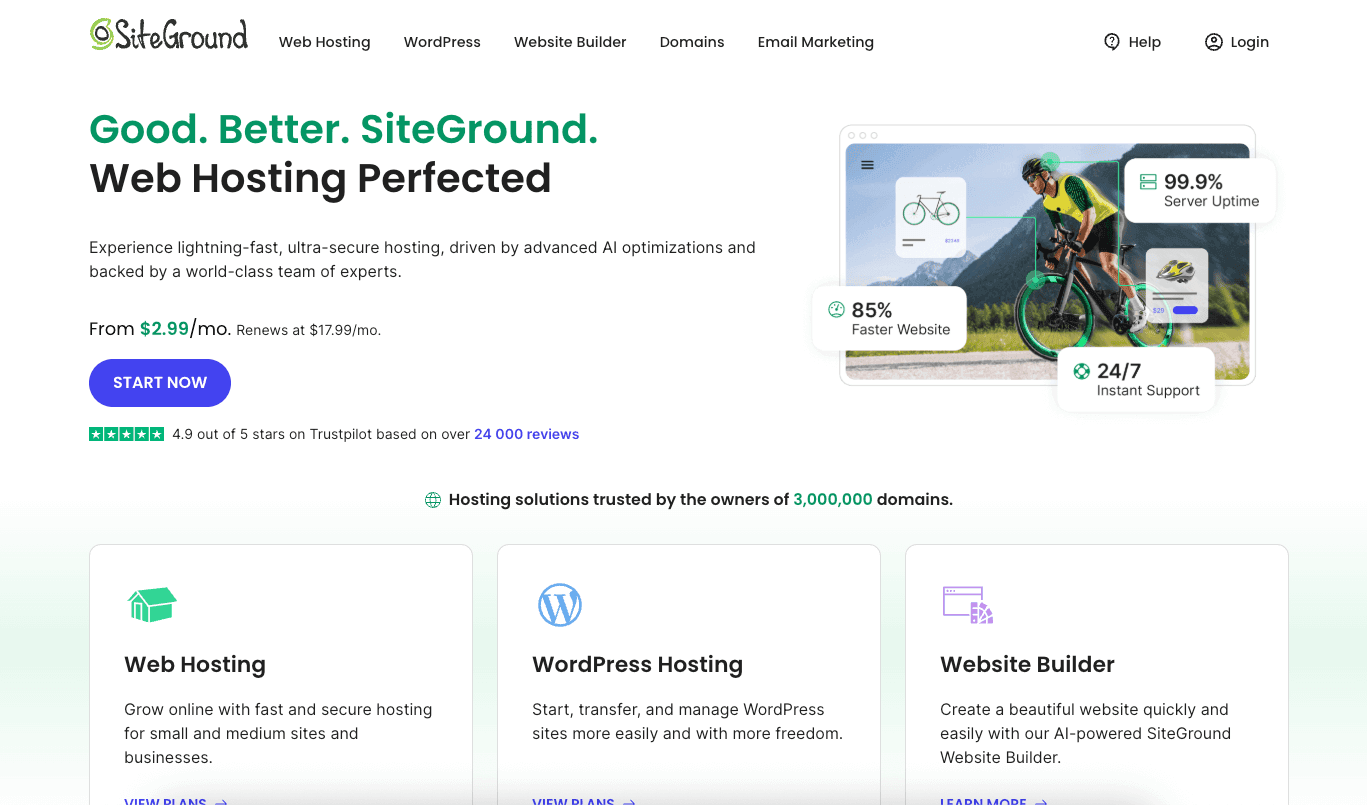
The first step is to visit SiteGround to get started with signing up with SiteGround. Click here to visit SiteGround and get up to 83% off web hosting.

siteground

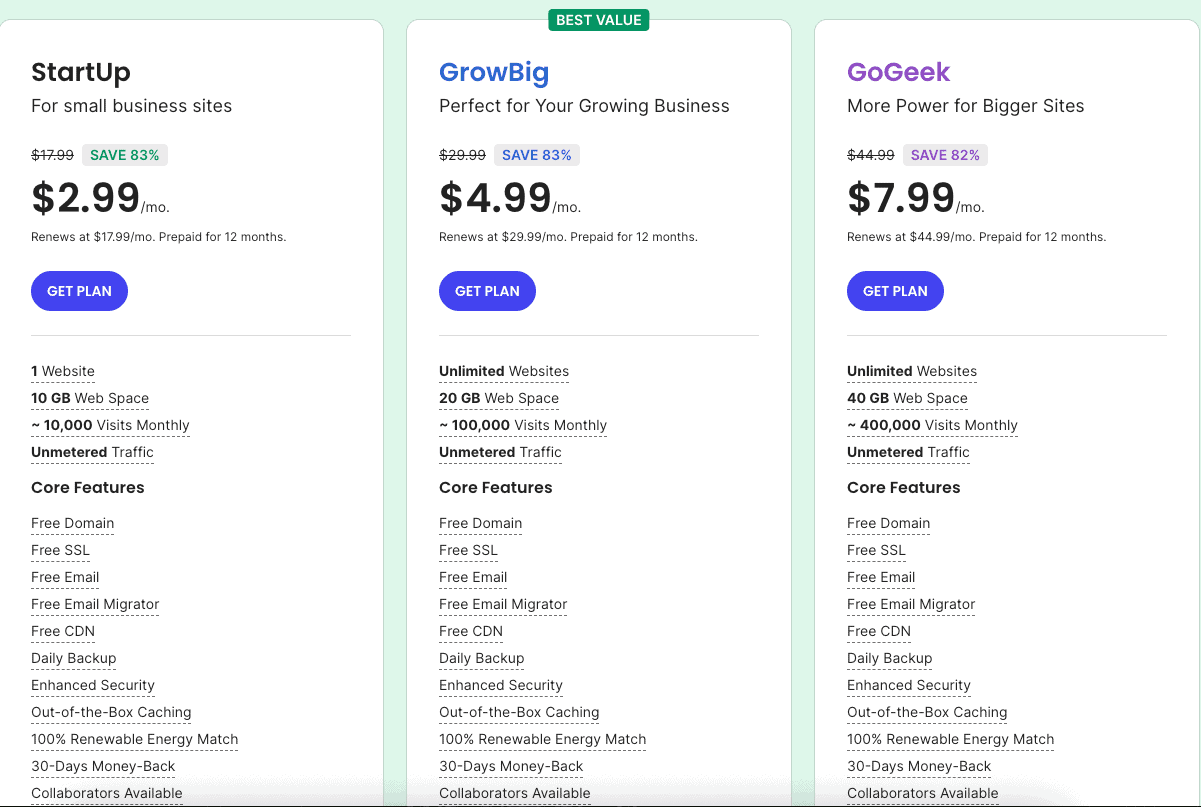
You will now be on the SiteGround plans page. You will see three different plans that you can choose from: the StartUp, GrowBig, and GoGeek plans.

You’ll see that you’ll get up to 82% to 83% off each of the three SiteGround plans.

siteground-plans

All the plans come with features such as free website builders, 24/7 support, free SSL and HTTPS, 30-day money-back guarantee, free email accounts, unmetered traffic, free Cloudflare CDN, unlimited MySQL, a free daily backup, cPanel, and SSH.

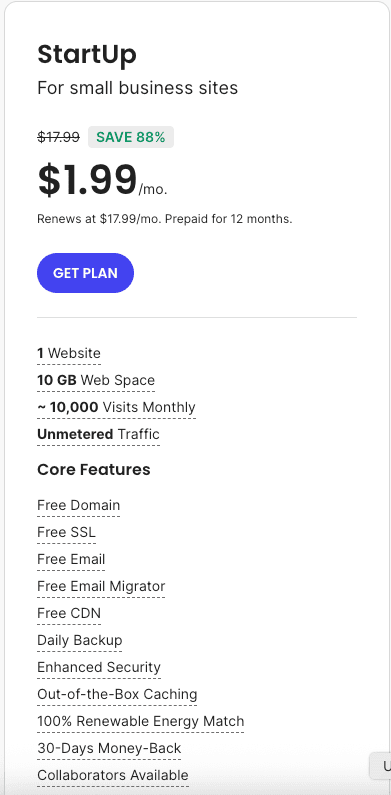
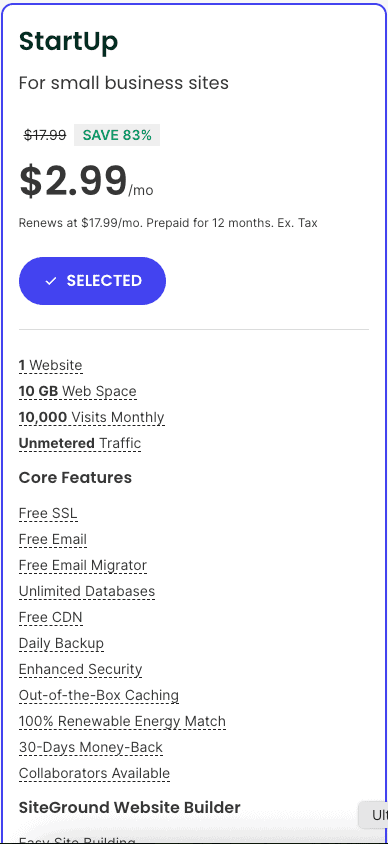
The StartUp plan is a good plan if you are just starting out. With the StartUp plan, you can have one website, 10GB of web space storage, and 10,000 monthly visitors.

You’ll get SiteGround hosting for as low as $2.99 a month.

siteground-startup-plan

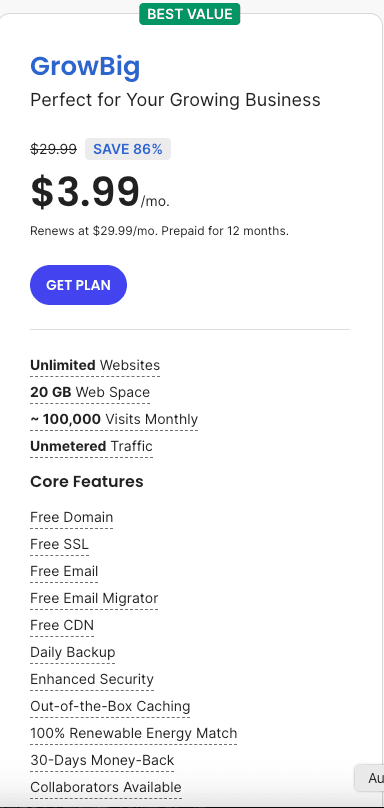
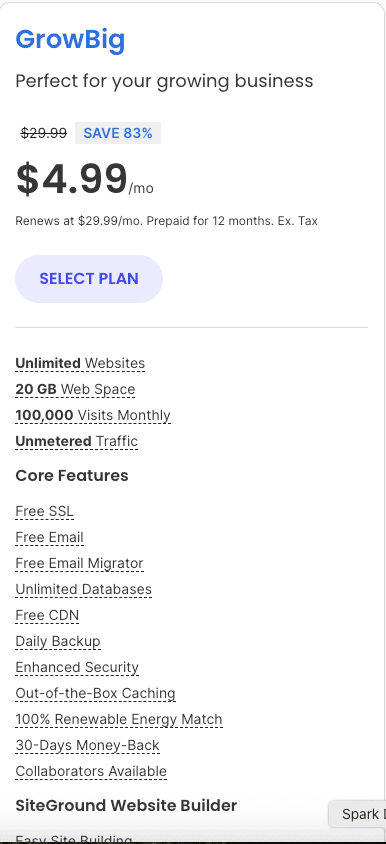
With the GrowBig plan, you can have unlimited websites, 20GB of web space storage, and 100,000 monthly visitors. One of the great things about the GrowBig plan is that you get some extra features, such as 30% faster PHP, advanced on-demand backups, and site staging.

You’ll get SiteGround web hosting for as low as $3.99 a month.

siteground-growbig-plan

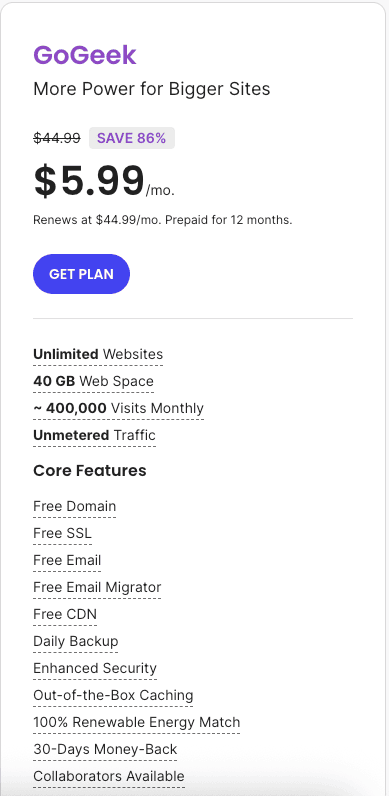
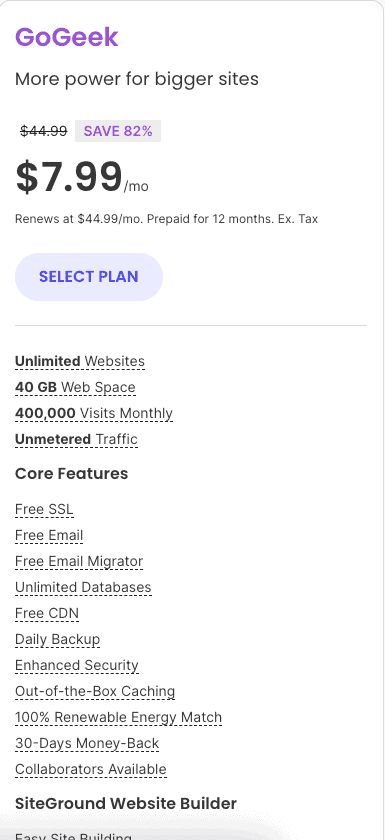
With the GoGeek plan, you can have unlimited websites, 40GB of web space storage, and 400,000 monthly visitors. You get all the features of the StartUp and GrowBig plan, plus features such as white-label hosting and client management, free private DNS, pre-installed GIT, and advanced priority support.

You’ll get SiteGround for as low as $5.99 a month.

siteground-gogeek-plan

Once you find the plan that you want, click on the get plan button.

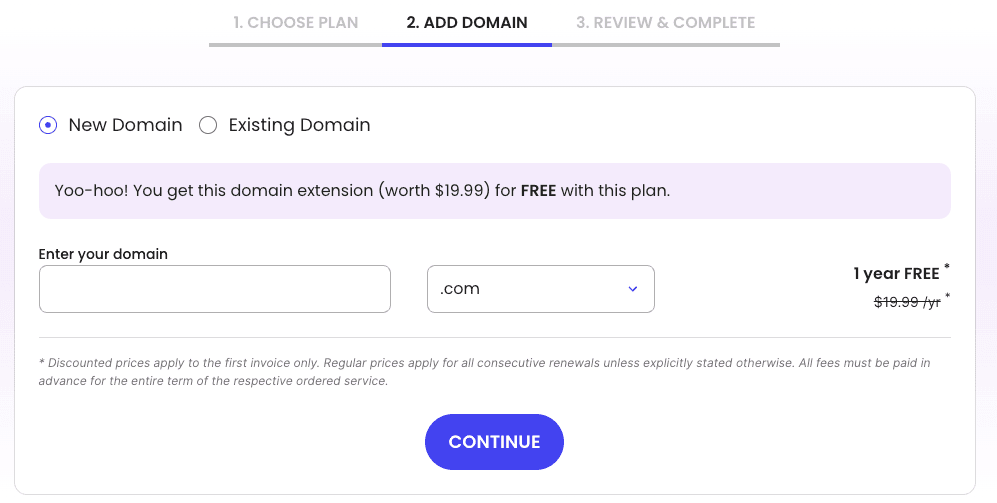
Next, in our SiteGround sign up tutorial, you want to choose a domain name for your site. A domain name comes free with SiteGround on any of the annual terms.

siteground-register-domain-name

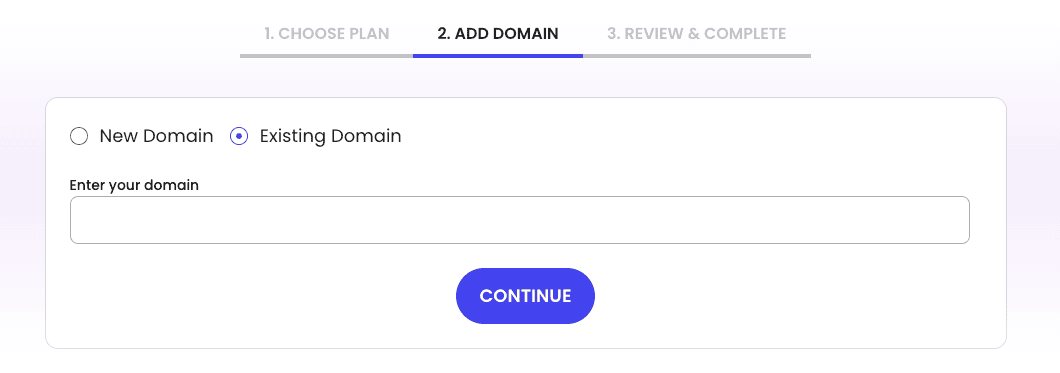
If you already have a domain name, you’d select the existing domain selection. You’d just enter the domain name that you already own and click the continue button.

Related: how to buy domain name from Namecheap.

siteground-existing-domain-name

If you need to choose your domain name, you can easily type in the domain name that you want to see if it is available.

Related: does SiteGround offer a free domain?

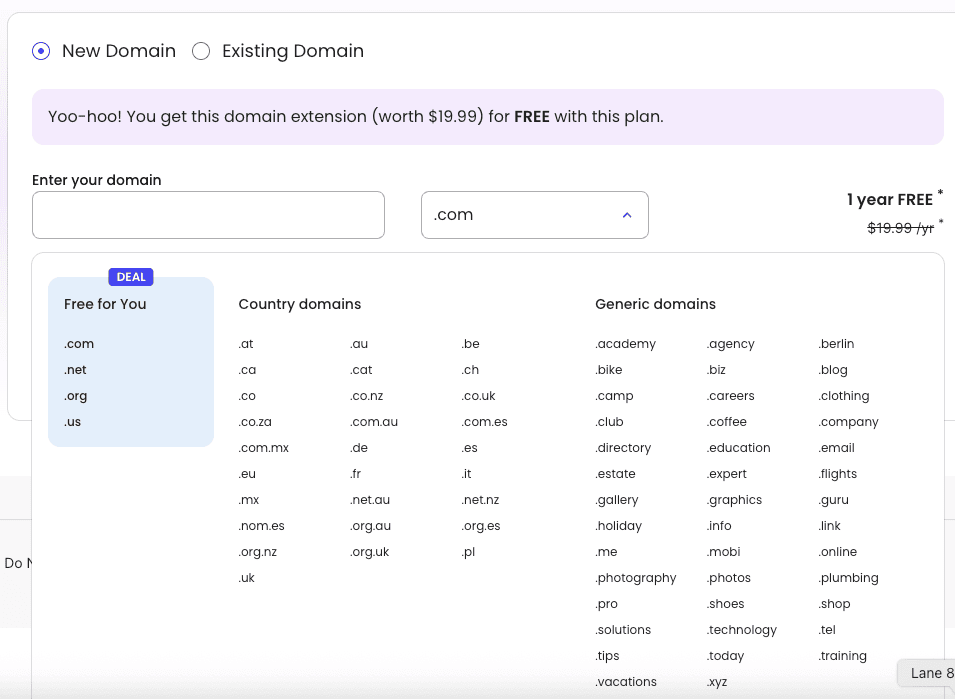
Over to the right, you can choose the domain extension that you wish to use, such as .com, .net, .org, etc. I recommend going with a .com if you can, because a .com is the most popular domain extension.

siteground-choose-domain-extension

Once you have your domain name entered and the domain extension you want, click the continue button.

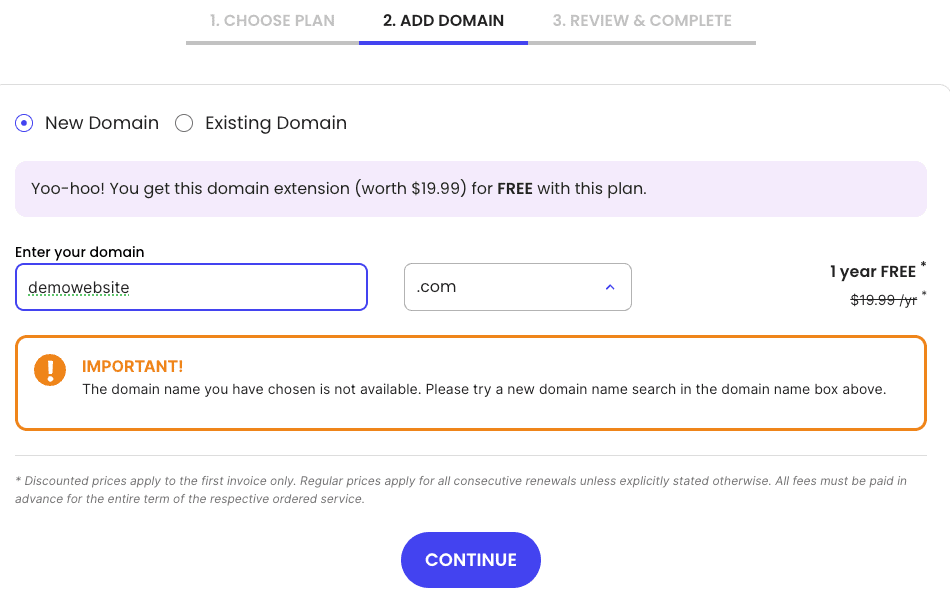
SiteGround will now let you know if your domain name is available or not. If it isn’t, it’ll let you know some other domain extensions you could use.

You could also add another word, like the or a hyphen, if you definitely want that domain.

siteground-domain-name-not-available

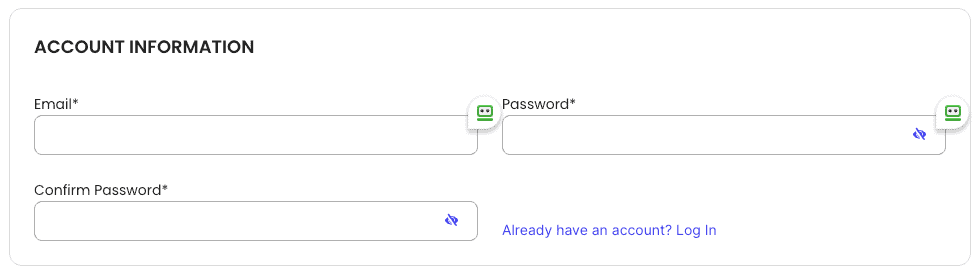
If your domain name is available, it’ll now take you to the account information page, where you need to enter your information. Start by entering your email address and a password to be used with your SiteGround account.

siteground-account-information

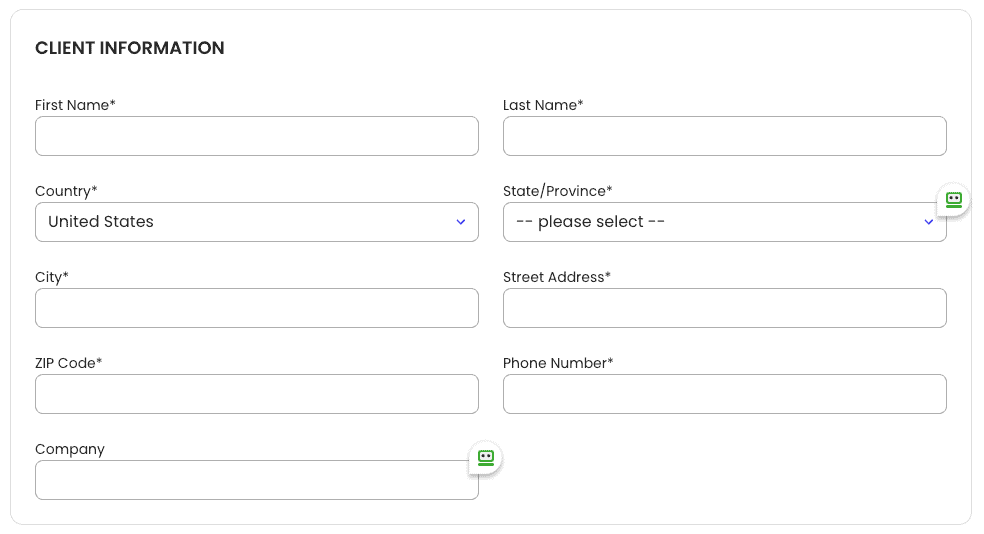
Next, in our SiteGround sign up tutorial, is the client information section. Enter all the information it is asking for.

siteground-client-information

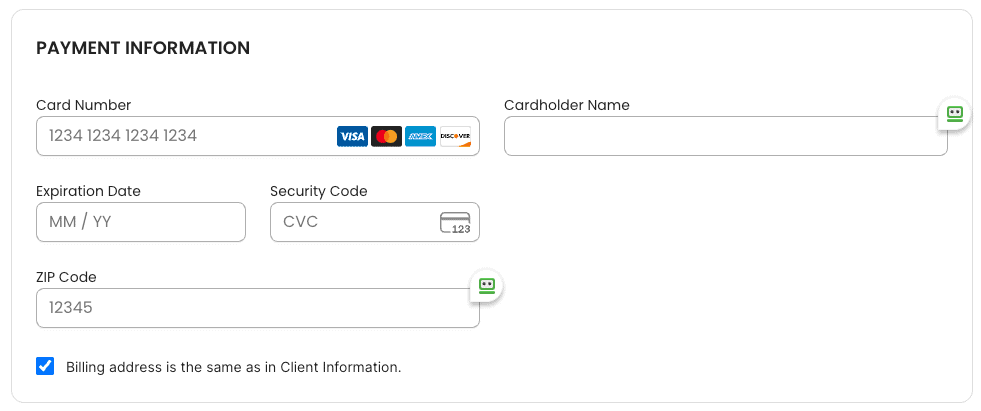
Next, you want to enter your payment information under the payment information section.

siteground-payment-information

Related: SiteGround payment methods

Next is the purchase information section.

siteground-purchase-information

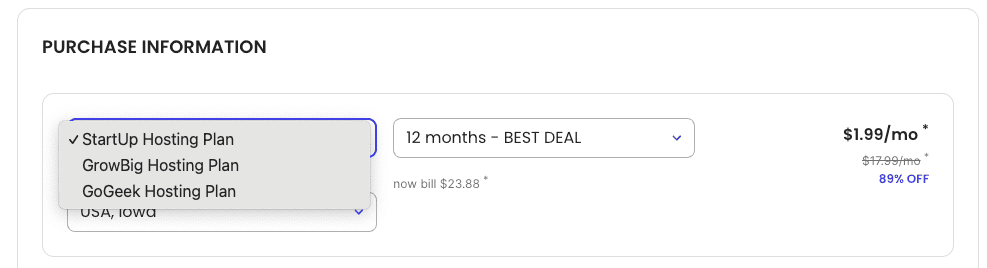
It will list out your plan. You can click the pencil icon if you need to change your plan.

siteground-change-hosting-plan

Next, the data center to be used with your site will be listed. You can click the pencil icon to change your data center preference. SiteGround currently offers data centers in the USA, Asia, Australia, France, Spain, the United Kingdom, Germany, and Europe.

Related: SiteGround data center locations

siteground-change-data-center

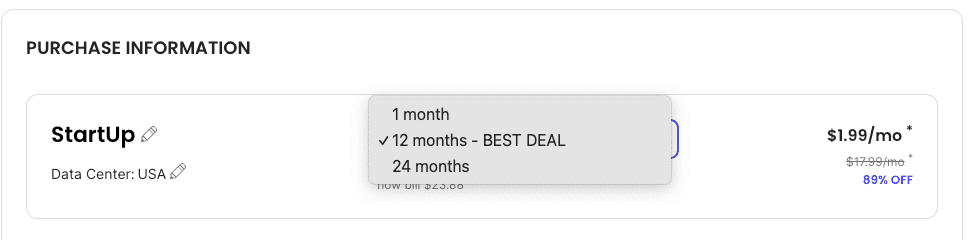
You will now see the period for your hosting term. You can easily change this by clicking the dropdown.

You’ll get the best deal of 83% off by going with the 12-month term. You’ll pay more for the 1-month, 24-month, and 36-month terms.

If you go with theย SiteGround monthly plan, the price will cost you $24.99 for the StartUp plan, $34.99 for the GrowBig plan, and $49.99 for the GoGeek plan.

If you go with the 12-month term, it’ll cost you $2.99 for the StartUp plan, $3.99 for the GrowBig plan, and $5.99 for the GoGeek plan.

siteground-change-hosting-term

Lastly, you’ll see the SiteGround hosting price.

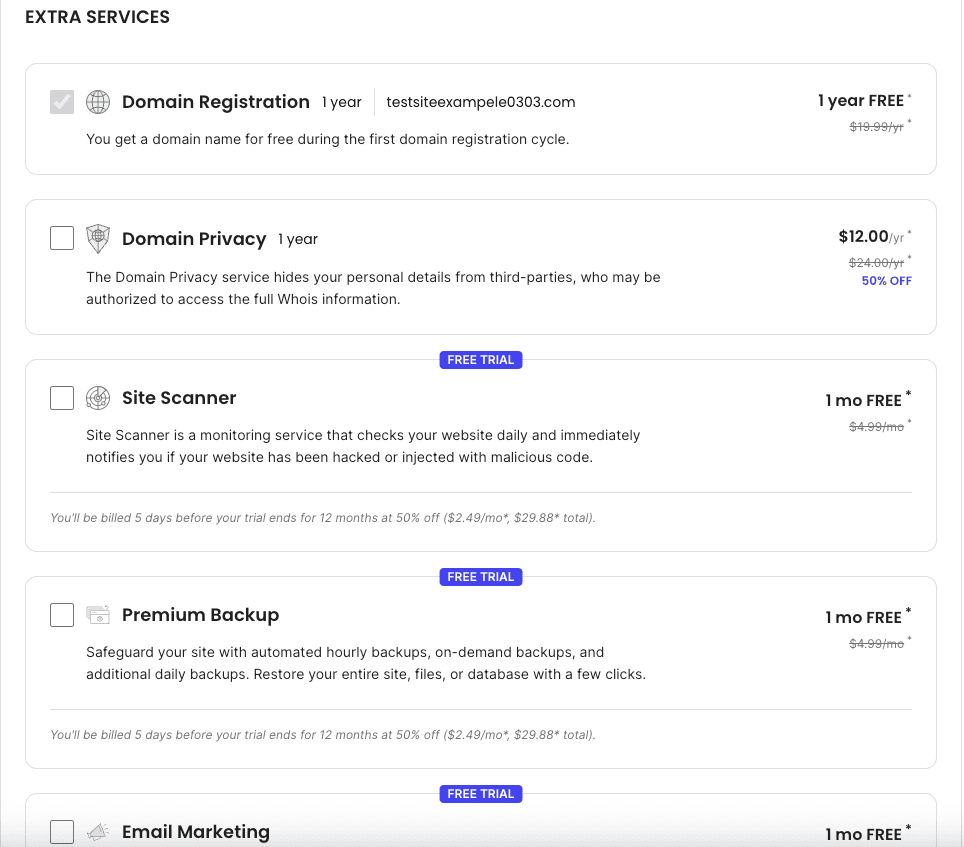
Next, in our how to sign up with SiteGround hosting tutorial, you will see the Extra Services section. You will see the domain registration show up unless you own your domain name with another provider.

siteground-extra-services

You will see domain privacy.

I highly recommend selecting the domain privacy option. Domain privacy protects your personal information from spammers and telemarketers who want to sell you stuff.

With the domain privacy, it will keep your personal information safe and prevent it from appearing on the web. It will show SiteGround’s default contact information instead of yours.

It is very common to get a ton of calls and emails from spammers and marketers trying to sell you stuff all day, without this being selected. This is entirely up to you, though.

SiteGround domain privacy will cost just $12.00 for an entire year. You’ll see the regular price is $24.00 for a year.

siteground-domain-privacy-pricing

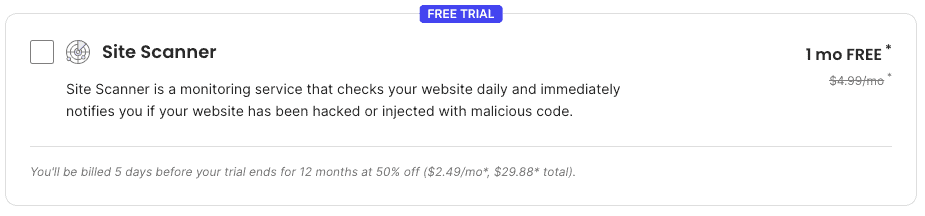
Next, you will see the SG site scanner. This add-on will scan your site daily to make sure your site hasn’t been hacked into or has malware.

It will let you know if your site has been hacked or has malware injected in the code of the site. This is entirely optional to get.

SiteGround SG Site Scanner will cost $4.99 a month. You’ll get the first month completely free.

siteground-site-scanner-pricing

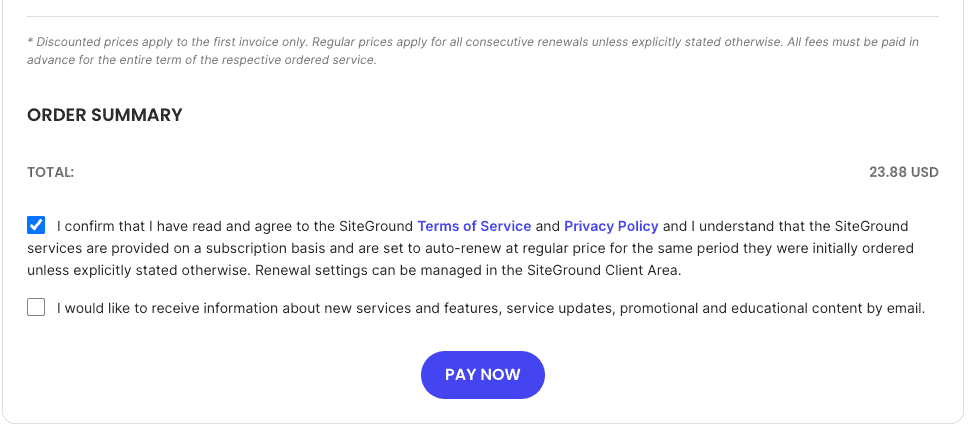
Lastly, in our SiteGround sign up tutorial, you want to check that you have read and agreed to SiteGround’s terms and conditions and select if you want to receive SiteGround news and offers to your email.

Click the pay now button to finish in signing up with SiteGround hosting.

siteground-pay-now

You will now receive an email confirming your SiteGround order and another email with your login credentials to SiteGround.

In case you haven’t signed up with SiteGround already, click here to be taken to SiteGround and sign up.

I now want to go over a quick introduction in this SiteGround sign up tutorial of what the SiteGround account looks like when logged in and what the SiteGround cPanel looks like so you can get familiar with it.

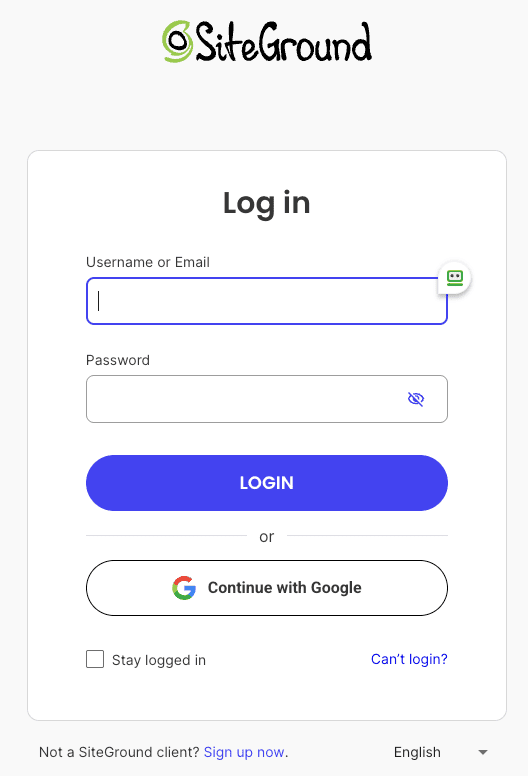
From the SiteGround login page, just enter your username and password and click the sign-in button.

siteground-login

You will now be in your SiteGround account.

siteground-dashboard

Click the Manage Button under Websites so you can start setting up and creating your site.

siteground-manage-website

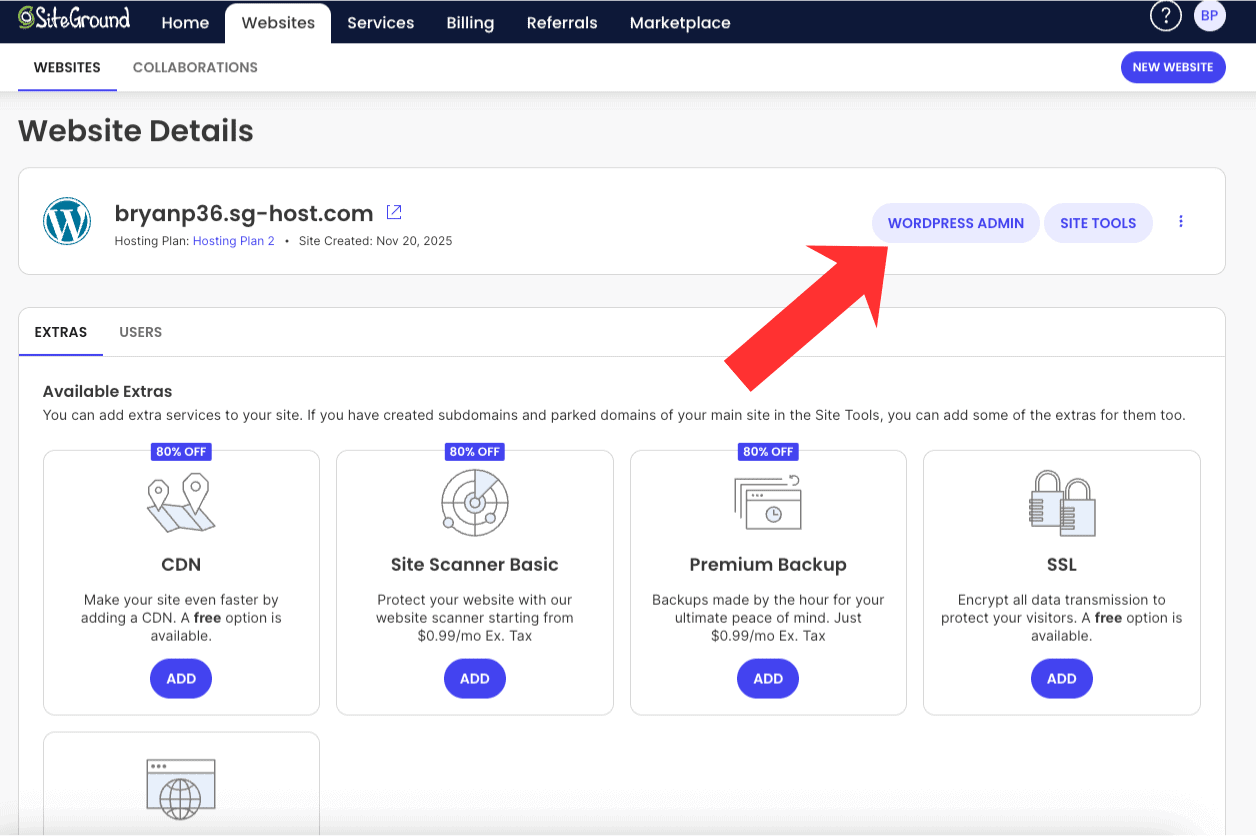
Click the WordPress Admin button to be taken to your WordPress dashboard, where you can start creating your website with SiteGround.

siteground-wordpress-admin

Related: how to set up WordPress on SiteGround
That is my SiteGround sign up tutorial on how to sign up with SiteGround hosting.

If you haven’t signed up with SiteGround yet, click here and get up to 83% off hosting.

How to create an account with SiteGround

Creating an account with SiteGround is a straightforward process. First, visit the SiteGround website and click on the “Get Started” button.

You will be presented with various hosting plans to choose from. Select the plan that best fits your needs.

After selecting a plan, you will need to choose your free domain name to register or choose an existing domain you already own.

Next, fill out your account information, including your email address and a password.

Input your client information.

Next, provide your payment details.

Select the term you’d like to have with your web hosting purchase.

You can change the Data Center if needed.

Select any Extra Services you’d like to have.

Lastly, complete your purchase. Once your payment is processed, you will receive a confirmation email with instructions on how to access your new account. Follow these steps, and youโ€™ll be ready to set up your website in no time!

Final Thoughts

We hope this article SiteGround sign up tutorial helped you in signing up with SiteGround hosting.

Let us know in the comments below if you signed up with SiteGround and what plan you ended up going with. We would love to hear from you.

Frequently Asked Questions

Can you guide me through the steps to sign up for a SiteGround account?

Sure! Hereโ€™s a quick guide to signing up for a SiteGround account for WordPress hosting:

  1. Visit the SiteGround Website: Go to SiteGround.com.
  2. Choose a Hosting Plan: Click on โ€œGet Startedโ€ or โ€œHostingโ€ in the menu, and select the plan that suits your needs (e.g., StartUp, GrowBig, or GoGeek).
  3. Select Your Domain: If you already have a domain, enter it in the provided field. If not, you can register a new domain through SiteGround during this process.
  4. Fill Out Your Details: Complete the registration form with your personal information, such as name, email address, and password.
  5. Configure Your Account: Choose any additional options you might want (like daily backups or enhanced security) and review the hosting plan configuration details.
  6. Payment Information: Enter your payment details to complete your purchase.
  7. Confirmation Email: After finishing the payment process, check your email for a confirmation message from SiteGround with details about your new account.
  8. Access Your Account: Follow the link in the confirmation email to log into your new SiteGround account and start setting up your website!

And that’s it! Youโ€™re all set to begin using SiteGround for your hosting needs!

What information do I need to provide during the SiteGround sign-up process?

During the SiteGround sign-up process, you typically need to provide the following information:

  1. Account Information: This includes your email address and a password for your account.
  2. Domain Details: You can either register a new domain, transfer an existing domain, or use an existing one that you already own.
  3. Personal Information: This may include your name, address, phone number, and country.
  4. Payment Information: You will need to provide credit card details or other payment methods to complete the purchase of your hosting plan.

Make sure to review all entered information before finalizing your sign-up!

Is there a free trial available when signing up for SiteGround?

SiteGround does not offer a free trial in the traditional sense, but they do provide a 30-day money-back guarantee. This allows you to try their services for website creation risk-free; if you’re not satisfied within the first 30 days, you can request a full refund. Itโ€™s a great way to test out SiteGroundโ€™s features and support without any long-term commitment!

How do I choose the best SiteGround hosting plan while signing up?

Choosing the best SiteGround hosting plan involves a few key considerations:

  1. Type of Website: Determine what type of website you are creating (e.g., personal blog, business site, e-commerce). Different plans cater to different needs.
  2. Traffic Expectations: Estimate your expected traffic. If you anticipate high visitor numbers, consider a plan that can handle more resources.
  3. Features Needed: Look at the features each plan offers, such as storage space, database limits, and email accounts. Choose a plan that provides the necessary tools for your website.
  4. Budget: Consider your budget and look for plans that fit within it while still meeting your needs.
  5. Scalability: Think about future growth. If you expect your website to grow over time, choose a plan that allows easy upgrades as needed.
  6. Customer Support: Check if the hosting plan includes support options like live chat or phone support, especially if you’re new to web hosting.

By evaluating these factors, you’ll be well-equipped to choose the SiteGround hosting plan that best suits your needs!

Are there any important things to know before creating a SiteGround account?

Before creating a SiteGround account, here are some important things to consider:

  1. Plan Options: SiteGround offers various hosting plans (web hosting, WordPress, WooCommerce, Cloud, Agency, and Reseller) with different features like free SSL certificates and pricing. Make sure to choose a plan that fits your needs.
  2. Performance Features: SiteGround is known for its speed and reliability. Look into their performance features like SSD storage, caching options, and CDN integration.
  3. Customer Support: They offer 24/7 customer support via chat, phone, and tickets. If you need assistance, you can chat with a team member and familiarize yourself with how to reach them.
  4. Money-Back Guarantee: SiteGround typically provides a 30-day money-back guarantee, so you can try their services risk-free.
  5. Domain Registration: If you donโ€™t already have a domain name, you can register one through SiteGround during the signup process.
  6. Migration Services: If you’re moving from another host, check if they offer free migration services or tools to help with the transition.
  7. Renewal Prices: Be aware that renewal prices may be higher than the initial promotional rates. Check the pricing details carefully.

By keeping these points in mind, you’ll be better prepared to set up your SiteGround account effectively!

Can I sign up for SiteGround without registering a domain name?

Yes, you can sign up for SiteGround without registering a domain name. During the signup process, you’ll have the option to either register a new domain or choose to skip that step and use an existing domain later. This flexibility allows you to set up your hosting account first and manage your domain separately if that’s what you prefer.

Do I need to verify my email during the SiteGround registration?

Yes, verifying your email during the SiteGround registration process is typically required. This step ensures that you have provided a valid email address and allows SiteGround to send you important information regarding your account, including confirmation of your registration and any necessary setup instructions. It’s a simple but essential part of securing your account!

Is payment required immediately when signing up for SiteGround?

When signing up for SiteGround, payment is typically required immediately to activate your hosting plan. This means you’ll need to provide payment information during the signup process to secure your account and start using their services right away. So, be prepared to take out your wallet when you’re ready to get started!

How long does it take to complete the SiteGround sign-up process?

The SiteGround sign-up process is typically quick and straightforward, usually taking about 5 to 10 minutes to complete. You just need to choose your hosting plan, fill in your account details, and make the payment. Once you’ve done that, you’ll be ready to set up your WordPress website or create your site with the SiteGround website builder!

Can I use SiteGroundโ€™s website builder after signing up?

Yes, once you sign up for SiteGround, you can use their website builder designed for beginners to create and customize your website. The builder is user-friendly and offers various templates and tools to help you design your site without needing extensive technical skills. Just log in to your SiteGround account, and you’ll find WordPress or the website builder available for use!

How to create an account in SiteGround?

Creating an account in SiteGround is a straightforward process. Hereโ€™s how you can do it:

  1. Visit the SiteGround Website: Go to the SiteGround homepage, and log in to your client area.
  2. Choose a Hosting Plan: Click on โ€œGet Startedโ€ or โ€œHostingโ€ to view the various hosting plans available. Select the plan that best suits your needs.
  3. Select Your Domain: You will be prompted to choose a domain name. If you already have one, you can enter it; if not, you can register a new domain through SiteGround during this process.
  4. Fill in Your Information: Enter the required details, such as your email address, and create a password for your account.
  5. Payment Details: Enter your payment information to complete the purchase of your chosen hosting plan.
  6. Finalize Your Account Setup: Once payment is processed, follow any additional prompts to finalize setting up your account.
  7. Access Your Account: After setup, youโ€™ll receive an email with your account details, and you can log into your SiteGround account anytime to manage your hosting services, including webmail access.

Here are related posts:

SiteGround Monthly Payment: Everything You Should Know

A common question I see being asked by individuals all around the world when it comes to SiteGround hosting is does SiteGround offer a monthly payment plan?

In this post, I’m going to be answering that very question, along with going in-depth with a complete SiteGround monthly plan breakdown.

If at any time you want to sign up and purchase SiteGround hosting, you can click here or anywhere on this page to get up to 83% off with our exclusive SiteGround hosting discount.

siteground-monthly-plan

Key Takeaways:

  • Yes โ€” SiteGround does offer monthly payments, but they are significantly more expensive than annual plans and do not include promotional discounts.
  • Monthly pricing starts at $24.99/month, depending on the plan, while annual plans start as low as $2.99/month (up to 83% savings).
  • Annual plans provide the best value and are recommended if you’re building a long-term website or want to maximize savings.

Related: SiteGround coupon code

SiteGround Monthly Plan: Can I Pay Monthly?

So, can you pay monthly with SiteGround? The answer to that question is yes; there is a SiteGround monthly plan that lets you pay for your SiteGround hosting needs monthly.

The SiteGround monthly plan is helpful if you are limited on cash or not sure if you want to invest in an annual plan with them.

The downside of going with the SiteGround monthly plan is that you have to pay the full price of SiteGround web hosting and don’t get a SiteGround discount.

Instead of getting SiteGround web hosting for as low as $2.99 a month, you’ll end up having to pay the full price of $24.99, $34.99, or $49.99 per month, depending on the SiteGround plan you choose.

The SiteGround monthly plan for the StartUp plan is $24.99 a month. After the first month, the pricing will be the same at $24.99 a month.

siteground-startup-monthly-plan

If you go with their GrowBig plan, the total SiteGround monthly cost for the first month is $34.99. After the first month, the SiteGround pricing will be the same at $34.99 a month.

siteground-growbig-monthly-plan

If you go with the GoGeek plan, the SiteGround monthly plan cost for the first month would be $49.99. The SiteGround cost after the first month will continue to be $49.99 per month.

siteground-gogeek-monthly-plan

If you want to save money long-term, I recommend going with an annual SiteGround hosting plan when signing up with SiteGround.

You won’t have to worry about spending the full price on your SiteGround hosting, and you’ll be saving a lot of money by purchasing an annual plan. You’ll save up to 83% off than if you went with the SiteGround monthly term.

siteground

Another reason why I recommend going with an annual SiteGround hosting plan is that you’ll be setting your website or blog up for long-term success. You’ll be less likely to ditch the site and give up after a month or two.

When it comes to SiteGroundโ€™s monthly payment option, users often mention that while it provides flexibility and a way to test the service before committing long-term, the initial setup fees and higher monthly price compared to the annual plan make it less appealing.

Many users feel that the annual SiteGround hosting plan offers better overall value.

For the year at $2.99 a month, you are looking at spending $35.88, give or take, depending on what SiteGround plan you go with and what add-on services you want to add to your order, or if you need a domain name with your SiteGround hosting plan.

SiteGround is an excellent web hosting provider. They are one of the top web hosts around today, and their customer and technical support team are fantastic. They provide a 99.9% uptime guarantee, and they offer a 30-day money-back guarantee.

Video Tutorial: SiteGround Monthly Payment: Can I Pay Monthly?

Siteground Monthly Plan | Can I Pay Monthly?

How Much Does It Cost To Get SiteGround?

I’m going to break down the costs of SiteGround so you can see how cheap their hosting plans are and how much SiteGround’s pricing plans cost.

SiteGround offers three different plans. They offer a StartUp plan, a GrowBig plan, and a GoGeek plan.

siteground-plans

As you can see from the screenshot above, the cheapest plan is the StartUp plan. The StartUp plan comes out to $2.99 a month. You’ll get the best deal of $2.99 with the 12-month term. With the StartUp plan, you are limited to just having one website with this plan.

siteground-startup-plan

If you plan on having or you do have more than one website, then the GrowBig plan is a good plan. This plan comes out to $4.99 a month by going with the 12-month term.

siteground-growbig-plan

The GoGeek plan is excellent for bigger sites with lots of traffic. This plan can handle up to 400,000 site visitors a month. The GoGeek plan comes out to $7.99 a month with the 12-month term.

siteground-gogeek-plan

SiteGround Monthly Plan Breakdown:

SiteGround StartUp Monthly Plan:

The SiteGround StartUp monthly plan is $24.99 for the first month. After the first month, the SiteGround monthly plan will be billed at $24.99 a month.

SiteGround GrowBig Monthly Plan:

The SiteGround GrowBig monthly plan is $34.99 for the first month. After the first month, the SiteGround monthly plan will be billed at $34.99 a month.

SiteGround GoGeek Monthly Plan:

The SiteGround GoGeek monthly plan is $49.99 a month for the first month. After the first month, the SiteGround monthly plan will be billed at $49.99 a month.

SiteGround Annual Cost Breakdown

SiteGround StartUp Annual Plan:

  • 12 Months โ€“ $2.99/mo – $35.88
    24 Months โ€“ $7.49/mo – $179.76

SiteGround GrowBig Annual Plan:

  • 12 Months โ€“ $4.99/mo – $59.88
    24 Months โ€“ $12.49/mo – $299.76

SiteGround GoGeek Annual Plan:

  • 12 Months โ€“ $7.99/mo – $95.88
    24 Months โ€“ $19.99/mo – $479.76

How to Set Up a Monthly Payment Plan on SiteGround
Setting up a monthly payment plan on SiteGround is a straightforward process that allows you to manage your web hosting expenses more effectively.
To begin, you will first need to create an account on SiteGround’s website. Once you’ve selected your desired hosting plan, you can proceed to the payment section. Here, you will find various billing options.

Choose the monthly payment option, which will typically be available alongside annual and other long-term plans. Itโ€™s essential to review the pricing, as monthly payments might have a slightly higher rate compared to annual commitments.

After selecting the monthly option, you will be prompted to enter your payment information. SiteGround accepts various payment methods, including credit cards and PayPal, making it convenient for users.

After completing your payment information, confirm your selection and finalize the setup. You will receive an email confirmation detailing your plan and payment schedule.

Itโ€™s important to note that with a monthly payment plan, you may need to keep an eye on your billing cycle to ensure timely payments and avoid interruptions to your service.

If you ever wish to upgrade or change your plan, you can do so through the SiteGround customer portal. They also provide customer support if you encounter any issues during this process.
Overall, choosing a monthly payment plan with SiteGround offers flexibility and can be a beneficial option for those who prefer not to commit to a long-term contract right away.

Click here to get started with SiteGround and get up to 83% off web hosting.

Check out a post where we go in-depth on what SiteGround is used for.

Final Thoughts

We hope this article SiteGround monthly plan helped you.

Let us know in the comments below if you signed up with SiteGround and if you went with the SiteGround month-to-month plan or their annual plan. We would love to hear from you.
Frequently Asked Questions

Does SiteGround offer monthly payment options for hosting plans?
Yes, SiteGround does offer monthly payment options for its hosting plans, providing an extra layer of convenience. While many users typically opt for longer-term subscriptions to benefit from lower prices, you can choose a monthly billing cycle if that suits your needs better. Just keep in mind that the cost per month may be higher compared to annual or multi-year plans.
What is the cost of SiteGround hosting if I want to pay month-to-month?

SiteGround offers several hosting plans with sufficient storage space, and the cost for month-to-month payments typically varies based on the type of hosting you choose (shared, cloud, etc.). As of my last update, their web hosting plans start at around $24.99 per month when billed monthly. However, prices can change over time and may also depend on promotions or specific features included in your plan. It’s always best to check their official website for the most current pricing and details.

Are there any extra fees or differences when choosing monthly payments with SiteGround?

When choosing monthly payments with SiteGround, there may be a few extra fees or differences compared to annual payments. Generally, SiteGround offers lower rates for longer-term commitments, so opting for monthly payments might result in higher overall costs. Additionally, some promotions or discounts may only apply to annual subscriptions. It’s important to consider potential big changes in your budget before making a decision, as these can vary based on the plan you choose and any ongoing promotions.

Which SiteGround hosting plans are available with a monthly payment option?

SiteGround offers several hosting plans with a monthly payment option. These typically include:

  1. Shared Hosting: Ideal for small websites and personal projects, this plan often allows for monthly payments.
  2. WordPress Hosting: Specifically optimized for WordPress sites, this plan can also be paid monthly.
  3. Cloud Hosting: For more resource-intensive applications or websites, SiteGroundโ€™s cloud plans can usually be billed on a monthly basis.

However, it’s always best to check their website for the most accurate and up-to-date information on available plans and payment options!

How can I set up a monthly payment plan on SiteGround?

To set up a monthly payment plan on SiteGround, follow these steps:

  1. Sign Up or Log In: Go to the SiteGround website and either create a new account or log in to your existing account.
  2. Choose a Hosting Plan: Select the hosting plan that best fits your needs. SiteGround offers various plans for shared hosting, cloud hosting, and more.
  3. Payment Options: During the checkout process, look for payment options. SiteGround typically offers billing cycles, including monthly subscriptions.
  4. Select Monthly Billing: If available, choose the monthly payment option instead of paying annually or biannually.
  5. Enter Payment Information: Fill in your payment details as prompted, making sure to review any terms regarding monthly payments.
  6. Complete Your Order: Confirm your order and complete the sign-up process.
  7. Confirmation: You should receive a confirmation email detailing your plan and payment schedule.

If you have any issues during this process, consider reaching out to SiteGround’s customer support for assistance!

Do SiteGroundโ€™s monthly payment plans include all standard features?

Yes, SiteGround’s monthly payment plans include all standard features offered by their hosting services. This includes essential features like daily backups, free CDN, email accounts, and SSL certificates. Additionally, collaborators can receive their own access to the Site Tools of the website, alongside the standard features of the plan. However, it’s always a good idea to review the specific plan details on their website to ensure you understand what is included and if there are any limitations based on the plan you choose.

Are there any discounts for choosing annual payment over monthly payment on SiteGround?

Yes, SiteGround offers discounts for users who choose to pay annually rather than monthly. By opting for an annual payment plan, you can often save money compared to making monthly payments. It’s a great way to get more value out of your hosting service! Be sure to check their website or contact their customer support for the most current pricing and any available promotions.

Is monthly billing available for WordPress hosting on SiteGround?

Yes, SiteGround offers monthly billing for its WordPress hosting plans. This flexibility allows you to choose a payment plan that suits your needs. Keep in mind that while monthly billing is available, opting for longer-term plans may provide cost savings or additional benefits. Be sure to check their website for the most current information and pricing options!

Here are some related SiteGround posts:

ยฉ Copyright 2025 | WP Cupid Blog