

Bluehost Data Center Locations and Server Locations (2026)
Last Updated on September 30, 2026
If you are trying to find the Bluehost data center locations or want to know where your Bluehost website is hosted, the answer depends on the type of Bluehost hosting you use.
Bluehost now offers different data center choices across products such as Cloud Hosting, Agency Hosting, and Self-Managed VPS. Some hosting products let you select a location when the website or server is created, while others show the assigned data center inside your Bluehost account.
If you are considering Bluehost, you can view the current Bluehost hosting plans and discount here.

Where Are Bluehost’s Data Centers Located?
Bluehost operates hosting infrastructure across multiple geographic regions, but there is not one universal list of locations that applies to every Bluehost hosting product.
The locations you can use depend on whether you are purchasing standard web hosting, Cloud Hosting, Agency Hosting, VPS hosting, or another Bluehost service.
For Bluehost Cloud and Agency Hosting, Bluehost currently documents these primary data center choices:
- Los Angeles, California, United States
- Dallas, Texas, United States
- Ashburn, Virginia, United States
- Amsterdam, Netherlands
Bluehost Cloud and Agency Hosting currently offer primary data center choices in Los Angeles, Dallas, Ashburn, and Amsterdam.
Your selected location acts as the primary data center.
Bluehost also uses replication, failover systems, and CDN technology on supported cloud infrastructure, so selecting one primary data center does not necessarily mean every request to your website must always be served directly from that one physical location.
If you are still deciding whether Bluehost fits your website, read my guide explaining what Bluehost is and what Bluehost is used for.
Bluehost Data Center Locations by Hosting Type
The biggest change to understand is that Bluehost’s server locations are now more product-specific.
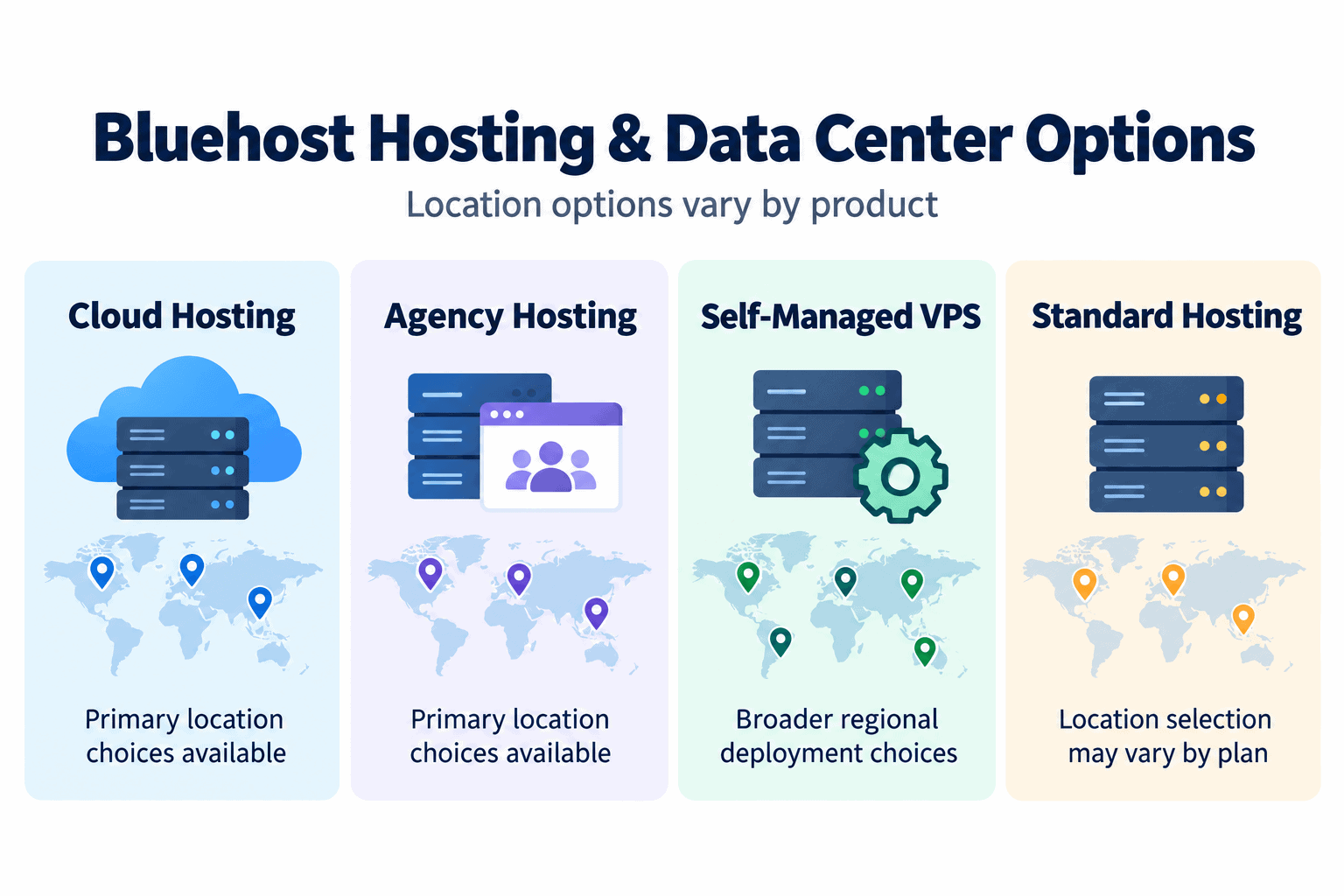
Bluehost data center availability varies depending on the hosting product you choose.
Bluehost Cloud and Agency Hosting Data Centers
Bluehost currently allows Cloud and Agency Hosting customers to choose from four primary locations:
| Region | Primary Data Center |
|---|---|
| Western United States | Los Angeles, California |
| Central United States | Dallas, Texas |
| Eastern United States | Ashburn, Virginia |
| Europe | Amsterdam, Netherlands |
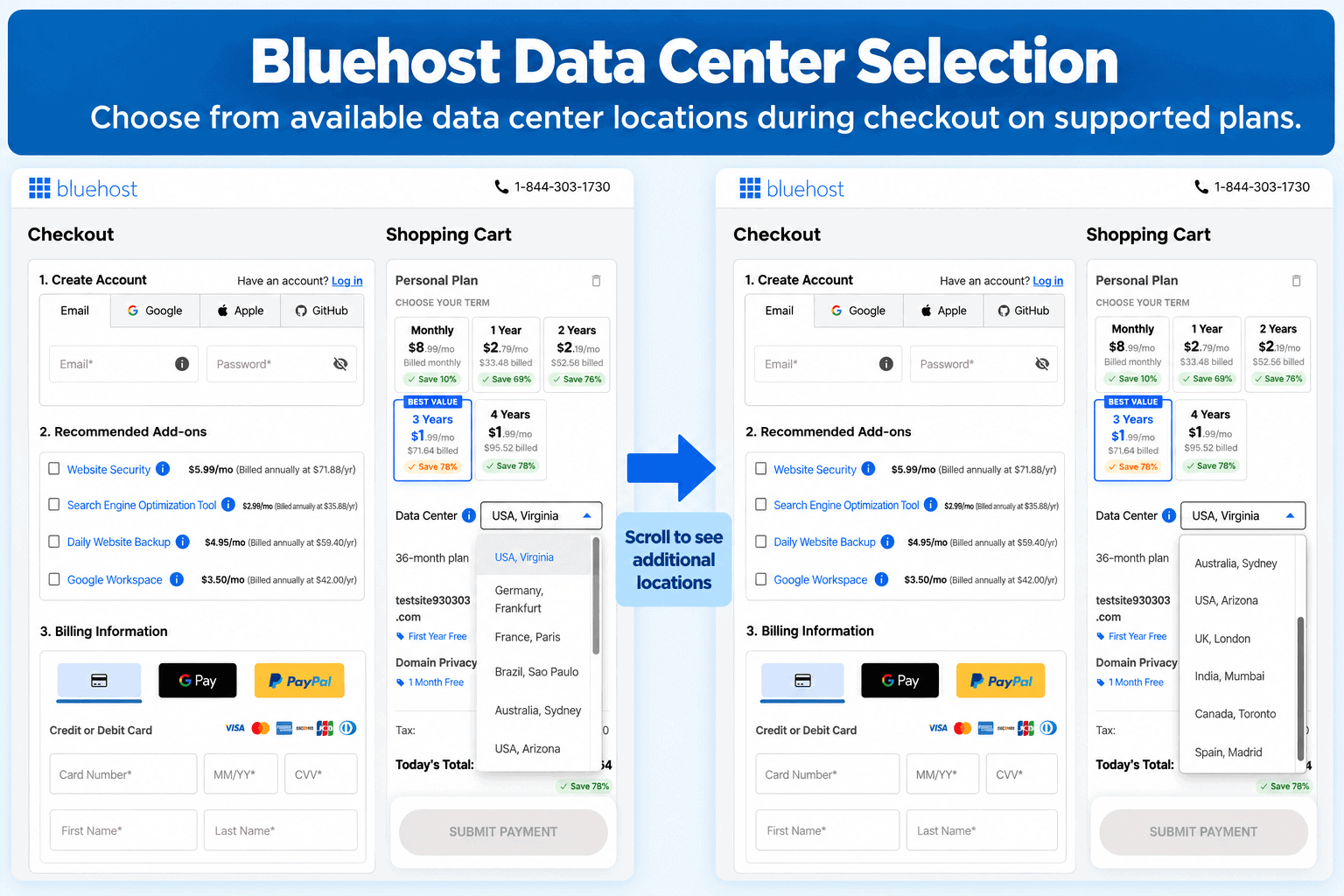
Supported Bluehost plans let you choose a primary data center during setup.
Bluehost recommends choosing the location closest to the majority of your visitors when possible.
If you are comparing plans before signing up, see my Bluehost pricing and plans guide and my guide explaining which Bluehost plan is best.
Bluehost Self-Managed VPS Locations
Bluehost Self-Managed VPS gives customers more regional deployment choices.
Bluehost currently documents VPS deployment options across the United States, Canada, Europe, India, Singapore, and Australia. Available locations can change as Bluehost expands its infrastructure, so the location selector shown when you configure the VPS is the best place to confirm the choices currently available to your account.
Recent documented locations include areas such as:
- Ashburn, United States
- Phoenix, United States
- Toronto, Canada
- Amsterdam, Netherlands
- Frankfurt, Germany
- London, United Kingdom
- Mumbai, India
- Singapore
- Sydney, Australia
Bluehost Self-Managed VPS offers a broader selection of deployment regions than some other Bluehost hosting products.
Because Bluehost has continued expanding its VPS infrastructure, you may see additional supported regions depending on the product and date you purchase.
If you are looking at Bluehost from outside the United States, you may also find my Bluehost Australia review, Bluehost Canada review, Bluehost India review, and guide to using Bluehost in the UK useful.
Which Bluehost Data Center Should You Choose?
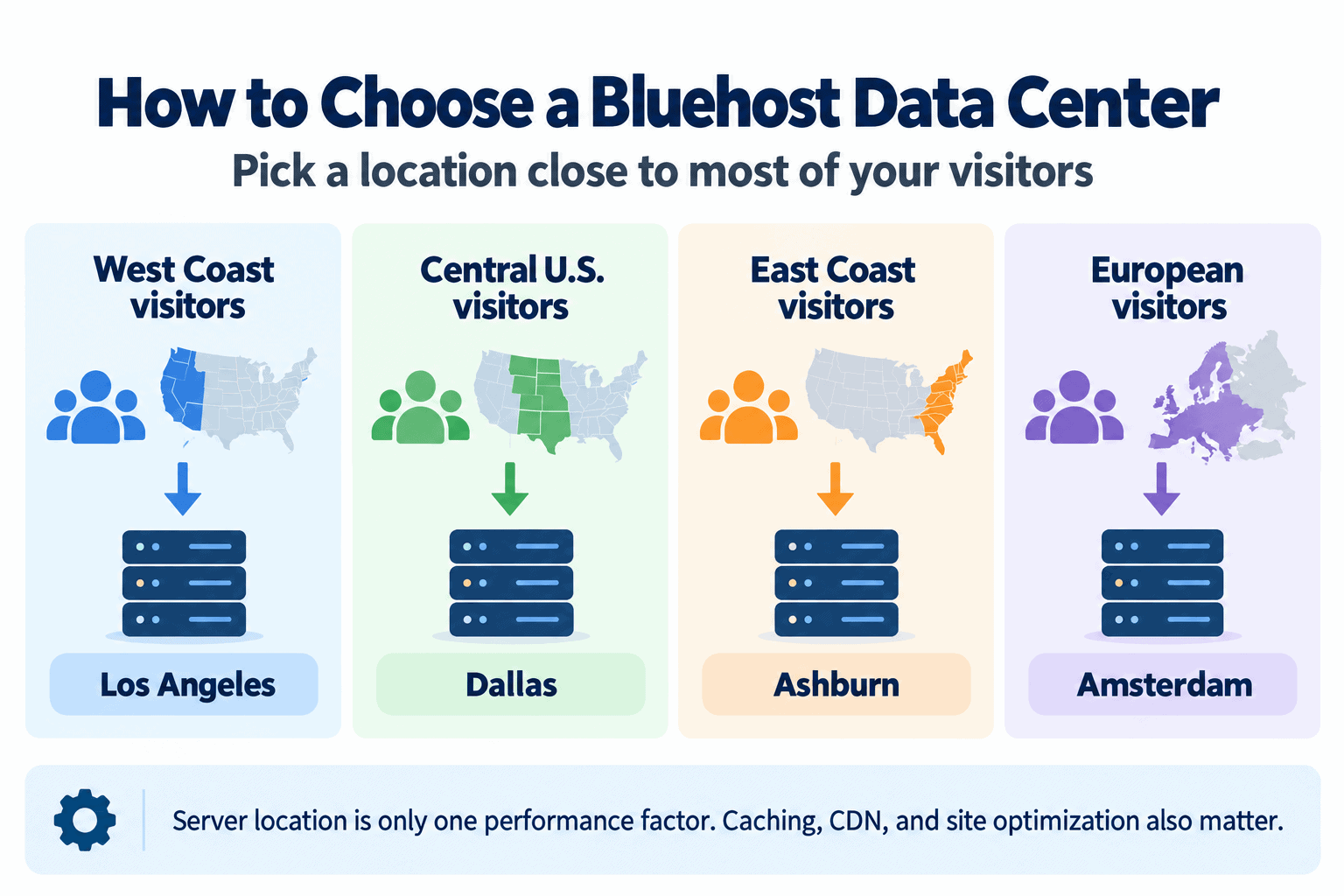
For most websites, choose a data center that is geographically close to the largest portion of your audience.
For example:
- If most visitors are on the U.S. West Coast, Los Angeles may be a logical Cloud or Agency Hosting location.
- If most visitors are in the central United States, Dallas may make sense.
- If most visitors are on the East Coast, Ashburn may be preferable.
- If most visitors are in Europe, Amsterdam can reduce the distance between your origin server and your primary audience.
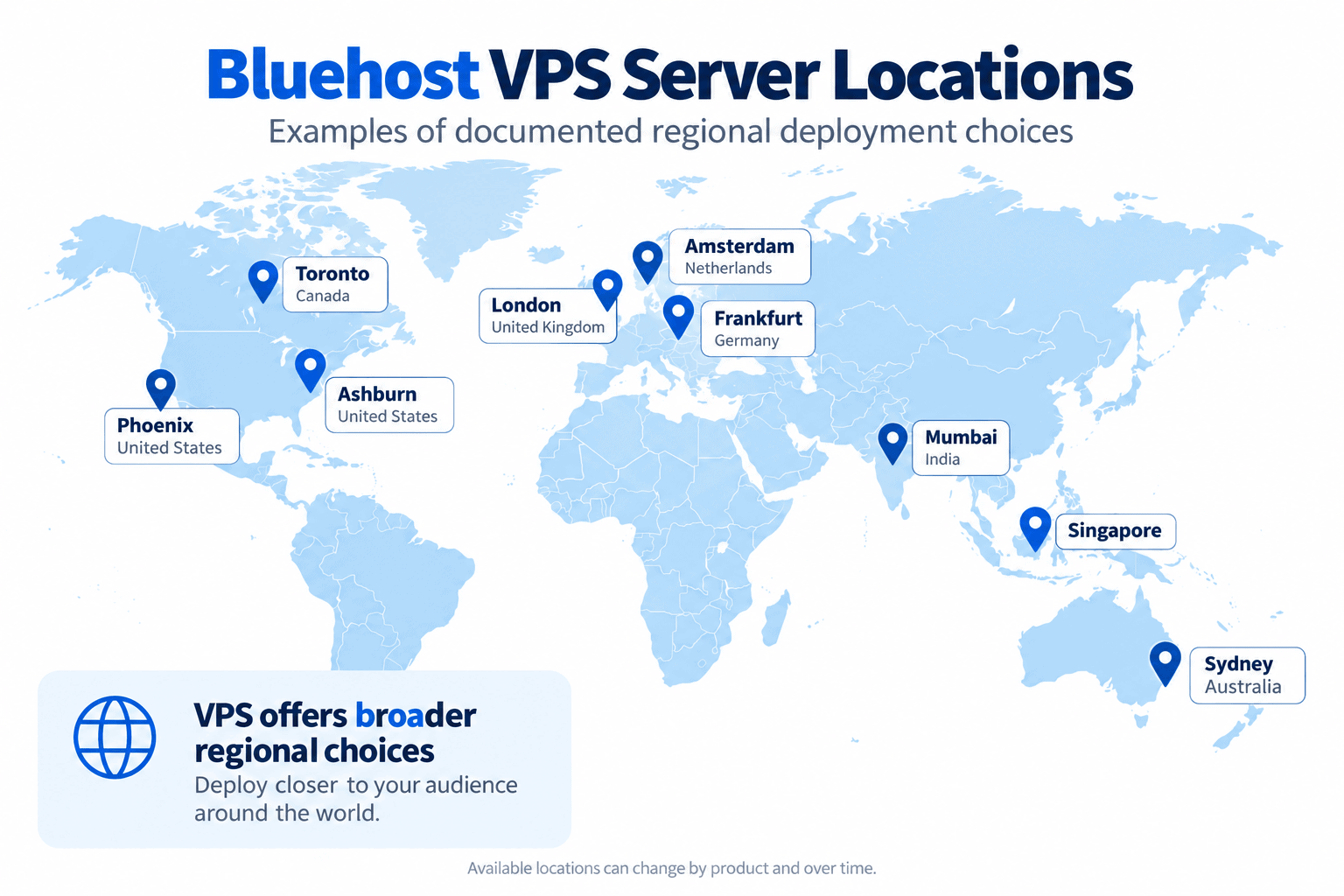
Choose a Bluehost data center close to the largest portion of your website audience when possible.
The closest data center is not the only factor that affects website speed.
Your hosting plan, website optimization, WordPress configuration, caching, CDN, plugins, image sizes, and the amount of server resources available can all affect performance.
If you are building your first website, my Bluehost for beginners review explains what first-time users should expect.
Does Your Bluehost Data Center Affect Website Speed?
Yes. Physical distance between the visitor and the website’s origin server can affect latency.
In general, reducing that distance can reduce the amount of time required for requests to travel between the visitor and the server.
However, modern hosting platforms also use caching and content delivery networks to reduce the effect of geographical distance.
For that reason, you should think of the Bluehost data center as the origin location rather than assuming every website asset will always be delivered directly from that facility.
If you plan to create a WordPress site, follow my guide to installing WordPress on Bluehost.
You can also follow my complete Bluehost website-building tutorial or my guide to starting a WordPress blog with Bluehost.
How Bluehost Cloud Hosting Uses Multiple Data Centers
Bluehost’s Cloud and Agency infrastructure does more than place a website in one data center.
Bluehost states that supported websites are replicated across its available infrastructure. The location you choose becomes the primary location, while synchronized copies help provide redundancy and automatic failover.
For example, a site with Dallas as its primary data center can still have replicated infrastructure available in Bluehost’s other supported cloud locations.
If the primary location experiences an infrastructure problem, Bluehost can use its failover architecture to help maintain availability.
This is different from traditional hosting where you might think of one server in one building as the only place your website exists.
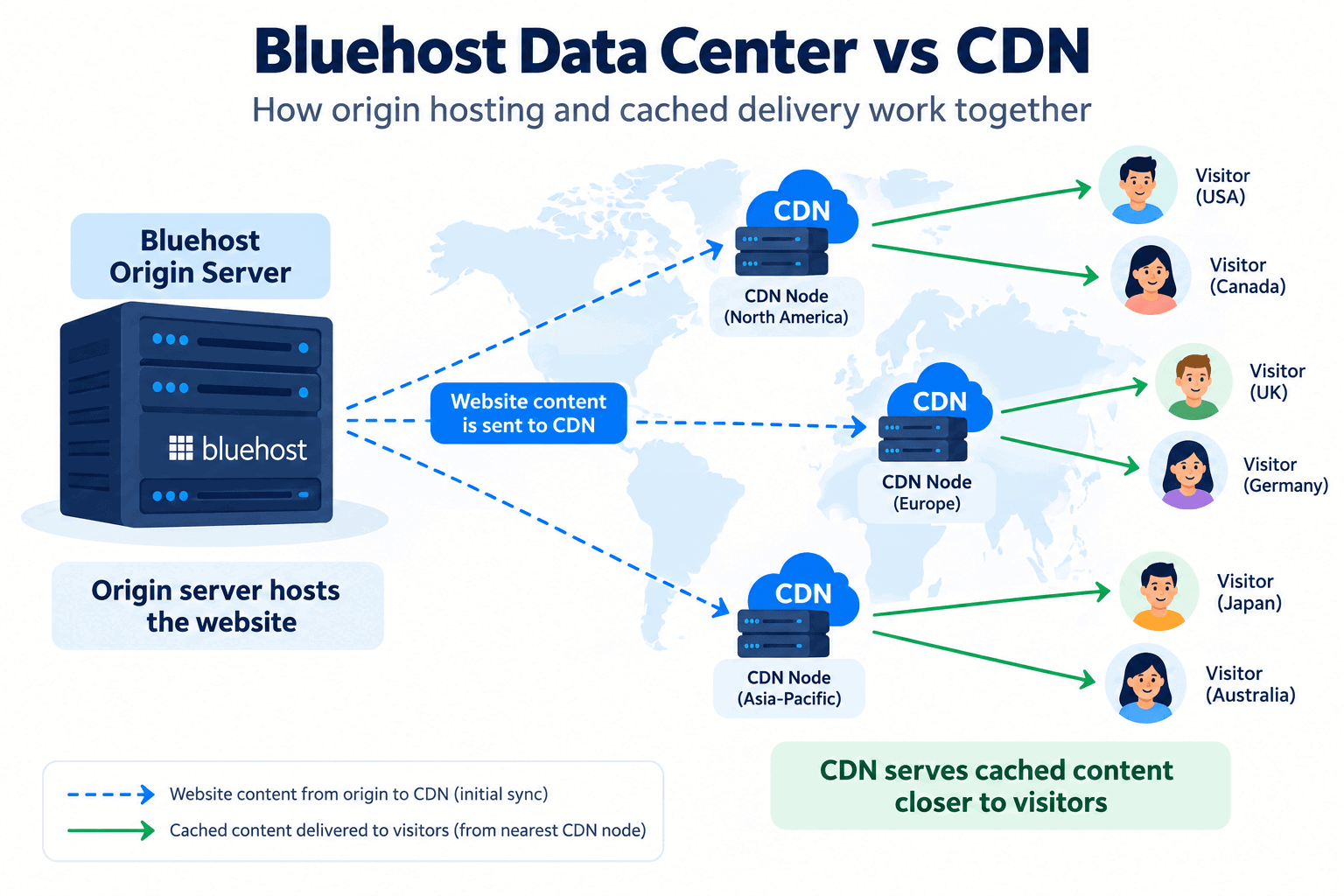
Bluehost Data Center vs CDN: What Is the Difference?
A data center is where the primary hosting infrastructure for your website or server is located.
A content delivery network distributes or caches website content closer to visitors in different geographic areas.
The two work together.
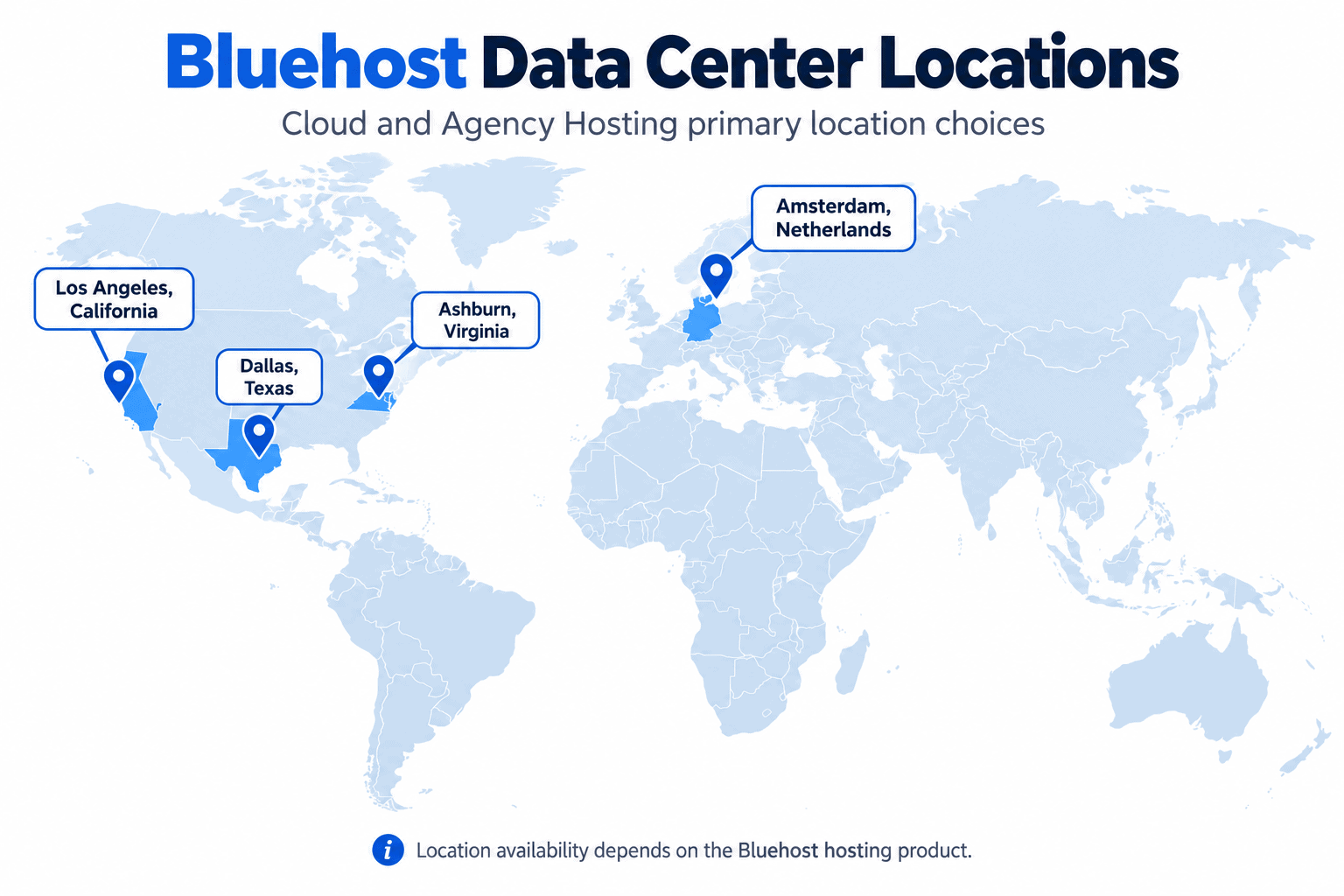
The origin server hosts the website while a CDN can serve cached content closer to visitors.
Your Bluehost server or primary cloud location handles the origin website, while a CDN can deliver cached content from locations closer to the visitor.
That means someone visiting from another country may receive cached content from a nearby CDN location even when your origin hosting is in the United States or Europe.
How to Find Your Bluehost Data Center
Bluehost now makes it easier to see the data center associated with supported hosting plans.
Log in to your Bluehost account and open the Hosting section.
Your hosting information can include details such as:
- Hosting plan
- Website information
- IP address
- Server information
- Data center location
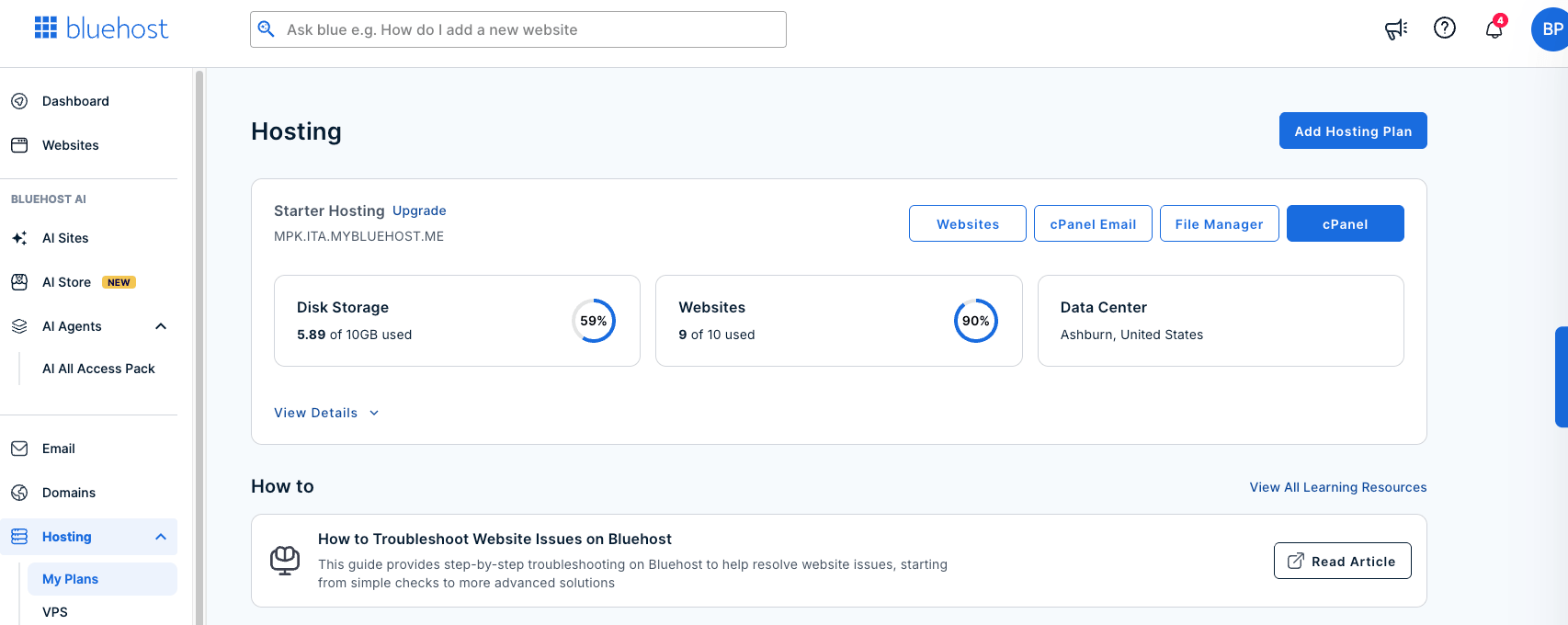
Check your Bluehost hosting dashboard to see the server and data center information available for your plan.
For VPS products, Bluehost can also show the server’s data center location within the VPS details.
This is more reliable than trying to determine your physical server location from an IP address alone.
Can You Choose Your Bluehost Server Location?
It depends on the hosting product.
For products such as Bluehost Cloud, Agency Hosting, and supported VPS plans, Bluehost provides a location selection during site or server creation.
Other products may assign the hosting infrastructure automatically.
Do not assume that every Bluehost plan offers the same location selector.
Check the options displayed for the specific plan before completing your purchase.
If you have not created your Bluehost account yet, see my Bluehost signup tutorial or my walkthrough showing how to buy web hosting from Bluehost.
You can also check the current Bluehost plans and offers here.
Can You Change Your Bluehost Data Center Later?
Whether you can effectively move to another location depends on the Bluehost product.
For Cloud and Agency Hosting, Bluehost documents a process in which a website can effectively be moved to another primary data center by creating a staging site in the desired location and then promoting that environment to production.
For Self-Managed VPS, Bluehost states that the deployment location is selected when the VPS is created and cannot simply be changed after provisioning.
Because these rules vary between products, check the current Bluehost documentation or contact Bluehost support before assuming your location can be changed later.
Do Bluehost Data Centers Matter for WordPress?
Yes, but the data center is only one piece of WordPress performance.
A properly optimized WordPress website can benefit from:
- A server location close to its main audience
- Page caching
- A CDN
- Optimized images
- Efficient plugins
- Updated WordPress software
- HTTPS
For HTTPS setup, see my Bluehost free SSL certificate tutorial.
If you want to build the site with Elementor, see my guide to using Elementor with Bluehost.
You can also learn how to remove the Bluehost Coming Soon page when you are ready to launch.
Bluehost Data Centers for International Websites
If you serve visitors in several countries, do not focus only on choosing the exact physical location of the origin server.
Choose a suitable primary region and then use caching and CDN technology to serve visitors efficiently across different geographic areas.
Your target audience matters more than your own physical location.
For example, if you live in Europe but most of your customers are in the United States, a U.S. origin location may make more sense than choosing Europe purely because that is where you live.
For location-specific information, see my Bluehost Australia review, Bluehost Canada review, Bluehost India review, guide to Bluehost for UK websites, and Bluehost India vs Bluehost.com comparison.
Is Bluehost Good for Different Types of Websites?
Server location is important, but your website type and resource requirements should also influence the hosting plan you choose.
For more specific use cases, see my guides covering Bluehost for blogging, Bluehost for small businesses, Bluehost for photographers, Bluehost for ecommerce, and Bluehost for beginners.
If you are considering the Choice Plus plan specifically, see my Bluehost Choice Plus plan review.
Connecting a Domain to Your Bluehost Hosting
Your domain name does not have to be registered at Bluehost in order for your website to use Bluehost’s servers.
You can point a domain from another registrar to your Bluehost hosting account.
For step-by-step instructions, see my guides on pointing a Namecheap domain to Bluehost, pointing a GoDaddy domain to Bluehost, adding an addon domain in Bluehost, and getting a free domain name with Bluehost.
Bluehost Hosting Without WordPress
Bluehost is closely associated with WordPress, but WordPress is not the only type of project you may want to host.
See my guide to using Bluehost without WordPress if you are considering another CMS or a custom website.
Developers should also read my Bluehost Node.js hosting guide to understand the hosting requirements for Node.js projects.
Bluehost Pricing, Billing, and Discounts
Data center location should not be your only consideration when choosing Bluehost.
Also compare the billing term, introductory price, renewal price, included features, and the total due at checkout.
For pricing and discounts, see my Bluehost coupon code guide, Bluehost pricing and plans guide, explanation of whether Bluehost charges monthly or all at once, Bluehost free trial guide, and Bluehost money-back guarantee guide.
If you already have an account and need to leave, see my guide to canceling Bluehost and requesting a refund.
I also cover why Bluehost can seem so cheap, why Bluehost can become more expensive, and the Bluehost Black Friday deal.
You can check Bluehost’s current hosting offer here.
Bluehost Payment Methods
If you are ready to purchase hosting, you may also want to confirm how you can pay.
My Bluehost payment methods guide covers the available payment options.
I also have separate guides explaining whether Bluehost accepts debit cards, whether Bluehost accepts PayPal, and whether Bluehost accepts Bitcoin.
Bluehost Package Extras and Add-ons
During signup or while managing your hosting, Bluehost may offer optional products and services.
Before paying for an add-on, determine whether your hosting plan already includes similar functionality or whether you can get the feature elsewhere.
Start with my Bluehost package extras guide.
You can also read my guides covering CodeGuard Basic, Bluehost SEO Tools, domain privacy protection, SiteLock Security, Single Domain SSL, Yoast SEO Premium, Bluehost marketing offers, and Google Workspace with Bluehost.
Who Owns Bluehost?
If you are researching Bluehost as a company in addition to its server infrastructure, see my guide explaining who owns Bluehost.
For a broader explanation of the platform itself, read my guide on why people choose Bluehost.
Bluehost vs Other Hosting Providers
If data center location is one of the factors you are using to compare hosts, you may also want to read my HostArmada vs Bluehost comparison, Bluehost India vs Bluehost.com comparison, and WPX Hosting vs Bluehost comparison.
Frequently Asked Questions
Where are Bluehost servers located?
Bluehost uses multiple hosting locations. The specific locations available depend on your hosting product. Cloud and Agency Hosting currently document primary locations in Los Angeles, Dallas, Ashburn, and Amsterdam, while Bluehost VPS products provide additional regional deployment choices.
Can I choose my Bluehost data center?
On supported Bluehost products, yes. Cloud, Agency, and certain VPS products allow you to choose a location during setup. Other plans may assign the location automatically.
What is the best Bluehost server location?
The best server location is usually the one closest to the majority of your website visitors.
A shorter distance can reduce latency for requests that must reach the origin server.
How do I find my Bluehost server location?
Log in to your Bluehost account and open your hosting information. Supported plans display the associated data center or server information within the Bluehost dashboard.
Does Bluehost have servers outside the United States?
Yes. Bluehost currently documents hosting and VPS infrastructure in multiple regions outside the United States, including locations in Europe, India, Singapore, Australia, and other supported markets depending on the hosting product.
Does Bluehost use a CDN?
Bluehost uses CDN and edge-caching technologies on supported hosting products. A CDN can serve cached website content closer to visitors even when your origin data center is located farther away.
Does server location matter if I use a CDN?
Yes. A CDN reduces the importance of physical distance for cached content, but requests that reach the origin server can still be affected by the distance between the server and the visitor.
Is Bluehost only for WordPress?
No. Bluehost is strongly associated with WordPress hosting, but supported hosting products can also be used for other website systems and development workloads.
See my guide to using Bluehost without WordPress for more information.

Final Verdict on Bluehost Data Centers
Bluehost now gives customers more location flexibility than a simple one-location hosting model.
The exact Bluehost data center options depend on the hosting product you purchase. Cloud and Agency Hosting currently provide primary location choices in Los Angeles, Dallas, Ashburn, and Amsterdam, while Bluehost Self-Managed VPS provides a broader selection of deployment regions.
For most website owners, the best approach is to choose a primary data center close to the majority of your visitors, then use caching and CDN technology to improve delivery for visitors in other locations.
Before signing up, compare the location choices available for the specific Bluehost plan you want and confirm your billing term, included resources, and total checkout price.

- Shopify Black Friday Checklist: Prepare Your Store for BFCM 2026 - October 16, 2026
- How to Build a One-Product Shopify Store (Step by Step) - October 16, 2026
- Shopify Product Photography Ideas for Beginners - October 16, 2026

Leave a Reply
Want to join the discussion?Feel free to contribute!