
Shopify Black Friday Checklist: Prepare Your Store for BFCM 2026
Last Updated on October 23, 2026
Black Friday can bring more shoppers to an ecommerce store, but increased attention does not correct weak margins, confusing promotions, unavailable inventory, broken checkout settings, or slow fulfillment. A Shopify Black Friday campaign works best when the offer, storefront, marketing, operations, and post-purchase experience are prepared as one system.
In 2026, Black Friday falls on November 27 and Cyber Monday falls on November 30. Many promotions will begin earlier and continue beyond the weekend, so merchants should prepare for a longer sales period rather than treating BFCM as a four-day event.
This Shopify Black Friday checklist explains what to complete before, during, and after the promotion. It covers offer economics, inventory, discount settings, product pages, email, shipping, checkout testing, customer support, analytics, fulfillment, and retention without promising that a sale will automatically produce revenue or profit.
If you have not built the underlying business yet, begin with my complete guide to starting an online store. A seasonal promotion should strengthen a working store rather than replace product validation, reliable fulfillment, and a clear customer offer.
Key Takeaways
- Begin planning early enough to confirm inventory, margins, shipping capacity, creative assets, and campaign timing.
- Calculate contribution per order before selecting a percentage discount, bundle, gift, or free-shipping threshold.
- Make the offer easy to understand on mobile, in product pages, in the cart, and at checkout.
- Place complete test orders using the actual promotion, products, shipping locations, payment methods, notifications, and fulfillment workflow.
- Monitor profit, inventory, checkout behavior, support volume, and fulfillment—not only gross sales.
- Use the campaign to build customer relationships after BFCM instead of treating every buyer as a one-time transaction.
Shopify workflow and seasonal-sales information verified October 16, 2026. Features, plan availability, app functionality, payment rates, promotional terms, and shipping conditions can change. Confirm all settings in your own Shopify admin and obtain qualified legal, tax, accounting, or advertising guidance when appropriate.
What Is Shopify Black Friday Cyber Monday?
Black Friday Cyber Monday, commonly shortened to BFCM, is the promotional period surrounding the Friday and Monday after U.S. Thanksgiving. Ecommerce brands often start their offers before Black Friday, change messaging throughout the weekend, and continue selected promotions into the holiday-shopping season.
Shopify reported that merchants generated $14.6 billion in sales during BFCM 2025. That figure demonstrates the scale of the event, but it does not mean every store benefits. High revenue can still produce weak profit if the discount, advertising, shipping, returns, payment fees, app expenses, and customer-support costs are not included in the plan.
Shopify is a hosted ecommerce platform with products, inventory, discounts, checkout, payments, orders, analytics, and apps in one operating system. My complete Shopify review explains the broader strengths and limitations. If you are comparing platforms before the holiday season, review Shopify vs WooCommerce, Shopify vs WordPress, and Shopify vs Etsy.
When Should You Prepare for Shopify Black Friday?
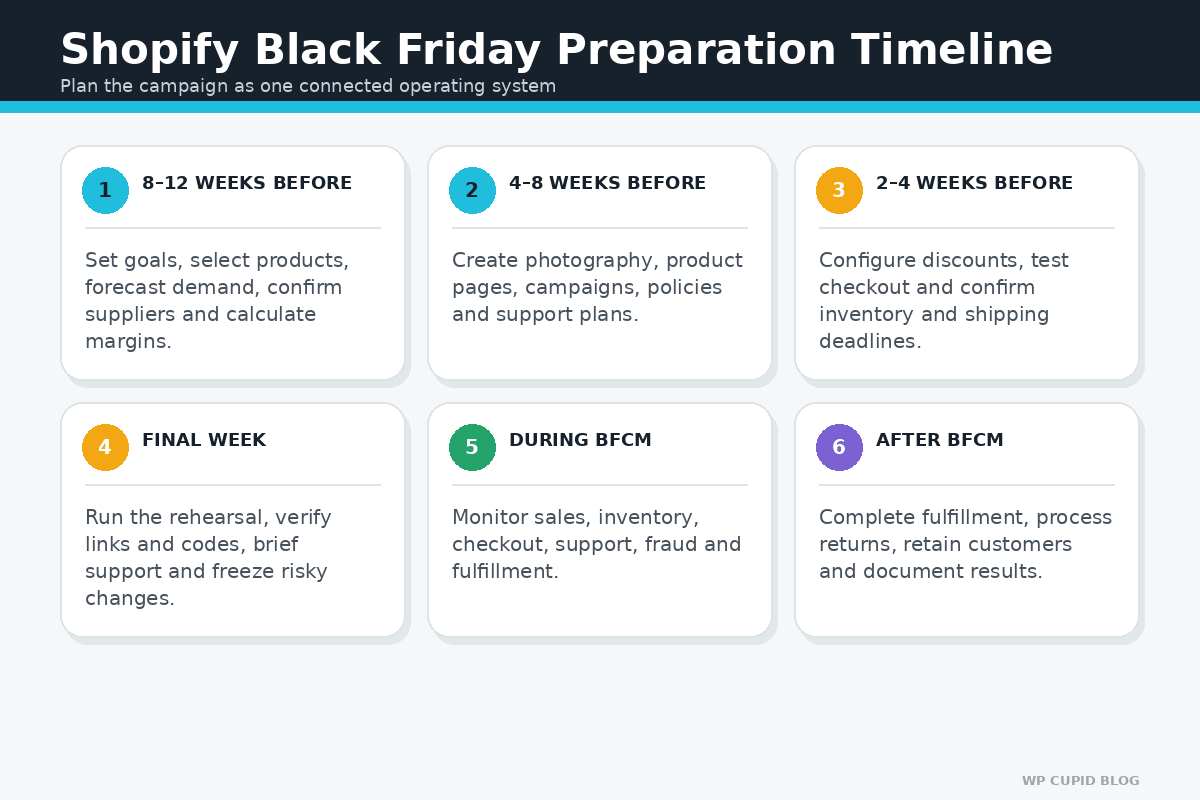
Start early enough to change the offer if the economics, inventory, supplier, website, or fulfillment test fails. Shopify’s seasonal-sales guidance recommends preparing in early fall or by the beginning of November at the latest. Stores that manufacture products, order wholesale inventory, depend on international suppliers, or need original creative may need to begin months earlier.
| Timing | Primary Work |
|---|---|
| 8–12 weeks before | Set goals, review prior data, select products, forecast demand, confirm suppliers, and calculate offer economics. |
| 4–8 weeks before | Create photography, product pages, collections, campaign messaging, email, ads, policies, and support plans. |
| 2–4 weeks before | Configure discounts, test devices and checkout, confirm inventory, finalize shipping deadlines, and schedule campaigns. |
| Final week | Run the rehearsal, verify live links and codes, brief support and fulfillment, confirm monitoring, and freeze unnecessary changes. |
| During BFCM | Monitor inventory, checkout, support, fulfillment, fraud, spend, conversion, and contribution per order. |
| After BFCM | Complete fulfillment, handle returns, retain customers, reconcile costs, and document lessons. |
If the store itself is not complete, follow my step-by-step Shopify store tutorial. The Shopify store launch checklist provides the broader prelaunch checks that still apply before a seasonal promotion.
Shopify Black Friday Checklist
1. Define the Campaign Goal
Choose one primary goal before choosing a discount. Possible goals include acquiring first-time customers, increasing average order value, moving aging inventory, generating cash flow, introducing a new product, reactivating past customers, or growing an email list. A campaign designed to clear inventory may use a different offer from one designed to acquire profitable repeat customers.
Set measurements for revenue, contribution margin, units sold, average order value, conversion rate, new-customer percentage, email growth, refund rate, fulfillment time, and repeat purchase behavior. Gross sales alone can hide an unprofitable promotion.
2. Choose Products Using Evidence
Review product-level sales, margin, inventory, return rate, support questions, seasonality, supplier lead time, and customer feedback. A popular product may support a smaller discount because demand already exists. A slow-moving product may need a stronger offer, but discounting does not correct quality problems or a lack of demand.
If you are still deciding what to sell, use my 30 Shopify product ideas for beginners. A focused brand can also use the process in my one-product Shopify store guide to evaluate a hero offer, positioning, sourcing, and unit economics.
3. Calculate the Complete Offer Economics
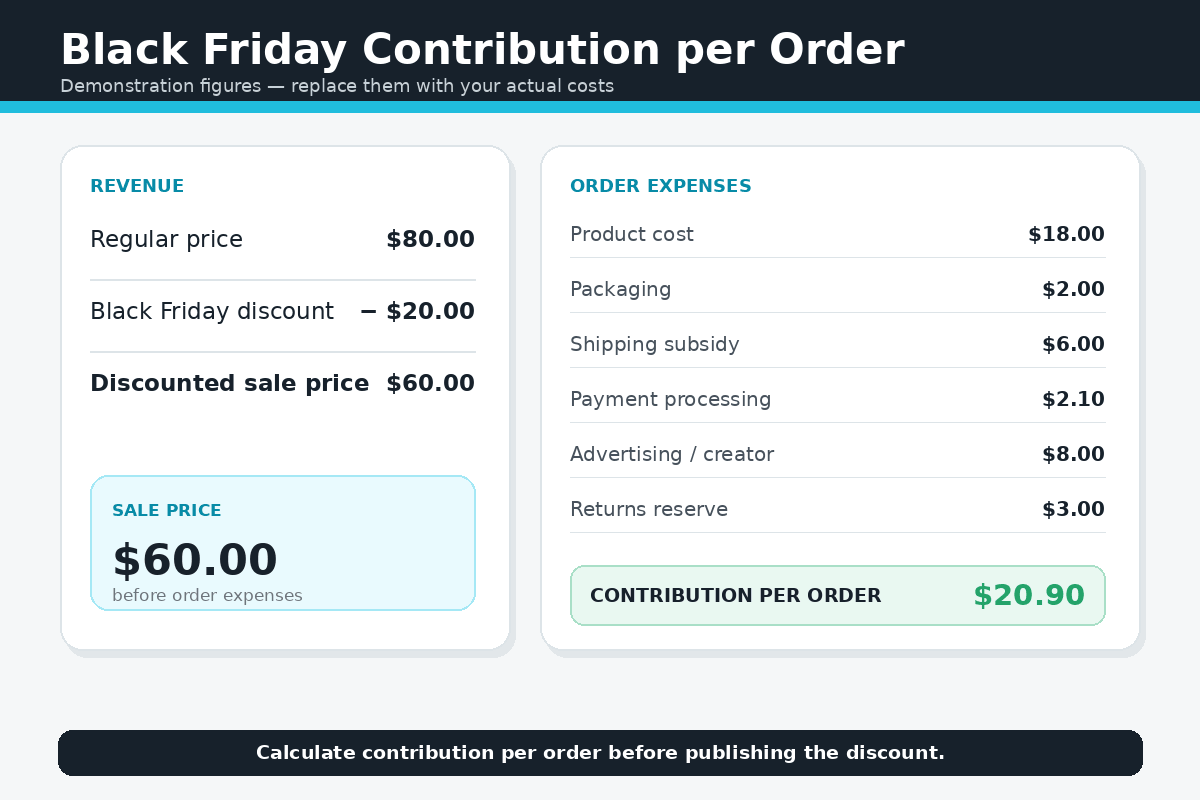
Calculate the expected contribution from each order before publishing the promotion. Include product cost, inbound freight, packaging, fulfillment, outbound shipping subsidies, payment processing, platform transaction fees where applicable, app charges, advertising, creator commissions, returns, replacements, fraud, customer support, and taxes the business must absorb.
Compare percentage-off discounts, fixed-amount discounts, bundles, gifts with purchase, tiered offers, free shipping, and loyalty rewards. A bundle or threshold can sometimes protect margin better than a storewide percentage discount. Do not raise a price solely to create a misleading comparison price.
Use my Shopify pricing guide to account for the platform, payment, transaction, app, theme, and operating costs that may sit outside the product itself.
4. Confirm Inventory, Suppliers, and Cash Flow
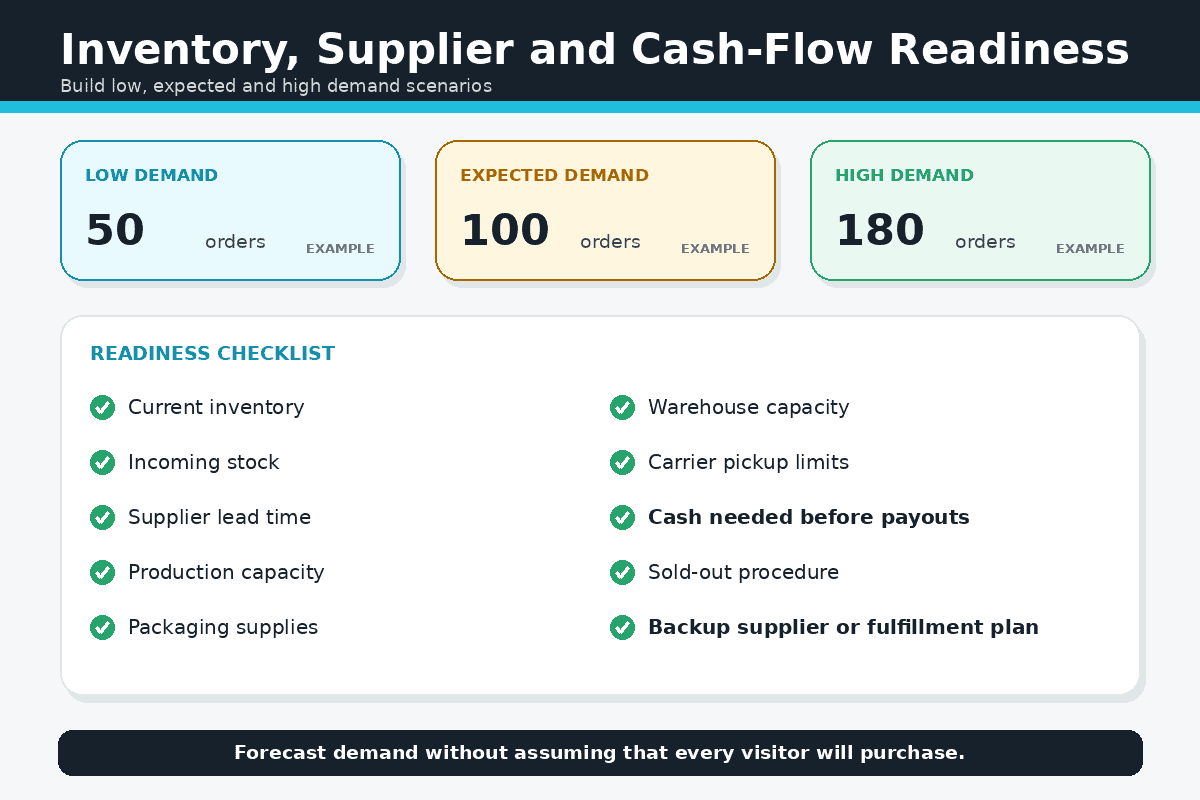
Forecast conservatively and create low, expected, and high order-volume scenarios. Confirm current stock, incoming inventory, supplier lead times, production capacity, warehouse capacity, packaging, carrier pickup limits, and the process for overselling or backorders. Decide when the store will hide sold-out products and what customers will see if an item becomes unavailable.
Cash timing matters when suppliers charge before Shopify payouts arrive. If a supplier fulfills orders, review the cash-flow, sample, stock, and backup-provider guidance in my Shopify dropshipping guide. Made-to-order brands should also review my Shopify print-on-demand guide.
5. Create the Offer and Promotion Rules
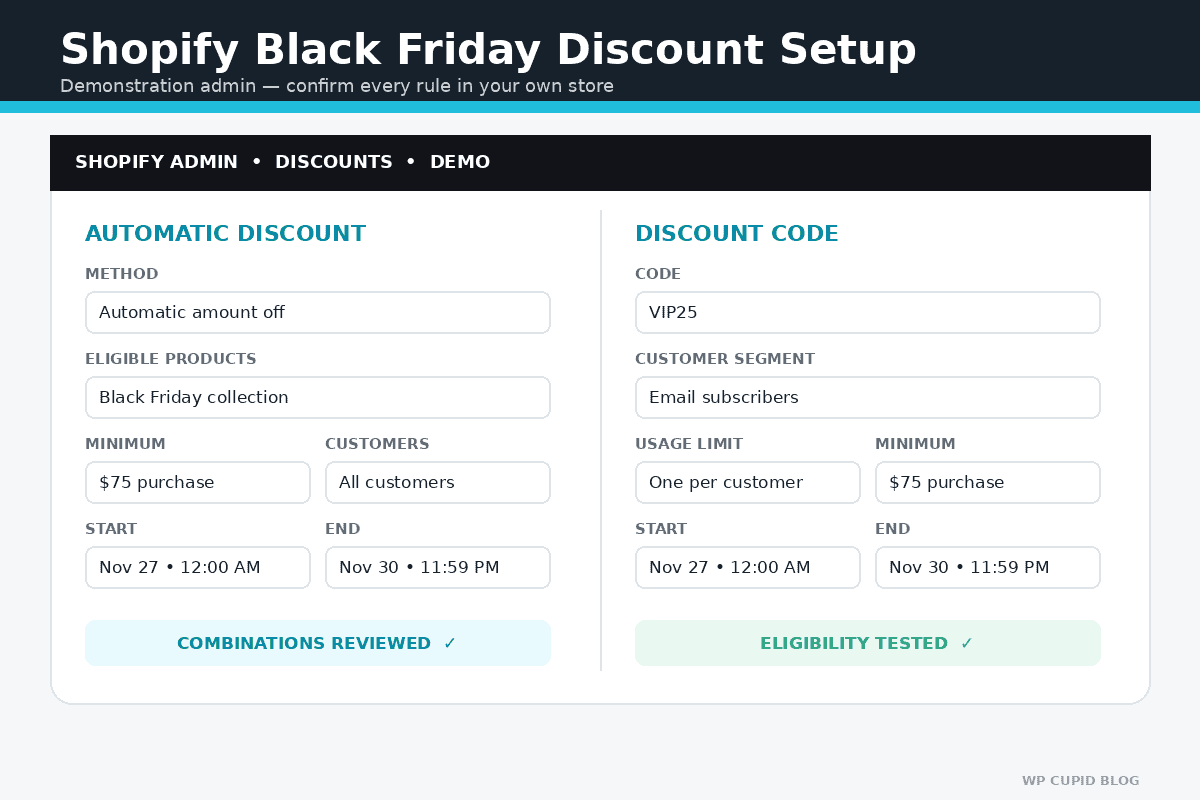
Write the complete offer before configuring Shopify. Identify eligible products and customers, minimum purchase requirements, excluded products, start and end times, usage limits, geographic limits, whether discounts combine, how returns affect gifts or bundles, and what happens when inventory sells out.
Shopify supports discount codes and automatic discounts. Automatic discounts can reduce checkout friction because eligible customers do not have to remember a code. Codes can work well for email segments, partners, creators, or customers who expect an exclusive offer. Test the exact combination rules and cart conditions rather than assuming the discount will behave as intended.
If you need to build or reopen the store before configuring the campaign, you can start Shopify through my affiliate link. I may earn a commission at no additional cost to you. Trial and promotional terms can change, so review Shopify’s current offer before selecting a plan.
6. Build a Dedicated Sale Collection
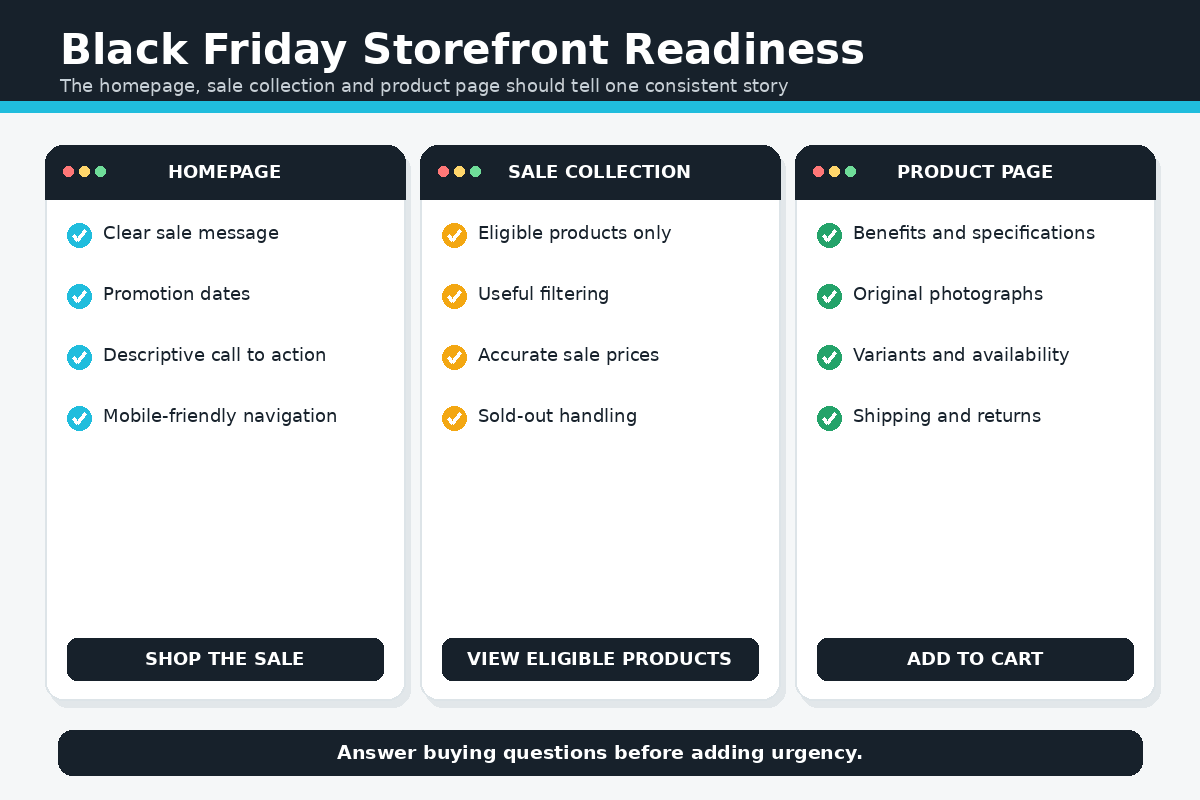
Create a collection containing only the products included in the promotion. Use a descriptive title, short explanation, consistent product cards, useful filters when needed, and a clear path back to regular categories. Confirm that discounted variants, compare-at prices, inventory, badges, and collection sorting are accurate.
Do not create a sale collection full of unavailable items or products that are excluded from the advertised discount. Test the collection while logged out, on mobile, and with different filters or sorting options.
7. Update the Homepage and Navigation
The homepage should explain the offer without forcing visitors to interpret several competing banners. State what is included, the meaningful benefit, the deadline, important exclusions, and the next action. Link the primary call to action directly to the relevant sale collection or landing page.
Add the sale destination to the navigation when it helps customers, but preserve access to important categories, search, account, and cart. Schedule changes when your Shopify plan and workflow support it, or prepare a duplicate theme and a documented manual publishing process. Do not redesign the entire store immediately before the campaign.
Use the practical design lessons in my best Shopify store examples. If you use Shopify’s generated designs, my Shopify AI Store Builder review explains what the tool creates and what still requires manual work.
8. Improve Product Pages Before Adding Urgency
Product pages should answer buying questions before relying on countdowns or discount labels. Review the title, benefits, specifications, size, materials, compatibility, variants, inventory, price, product media, shipping estimate, return conditions, warranty, safety information, FAQs, reviews, and add-to-cart button.
Create original photographs and demonstrations that accurately show the item. My Shopify product-photography guide provides a beginner setup, shot list, editing workflow, gallery plan, alt-text guidance, and image-optimization process.
For downloadable products, show previews, sample pages, interface images, file formats, compatibility, licensing, delivery instructions, and support expectations. The Shopify digital-products guide covers delivery apps, product settings, policies, testing, and launch.
9. Prepare Email, SMS, Social, and Partner Campaigns
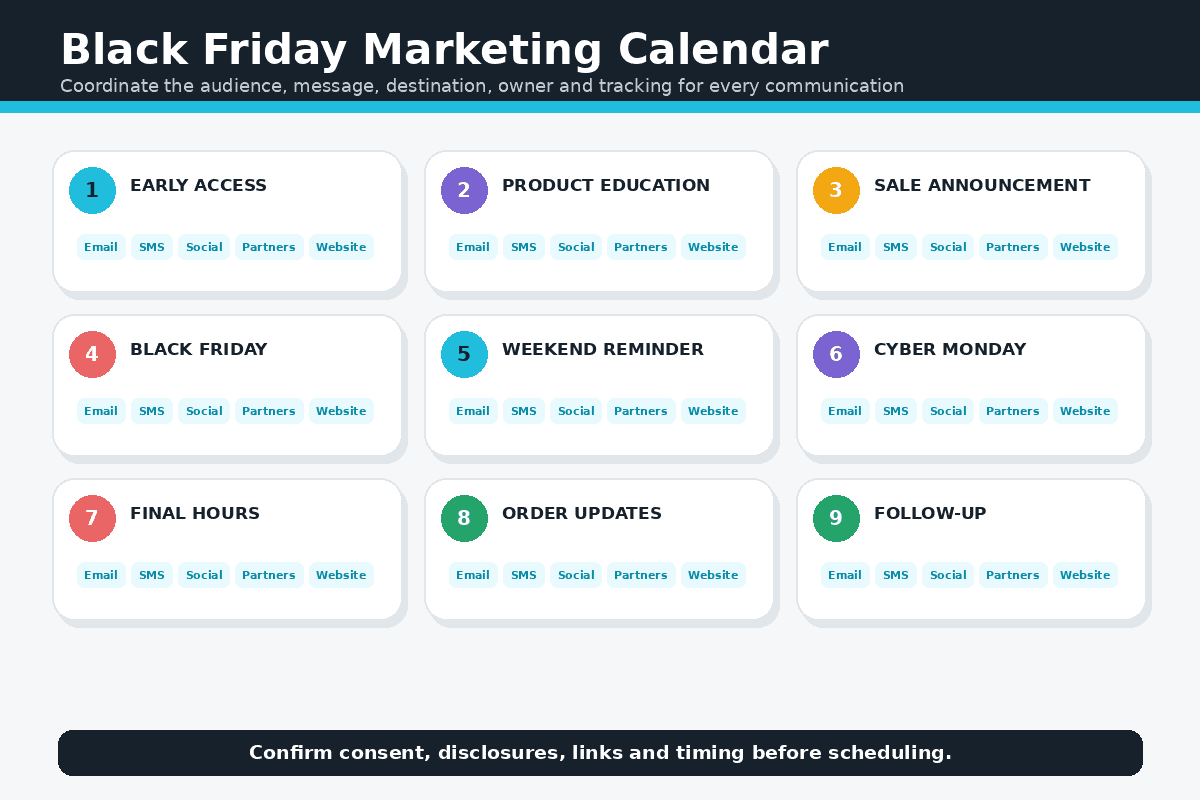
Build a campaign calendar containing the audience, message, offer, destination, creative, send time, owner, tracking code, and approval status for every communication. Typical stages include early access, announcement, product education, launch, reminder, final hours, extension only if genuine, order updates, and post-purchase follow-up.
Segment when the available data supports it. Existing customers, subscribers who have not purchased, recent visitors, past product buyers, and high-value customers may need different messages. Respect consent requirements, opt-outs, platform rules, advertising disclosures, and frequency. Do not manufacture urgency or claim an item is almost sold out unless the claim is accurate.
10. Review Search and Landing-Page Readiness
Seasonal pages can attract search traffic, but temporary copy should not damage useful evergreen pages. Write a unique page title, meta description, heading, introductory copy, image alt text, and internal links. Keep the URL reusable if the page will return next year, then update the content and date rather than creating several thin versions.
Follow my Shopify SEO guide for beginners for keyword mapping, product and collection optimization, internal linking, technical checks, and measurement. Organic rankings are not guaranteed, so the BFCM plan should not depend on a new page ranking immediately.
11. Confirm Shipping, Delivery, Returns, and Policies
Publish realistic order-processing times, carrier estimates, geographic restrictions, shipping rates, free-shipping conditions, holiday cutoff dates, pickup options, tracking expectations, return windows, exchanges, final-sale exclusions, and support contact information. Distinguish the date an order ships from the date a carrier is expected to deliver it.
Confirm that suppliers, warehouses, fulfillment apps, and support staff use the same promise. If a delay develops, communicate early and offer lawful remedies rather than waiting for complaints. Obtain qualified guidance for the jurisdictions where you sell.
12. Prepare Customer Support
Create approved answers for discount eligibility, code problems, product selection, sizing, compatibility, shipping, delivery dates, address changes, cancellations, gift receipts, exchanges, returns, warranties, digital access, and sold-out products. Make escalation rules clear so staff know who handles payment, fraud, fulfillment, or policy exceptions.
Test contact forms, chat, support email, autoresponders, help-center links, and confirmation messages. Ensure that support volume can be handled without making response-time promises the business cannot keep.
13. Test Mobile Usability, Speed, and Accessibility
Test the homepage, navigation, search, collection, product page, variants, cart, discount, checkout, policies, and contact options on several mobile screen sizes. Look for intrusive popups, overlapping banners, unreadable contrast, small controls, missing labels, oversized images, layout shifts, broken menus, and slow app scripts.
Remove nonessential apps and campaign scripts before the high-traffic period. Confirm that analytics, consent tools, reviews, chat, email capture, upsells, search, and discount apps still work together after any change.
14. Place Complete Test Orders
A preview is not enough. Place test orders using the actual sale products, variants, quantities, customer eligibility, discount, shipping regions, tax conditions, payment methods, and devices. Test logged-in and guest checkout, successful and failed payment scenarios, sold-out behavior, confirmation emails, inventory changes, fulfillment, tracking, cancellation, partial refund, full refund, and abandoned checkout automation.
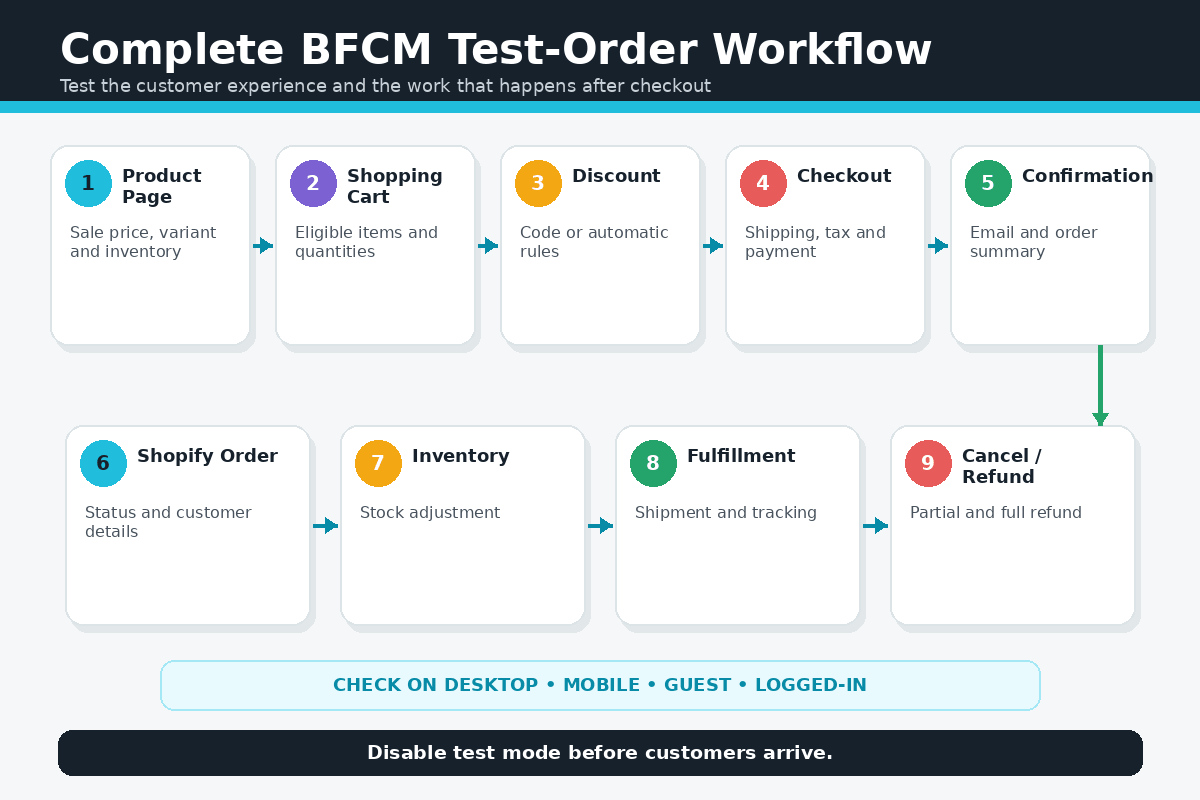
Shopify provides test-payment options, but test mode prevents customers from placing live orders while it is active. Deactivate it immediately after completing the test. A real transaction can provide another useful check, although some payment or transaction fees might not be refunded.
Review the avoidable problems in 15 Shopify mistakes to avoid before the final rehearsal.
15. Verify Analytics and Campaign Tracking
Confirm that Shopify Analytics and any approved analytics or advertising tools record product views, add-to-cart activity, checkout activity, completed sales, discount usage, traffic sources, campaign parameters, device performance, and new versus returning customers. Test the reporting before the campaign begins.
Create a simple monitoring view for traffic, conversion, average order value, contribution per order, inventory, checkout failures, support volume, refunds, fulfillment backlog, and advertising spend. Decide who reviews it, how often, and which conditions require action.
16. Prepare Fulfillment and Fraud Procedures
Document how orders move from payment to picking, packing, shipping, tracking, support, returns, and reconciliation. Confirm staffing, cutoff times, batch processes, printer supplies, packaging, carrier pickups, backup procedures, high-risk order review, address changes, cancellations, and split shipments.
Do not weaken fraud review simply to process orders faster. Define who can approve high-risk orders, issue refunds, change customer details, or install apps. Use individual staff accounts and the minimum permissions each person needs.
17. Run a Final BFCM Rehearsal
At least several days before launch, rehearse the campaign from the customer’s first message through delivery and refund. Open every email and ad link, test the landing page, confirm the offer, add eligible and ineligible items, test the discount, complete checkout, inspect notifications, fulfill the order, send tracking, and process the cancellation or refund scenario.
Use a written go-live checklist with an owner and completion time for each task. Freeze unnecessary theme, app, navigation, DNS, payment, shipping, and integration changes during the final days. If a critical test fails, simplify or delay the offer instead of publishing a campaign the store cannot reliably support.
If Pinterest is part of your holiday promotion plan, follow my Shopify Pinterest guide to connect your catalog, prepare Product Pins, and verify tracking before campaign traffic begins.
What to Monitor During Black Friday
Assign responsibility for the storefront, marketing, inventory, orders, fulfillment, support, and technical issues. Use one communication channel and document meaningful changes so the team does not create conflicting fixes.
- Storefront: uptime, speed, navigation, product availability, sale messaging, and mobile usability.
- Checkout: discount application, payment failures, shipping rates, tax behavior, and abandoned checkouts.
- Inventory: fast-selling variants, overselling risk, incoming stock, and supplier updates.
- Economics: revenue, margin, advertising spend, average order value, refunds, and contribution per order.
- Operations: unfulfilled orders, processing time, carrier issues, support backlog, fraud review, and cancellations.
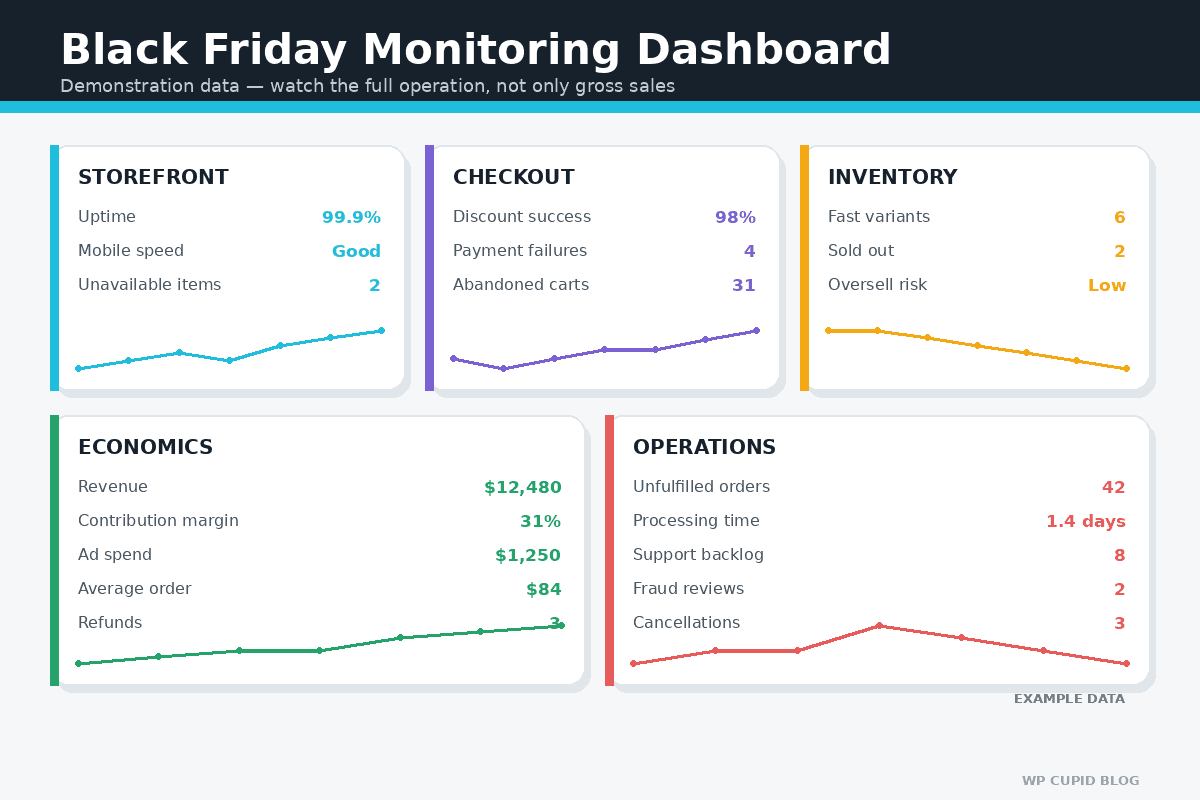
Do not react to a few visits by changing the complete offer. Make urgent corrections when checkout, pricing, availability, policies, or customer promises are wrong. For performance changes, wait for enough qualified data to compare one meaningful change at a time.
What to Do After BFCM
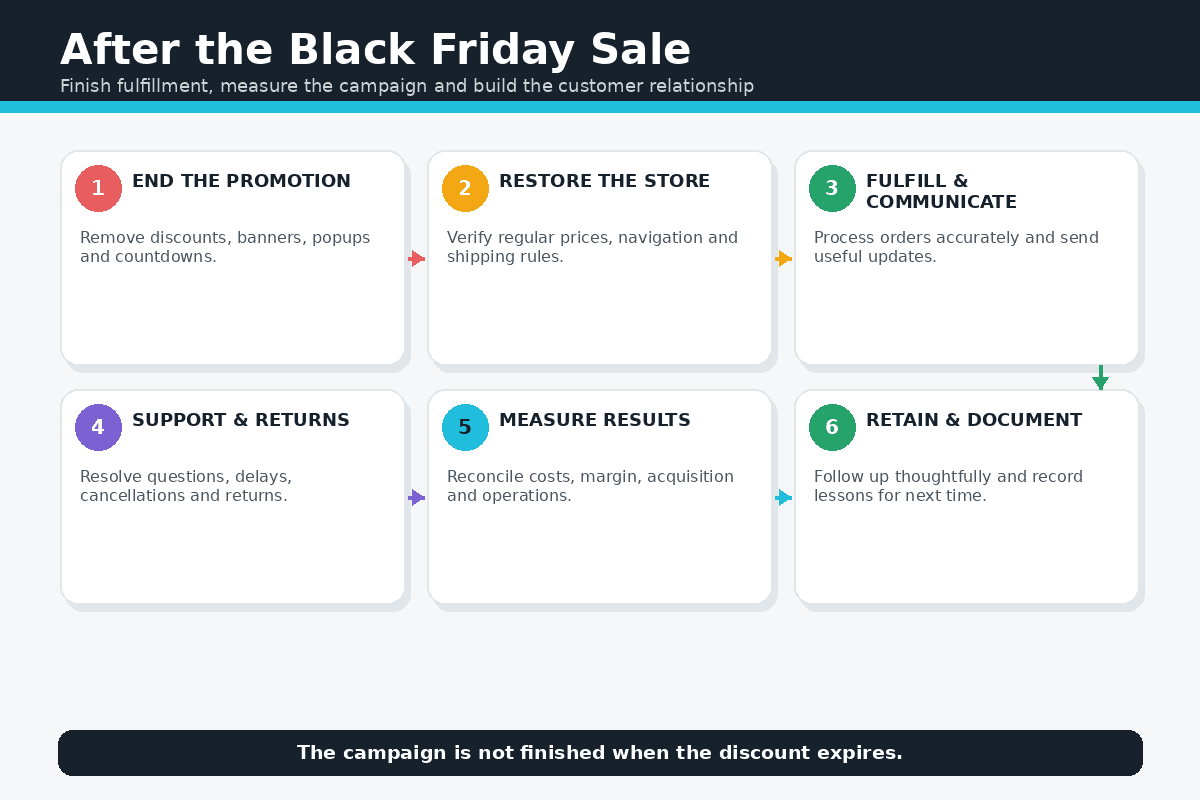
The campaign is not finished when the discount expires. Remove or roll back promotional banners, navigation, discounts, collection rules, popups, countdowns, ads, and automated messages at the promised time. Confirm that regular prices and shipping rules are restored correctly.
Prioritize accurate fulfillment and proactive communication. Track delayed orders, answer support requests, process returns consistently, reconcile discounts and advertising costs, and monitor reviews. Do not immediately overwhelm new customers with unrelated promotions.
Build a post-campaign report comparing the goal with revenue, contribution margin, conversion rate, average order value, products sold, customer-acquisition cost, email performance, refund rate, fulfillment time, repeat purchases, and support issues. Record which offer, message, product, audience, and channel worked—and what should change next year.
If the campaign produces the store’s first customers, use my Shopify first-sale guide to keep improving the offer, product page, traffic sources, and customer feedback loop.
Common Shopify Black Friday Mistakes
- Choosing the percentage discount before calculating the complete contribution per order.
- Running a storewide sale when inventory, margin, or supplier capacity differs substantially by product.
- Displaying an inflated comparison price or a deadline that is not genuine.
- Publishing several banners, popups, countdowns, and coupon messages that contradict one another.
- Assuming a discount works without testing eligible and ineligible carts.
- Changing the theme or installing untested apps immediately before launch.
- Advertising delivery dates that suppliers or carriers cannot support.
- Measuring gross revenue without margin, advertising, returns, replacements, and fulfillment costs.
- Having no plan for sold-out products, delayed orders, fraud review, or support escalation.
- Stopping communication after the sale instead of earning a repeat customer.
Shopify Black Friday FAQs
When is Black Friday 2026?
Black Friday is November 27, 2026. Cyber Monday is November 30, 2026. Many ecommerce promotions begin earlier or continue into December, so publish the exact start and end time, time zone, exclusions, and inventory conditions for your own campaign.
How early should I prepare my Shopify store?
Begin in early fall or earlier when the business needs inventory, manufacturing, supplier coordination, photography, or new fulfillment capacity. The final weeks should focus on testing and rehearsing, not inventing the offer or redesigning the store.
Should I use an automatic discount or a discount code?
An automatic discount can reduce friction for a broadly available offer. A code can be useful for a defined email segment, partner, or creator campaign. The correct method depends on eligibility, combination rules, tracking, customer expectations, and the possibility of forgotten codes. Test the exact cart and checkout behavior before launch.
How much should I discount for Black Friday?
There is no universally correct percentage. Start with the complete cost and required contribution per order, then compare a percentage discount with bundles, thresholds, gifts, loyalty rewards, or free shipping. Do not copy a competitor’s percentage without knowing its margin, inventory, repeat-purchase rate, and acquisition costs.
Can a new Shopify store run a Black Friday sale?
Yes, but a new store has less historical data for forecasting and may not have an established audience. Keep the offer and inventory manageable, validate the product, test checkout and fulfillment, and avoid ordering excessive stock solely because BFCM is approaching. My Shopify free-trial guide explains what can be prepared before choosing a paid plan.
Should I offer free shipping?
Only when the economics and fulfillment rules support it. Calculate the cost by destination, package size, weight, order value, and carrier. A minimum-order threshold can help protect margin, but it must be displayed clearly and tested with eligible and ineligible carts.
Do I need special Shopify apps for Black Friday?
Not necessarily. Shopify includes products, collections, inventory, discounts, checkout, orders, analytics, and basic marketing tools. Install an app only for a defined requirement the existing platform or theme cannot meet. Review cost, permissions, compatibility, performance, support, and removal procedures, then test the app well before the campaign.
What should I test before the sale?
Test every campaign link, product, variant, inventory rule, discount, gift or bundle, shipping destination, tax scenario, payment method, mobile layout, notification, fulfillment step, tracking message, cancellation, refund, and abandoned checkout. Confirm that test mode is disabled before customers arrive.
Is a Black Friday sale guaranteed to increase profit?
No. A promotion can increase traffic or revenue while reducing profit through discounts, advertising, shipping subsidies, returns, payment fees, overtime, replacements, or operational failures. Set a goal, calculate the economics, cap risk, and monitor the complete result.
Final Verdict
A successful Shopify Black Friday campaign is an operating plan, not merely a discount code. The strongest preparation connects a profitable offer with accurate inventory, a clear storefront, tested checkout, realistic delivery promises, responsive support, reliable fulfillment, meaningful measurement, and a plan for the customer relationship after the sale.
Start early, calculate every cost, simplify the message, verify every promise, and rehearse the complete order journey. During BFCM, fix critical customer problems first and avoid making broad changes from a small amount of data. Afterward, fulfill accurately and document what the business learned.
When you are ready to prepare the store, open Shopify through my affiliate link and build alongside this checklist. I may earn a commission at no additional cost to you. Review the current trial, promotional terms, plan features, and final price before subscribing.

- How to Connect Shopify to Pinterest and Sell Products - October 23, 2026
- Shopify Black Friday Checklist: Prepare Your Store for BFCM 2026 - October 23, 2026
- How to Build a One-Product Shopify Store (Step by Step) - October 23, 2026

Leave a Reply
Want to join the discussion?Feel free to contribute!