
How to Connect Shopify to Pinterest and Sell Products
Last Updated on October 23, 2026
Pinterest can help a Shopify store place products in front of people while they are planning purchases, comparing ideas, and saving products for later. Connecting the two platforms can publish Product Pins, keep catalog information synchronized, and measure actions that happen after someone visits the store.
The connection does not automatically create an audience or guarantee sales. Your products still need accurate information, useful photographs, competitive positioning, reliable fulfillment, clear policies, and Pinterest content that matches what people are searching for.
This guide explains how to connect Shopify to Pinterest, prepare the store, review the product catalog, verify tracking, create Pins, measure performance, and turn qualified Pinterest traffic into Shopify orders.
If you are still planning the business, begin with my complete guide to starting an online store. It covers product validation, costs, margins, fulfillment, platform selection, testing, and launch planning before you add another marketing channel.
Key Takeaways
- Use the official Pinterest for Shopify app to connect one Shopify store with one Pinterest business account.
- The integration can claim the website, install the Pinterest tag and Conversions API, connect the catalog, and generate Product Pins.
- Complete product data, original images, visible contact information, and clear shipping and refund policies before connecting the catalog.
- Review catalog diagnostics and test PageVisit, AddToCart, and Checkout events instead of assuming the integration is working.
- Catalog synchronization makes products eligible for discovery; it does not automatically advertise them or guarantee distribution.
- Measure qualified visits, product views, add-to-cart activity, checkout activity, sales, and contribution—not impressions alone.
Shopify and Pinterest workflow details verified October 17, 2026. App availability, account requirements, menus, catalog limits, advertising features, promotional credits, policies, and synchronization timing can change. Confirm the current requirements in your own accounts before relying on the integration.
What Does the Pinterest for Shopify App Do?
The official Pinterest app in the Shopify App Store connects your Shopify store with a Pinterest business account. Pinterest states that the integration can claim your website, install the Pinterest tag and Conversions API, connect the Shopify product feed, and generate Product Pins from that feed.
A Product Pin is a shoppable Pin format that can display current product information such as the title, description, price, and availability. When a shopper selects the Pin, the purchase is completed through your Shopify storefront and checkout. Pinterest helps people discover the product; you remain responsible for the product, store, payment, fulfillment, support, returns, and customer experience.
The app is free to install according to its current Shopify App Store listing, although advertising and other services may create costs. Availability depends on the merchant’s country and account eligibility. One Shopify store can be connected to only one Pinterest business account at a time.
If you are deciding whether Shopify is the correct platform before connecting Pinterest, read my complete Shopify review. You can also compare Shopify vs WooCommerce, Shopify vs WordPress, and Shopify vs Etsy before building the catalog.

What You Need Before Connecting Shopify to Pinterest
Do not install the app before the store is ready to be reviewed. A technically successful connection can still produce rejected products, weak Pins, or traffic that arrives at incomplete pages.
A Pinterest Business and Advertiser Account
Pinterest requires a business account and an advertiser account for the Shopify connection. Use the account that should own the catalog, analytics, advertising history, and claimed domain. Pinterest currently says the person making the connection must be an account owner; Business Manager permissions alone may not be sufficient.
Complete the profile with the business name, logo, description, website category, and other relevant details. Use a company-controlled email address and enable appropriate account security. Decide who should retain owner access before connecting the store.
A Complete Shopify Store
Your Shopify store should be publicly accessible and contain products customers can actually purchase. Complete the domain, navigation, product pages, payment settings, shipping, taxes, order notifications, policies, contact information, and mobile testing first. My step-by-step Shopify store tutorial covers that foundation.
If you need to open a store, you can start Shopify through my affiliate link. I may earn a commission at no additional cost to you. Trial availability, promotional terms, plan features, and final prices can change, so review the current offer before subscribing.
Products That Meet Pinterest Requirements
Each product needs accurate structured information. Pinterest identifies the product ID, title, description, link, image link, price, and availability as required retail-catalog fields. Products with variants also need an item group ID. The Shopify integration handles the feed format, but it can only use the information you provide in Shopify.
Before connecting, inspect every product title, description, image, price, compare-at price, inventory status, variant, URL, product type, and collection. Remove placeholder products and images. Confirm that the information displayed on Pinterest will match the landing page customers see.
If you have not selected a product, use my 30 Shopify product ideas for beginners. Stores built around one focused offer can follow my one-product Shopify store guide.
Visible Contact, Shipping, and Return Information
Pinterest’s catalog guidance says the website should meet its merchant guidelines and include easy-to-find contact details, a shipping policy, and a refund policy. These pages should reflect how your business actually operates. State processing times, delivery estimates, destinations, shipping charges, return eligibility, return windows, exclusions, refund timing, and the method customers use to request help.
Do not copy policies that do not match your products or location. Digital products, made-to-order products, print-on-demand items, personalized goods, subscriptions, and international orders can require different language and procedures. Merchants selling downloads can use my Shopify digital-products guide, but they should confirm whether each product and business model is eligible for Pinterest’s current merchant and catalog programs.

How to Connect Shopify to Pinterest Step by Step

1. Review Existing Pinterest Tracking
Check whether the Pinterest tag was previously added through theme code, Shopify customer events, a tag manager, another app, or an agency. Pinterest recommends removing a manually installed tag before using the official Shopify app. Duplicate installations can record the same event more than once and make reporting unreliable.
Document the current tag ID and any active campaigns before removing anything. If another person manages your advertising, coordinate the change so the correct advertiser account, catalog, and historical reporting remain connected.
2. Install the Official Pinterest App
- Sign in to the Shopify account that has permission to install and manage apps.
- Open the official Pinterest listing in the Shopify App Store.
- Confirm that the developer is Pinterest, Inc.
- Review the requested data access and permissions.
- Select Install or Add app if you agree.
App labels and menus can change. Read the permissions instead of clicking through automatically. The integration needs access to product, storefront, and conversion information to create and update the catalog and measure events.
3. Connect the Correct Pinterest Account
Follow the app’s connection prompt and sign in to Pinterest. Select the business and advertiser account that should own the store connection. Confirm the account name and identifier before approving the connection, especially if your login can access several brands or clients.
A Shopify store can currently connect to one Pinterest business account at a time. Changing the connection later may interrupt the catalog, tracking, product groups, audiences, and campaigns. Treat this as an ownership decision rather than a temporary login choice.
4. Complete the App Setup
Complete each setup item presented by the app. Depending on the account and region, this may include connecting the advertiser account, accepting terms, confirming billing information for advertising, connecting the catalog, and completing account settings.
According to Pinterest, the integration can claim the Shopify website, install the Pinterest tag and Conversions API, connect the product feed, and create Product Pins. Record which assets were created—the business account, advertiser account, tag, catalog, and data source—so future team members do not create duplicates.
The Pinterest connection can be configured while you build the store, but customers should not be sent to unfinished pages. My Shopify free-trial guide explains what you can prepare before choosing a paid plan, while my Shopify pricing guide covers the platform expenses to include in the budget.
5. Make Products Available to Pinterest
Confirm that each intended product is active, published to the relevant sales channel, available in the appropriate market, and permitted by Pinterest’s merchant and advertising policies. A product that remains a draft, is unavailable to the Pinterest channel, has missing information, or violates a policy may not appear.
Do not publish the entire catalog automatically if it contains products that should not be promoted. Review restricted products, subscription terms, age or location restrictions, inventory, regional availability, and the destination page for each item.
6. Allow the Catalog to Synchronize
The first synchronization is not always immediate. Pinterest’s current troubleshooting guidance says Shopify feeds update every 24 hours, while Shopify collections can synchronize as product groups every 48 hours. These are processing intervals, not promises that every product will be approved or distributed.
Avoid repeatedly disconnecting and reinstalling the app while the initial feed is processing. First confirm the connection status, wait through the expected processing period, and then use diagnostics to identify a specific problem.
7. Review Catalog Diagnostics
In Pinterest Business, open Catalogs and product groups, choose the catalog, and review Diagnostics. Pinterest separates ingestion issues from distribution issues:
- Successful uploads: products that were accepted into the catalog.
- Failed uploads: products that cannot be added until errors are corrected.
- Warnings: accepted products with missing or invalid information that can reduce usefulness.
- Ineligible products: items that cannot receive organic or paid distribution until policy or data problems are resolved.
Correct the source information in Shopify whenever possible, then allow the next synchronization to update Pinterest. This preserves Shopify as the primary product record and reduces conflicts between the storefront and catalog.

8. Organize Shopify Collections for Pinterest
Shopify collections can become Pinterest product groups. Pinterest currently supports syncing up to 100 Shopify collections, with up to 1,000 products in each collection, every 48 hours. Limits and behavior can change, so verify them before designing a large catalog structure.
Create collections that reflect how customers shop: product type, recipient, room, activity, style, season, problem, price range, or use case. Avoid dozens of nearly identical groups with unclear names. Product groups should help you review performance and create relevant ads—not merely duplicate the store’s menu.
How Customers Buy Shopify Products From Pinterest
The normal journey is:
- A person discovers an organic Pin, Product Pin, or Pinterest ad.
- The Pin displays the idea or product and links to a relevant Shopify page.
- The shopper visits the Shopify product, collection, guide, or landing page.
- The shopper reviews the product, price, variants, shipping, returns, and proof.
- The shopper adds the product to the cart and completes Shopify checkout.
- Shopify records the order, and the merchant fulfills and supports it.
The Pin and landing page must make the same promise. Do not use an attractive lifestyle image that sends visitors to an unrelated homepage, unavailable product, different price, or confusing catalog page. Deep-link to the most relevant live page.
Before promoting the catalog, complete the checks in my Shopify store launch checklist and correct the problems covered in 15 Shopify mistakes to avoid.

How to Optimize Shopify Products for Pinterest
Use Clear, Searchable Product Titles
A title should identify what the product is and include the attributes customers need to distinguish it. Replace internal names such as “The Willow” with descriptive language such as “Women’s Water-Resistant Hiking Pants—Straight Leg” when that wording accurately describes the product.
Do not force a list of keywords into the title. Use natural language, keep important information near the beginning, and match the wording used on the Shopify page. My Shopify SEO guide for beginners explains how to map search intent to product, collection, and article pages.
Write Complete Product Descriptions
Explain the customer, problem, important benefit, materials, dimensions, fit, compatibility, care, contents, shipping, and limitations. Include the details someone needs to decide whether the item fits the intended use. Avoid vague copy such as “premium quality” unless the page explains what makes the product different.
Create Original Product Images
Use a clean product image for accuracy, then add vertical lifestyle images, demonstrations, details, scale, packaging, variations, and the product in use. The Pin should remain understandable on a phone. Use readable contrast and keep important text away from edges where an interface might cover it.
My Shopify product photography guide includes a beginner setup, shot list, editing limits, upload workflow, alt-text examples, and gallery checklist. If you need design inspiration, study the product presentation lessons in my best Shopify store examples.
Keep Price and Availability Accurate
Product Pins lose trust when the Pin shows one price or availability state and the Shopify page shows another. Confirm base prices, sale prices, currency, variant pricing, inventory, preorder language, subscription conditions, and regional availability. End expired promotions and update sold-out products promptly.
Made-to-order sellers should state realistic processing times. Review supplier and fulfillment risks in my Shopify dropshipping guide or Shopify print-on-demand guide before sending Pinterest traffic to products you do not stock.

How to Create Pinterest Content That Can Drive Shopify Sales
A synchronized catalog is the foundation, not the complete strategy. Publish original Pins that help a specific person solve a problem, choose a product, plan a project, compare options, or imagine an outcome.
Build Boards Around Customer Intent
Create focused boards with descriptive names and explanations. A hiking-apparel store might use boards for women’s hiking outfits, cold-weather hiking layers, hiking-pants fit guides, trail essentials, and gifts for hikers. A generic board called “Products” gives Pinterest and the customer less context.
Create More Than Product Ads
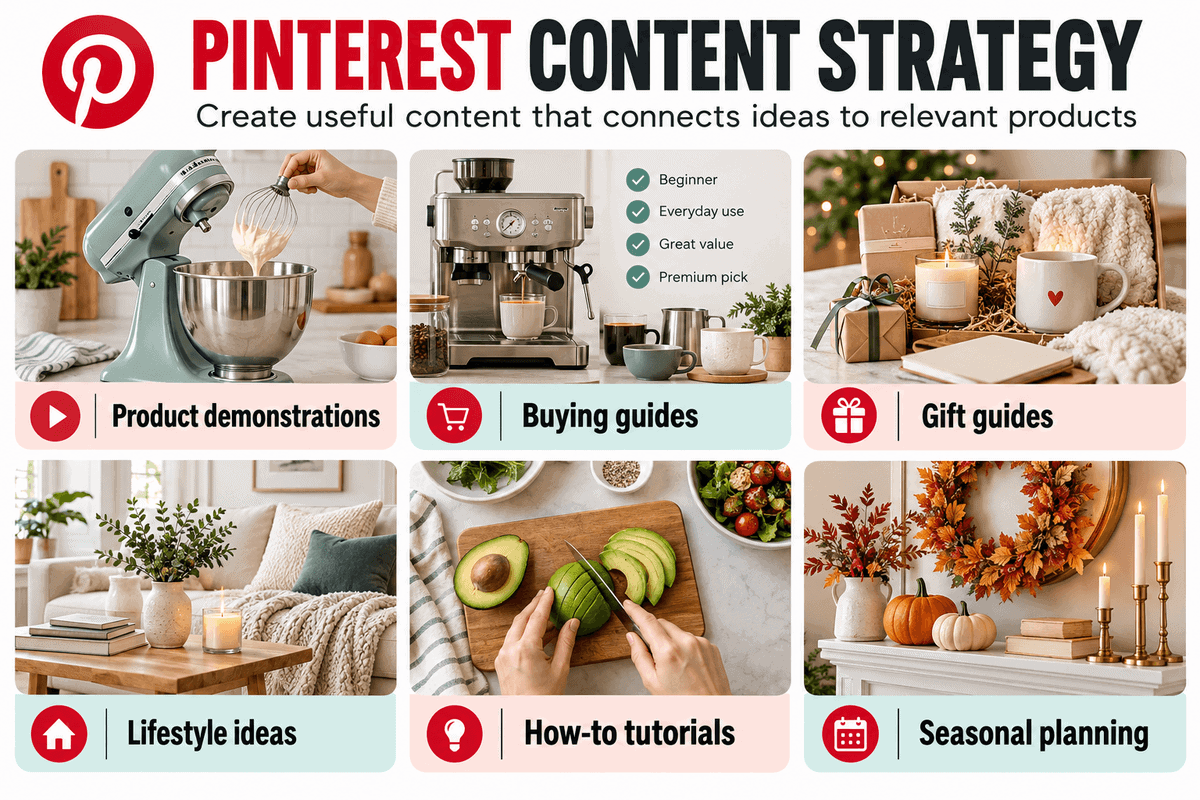
Useful Pinterest content can include:
- Product demonstrations and before-and-after examples.
- Buying guides and comparison charts.
- Gift guides organized by recipient or budget.
- Style, room, recipe, project, or activity inspiration.
- Care, sizing, installation, or usage tutorials.
- Customer questions answered visually.
- Seasonal planning content created before demand peaks.
Link each Pin to the page that completes its promise. A buying-guide Pin should normally lead to the guide, while a product-specific demonstration should lead to the exact product. Use articles to educate people who are not ready to purchase immediately, then link those articles to relevant products and collections.
Plan for Seasonal Demand Early
Pinterest users often plan ahead. Prepare seasonal product pages, guides, Pins, inventory, and fulfillment before the shopping period begins. For the largest holiday promotion, use my Shopify Black Friday checklist to coordinate the offer, inventory, marketing, checkout, support, and post-sale workflow.
Verify the Pinterest Tag and Conversion Events
Do not assume tracking works because the app reports that it is connected. Pinterest provides a Test events area under Conversions. Enter the store URL, launch the test, and perform the actions you expect Pinterest to record.
- Open the homepage and product pages.
- View products with different variants.
- Add a product to the cart.
- Begin checkout.
- Complete an approved test or controlled real order when appropriate.
Return to Pinterest and confirm that the expected events appear with appropriate product IDs, values, quantities, and currency. Pinterest identifies PageVisit, AddToCart, and Checkout as important events for conversion insights and merchant features. Its documentation notes that a newly installed tag can take time to appear in Ads Manager.
Compare Pinterest reporting with Shopify orders and analytics, but do not expect the numbers to match perfectly. Attribution windows, consent choices, browser restrictions, cross-device behavior, view-through conversions, refunds, and reporting delays can produce differences.

Should You Run Pinterest Ads for Shopify?
Advertising is optional. Connecting the catalog does not automatically promote products. Pinterest states that Shopify products can synchronize while the app is active, but products are not advertised until you create a campaign.
Consider paid promotion only after the product, margin, product page, checkout, tracking, and fulfillment have been tested. Calculate the maximum amount you can spend to acquire an order after product cost, shipping, payment fees, returns, discounts, apps, and support. A campaign that creates revenue can still lose money.
Start with a defined product group, audience, objective, budget, time period, and success measurement. Cap the test, verify conversion events, exclude unavailable products, and avoid changing several variables at once. Promotional ad credits may be available in some locations, but eligibility and terms can change and should not determine whether the economics work.
If the store has not generated a sale yet, my Shopify first-sale guide explains how to validate the offer, improve the product page, build an audience, conduct outreach, test traffic sources, and measure the funnel without assuming advertising will fix the business.
How to Measure Pinterest and Shopify Performance
Review the complete journey instead of using follower count or impressions as the primary result. Track:
- Pinterest visibility: impressions, saves, outbound clicks, engagement, and top Pins.
- Traffic quality: landing pages, engaged sessions, device, region, and new versus returning visitors.
- Shopping behavior: product views, add-to-cart activity, checkout activity, and completed orders.
- Economics: conversion rate, average order value, advertising cost, refunds, and contribution per order.
- Operations: inventory, fulfillment time, support questions, returns, and product complaints.
Pinterest Conversion Insights can combine organic and paid conversion reporting for eligible accounts with a healthy tag. Shopify Analytics shows store sessions, product behavior, checkout, sales, and order information. Use both systems to investigate patterns, then verify important financial conclusions against actual orders, refunds, costs, and payouts.
Give organic Pins time to be indexed and discovered. Improve one meaningful weakness at a time: the Pin concept, title, image, destination, product information, offer, or checkout. Do not redesign the entire store because a few Pins received little activity.

Why Shopify Products May Not Appear on Pinterest
| Problem | What to Check |
|---|---|
| Accounts are disconnected | Reconnect the Pinterest account inside the Shopify app and confirm the correct business and advertiser account. |
| Initial feed is still processing | Allow the expected synchronization period before reinstalling or rebuilding the connection. |
| Product is not published | Confirm that the Shopify product is active and available to the Pinterest sales channel and intended market. |
| Missing or invalid product data | Review the title, description, link, image, price, availability, variants, and catalog diagnostics. |
| Product violates a policy | Review Pinterest merchant, catalog, advertising, and prohibited-product requirements. |
| Website lacks merchant information | Add accurate contact, shipping, refund, and business information that is easy to find. |
| Price or inventory does not match | Correct Shopify as the source and wait for the next feed update. |
| Collection changes are delayed | Allow time for Shopify collections to synchronize as Pinterest product groups. |
| Products are organic but not advertised | Create and fund an eligible campaign; catalog connection alone does not launch ads. |
| Out-of-stock product remains in an ad | Review active campaigns and pause or update promotion of unavailable products. |
Use the diagnostic message and affected product count to find the source of the problem. Correcting one field across several Shopify products is usually better than manually changing each item in Pinterest.
Common Shopify Pinterest Mistakes
- Connecting the store to a personal or temporary Pinterest account instead of the correct business-owned account.
- Leaving a manually installed tag active and creating duplicate conversion events.
- Publishing incomplete products with placeholder images, vague descriptions, or missing variants.
- Sending every Pin to the homepage instead of the most relevant product, collection, or guide.
- Creating only promotional Pins and no useful planning, comparison, demonstration, or educational content.
- Using supplier images without checking quality, accuracy, licensing, or whether competitors use the same files.
- Ignoring catalog warnings because some products uploaded successfully.
- Running ads before testing the product, margin, tracking, landing page, checkout, and fulfillment.
- Judging Pinterest from a few days of impressions instead of measuring qualified traffic and downstream behavior.
- Failing to update seasonal Pins, prices, inventory, shipping deadlines, or expired offers.
Shopify’s AI tools can help create a starting layout, but they do not complete catalog strategy, original photography, Pinterest research, policies, or testing. My Shopify AI Store Builder review explains what the tool creates and what still requires manual work.
Shopify Pinterest FAQs
Is the Pinterest app for Shopify free?
The official Shopify App Store listing currently describes the Pinterest app as free to install, although additional charges may apply. Advertising costs money, and your Shopify subscription, domain, apps, creative work, inventory, fulfillment, and other business expenses remain separate.
Do I need a Pinterest business account?
Yes. Pinterest’s current Shopify connection requirements include a Pinterest business account and advertiser account. The person connecting the store should have the required owner access.
Can I connect one Shopify store to multiple Pinterest accounts?
Pinterest currently allows one Pinterest business account to be connected to a Shopify store at a time. Connect the account that should permanently own the catalog, claimed domain, tracking, audiences, and campaigns.
Does connecting Shopify automatically advertise my products?
No. The integration can synchronize products and create Product Pins, but Pinterest states that products are not advertised until you create a campaign. Organic eligibility also does not guarantee distribution or clicks.
How long does Shopify take to sync with Pinterest?
Pinterest’s current troubleshooting information says Shopify product feeds update every 24 hours and Shopify collections sync as product groups every 48 hours. Initial processing, product review, errors, policy checks, and account issues can take longer.
Why was a Shopify product rejected by Pinterest?
Common causes include missing or invalid product data, inaccessible images or pages, price or availability mismatches, products not published to Pinterest, missing merchant information, and policy restrictions. Open catalog diagnostics to see the actual ingestion or distribution issue affecting the item.
Can I sell digital products from Shopify on Pinterest?
You can create Pinterest content that links to eligible digital-product pages, but catalog, merchant, advertising, and product eligibility rules can differ by product and region. Review Pinterest’s current policies before assuming a digital item can be distributed as a Product Pin or promoted with shopping ads.
Do I need to install the Pinterest tag manually?
Normally, no. Pinterest recommends using the official Shopify integration, which can install the Pinterest tag and Conversions API. If a tag was previously installed manually or by another tool, remove or coordinate it before activating the app to avoid duplicate tracking.
Is Pinterest guaranteed to generate Shopify sales?
No. Connecting the catalog creates the technical path for discovery and measurement. Results depend on product demand, creative quality, search intent, distribution, price, landing pages, trust, checkout, fulfillment, competition, seasonality, and the amount of qualified traffic.
Final Verdict
The Pinterest for Shopify app is the simplest supported way to connect a Shopify catalog with Pinterest. It can claim the website, connect the product feed, install tracking, create Product Pins, and keep product information synchronized without requiring a merchant to build a manual feed.
The installation is only the beginning. Complete the store first, connect the correct business-owned account, review every product, resolve diagnostics, test conversion events, publish useful original Pins, and measure what happens after the click. Treat Pinterest as a long-term discovery channel supported by accurate merchandising and reliable operations.
When you are ready to build the store, open Shopify through my affiliate link and follow the setup steps in this guide. I may earn a commission at no additional cost to you. Review Shopify’s current offer, plan features, app requirements, and final price before subscribing.

- How to Connect Shopify to Pinterest and Sell Products - October 23, 2026
- Shopify Black Friday Checklist: Prepare Your Store for BFCM 2026 - October 23, 2026
- How to Build a One-Product Shopify Store (Step by Step) - October 23, 2026

Leave a Reply
Want to join the discussion?Feel free to contribute!