
Shopify Review 2026: Is It Worth It? Pros and Cons
Last Updated on October 23, 2026
Shopify is one of the best ecommerce platforms for beginners, established online stores, and businesses that want to sell through more than one channel. It combines a website builder, secure hosting, inventory tools, payment processing, marketing features, analytics, point-of-sale options, and a large app ecosystem in one service.
It is not automatically the best choice for every seller. The monthly subscription, payment-processing costs, paid apps, premium themes, and limited control over the hosted platform can make Shopify more expensive than it first appears. Sellers who need only a simple website—or who depend mainly on an existing marketplace audience—may get better value elsewhere.
After creating Shopify store-building tutorials and working through the setup process from a beginner’s perspective, my overall conclusion is straightforward: Shopify is worth it when ecommerce is the main purpose of your website and you value convenience, reliable infrastructure, and room to grow.
Key Takeaways
- Shopify is a complete hosted commerce platform, so you do not need to purchase or maintain separate web hosting.
- The platform is especially strong for inventory, checkout, multichannel selling, payments, shipping, analytics, and app integrations.
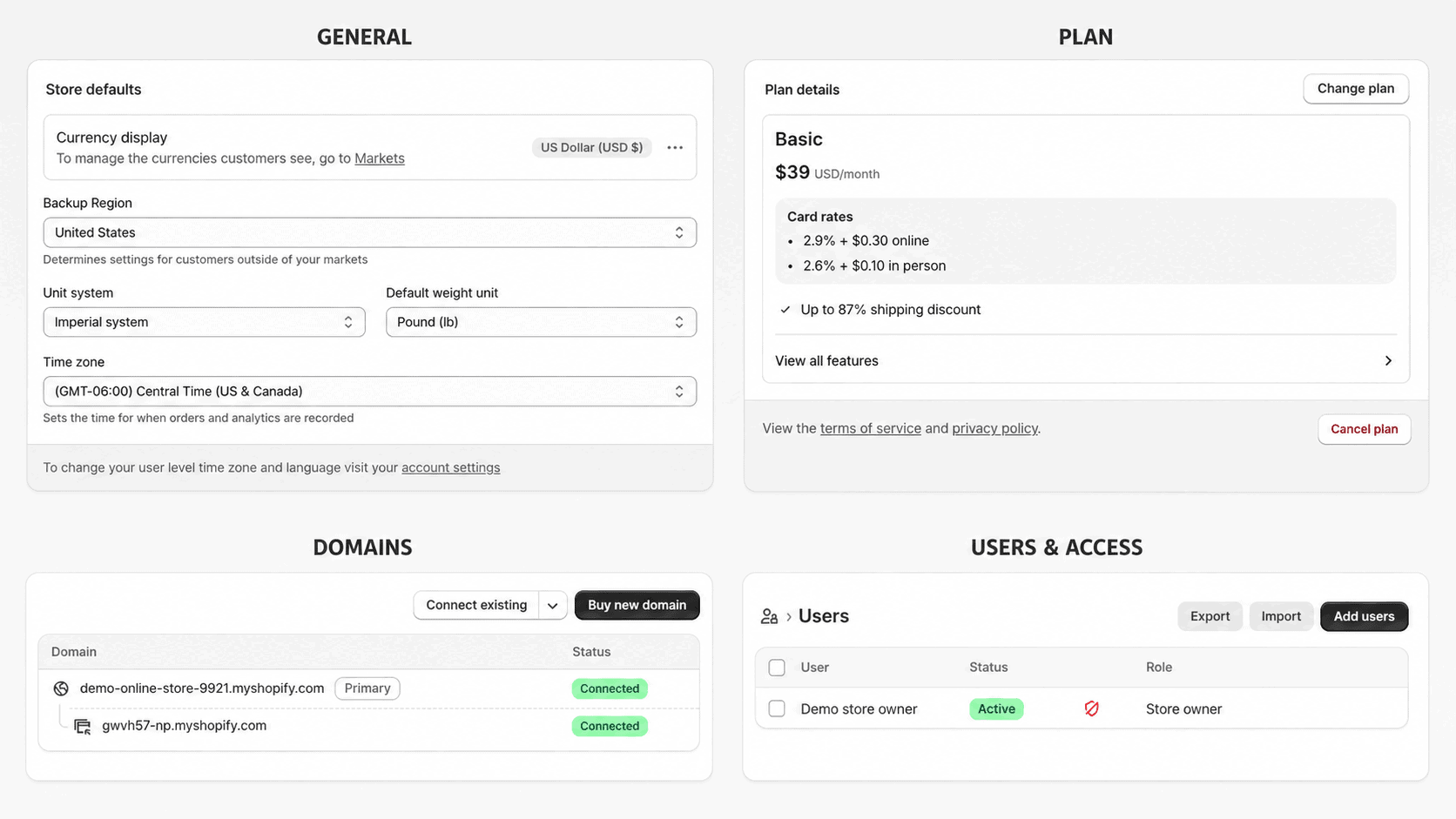
- Basic currently costs $39 per month with monthly billing or $29 per month when billed yearly for U.S. merchants.
- New users can currently try Shopify free for three days and then pay $1 per month for the first three months on eligible plans.
- The biggest drawbacks are additional app expenses, payment fees, less server-level control, and the effort required to customize a truly distinctive store.
- Shopify is best for sellers building a long-term ecommerce brand rather than a basic informational website.
Prefer to watch? This Shopify review video covers the platform’s features, pricing, advantages, drawbacks, and who Shopify is best for.

Review and pricing details verified October 14, 2026, for U.S. merchants. Features, prices, payment rates, and promotions can change. Confirm the final terms on Shopify’s official pricing page.
Shopify Review Summary and Rating
| Category | WP Cupid Rating | Summary |
|---|---|---|
| Ease of use | 4.7/5 | Beginner-friendly dashboard with a guided setup process |
| Ecommerce features | 4.9/5 | Excellent inventory, checkout, order, shipping, and selling tools |
| Store design | 4.5/5 | Professional themes and flexible sections, but advanced changes take work |
| AI tools | 4.6/5 | Useful store generation, content, image, analysis, and admin assistance |
| Value | 4.4/5 | Strong core value, although apps and payment costs can accumulate |
| Support | 4.3/5 | 24/7 live chat on core plans with stronger support on higher plans |
| Overall | 4.7/5 | One of the strongest all-around choices for building an online store |
The rating reflects Shopify as an ecommerce platform, not as a general-purpose website builder. A less expensive builder can be enough for a brochure website, portfolio, or simple service-business site. Shopify earns its higher rating because its entire system is designed around selling, fulfilling orders, and managing a commerce business.
What Is Shopify?
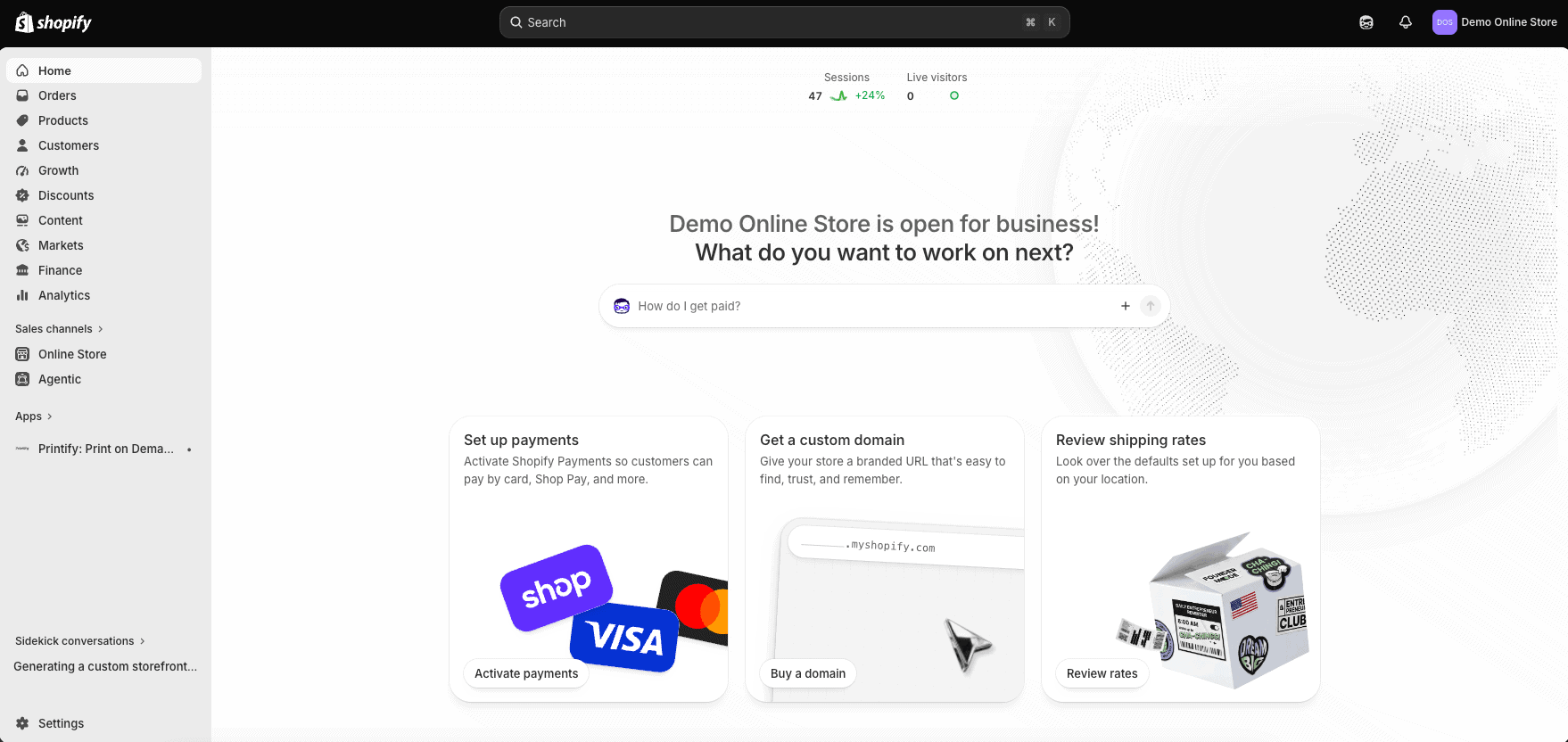
Shopify is a cloud-hosted commerce platform that lets you create an online store and manage products, inventory, customers, orders, payments, shipping, discounts, marketing, analytics, and in-person sales. Because Shopify hosts the platform, you do not need to install ecommerce software, manage server updates, or purchase a separate SSL certificate.
You can sell through your Shopify website, social channels, online marketplaces, the Shop app, in-person locations, and supported AI shopping experiences. This centralized approach is one of Shopify’s main advantages: products, inventory, orders, and customer information can be managed from one dashboard rather than several disconnected systems.
Shopify is also expandable. A new seller can begin with a free theme and the built-in features, then add apps, sales channels, custom code, advanced reporting, employee accounts, international tools, or point-of-sale features as the business grows.
Who Is Shopify Best For?
- Beginners who want a guided way to build their first ecommerce website
- Product brands that want control over their domain, design, customer journey, and marketing
- Businesses selling physical products, digital products, subscriptions, services, or a combination
- Stores that sell online and in person and need synchronized inventory
- Sellers expanding to social media, marketplaces, international markets, or additional locations
- Established stores that need a platform capable of handling more products, traffic, staff, and operational complexity
Shopify is less suitable for someone who has no plan to sell online, wants a free permanent platform, or needs unrestricted access to the server and every part of the underlying software. It can also be unnecessary for a seller who wants only a few marketplace listings and does not intend to build an independent brand.
If you are still deciding what to sell, how orders will be fulfilled, or how much money to budget beyond the platform, begin with the complete guide to starting an online store. It covers product validation, costs, profit margins, fulfillment, store setup, testing, launch, and customer acquisition.
Getting Started and Ease of Use
Shopify does a good job of turning a complicated ecommerce setup into a series of manageable steps. The dashboard guides you toward adding products, choosing a theme, creating pages, configuring payments, setting shipping rates, connecting a domain, reviewing policies, and testing the checkout.
The interface is clean, but a complete store still requires real work. Product photography, descriptions, collections, navigation, shipping rules, taxes, policies, email settings, and test orders all need attention. Shopify removes much of the technical burden; it does not make product strategy or store preparation automatic.
For a complete walkthrough, follow the step-by-step Shopify store tutorial. It covers the important setup tasks in the order a beginner should complete them.
Shopify Website Builder and Themes
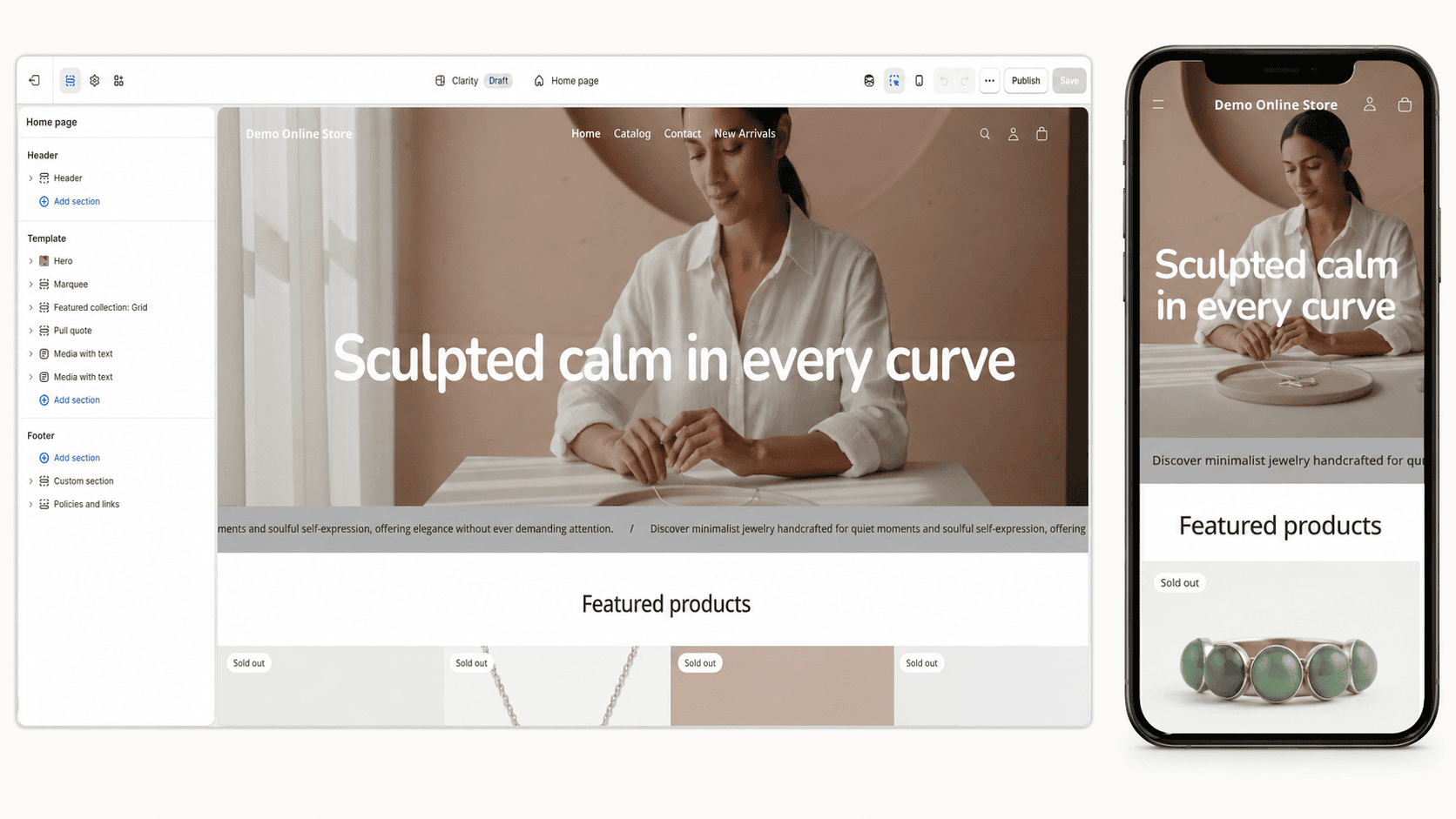
Shopify’s online store editor uses sections and blocks. You can rearrange homepage content, feature products and collections, add banners, change fonts and colors, edit menus, and create supporting pages without writing code. Themes are responsive, so the storefront adapts to desktop, tablet, and mobile screens.
The free themes are strong enough for many new stores. Paid themes can provide more layouts, merchandising options, and built-in features, but a premium theme is not required to launch. Starting with a free theme also makes it easier to determine which features you actually need before spending more money.
The limitation is that creating a highly distinctive design can take more time than the editor first suggests. Advanced layouts may require custom Liquid, CSS, generated theme blocks, a page-builder app, or help from a Shopify developer. The theme remains customizable, but it is not unlimited drag-and-drop design freedom.
For practical inspiration before customizing a theme, examine these successful Shopify store examples. Focus on how each store communicates its products, organizes navigation, answers customer questions, and creates trust rather than copying its design.
Shopify AI Tools
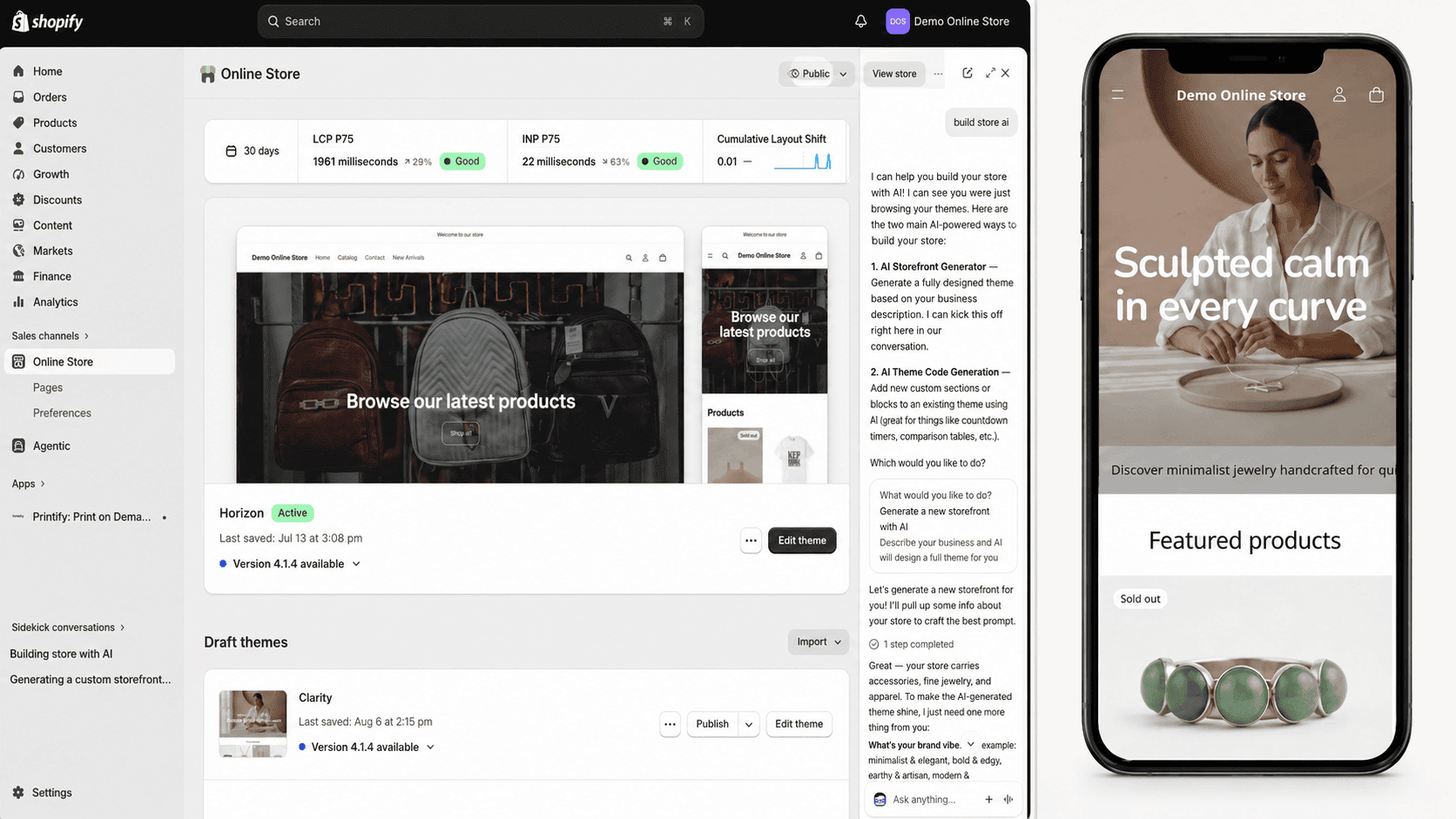
Shopify now includes several AI tools rather than treating AI as a separate add-on. The AI Store Builder can generate personalized store designs from a short business description. Shopify Magic can assist with product descriptions, written content, images, theme generation, and custom theme blocks. Sidekick works inside the admin to answer commerce questions, analyze store information, create content, and help complete supported tasks.
These tools are most useful for eliminating the blank page and speeding up routine work. They can produce a starting design, draft product copy, adjust an image, or help locate information in the dashboard. They should not be trusted without review. Product claims, pricing, policies, branding, accessibility, SEO copy, and generated images still need a human accuracy check.
My practical view is that Shopify’s AI features make the platform easier and faster, but the ecommerce foundation is still the main reason to choose it. AI can shorten setup time; it cannot validate demand, choose profitable products, create a trustworthy brand, or bring customers to the store by itself.
The complete Shopify AI Store Builder review shows what the prompt-based builder generates, where it saves time, what still requires manual work, and whether it provides a useful starting point for a real store.
Ecommerce and Inventory Features
Shopify provides the selling tools, but you still need a product idea with real customer demand and workable margins. My Shopify product-ideas guide compares 30 beginner-friendly possibilities and explains how to validate an idea before building the catalog.
Strong product photography helps customers understand what they are buying and makes a Shopify storefront feel more trustworthy. My Shopify product-photography guide explains the essential shots, beginner equipment, editing workflow, and image optimization steps.
Shopify is strongest when you move beyond website design and begin operating the store. You can manage unlimited products, variants, collections, inventory locations, purchase orders, transfers, customer profiles, discounts, gift cards, abandoned checkouts, returns, refunds, shipping, tax settings, and reporting.
Products can be organized into manual or automated collections. Inventory updates as orders are placed, and supported sales channels can keep quantities synchronized. This matters for sellers who would otherwise risk overselling the same stock on a website, marketplace, social channel, and physical counter.
Not every specialized feature is built in. Subscriptions, advanced bundles, loyalty programs, complex product options, wholesale workflows, and specialized fulfillment often require an app or a higher plan. Check Shopify’s native features before installing anything, because unnecessary apps create monthly expenses and can complicate the store.
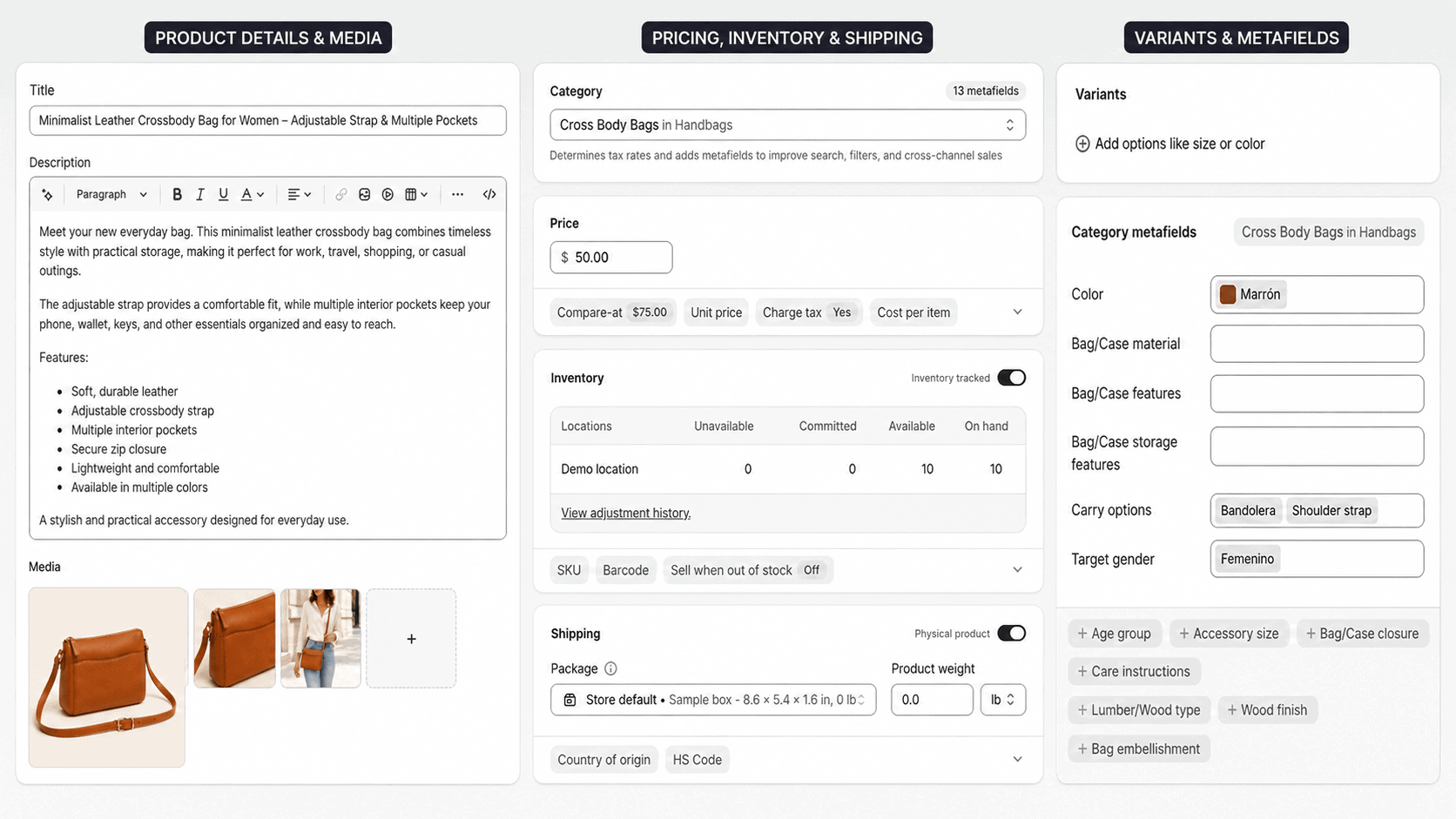
Shopify can also support downloads, templates, ebooks, courses, creative assets, and other nonphysical offers. My guide to selling digital products on Shopify explains the additional delivery, product-page, licensing, and testing steps these products require.
Checkout, Payments, and Transaction Fees
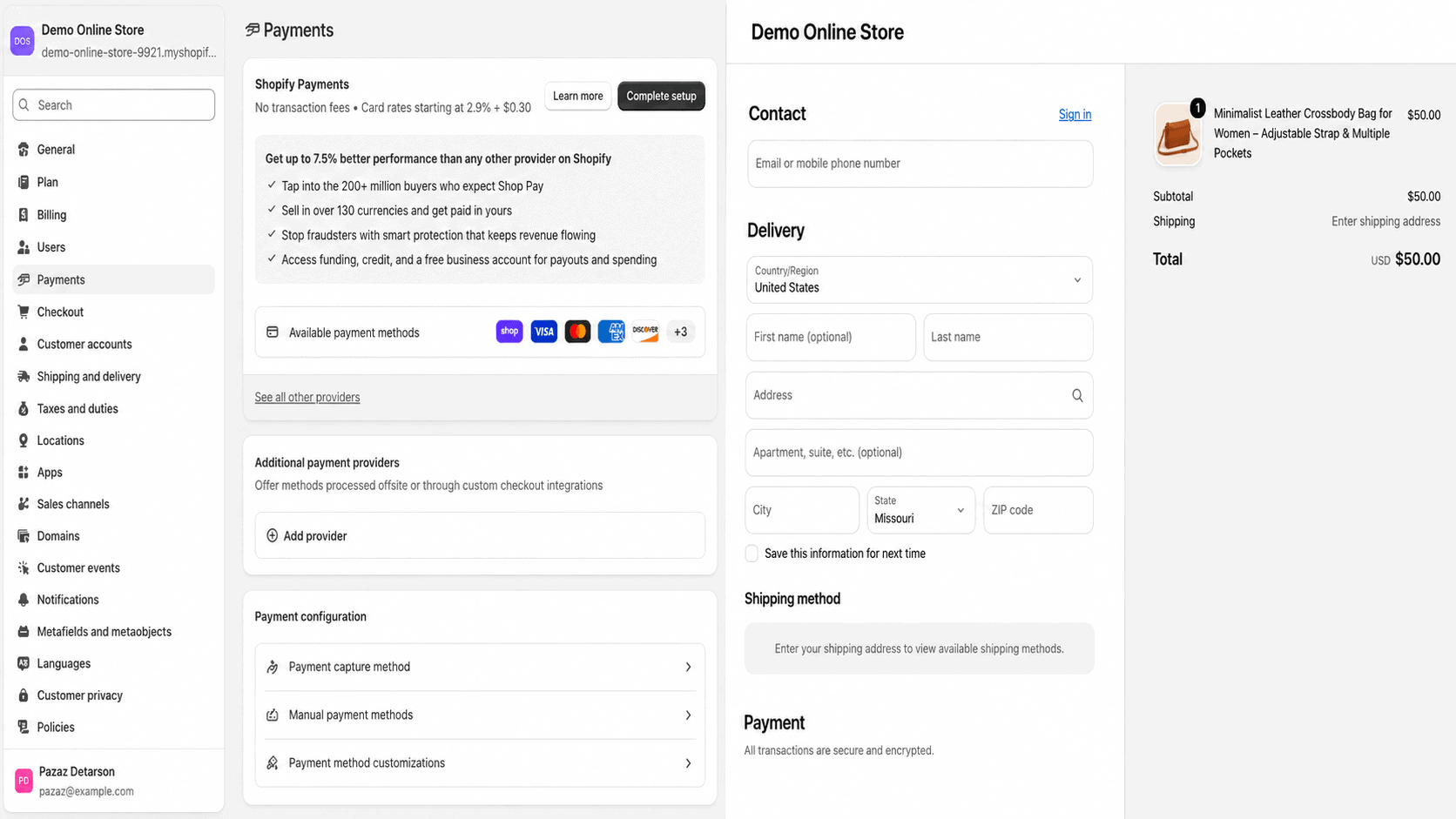
Shopify includes its own checkout and offers Shopify Payments in supported countries. Shopify Payments removes the need to connect a separate merchant account and supports major payment methods. Shopify does not charge its additional third-party transaction fee on eligible orders processed through Shopify Payments, although standard payment-processing charges still apply.
If you use an outside payment provider, Shopify currently lists an additional third-party transaction fee of 2% on Basic, 1% on Grow, and 0.6% on Advanced. Payment rates can vary by plan, card type, country, and method, so review the rates shown in your Shopify admin before setting product prices.
The checkout is polished and trusted, but the cost structure deserves attention. A low-margin business should estimate subscription, processing, app, shipping, return, and advertising costs before choosing a plan. Revenue alone does not determine whether an online store is profitable.
Marketing, SEO, and Sales Channels
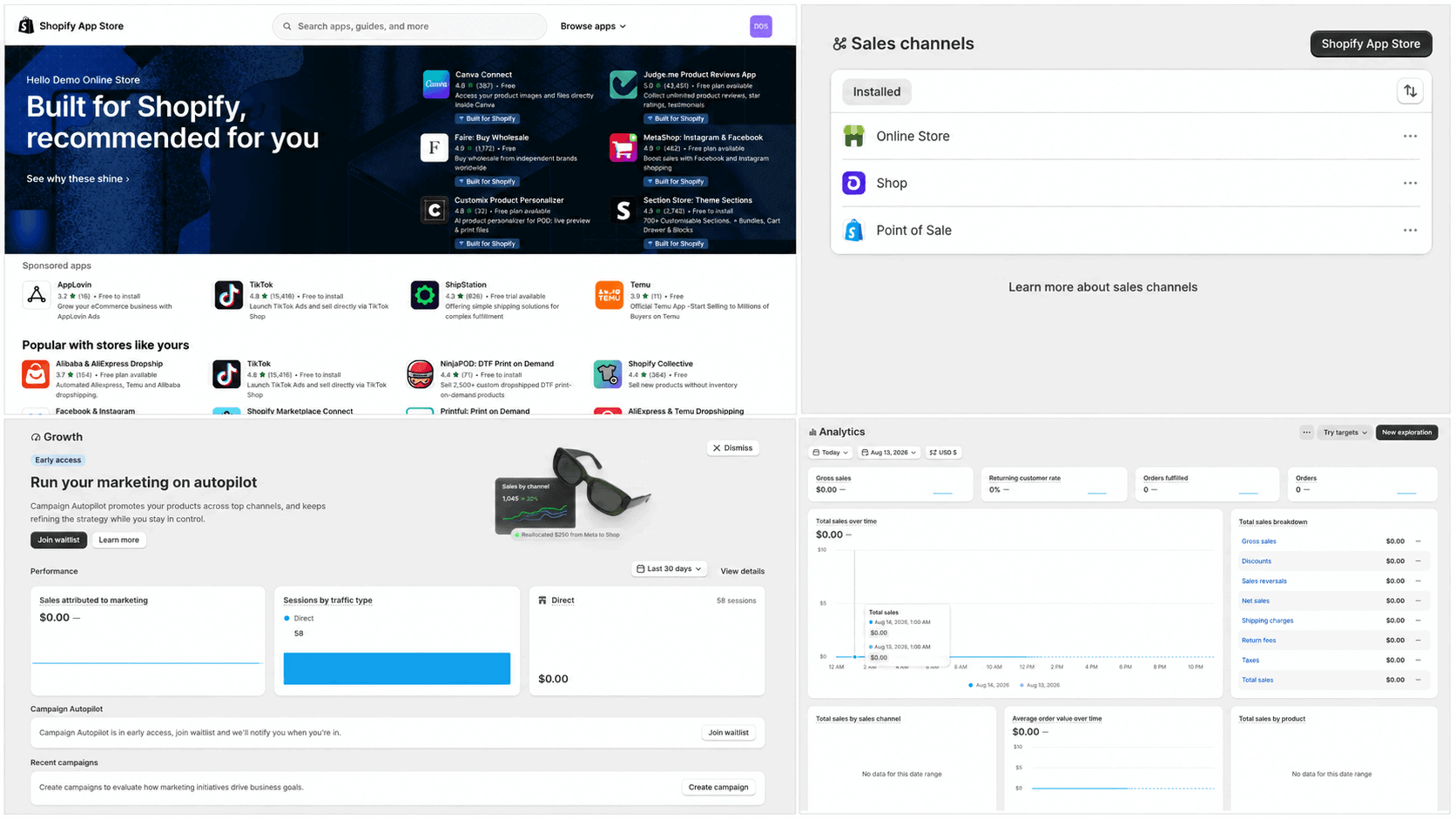
Shopify provides editable page titles, meta descriptions, URLs, redirects, image alt text, an automatically generated sitemap, blogging, customer segments, discount codes, email tools, chat, marketing automations, and analytics. These features provide a solid technical foundation for ecommerce SEO and customer retention.
For step-by-step help, follow my Shopify SEO guide for beginners to research keywords, optimize product and collection pages, improve internal links, complete technical checks, and measure performance in Google Search Console.
The platform does not guarantee traffic. If Pinterest fits your products, my Shopify Pinterest guide explains how to connect your catalog, create Product Pins, and verify tracking. A new store still needs keyword research, useful category and product content, original images, links, email growth, social distribution, advertising, partnerships, or another acquisition strategy. This is one of the most important expectations to set before subscribing: Shopify helps you operate and convert a store, but you remain responsible for attracting the right visitors.
If your store is ready to receive visitors, follow my guide to getting your first sale on Shopify to strengthen your offer, reach a qualified audience, plan your promotion, and measure the path from product view to purchase.
Multichannel support is a major advantage. Depending on eligibility and location, Shopify can connect products and orders with social platforms, marketplaces, the Shop app, point of sale, and other channels. Centralized order and inventory management becomes increasingly valuable as the business expands.
Shopify Apps and Integrations
Shopify’s app ecosystem is one of the largest in ecommerce. Apps can extend reviews, email, subscriptions, dropshipping, print on demand, accounting, customer service, international selling, page design, product sourcing, and fulfillment.
The advantage is flexibility. The disadvantage is recurring cost and dependence on third parties. A store using five paid apps can spend more on apps than on its Shopify plan. Apps can also add scripts, create overlapping features, or require cleanup when removed.
Begin with the smallest practical app stack. Install an app only when it solves a specific business problem, check its permissions and recent reviews, test the store after installation, and periodically remove tools that no longer provide measurable value.
If you want to sell customized products without purchasing bulk inventory, the Shopify print-on-demand guide explains provider selection, app connections, product creation, pricing, samples, order flow, and launch preparation.
Hosting, Security, and Reliability
Shopify plans include cloud hosting, unlimited bandwidth, and an SSL certificate for connected domains. Shopify manages infrastructure, platform updates, and core security responsibilities, which removes several technical jobs that a self-hosted store owner would otherwise handle.
This managed approach is valuable for a store that cannot afford to troubleshoot hosting during a sales campaign. The tradeoff is reduced server-level control. You cannot move the complete Shopify software to another host, and some technical customizations must work within Shopify’s themes, APIs, checkout rules, and plan limitations.
Merchants still have security responsibilities. Use a unique password, enable two-step authentication, limit staff and app permissions, protect domain and email accounts, review suspicious orders, and maintain accurate recovery information.
Shopify Customer Support
Shopify currently includes 24/7 live chat support on Basic and Grow, enhanced live chat on Advanced, and priority support on Plus. The Help Center, community, Shopify Academy, developer documentation, and partner directory provide additional ways to find answers.
Support quality can depend on the problem. Shopify can help with the platform and account, but a third-party theme, app, domain provider, payment gateway, or custom-code issue may need to be handled by that provider or a developer. Keeping a record of installed apps and recent changes makes troubleshooting easier.
Shopify Pricing in 2026
| Plan | Monthly Billing | Yearly Billing | Best For |
|---|---|---|---|
| Basic | $39/month | $29/month | Solo entrepreneurs and new online stores |
| Grow | $105/month | $79/month | Small teams that need up to five staff accounts |
| Advanced | $399/month | $299/month | International and higher-volume businesses |
| Plus | From $2,300/month | Contract-based | Complex and enterprise commerce |
Basic is the right starting point for most readers. Grow becomes useful when staff access, a lower third-party transaction fee, or its added benefits justify the higher subscription. Advanced is intended for businesses that need more staff access, live third-party shipping rates, regional customization, and greater operational capacity.
The subscription is not the total cost. Budget for payment processing, a custom domain, optional apps, themes, email service requirements, point-of-sale hardware or POS Pro, product costs, shipping, returns, and marketing. See the complete Shopify pricing and fee breakdown before choosing a plan.
Before signing up, read the Shopify free trial guide to understand the current offer, what you can build during the trial, and what happens when it ends.
Shopify Pros and Cons
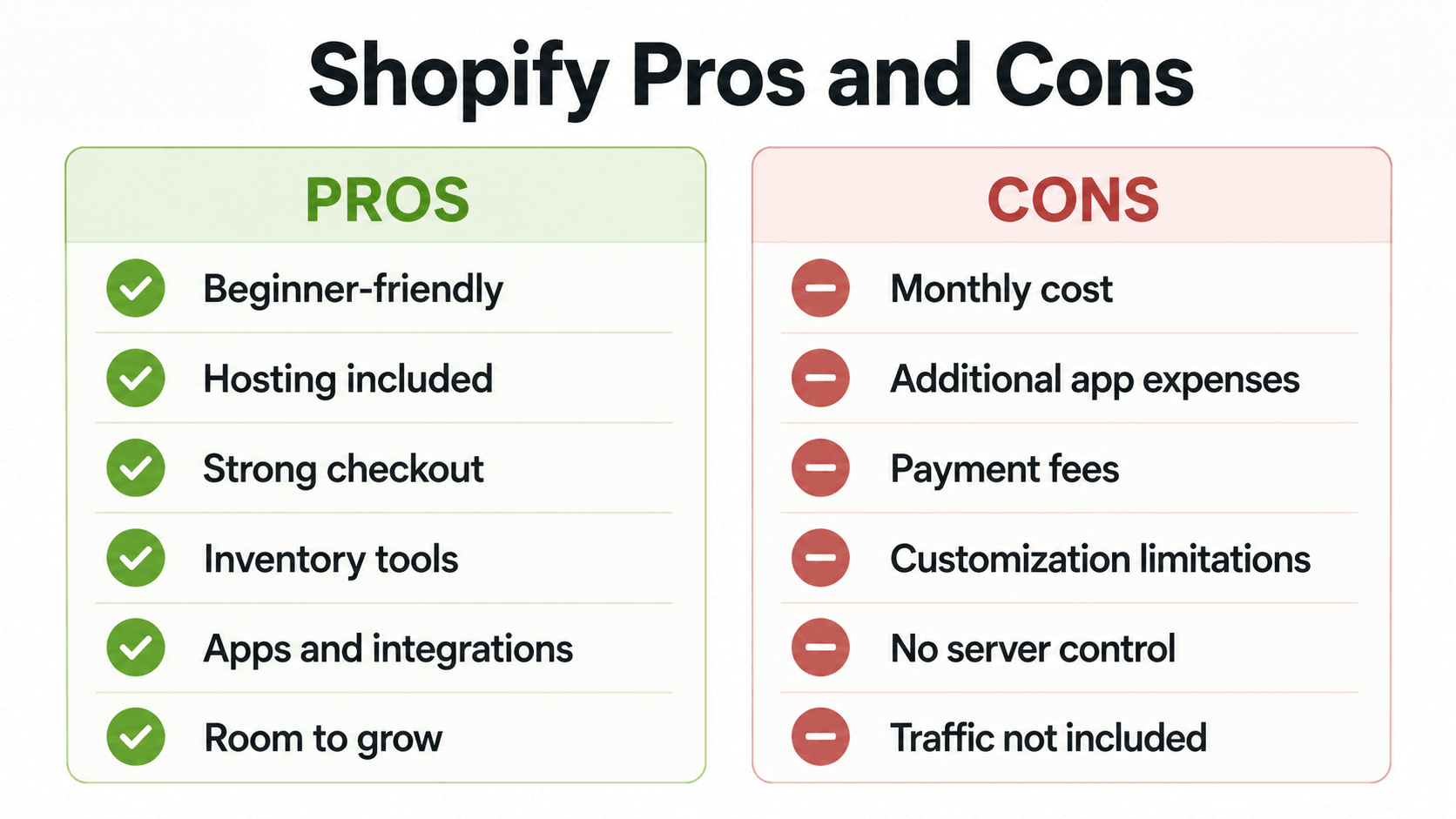
Shopify pros
- Beginner-friendly setup and store-management dashboard
- Secure hosting and SSL included
- Strong checkout, product, inventory, order, shipping, and analytics tools
- Professional free and paid themes
- Built-in AI Store Builder, Shopify Magic, and Sidekick tools
- Large app and integration ecosystem
- Online, social, marketplace, international, and in-person selling options
- Can support a business from its first product through much larger operations
Shopify cons
- Ongoing subscription and payment-processing costs
- Paid apps and premium themes can raise the real monthly expense
- Additional transaction fees can apply when using an outside payment provider
- Advanced design changes may require code, an app, or a developer
- No access to move the full hosted platform to another web host
- Building a store does not provide an automatic audience or guaranteed sales
If you decide to use Shopify, review these Shopify mistakes to avoid before launch so product, design, app, checkout, shipping, and maintenance problems do not undermine your store.
Shopify Alternatives
The right alternative depends on why Shopify is not a fit. WooCommerce provides greater hosting and code control for WordPress users, but requires more maintenance.
If WordPress is one of the alternatives you are considering, my Shopify vs WordPress comparison explains the differences in ecommerce, publishing, pricing, customization, SEO, maintenance, and ownership.
Read my complete Shopify vs WooCommerce comparison for a closer look at their pricing, setup, design options, checkout, SEO capabilities, ownership, security, maintenance, and scalability.
Etsy provides access to a marketplace audience for eligible creative products, but gives the seller less brand control and charges marketplace fees. General website builders can be simpler for service websites with only light selling needs.
If an established marketplace is part of your decision, the Shopify vs Etsy comparison explains the differences in audience, ownership, branding, fees, product rules, marketing, and long-term business control.
Do not choose solely by the advertised starting price. Compare the complete cost of payments, required extensions, hosting, themes, transaction fees, maintenance, and the time needed to operate each platform.
If you choose Shopify for holiday selling, use my Shopify Black Friday checklist to prepare the offer, inventory, storefront, checkout, marketing, and fulfillment.
Shopify Frequently Asked Questions
Is Shopify worth it for beginners?
Yes. Shopify is worth it for beginners who are serious about selling online. The guided dashboard, included hosting, themes, checkout, inventory tools, and support remove many technical barriers. Beginners still need to prepare products, shipping, policies, marketing, and store content.
How much does Shopify cost in 2026?
For U.S. merchants, Basic currently costs $39 per month or $29 per month with annual billing. Grow is $105 monthly or $79 with annual billing, and Advanced is $399 monthly or $299 with annual billing. Additional costs can include processing, apps, themes, domains, and marketing.
Can I try Shopify for free?
Shopify currently offers a three-day free trial without requiring a credit card to start. Eligible new users can then pay $1 per month for the first three months. Offers can change, so confirm the terms before joining.
Does Shopify take a percentage of sales?
Payment-processing fees apply when customers pay online or in person. Shopify can also charge an additional third-party transaction fee when you use an outside payment provider. The fee depends on the plan and payment setup.
Do I need separate hosting for Shopify?
No. Shopify includes ecommerce hosting, unlimited bandwidth, and SSL. You can purchase or connect a custom domain, but you do not need a separate web hosting account.
Can Shopify build a store with AI?
Yes. Shopify’s AI Store Builder can generate personalized store designs from a business description. Shopify Magic and Sidekick can also help with content, images, theme blocks, analysis, and supported admin tasks. You must still review and complete the store before publishing.
Can I use my own domain with Shopify?
Yes. You can purchase a domain through Shopify, connect a domain registered elsewhere, or transfer an eligible domain. The custom domain cost is separate from the Shopify plan.
Is Shopify good for SEO?
Shopify provides a solid ecommerce SEO foundation with editable titles, descriptions, URLs, redirects, alt text, mobile-ready themes, blogging, and a sitemap. Rankings still depend on search intent, content quality, site structure, authority, competition, and ongoing promotion.
If you are evaluating Shopify specifically for supplier-direct selling, read my Shopify dropshipping guide for the complete workflow from supplier selection and pricing through fulfillment, marketing, and cash-flow planning.
Final Verdict: Is Shopify Worth It in 2026?
Shopify is worth it for a beginner who wants an easier route into ecommerce and for an established seller who needs reliable infrastructure and room to expand. Its best qualities are not flashy: the checkout, inventory, orders, payments, hosting, integrations, and sales channels work together in a way that reduces operational friction.
The platform is not inexpensive once apps and processing are included, and it will not create demand for an unproven product. Start lean, use a free theme, limit apps, validate the business, and upgrade only when a feature has a clear financial or operational benefit.
Before removing the storefront password, work through the complete Shopify store launch checklist to verify products, mobile usability, payments, taxes, shipping, policies, notifications, analytics, checkout, fulfillment, cancellations, refunds, and customer support.
Start Shopify’s free trial and build a test version of your store before committing. Use the trial to evaluate the editor, product workflow, shipping settings, and dashboard with your own business—not just a sample store.
If you plan to build your store around one flagship item, my one-product Shopify store guide explains how to validate the offer, calculate profit, structure the pages, and test the complete customer journey.

- How to Connect Shopify to Pinterest and Sell Products - October 23, 2026
- Shopify Black Friday Checklist: Prepare Your Store for BFCM 2026 - October 23, 2026
- How to Build a One-Product Shopify Store (Step by Step) - October 23, 2026

Leave a Reply
Want to join the discussion?Feel free to contribute!