
How to Sell Digital Products on Shopify: Step-by-Step Guide
Last Updated on October 23, 2026
Digital products can be attractive because there is no physical inventory to store, pack, or ship. That does not make the business automatic. You still need a useful product, clear licensing terms, reliable delivery, accurate tax settings, a persuasive product page, customer support, and a repeatable way to reach buyers.
This guide explains how to sell digital products on Shopify from idea validation through delivery and launch. It covers downloadable files, externally hosted content, pricing, policies, testing, marketing, and the mistakes that create refunds or support problems.
If you are still deciding what kind of business to build, begin with my guide to starting an online store. It explains validation, costs, fulfillment, platform selection, testing, and launch planning in order.
Key Takeaways
- Start with one narrow customer problem and one complete digital product instead of a large unfocused catalog.
- Shopify can sell downloadable files and access links, but you need a delivery app and must configure the product as non-physical.
- Write the license, refund terms, file requirements, access rules, update policy, and support boundaries before launch.
- Calculate payment costs, app expenses, support time, taxes, refunds, marketing, and content-production costs before choosing a price.
- Complete a real test of payment, delivery, email, download permissions, mobile usability, and customer instructions.
Workflow and app details verified October 14, 2026. Shopify features, app limits, tax tools, prices, and promotional terms can change. Confirm current settings inside your own Shopify admin and obtain professional tax or legal advice when appropriate.
What Counts as a Digital Product?
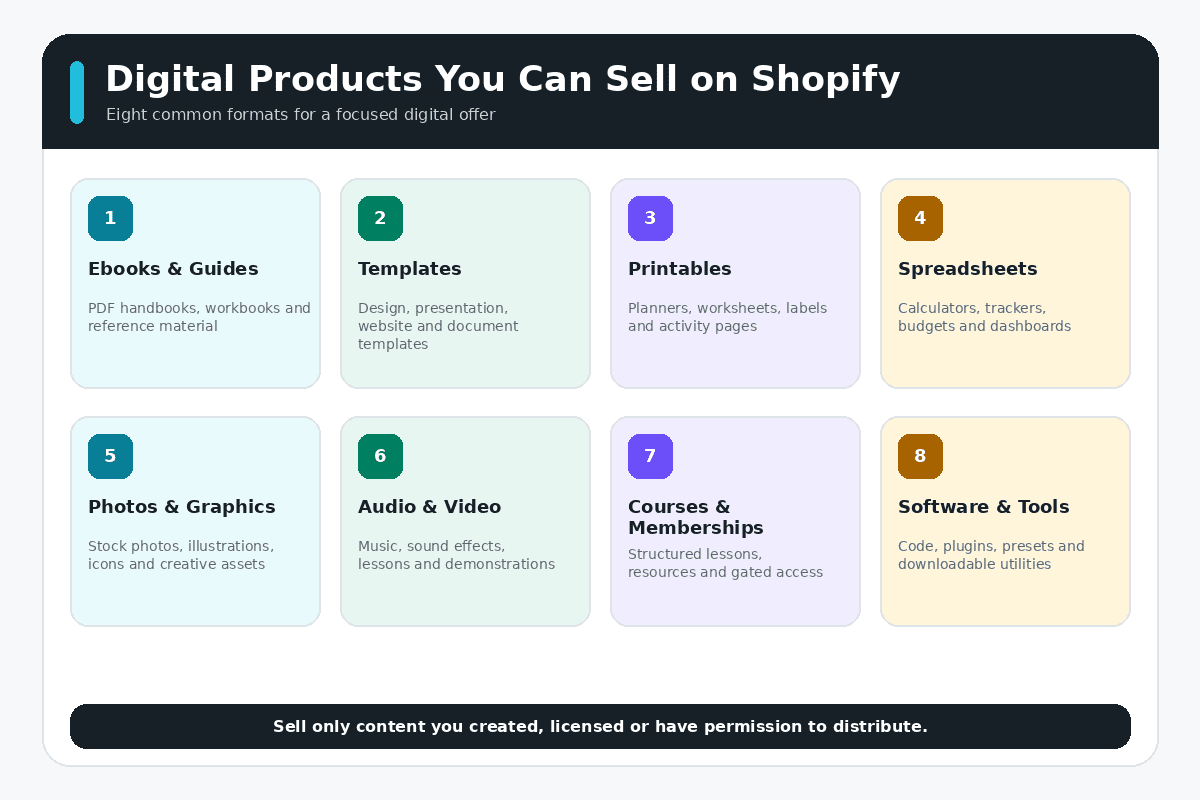
A digital product is delivered electronically instead of being shipped as a physical item. The customer might download a file, open a protected resource, access a course, use a template, or receive a license for a creative asset.
- Ebooks and guides: focused instructions, reference manuals, workbooks, or research summaries.
- Templates: spreadsheets, planners, checklists, presentations, proposals, or design systems.
- Printables: wall art, learning activities, labels, trackers, invitations, or craft patterns.
- Creative assets: photographs, video clips, presets, fonts, icons, illustrations, music, or sound effects.
- Educational products: recorded lessons, workshops, resource libraries, or guided programs.
- Technical products: code, themes, extensions, automations, data files, or documentation.
- Access products: memberships, paid communities, hosted tools, Notion resources, or appointment links.
For a wider list of physical, digital, subscription, and service options, see 30 product ideas to sell on Shopify. The strongest idea is not necessarily the most popular category; it is one you can create legally, explain clearly, support reliably, and sell at workable economics.
Is Shopify Good for Selling Digital Products?
Shopify is a practical choice when digital products are part of a commerce-focused business. It provides the storefront, product catalog, checkout, payments, discounts, customer records, orders, analytics, and app ecosystem in one hosted system. You can also combine digital and physical products in the same store.
The tradeoff is that Shopify does not turn an idea into a finished product or create demand. Digital delivery also relies on an app, and advanced licensing, subscriptions, course access, memberships, or software fulfillment may require a specialized paid solution. My complete Shopify review explains the broader strengths and limitations of the platform.
If you are ready to build while following the steps below, you can create your Shopify account here. This is an affiliate link, so I may earn a commission at no additional cost to you.
How Much Does It Cost to Sell Digital Products on Shopify?
Your budget can include the Shopify plan, payment processing, a domain, a premium theme, delivery or subscription apps, email marketing, design tools, professional services, advertising, refunds, taxes, and the time required to create and support the product. Shopify’s own Digital Products app is free, but a more specialized app may charge monthly or usage-based fees.
Review the current plans and operating expenses in my Shopify pricing guide. If you want to explore the admin before committing, the Shopify free trial guide explains the current signup process and what to verify before selecting a paid plan.
How to Sell Digital Products on Shopify Step by Step
1. Choose One Specific Customer and Result
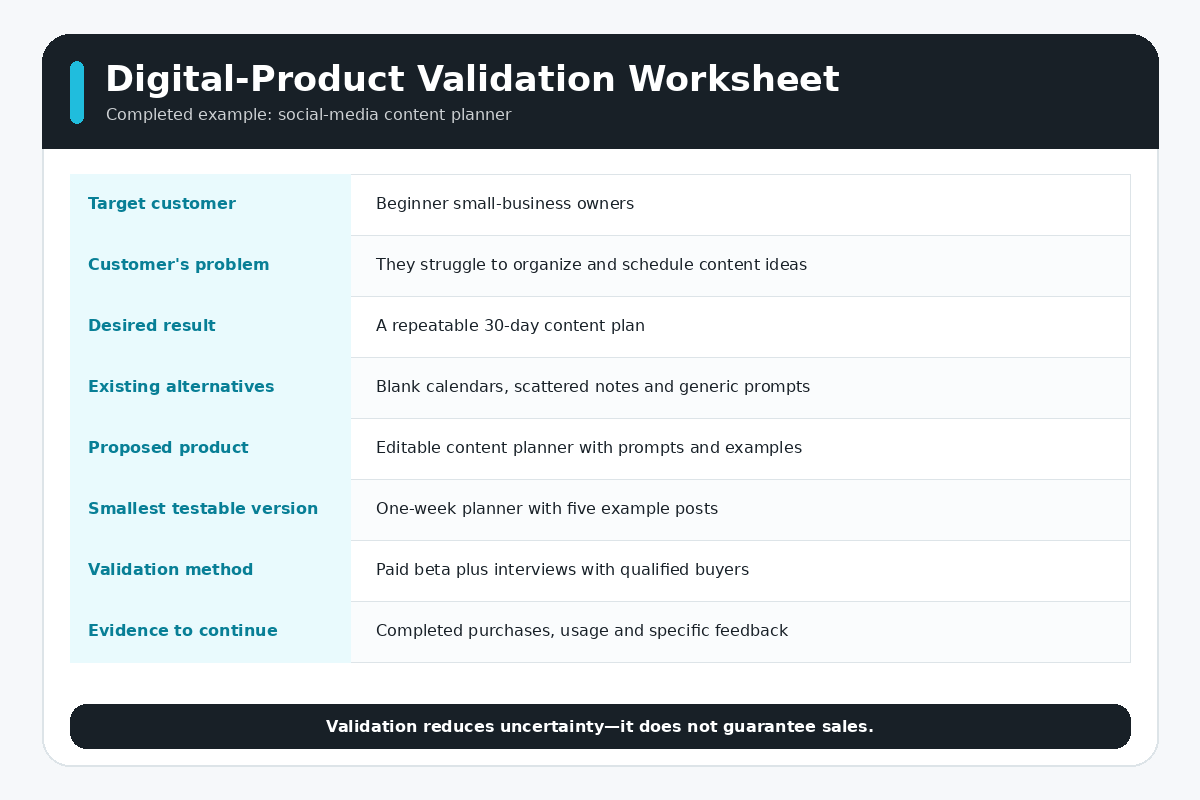
Begin with a narrow sentence: “I help [specific customer] achieve [specific result] with [digital product] because [meaningful difference].” A generic printable, ebook, or template has little reason to win against free information and established competitors.
Interview likely buyers, study recurring questions, review competing products, inspect search demand, and identify where existing options are too broad, confusing, outdated, unattractive, or difficult to use. Avoid collecting compliments as proof. Look for evidence that people already spend time or money solving the problem.
2. Validate the Offer Before Building Everything
Create the smallest version that can demonstrate the result: a sample chapter, limited template, prototype lesson, preview file, live workshop, or small paid beta. Define what evidence would justify continuing, such as qualified waitlist signups, completed purchases, acceptable support volume, or repeat interest.
Do not exaggerate results or sell access you cannot deliver. Validation reduces uncertainty; it does not guarantee success. The product-selection and customer-research process in my Shopify first-sale guide can help you turn an idea into a testable offer.
3. Create the Product and Delivery Package
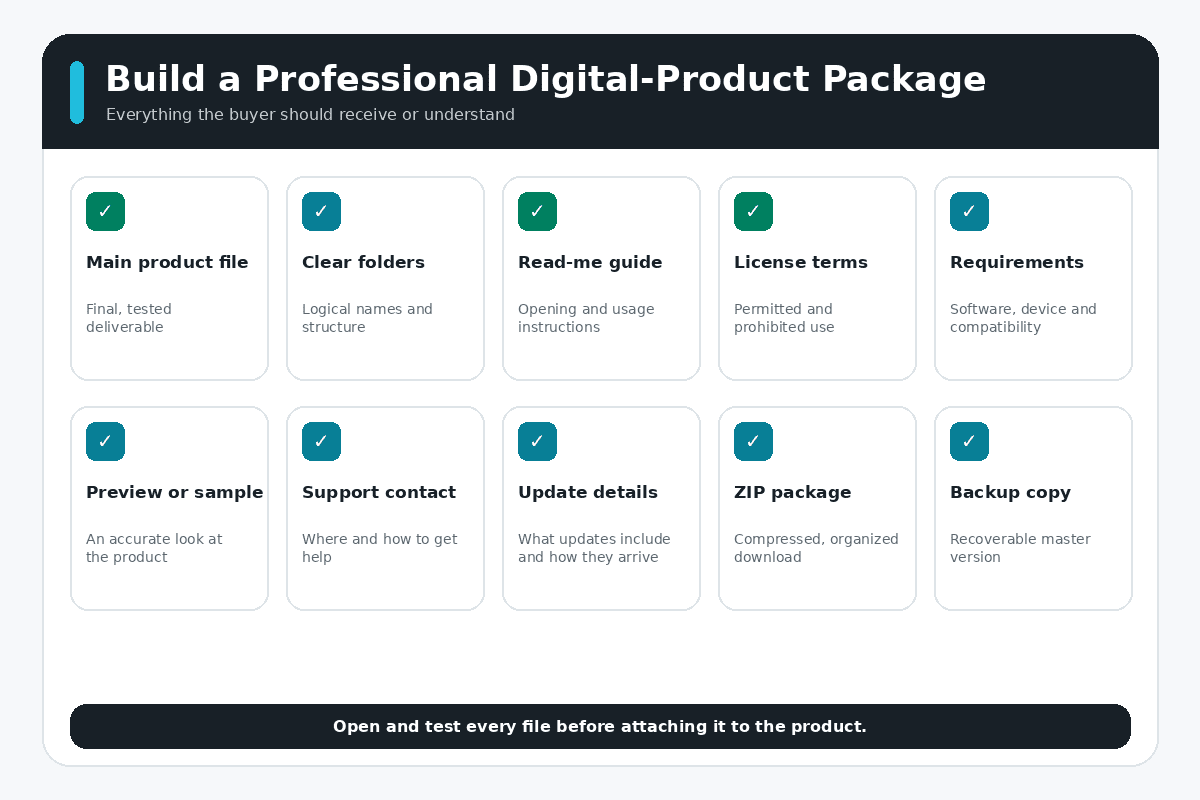
Produce the product in the format the customer actually needs. Use clear file names, sensible folder structure, readable typography, accessible color contrast, working formulas, compressed media, and instructions that assume the buyer did not create the product.
- Include a start-here file or short onboarding page.
- List compatible software, devices, file types, and required skill level.
- Explain how to duplicate, edit, install, import, print, or access the product.
- Provide the license, permitted uses, restrictions, and attribution requirements.
- State whether updates are included and for how long.
- Keep an archived master copy and a version log.
Only sell material you created, licensed, or have permission to distribute. Fonts, photographs, audio, stock assets, code, and templates can each carry separate commercial-use restrictions. A license to use an asset in your own design does not always include the right to redistribute the source file.
4. Create the Shopify Store
Set up the store name, domain, theme, navigation, payments, taxes, policies, contact details, email sender information, analytics, and basic branding. If you want a complete walkthrough of the dashboard and launch settings, follow my step-by-step Shopify store tutorial.
Shopify’s AI tools can help generate a starting design, but they do not complete the product, positioning, policies, delivery workflow, tax setup, or testing. The Shopify AI Store Builder review shows what the tool handles and what still requires manual work.
5. Add the Product and Remove Shipping
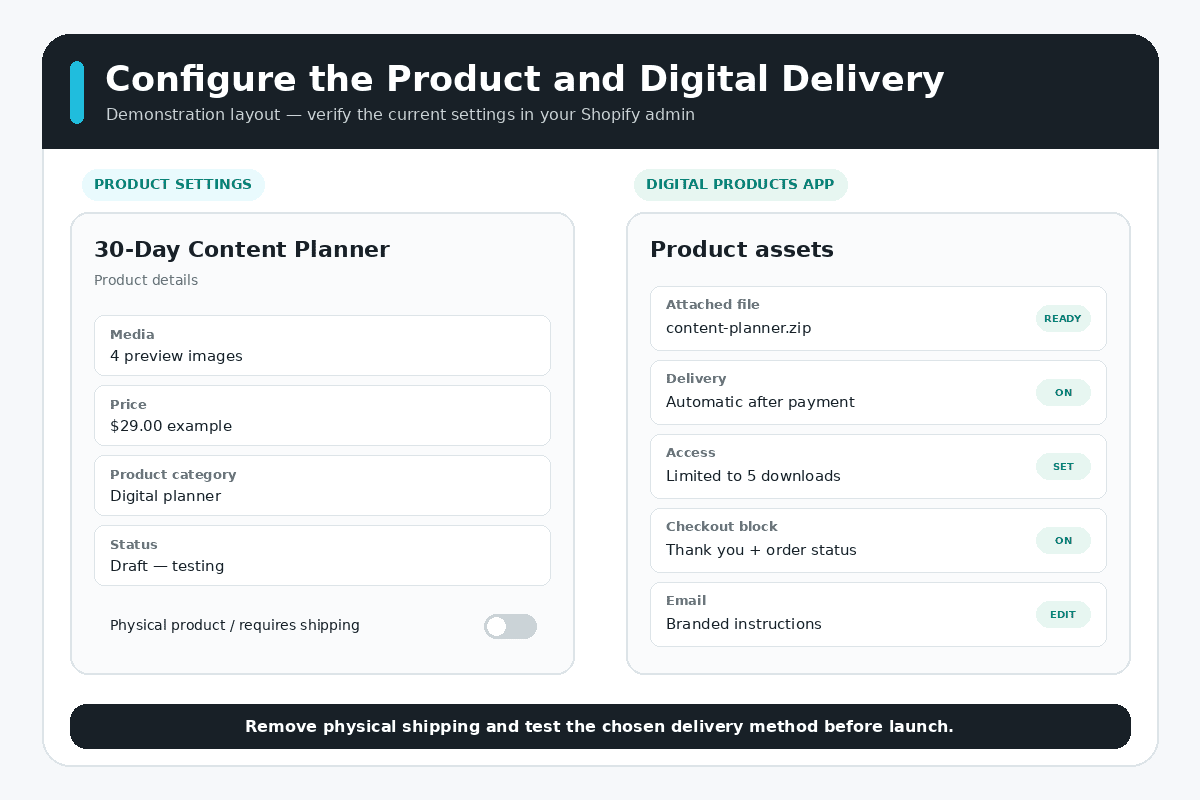
In Shopify, create a new product and add the title, description, media, price, product category, status, and any relevant variants. Because the item is digital, deactivate the physical-product or shipping requirement so the customer is not asked to select a shipping method for a download-only order.
If the order includes both digital and physical items, test the complete mixed-order workflow. Digital and physical fulfillment can behave differently, and you do not want a download delayed because a physical item has not shipped.
6. Install Shopify’s Digital Products App
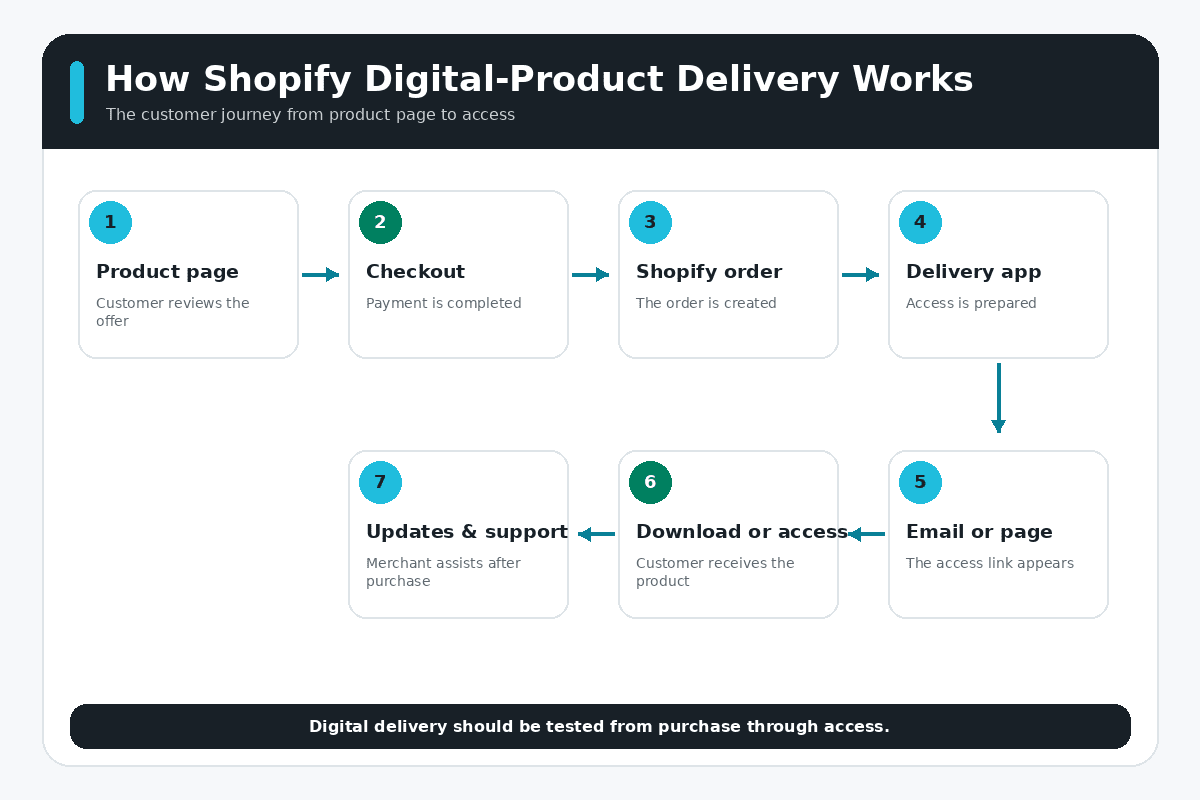
Install Shopify’s Digital Products app from the Shopify App Store. The app can attach uploaded files, supported externally hosted links, or both to a product. Shopify currently describes uploaded files and external links collectively as product assets.
Shopify’s Digital Products documentation currently says that each variant can hold multiple assets, access can be unlimited or limited, and delivery can be automatic or manual. Check the current documentation before building around a specific file-size, provider, or checkout limitation.
7. Upload the File or Add a Supported Link
Use a file when the customer should receive a downloadable copy. Use a link when the content remains on a supported external platform, such as a course host, cloud document, scheduling page, video service, design file, or workspace. A product can include both.
When selling a link, confirm its permissions on the destination platform. Shopify can deliver the URL, but it does not control who can open the content there. Moving, deleting, renaming, or restricting the destination can break access for buyers.
8. Configure Delivery and Access Limits
Choose automatic delivery for a finished download that should be sent after successful payment. Use manual delivery when you must review, customize, approve, or combine the product with another fulfillment step.
Decide whether access should be unlimited or limited. Too little access can create unnecessary support requests when a buyer changes devices or loses a file. Unlimited access may be inappropriate for certain licensed products or externally hosted resources. Explain the rule before purchase and make the support process clear.
You can also add the Digital Products block to eligible Thank you and Order status pages so customers can access the file or link after checkout. Customize the delivery email with your store name, support contact, instructions, and the next step.
9. Build a Product Page That Reduces Uncertainty
Digital products still need strong product visuals, such as cover images, interface previews, sample pages, mockups, or screenshots that demonstrate what buyers receive. Use the principles in my Shopify product-photography guide to create consistent, useful product imagery.
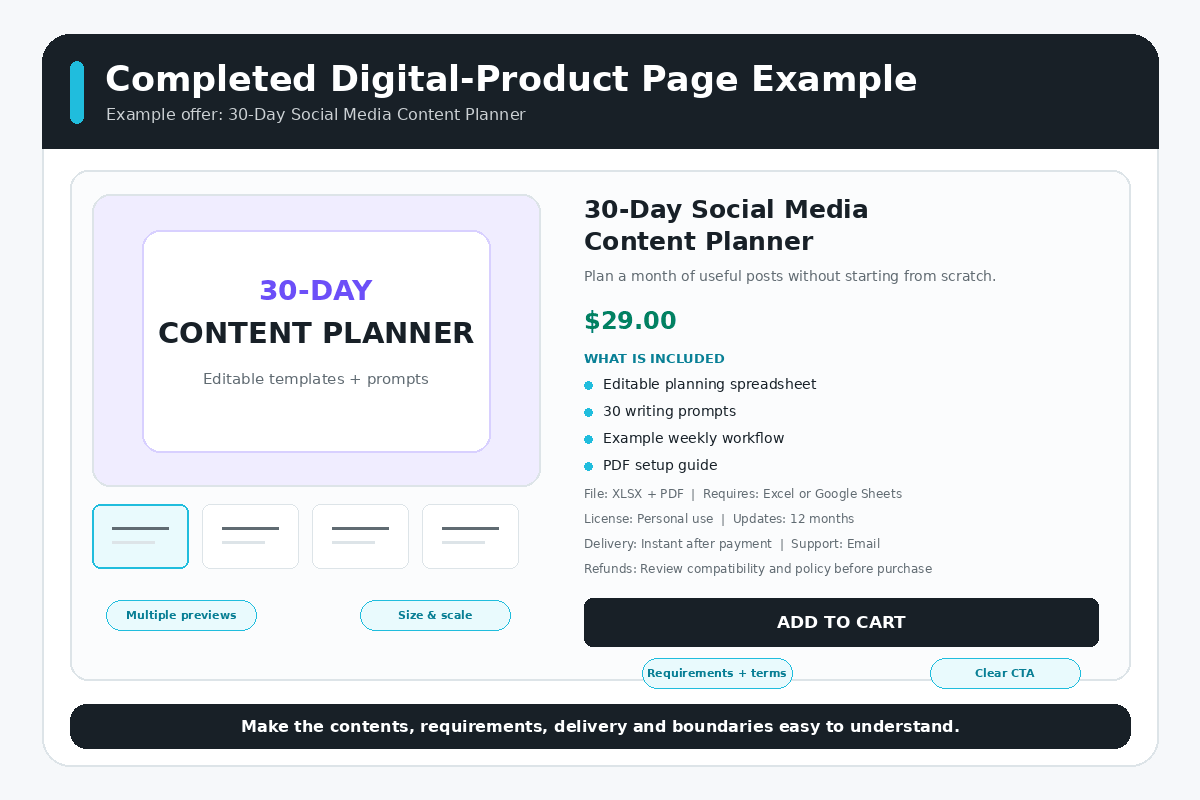
A digital product page needs more than a cover image. The buyer cannot pick up the item, so the page must make the contents, result, format, requirements, and boundaries tangible.
- A specific title that names the customer or result.
- A benefits-focused opening explaining what becomes easier or possible.
- An exact contents list with page, file, lesson, template, or asset counts.
- Original previews, screenshots, demonstrations, or sample pages.
- File types, software compatibility, dimensions, language, and skill requirements.
- License, access, update, support, and refund terms.
- Answers to predictable questions and objections.
- A clear purchase button and a visible support contact.
Study the positioning, photography, navigation, and trust lessons in these successful Shopify store examples. Apply the principles to your own product instead of copying another store’s design or claims.
10. Price the Product Using Complete Economics
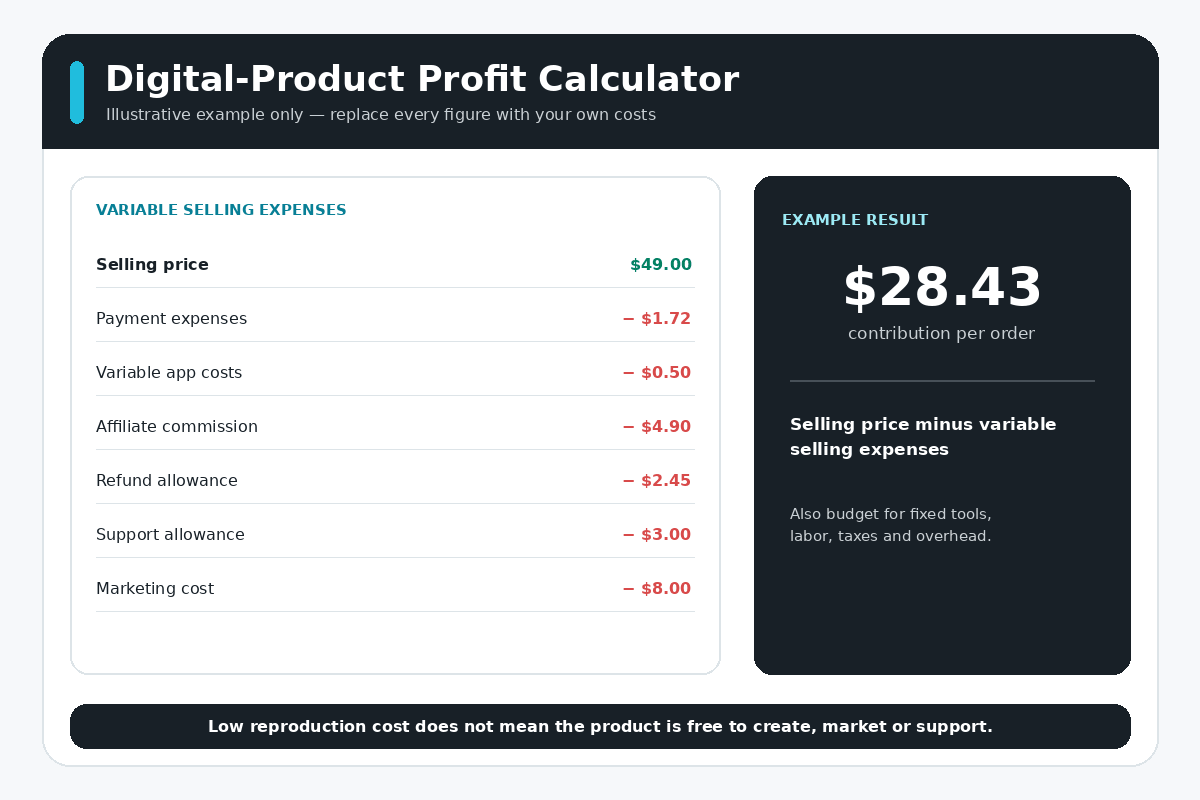
Digital products often have low reproduction costs, but they are not free to create or sell. Include research, writing, design, software, contractors, payment processing, app fees, advertising, affiliate commissions, taxes, refunds, support time, updates, and overhead.
Contribution per order = selling price − payment expenses − variable app costs − affiliate commissions − refund allowance − support allowance − marketing cost
Price according to the specific value, market, alternatives, license, depth, support, and positioning—not merely the number of pages or files. Test one clear offer before creating complicated tiers. If you add bundles, make the difference between versions obvious.
11. Write Policies for Digital Products
Your terms should explain delivery timing, file access, compatibility, permitted use, prohibited redistribution, intellectual-property ownership, updates, support, cancellations, and refunds. Do not assume that writing “no refunds” overrides consumer-protection law or payment-network requirements.
Make the terms visible before purchase and use plain language. Different locations can impose different rules for digital content, privacy, accessibility, subscriptions, taxes, and cancellation rights. Consult a qualified professional for the markets you serve.
12. Configure Taxes Carefully
Digital-product tax treatment depends on the product, seller location, buyer location, and applicable registrations. Shopify notes that digital goods sold to customers in the European Union can require VAT based on the customer’s country and may require location evidence and an appropriate registration method.
Use Shopify’s digital-product tax guidance as a starting point, then confirm the correct product category, registrations, collection settings, invoices, and records with a tax professional. Do not copy another store’s tax setup.
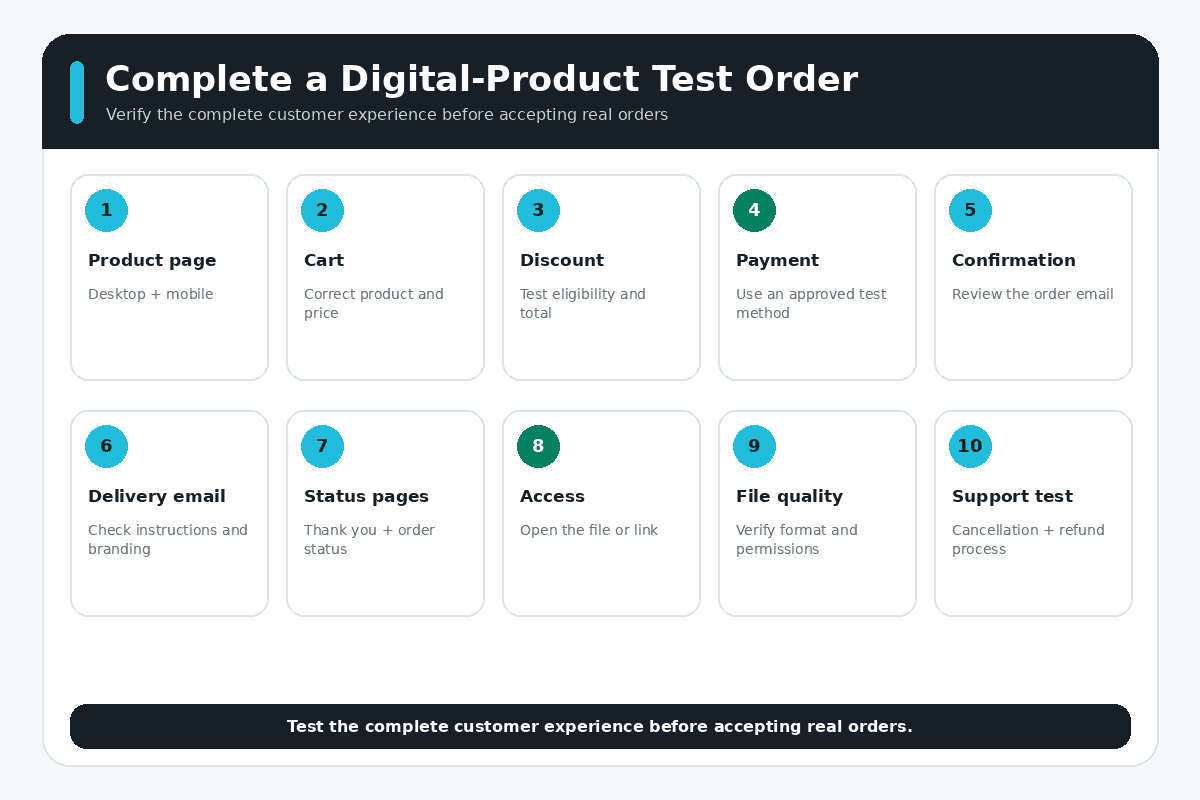
13. Complete a Full Test Order
Test the store as a customer on desktop and mobile. Confirm the product page, discount, payment, taxes, order confirmation, delivery email, Thank you page, Order status page, download or access link, file integrity, instructions, customer account behavior, and support contact.
Open every file after downloading it. Test externally hosted links in a private browser window and with an account that does not own the source material. Confirm that permissions are neither blocked nor unintentionally public. Shopify recommends placing a test order after creating a digital product, and its test-order documentation explains the available payment-testing methods.
Before going live, work through the complete Shopify store launch checklist. It covers payments, taxes, policies, analytics, domains, mobile usability, checkout, fulfillment, and customer support.
14. Launch to a Qualified Audience
Begin with the people most likely to have the problem: your email list, customers, professional network, relevant communities, search audience, partners, or followers. Follow community rules, disclose relationships, and contribute useful information instead of dropping links everywhere.
Track product views, add-to-cart activity, checkout starts, purchases, refunds, support questions, download problems, and conversion rate. Diagnose the narrowest problem instead of redesigning everything at once.
How to Market Digital Products on Shopify
Search Content
Create tutorials, examples, comparisons, definitions, and buying guides around problems the product solves. Connect each article to the most relevant product or collection page. My Shopify SEO guide for beginners explains keyword mapping, collection and product optimization, internal links, technical checks, and performance measurement.
Email Marketing
Offer a genuinely useful sample, checklist, preview, or mini-tool related to the paid product. Use the email sequence to help the subscriber complete a small result, understand the larger problem, review the paid offer, and decide whether it fits. Include instructions, receipts, update notices, and support separately from promotional emails where appropriate.
Demonstrations and Social Content
Show the product in use. Walk through a spreadsheet, complete part of a template, show before-and-after organization, demonstrate a creative asset, or teach one lesson. A useful demonstration is more persuasive than repeatedly announcing that the product exists.
Partners and Affiliates
Work with educators, creators, consultants, newsletters, or communities serving the same audience without offering a directly competing product. Define the commission, tracking method, permitted claims, disclosure requirements, payment schedule, refund treatment, and prohibited promotion methods in writing.
For visually demonstrable downloads, templates, planners, or educational products, my Shopify Pinterest guide explains how to connect your catalog, create Pins, and track visits back to the store.
Digital Products, Print on Demand, or Dropshipping?
| Model | Primary Delivery | Main Advantage | Main Risk |
|---|---|---|---|
| Digital products | File or access link | No physical shipping | Piracy, compatibility, support, and tax complexity |
| Print on demand | Provider prints and ships after purchase | Original designs without bulk stock | Unit cost, samples, print consistency, and delivery |
| Dropshipping | Supplier ships a physical product | Test products without bulk inventory | Limited control over quality, stock, and shipping |
Read the Shopify print-on-demand guide if original designs belong on physical merchandise. Use the Shopify dropshipping guide if a supplier will hold and ship finished products. Digital products remove physical fulfillment, but they create their own delivery, licensing, compatibility, piracy, support, and tax responsibilities.
Should You Use Shopify, Etsy, WooCommerce, or WordPress?
Choose based on where the audience shops, the checkout and delivery workflow, control requirements, fees, ownership, publishing needs, integrations, and your technical resources.
- Compare a standalone store with marketplace discovery in Shopify vs. Etsy.
- Compare Shopify’s hosted commerce system with an open-source ecommerce plugin in Shopify vs. WooCommerce.
- Compare a commerce-first platform with a flexible content-management system in Shopify vs. WordPress.
A marketplace can provide built-in discovery but less ownership and control. A self-hosted system can provide extensive flexibility but requires more maintenance. Shopify provides a managed commerce foundation but still requires apps, product work, marketing, policies, and ongoing store management.
Common Mistakes When Selling Digital Products
- Creating a large product before validating the customer problem.
- Using assets without the right to resell or redistribute them.
- Hiding compatibility, license, access, update, or refund limitations.
- Leaving shipping enabled on a download-only product.
- Sending a broken, private, moved, or expired external link.
- Failing to test the complete order and delivery workflow.
- Ignoring taxes, privacy, accessibility, subscriptions, or consumer rights.
- Pricing from competitors without calculating complete costs.
- Installing overlapping apps without reviewing cost, permissions, and performance.
- Launching without customer support or backup delivery procedures.
The broader Shopify mistakes to avoid guide covers positioning, product pages, apps, SEO, checkout, shipping, mobile usability, analytics, and store maintenance.
For a seasonal digital-product promotion, use my Shopify Black Friday checklist to prepare the offer, product page, campaign schedule, checkout testing, support, and post-sale follow-up.
How to Sell Digital Products on Shopify FAQs
Can Shopify sell downloadable products?
Yes. Create a product, remove the physical-product shipping requirement, and use a digital-delivery app to send the file or access link after purchase. Shopify’s Digital Products app supports uploaded files, supported external links, automatic or manual delivery, and configurable access limits.
Do I need a Shopify app to deliver a digital product?
Yes, you need a delivery app when customers should receive a downloadable file or access link. Shopify offers its Digital Products app, while specialized third-party apps may be more appropriate for subscriptions, licensing, courses, memberships, or advanced fulfillment.
Can I sell PDFs, templates, videos, and courses?
Yes, provided you own or have the necessary rights to sell the content and the delivery method fits the product. State file types, software requirements, access rules, license terms, update policy, and support boundaries before purchase.
Does Shopify charge extra for digital products?
Shopify plan and payment costs still apply. Shopify’s Digital Products app is currently free, but third-party delivery, subscription, licensing, course, or membership apps may charge additional fees. Marketing, software, support, taxes, refunds, and professional services can also affect the real cost.
How do customers receive the download?
With automatic delivery, the app can email access after successful payment. You can also configure eligible Thank you and Order status pages to display the download or link. Manual delivery waits until you fulfill the digital item.
Can I limit the number of downloads?
Shopify’s Digital Products app currently allows unlimited or limited access settings for each variant. Choose a limit that protects the product without creating unnecessary problems for legitimate customers changing devices or recovering files.
Should digital products have a refund policy?
Yes. Explain the policy, product compatibility, access, delivery, and support before purchase. Your policy must comply with applicable consumer law, and a blanket no-refund statement might not control every situation.
Do I need to collect tax on digital products?
Possibly. The answer depends on the product, customer location, seller location, registrations, and local rules. Digital goods sold to EU customers can trigger destination-based VAT requirements. Configure the store with qualified tax advice rather than assuming digital products are tax-free.
Can I sell physical and digital products together?
Yes. You can sell them in one store and even add a digital asset to a physical product. Test mixed orders carefully so digital access is delivered at the intended time while physical items remain in the correct shipping workflow.
How do I know whether Shopify is right for my digital product?
Shopify is strongest when you want a hosted, commerce-first system and may combine products, bundles, discounts, email, analytics, or physical goods. Compare the complete costs, delivery requirements, publishing needs, control, and technical workload before deciding.
Final Verdict
Final Verdict
Shopify can provide a strong foundation for selling digital products, but the platform is only one part of the business. The offer must solve a defined problem, the product must be legally yours to sell, delivery must work without confusion, and the economics must support marketing, refunds, updates, and customer service.
Start with one focused product. Validate the need, create a professional delivery package, write clear policies, configure the Digital Products app, and complete the entire customer journey yourself before inviting buyers.
When you are ready to build the store, start Shopify and set up your first digital product. Review the offer and final terms on Shopify before selecting a plan.
If one downloadable offer will be the center of your business, follow my one-product Shopify store guide to define the positioning, structure the storefront, calculate profit, and test the complete buying experience.

- How to Connect Shopify to Pinterest and Sell Products - October 23, 2026
- Shopify Black Friday Checklist: Prepare Your Store for BFCM 2026 - October 23, 2026
- How to Build a One-Product Shopify Store (Step by Step) - October 23, 2026

Leave a Reply
Want to join the discussion?Feel free to contribute!