
How to Build a One-Product Shopify Store (Step by Step)
Last Updated on October 23, 2026
A one-product Shopify store centers the entire website around one hero product instead of asking shoppers to compare a large catalog. That focus can make the offer easier to explain, the photography easier to plan, and the customer journey easier to test.
It does not make the business automatic. One weak product, vague promise, unreliable supplier, or unprofitable offer leaves the store with nothing else to support it. The product has to earn the attention it receives.
This guide explains how to build a one-product Shopify store from validation through launch. You will learn how to choose the product, define the customer, structure the offer, create the storefront, build the product page, configure Shopify, test checkout, and begin marketing without pretending that a focused store guarantees sales.
If the business is still at the idea stage, begin with my complete guide to starting an online store. It covers validation, startup costs, margins, fulfillment, platform selection, testing, and launch planning.
Key Takeaways
- A one-product store can sell one item, one item with variants, or one hero product with closely related add-ons.
- Validate the customer problem, product quality, supplier, complete cost, and realistic demand before designing the store.
- The homepage should quickly explain the product, customer, primary benefit, proof, price, and next action.
- Use original demonstrations, detailed product information, clear shipping and returns, and a tested checkout to reduce uncertainty.
- Measure the complete funnel and improve one meaningful problem at a time instead of changing the entire store after a few visits.
Shopify workflow and product-setting details verified October 16, 2026. Features, plans, payment rates, apps, and promotional terms can change. Confirm the final settings inside your own Shopify admin and obtain qualified legal, tax, or accounting guidance when appropriate.
What Is a One-Product Shopify Store?
A one-product Shopify store is an ecommerce website organized around one primary offer. The business may sell a single SKU, several versions of the same product, or a hero product with a small number of complementary accessories. The defining feature is focus: nearly every page supports the same purchase decision.
- Single SKU: one item with no customer-selectable options.
- One product with variants: the same item in different colors, sizes, materials, bundles, or capacities.
- Hero product with add-ons: one main item supported by refills, replacement parts, cases, warranties, or bundles.
A one-product store is not merely a general store with every other listing removed. The positioning, navigation, visuals, offer, proof, FAQs, policies, email, and advertising should all be built around the same customer problem and outcome.

Is a One-Product Store a Good Idea?
The model can work well when the product is easy to demonstrate, solves a recognizable problem, has enough margin, supports compelling creative, and can be differentiated from alternatives. A focused catalog also makes operations and analytics easier to understand.
The concentration creates risk. If demand fades, supply fails, advertising becomes expensive, or the product receives poor reviews, the entire store is affected. Seasonality and limited repeat purchases can also make revenue uneven.
| Potential Advantage | Corresponding Risk |
|---|---|
| One clear message | The product must support that message with real value |
| Simpler navigation | Fewer opportunities to recover a shopper who rejects the main offer |
| Focused photography and content | Creative fatigue can develop quickly |
| Easier inventory planning | Supplier or stock problems affect the whole business |
| Clearer funnel measurement | Traffic dependence can become expensive |
Shopify is a practical platform for this model because products, variants, inventory, checkout, payments, orders, analytics, and apps share one hosted system. Review the broader platform strengths and limitations in my Shopify review before committing.
If that operating model fits your project, you can open Shopify and build the store alongside this guide. This is an affiliate link, so I may earn a commission at no additional cost to you.
How Much Does a One-Product Shopify Store Cost?
Budget for the platform, domain, payment processing, product samples, inventory or supplier charges, packaging, photography, apps, email, returns, replacements, professional services, taxes, and marketing. A premium theme is optional; strong positioning and original product media matter more than an expensive template.
Use my Shopify pricing guide to compare current plans and the expenses that can sit outside the subscription. The Shopify free trial guide explains what you can prepare before choosing a paid plan.
How to Build a One-Product Shopify Store Step by Step
1. Choose a Product Worth Building Around
Start with a customer and problem, not a viral-product list. Interview likely buyers, study recurring complaints, inspect competing offers, review search behavior, and identify what the available products fail to do well.
- The benefit can be understood and demonstrated quickly.
- The product has a defined customer rather than “everyone.”
- The complete selling price can support fulfillment, payment fees, returns, replacements, support, and customer acquisition.
- The supplier, quality, safety, claims, and legal requirements can be verified.
- The product gives you enough material for original photographs, demonstrations, comparisons, FAQs, and education.
For additional directions, use the evaluation process in 30 product ideas to sell on Shopify. Do not select an item only because another store appears successful; you cannot see its margins, return rate, advertising cost, or supplier problems.
2. Validate Demand Before Building the Full Store
Validation should test behavior rather than collect compliments. Show a prototype, sample, demonstration, preorder concept, landing page, or limited offer to people who resemble the intended customer. Track qualified email signups, questions, objections, purchases, and refund concerns.
Define success and failure before the test. A small test cannot guarantee future demand, but it can expose unclear positioning, weak margins, quality issues, and purchase objections before you invest heavily.

3. Decide How the Product Will Be Sourced and Fulfilled
You might manufacture the item, buy wholesale inventory, work with a private-label supplier, use dropshipping, create print-on-demand merchandise, or deliver a digital product. Each model changes cash flow, quality control, shipping speed, branding, returns, and customer support.
If a supplier will ship a finished item, follow the verification and cash-flow process in my Shopify dropshipping guide. For made-to-order merchandise, use the Shopify print-on-demand guide. If the hero product is a file, template, course, or other electronic offer, follow my Shopify digital-products guide.
Order samples before launch. Inspect dimensions, materials, finish, packaging, instructions, delivery time, tracking, and the unboxing experience. The storefront promise must match what the customer actually receives.

4. Calculate the Complete Unit Economics
Do not subtract only the supplier cost from the price. Include the product, inbound freight, packaging, fulfillment, payment processing, platform and app allocation, discounts, refunds, replacements, taxes you absorb, customer support, content, and expected customer-acquisition cost.
Calculate contribution per order before fixed overhead and then estimate how many orders are needed to cover recurring expenses. Test conservative, expected, and optimistic scenarios. A high gross margin can disappear when returns and paid traffic are included.

5. Define the Positioning and Offer
Write one sentence: “For [specific customer] who struggles with [problem], [product] helps create [desired result] through [credible difference].” Remove exaggerated claims and anything the product cannot consistently support.
Then define the complete offer: product, included components, variants, bundle options, price, delivery, guarantee or return terms, support, and any bonus. A discount is not the only way to improve value. Better instructions, faster support, clearer sizing, a useful accessory, or more reliable delivery can matter more.

6. Create Your Shopify Account
Create the store, use a working name if necessary, and keep the storefront protected while you build. Configure the business information carefully because it can affect payments, taxes, shipping, notifications, and customer-facing documents.
Follow my step-by-step Shopify store tutorial for the complete dashboard, products, theme, payments, shipping, domain, and launch workflow.
When you are ready, create your Shopify account through this link and complete each section below before removing the password.
7. Add the Hero Product
Shopify requires only a title and price to create a product, but a launch-ready listing needs much more. Add an original title, benefits-focused description, photographs or video, price, compare-at price only when legitimate, cost information, inventory, SKU, shipping data, variants, category, search listing, and relevant metafields.
Keep variants understandable. Use clear names, variant-specific images, accurate inventory, and consistent prices. If one option changes the material, performance, fit, warranty, or delivery time, explain it before purchase.
8. Create Original Product Photography and Demonstrations
A one-product store needs enough visual proof to answer different questions without repeating the same hero image. Photograph the front, back, sides, scale, materials, included components, packaging, variants, use case, and important details. Demonstrate the product solving the problem in a believable setting.
Plan the complete shot list with my Shopify product-photography guide. Supplier images can help with reference, but original media differentiates the store and lets you show the exact sample customers will receive.
9. Choose and Customize a Simple Theme
Choose a fast, mobile-responsive theme that supports the sections you need. Avoid paying for a theme because its demo looks impressive with another company’s photography. Test the actual product, copy, media, variants, cart, and mobile menu in the theme.
Shopify’s AI tools can generate a starting storefront direction, but they do not validate the offer, write accurate claims, create original proof, configure policies, or test checkout. My Shopify AI Store Builder review explains what still needs manual work.
Study the clarity, navigation, media, and trust patterns in these successful Shopify store examples. Use the lessons without copying another brand’s design or claims.
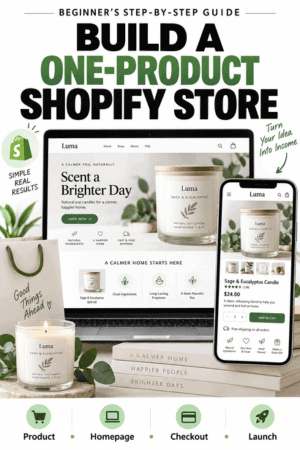
10. Build a Homepage That Makes the Product Clear
The first screen should identify the product, primary customer benefit, and next action. “Welcome to our store” wastes the most valuable space because it says nothing about the offer.
- Hero section: product-focused heading, credible benefit, original image or demonstration, and descriptive call to action.
- Problem and result: explain the situation the customer recognizes and what improves.
- How it works: show the main steps or mechanism without unsupported claims.
- Benefits and specifications: connect useful features to real customer outcomes.
- Proof: original demonstrations, reviews, testing, credentials, or transparent evidence.
- Offer and FAQ: show what is included, the price, delivery, returns, and common objections.
Repeat a clear purchase button after major decision sections. Do not create fake urgency, invented reviews, or unsupported before-and-after claims.

11. Create a Complete Product Page
The product page should help the visitor decide without contacting support for basic information. Include the original title, clear price, variant choices, multiple photographs, concise opening benefit, detailed description, specifications, dimensions or sizing, materials, what’s included, care instructions, shipping estimate, return terms, warranty information, FAQs, and an obvious add-to-cart button.
Write for a person first and search engines second. Use the customer’s language, describe the exact product, optimize the page title and meta description, add descriptive image alt text, and link to genuinely useful supporting content. The Shopify SEO guide for beginners covers keyword mapping, page optimization, internal links, technical checks, and measurement.

12. Add Trust, Policies, and Support Information
Create accurate contact, shipping, return, privacy, and terms pages. Add any legally required product warnings, subscription terms, safety information, accessibility details, or warranty limitations. Policy templates are starting points, not confirmation that the business complies with every applicable rule.
State who handles support, expected response time, where the product ships, delivery estimates, tracking, return conditions, and what happens when an order arrives damaged or incorrect. Trust grows when important limitations are easy to find before purchase.
13. Configure Payments, Shipping, Taxes, and Notifications
Activate only the payment methods you can support. Configure shipping zones, rates, weights, package sizes, delivery estimates, local options, and free-shipping thresholds according to the actual fulfillment process. Review tax registrations and product classifications with qualified help when needed.
Customize the order confirmation and shipping notifications so the customer knows what happens next. Verify the sender identity, reply-to address, product name, support contact, delivery expectation, and tracking flow.
14. Install Only Necessary Apps
Begin with a problem, not the app marketplace. Check whether Shopify or the theme already handles the requirement, review cost and permissions, test the app on mobile and checkout, and assign someone to monitor it. Remove tools that are not being used.
Common needs can include email, reviews, subscriptions, bundles, digital delivery, print on demand, supplier fulfillment, accessibility, or advanced analytics. Each additional dependency can affect cost, performance, privacy, and maintenance.
15. Test the Complete Customer Journey
Shopify recommends placing test orders to verify checkout, order processing, inventory, shipping, taxes, and notifications. Test on desktop and a real mobile phone. Simulate a successful payment, failed payment, discount, different address, fulfillment, tracking, cancellation, refund, and customer-support request.
Use the Shopify store launch checklist before removing the password. It covers the product, domain, payments, shipping, tax, policies, mobile usability, analytics, email, checkout, fulfillment, and support.

16. Launch to a Qualified Audience
Do not send random traffic simply to make the analytics graph move. Start with people who plausibly experience the problem: an existing audience, email list, relevant community, partner, customer interview group, or carefully defined search and social audience.
Create several useful content angles around the same product: demonstration, setup, comparison, objection, use case, customer question, maintenance, and result. My guide to getting your first Shopify sale provides a practical plan for proof, outreach, traffic, email, partnerships, and funnel measurement.
What Pages Does a One-Product Store Need?
- Homepage: the clearest path from product promise to purchase.
- Product page: complete offer, media, specifications, variants, price, delivery, returns, and add to cart.
- About page: credible reason the brand and product exist without an inflated origin story.
- Contact page: working support method and realistic response expectation.
- FAQ: answers to recurring questions and objections.
- Policy pages: shipping, returns, privacy, and terms appropriate to the business.
- Helpful content: buying, setup, use, care, comparison, and troubleshooting articles when genuinely useful.
Navigation can remain simple, but important information should not be hidden. A small website still needs complete policies, support, and customer education.
How to Improve Conversion Without Making False Promises
- Make the product and benefit clear in the first screen.
- Use original photographs and demonstrations instead of generic lifestyle imagery.
- Show size, scale, materials, compatibility, and included items.
- Place real reviews near the objections they address.
- Explain shipping, returns, warranty, and support before checkout.
- Make variant selection and add to cart easy on mobile.
- Remove unnecessary popups, apps, scripts, and competing calls to action.
- Test one meaningful change at a time and keep a record of the result.
Avoid the broader positioning, navigation, product-page, app, checkout, shipping, and maintenance problems in my guide to Shopify mistakes that can hurt a store.
A focused product can also work well with visual discovery. My Shopify Pinterest guide explains how to connect the store catalog, optimize Product Pins, and measure the customer journey.
How to Measure a One-Product Store
Review traffic source, landing-page engagement, product views, add-to-cart activity, checkout initiation, completed purchases, conversion rate, average order value, refund rate, contribution per order, support questions, delivery problems, and repeat purchase behavior.
Diagnose the narrowest problem you can support with evidence. Low product-page engagement may indicate the traffic or message is wrong. Strong add-to-cart activity with weak checkout completion may point to unexpected shipping, payment issues, or a broken mobile experience. Sales without contribution are not a healthy result.

One-Product Store vs. General Store
| Factor | One-Product Store | General Store |
|---|---|---|
| Positioning | Focused on one customer problem | Can serve several categories or audiences |
| Navigation | Short and purchase-oriented | Requires categories, filters, and discovery |
| Creative | Deep coverage of one offer | Broader variety of products and campaigns |
| Inventory risk | Concentrated | Distributed but more complex |
| Cross-selling | Limited unless add-ons exist | More natural opportunities |
| Testing | Clearer funnel | More products and paths to evaluate |
Neither structure is automatically better. Choose according to the customer, product relationships, inventory, economics, traffic strategy, and operational resources.
Shopify, Etsy, WooCommerce, or WordPress?
A one-product business can sell through more than one platform, but each creates a different customer-acquisition and maintenance model.
- Use Shopify vs. Etsy to compare an independent store with marketplace discovery.
- Use Shopify vs. WooCommerce to compare hosted ecommerce with a WordPress commerce plugin.
- Use Shopify vs. WordPress when deciding between a commerce-first platform and a flexible content-management system.
Do not spread a new business across several systems without a reason. Begin where the intended buyer can understand and purchase the offer, then add channels when the operations and economics justify them.
Common One-Product Shopify Store Mistakes
- Choosing a product from social-media hype without validating the customer or economics.
- Using the same supplier photos, descriptions, and claims as every competitor.
- Building a beautiful homepage that does not explain the product.
- Hiding dimensions, materials, compatibility, shipping, or return limitations.
- Creating fake scarcity, reviews, certifications, or performance claims.
- Installing too many apps before the basic store works.
- Skipping samples and the complete test-order workflow.
- Buying traffic before measuring contribution per order.
- Changing the entire store after a small amount of unqualified traffic.
- Having no backup supplier, support process, or plan for returns.
One-Product Shopify Store FAQs
Can you build a Shopify store with only one product?
Yes. Shopify can support one product, one product with variants, or a hero product with a few related add-ons. The store still needs complete product information, policies, support, payments, fulfillment, analytics, and checkout testing.
Do I need a collection for one product?
Not necessarily. You can link directly to the product or feature it on the homepage. A collection can still be useful for theme sections, navigation, future additions, or separate bundles and accessories. Keep the customer journey simple.
Before putting your hero product into a major holiday promotion, use my Shopify Black Friday checklist to verify the economics, inventory, product page, checkout, and fulfillment plan.
What theme is best for a one-product Shopify store?
Choose a fast, mobile-responsive theme that supports strong product media, flexible sections, clear variants, FAQs, reviews, and an obvious purchase path. Test the theme with your real content rather than choosing from its demo alone.
Should the homepage and product page be the same?
They can be, but they do not have to be. A long homepage can introduce the story, problem, proof, and offer before sending visitors to a detailed product page. A direct-response store may place product purchasing on the homepage. Test the clearest mobile path and keep product details consistent.
Can a one-product store have variants and bundles?
Yes. Sizes, colors, materials, capacities, multipacks, or bundles can remain part of one focused offer. Use clear labels, variant images, accurate inventory, and transparent pricing so the customer understands the choice.
How do I get traffic to a one-product store?
Use channels that reach the defined customer: search content, demonstrations, email, communities, creator partnerships, referrals, organic social media, marketplaces, or carefully capped advertising tests. Match every campaign to a specific problem, audience, and landing page.
Is a one-product store good for beginners?
It can reduce catalog and navigation complexity, but it concentrates risk in one offer. Beginners still need product validation, reliable fulfillment, workable margins, legal policies, customer service, and enough marketing skill to reach qualified buyers.
When should I add another product?
Add another product when customer research and operating data show a related need, not because the store feels too small. The new item should improve the customer result, average order value, retention, or risk profile without confusing the positioning.
Final Verdict
A one-product Shopify store can turn focus into an advantage. It gives the business one customer, one promise, one primary page, and one funnel to improve. That simplicity is useful only when the product, evidence, economics, and fulfillment are strong enough to support the attention.
Validate before designing. Order samples, calculate every cost, create original media, explain the offer clearly, publish accurate policies, and complete the entire order journey before launch. Then measure the funnel and improve the most important constraint rather than chasing constant redesigns.
When you are ready to build, start your one-product Shopify store here. Review Shopify’s current offer and final terms before selecting a plan.

- How to Connect Shopify to Pinterest and Sell Products - October 23, 2026
- Shopify Black Friday Checklist: Prepare Your Store for BFCM 2026 - October 23, 2026
- How to Build a One-Product Shopify Store (Step by Step) - October 23, 2026

Leave a Reply
Want to join the discussion?Feel free to contribute!