

How To Remove Bluehost Coming Soon Page?
Last Updated on November 13, 2025
Struggling to remove the Bluehost Coming Soon page and launch your site? You’re in the right place.
In this article, you’ll learn the quick steps to take down the temporary page, whether you prefer to work from the Bluehost dashboard or directly within WordPress.
To customize the Bluehost coming soon page, log in to your Bluehost dashboard, locate the coming soon page settings, and use the available editing tools to change content or design as needed. Alternatively, if you’re using WordPress, you can edit or replace the coming soon page by installing and configuring a plugin or by editing the page directly within your WordPress site.
In this article, you’ll learn the quick steps to take down the temporary page, whether you prefer to work from the Bluehost dashboard or directly within WordPress.
Get ready to make your site visible to the world!

Short Summary
-
To remove the Bluehost Coming Soon page, you can either go through the Bluehost dashboard ‘Settings’ or directly from the WordPress dashboard.
-
Removing the Coming Soon page makes your site live instantly, helping to boost visibility, engage visitors, and maintain or improve your Google rankings.
-
The removal process from the WordPress dashboard involves the Bluehost menu and simply toggling the Coming Soon page off, which presents your site to audiences without delay.
Related: Bluehost coupon code
Deactivating the Bluehost Coming Soon Feature
Ever felt like your brand-new WordPress site is playing hide and seek with your potential audience?
If you are looking for recommended WordPress plugins or themes to create a custom coming soon page on Bluehost, popular options include SeedProd and Coming Soon Page & Maintenance Mode.
These plugins offer easy-to-use templates and customization features to ensure your coming soon page makes a great first impression on your potential audience.
The Bluehost Coming Soon page is the culprit, keeping your site under wraps while you prepare for the grand opening.
But what if you’re ready now?
It’s showtime, and that means it’s time to remove the Bluehost Coming Soon page and let your site bask in the limelight.
Currently, Bluehost does not offer a built-in scheduling feature to automatically remove the coming soon page at a specific time. You need to manually deactivate the soon page when you’re ready for your site to go live, either via your WordPress dashboard or through the Bluehost dashboard.
There are two simple methods to remove the coming soon page—either directly through the Bluehost dashboard or from within the familiar surroundings of your WordPress dashboard.
If you’re experiencing issues where the coming soon plugin is not publishing as expected on Bluehost, first make sure you have properly deactivated the Bluehost coming soon feature in both your Bluehost dashboard and your WordPress dashboard.
Occasionally, conflicts can arise if multiple coming soon plugins or settings are enabled at the same time. Try clearing your browser cache and refreshing the page, and double-check that you have published your WordPress site so changes can take effect.
If difficulties persist, consider reaching out to Bluehost support for further troubleshooting.
No matter which path you choose, the process is quick and easy and user-friendly.
The difference between the Bluehost coming soon page and maintenance mode is important to note. The coming soon page appears to visitors when your site is not yet ready to be launched, signaling that your website will be live soon.
In contrast, maintenance mode is typically used when your site is temporarily down for updates or repairs; it communicates that your site is currently unavailable but will return soon.
Both features help manage visitor expectations, but they serve different purposes during your website’s lifecycle.
Let’s get started with the first way to remove Bluehost coming soon page.

How To Disable Coming Soon Page From Bluehost Control Panel
Here’s how to remove the Bluehost coming soon page.
If you want to preview your website before turning off the coming soon page, you can usually do so by visiting your site’s direct URL in a different browser tab or by using any preview option provided in your site builder.
This lets you see how your site will look before you disable the Bluehost coming soon page.
Once inside, follow these steps:
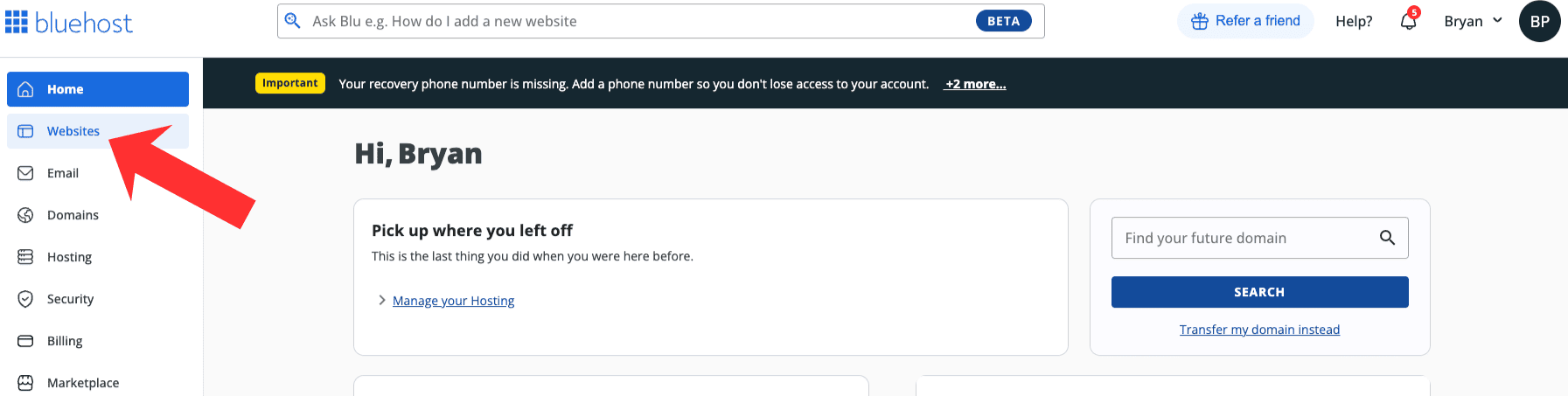
Start by signing into your Bluehost account. Click on the ‘Websites’ tab found on the left-hand side.
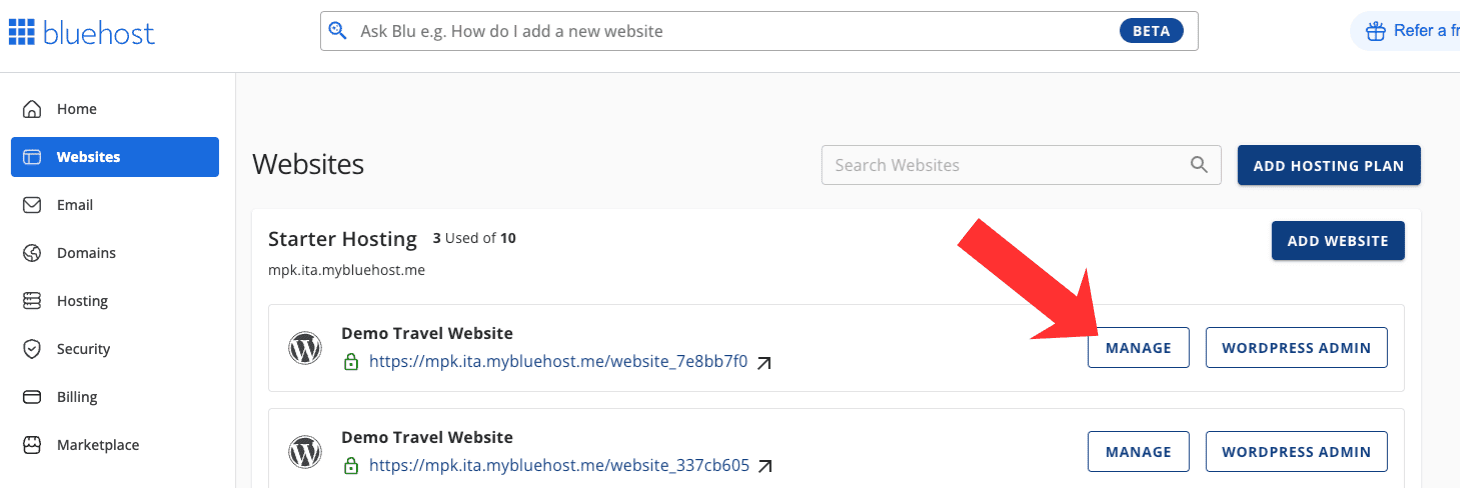
Find your website and click the ‘Manage’ tab underneath the site.
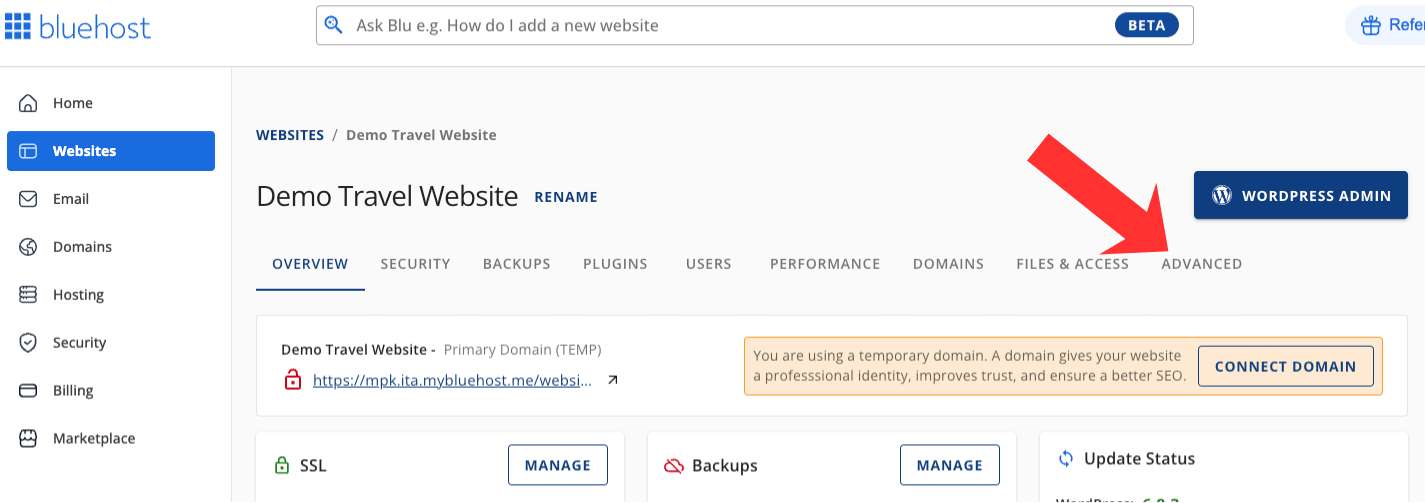
Click the ‘Advanced’ tab found in the top menu.
Scroll down to the bottom of the Bluehost settings page to the Coming Soon section. Toggle it off to remove the Bluehost coming soon page from showing.
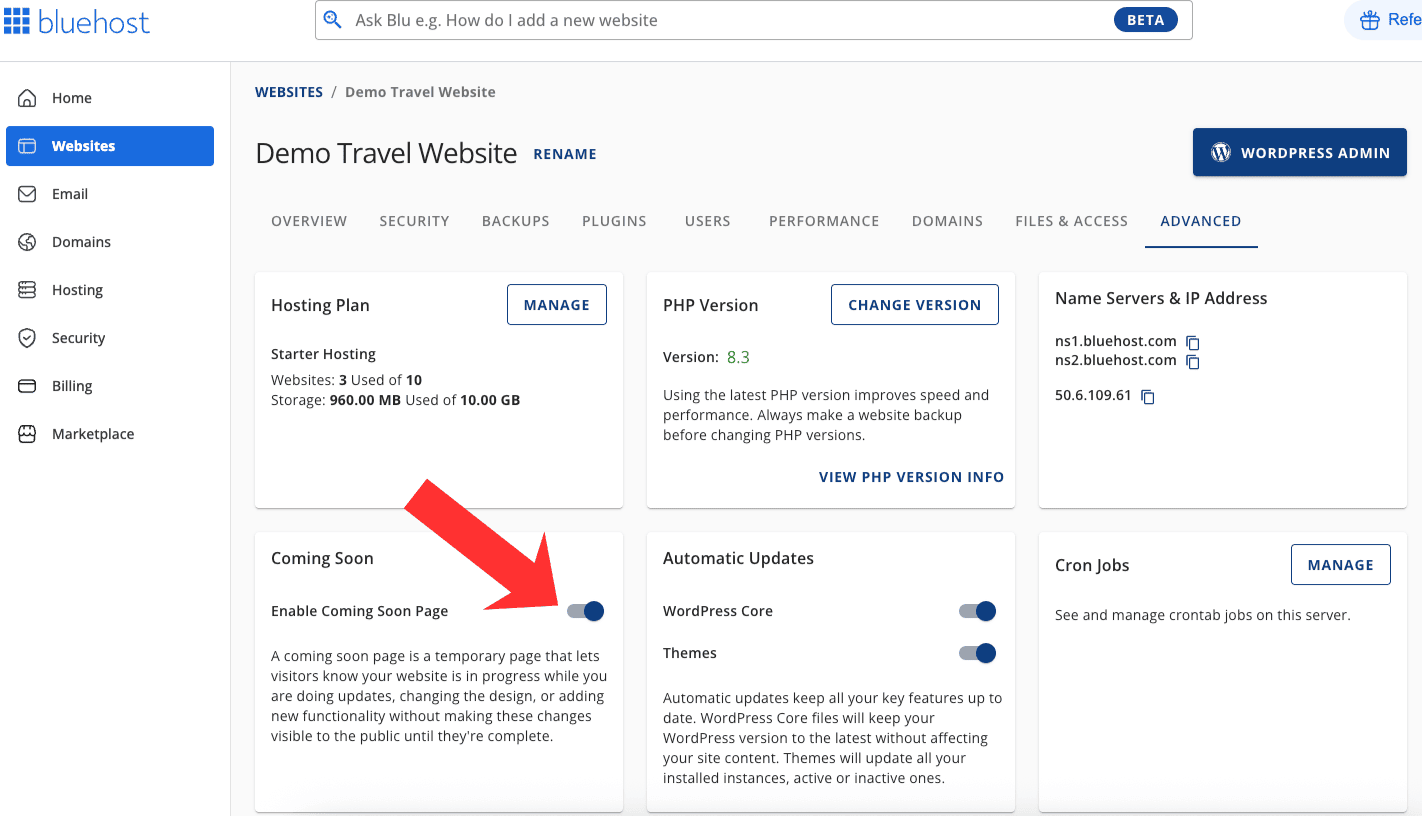
Once the Coming Soon page is deactivated, your website is now live and showing to the public.
Currently, Bluehost does not offer a built-in feature to schedule automatic removal of the coming soon page at a specific date or time.
You will need to manually toggle the coming soon page off through the settings tab when you are ready for your site to go live.
To access the Bluehost plugin settings related to the coming soon page, log in to your WordPress dashboard, navigate to the Bluehost section on the left menu, and select ‘Coming Soon’.
From there, you can adjust or disable the coming soon page as needed. Your website is now officially launched and available to the public, signifying the beginning of your online presence.
Your website is now officially launched and available to the public, signifying the beginning of your online presence.
Note: If you want to add the Bluehost coming soon page, just toggle it back on to enable it.
Removing Bluehost WordPress Site Coming Soon Page
The second way to remove Bluehost coming soon page is directly in the WordPress dashboard.
Removing the Bluehost coming soon page from within WordPress is like flipping a switch to reveal your masterpiece.
The process is straightforward, ensuring a seamless transition to a live site that’s eager to engage with its audience.
Navigating the WordPress dashboard feels like having a backstage pass to your site’s inner workings.
It’s where you can pull the strings and watch your digital puppet dance.
So let’s dive in and remove Bluehost Coming Soon page from the WordPress dashboard.
How To Remove Coming Soon Page In WordPress
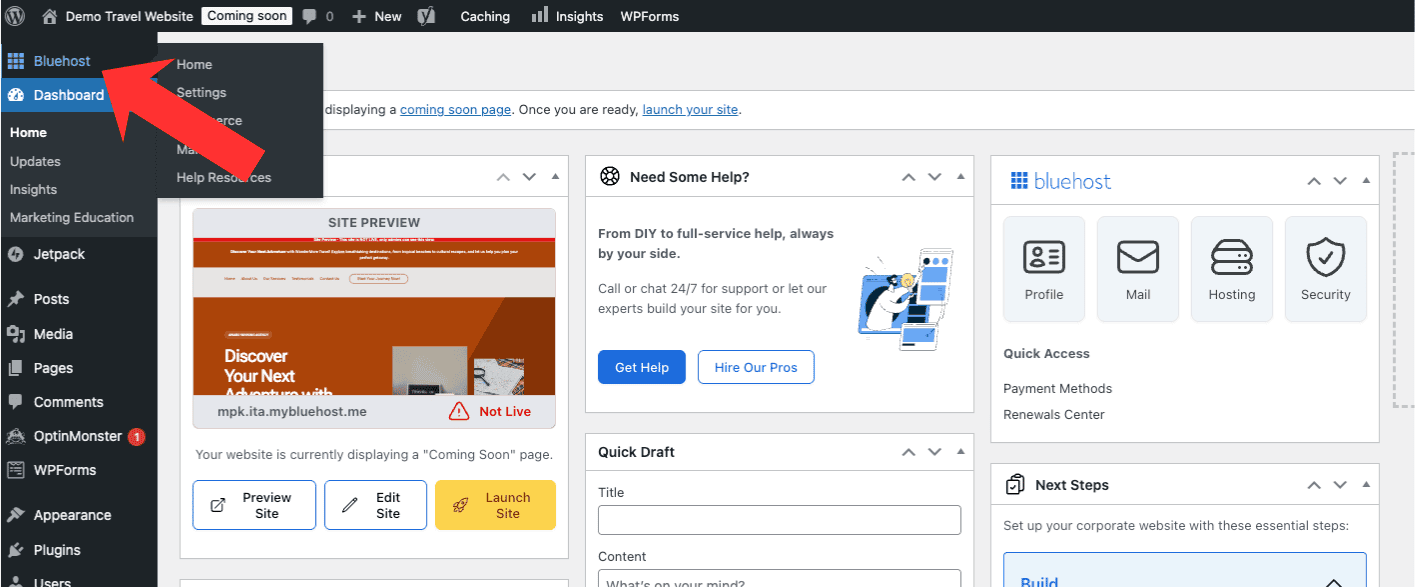
Start by logging into your WordPress dashboard. Once logged in, click the Bluehost tab found in the left-side menu.
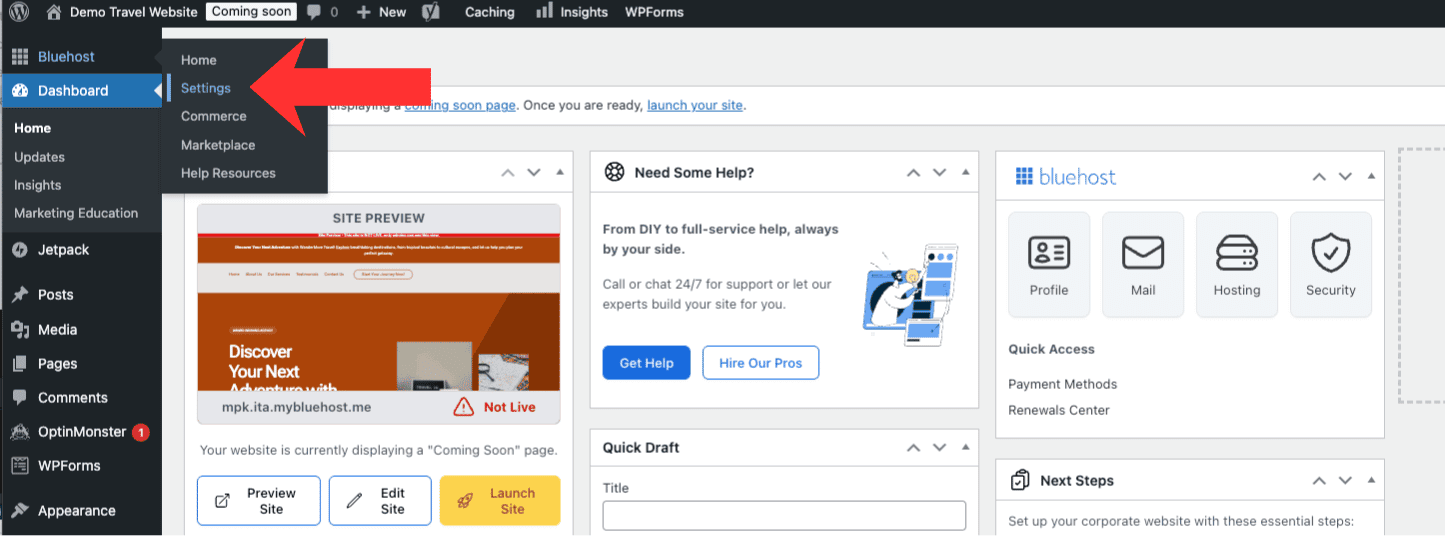
Click the Settings tab in the left-side menu.
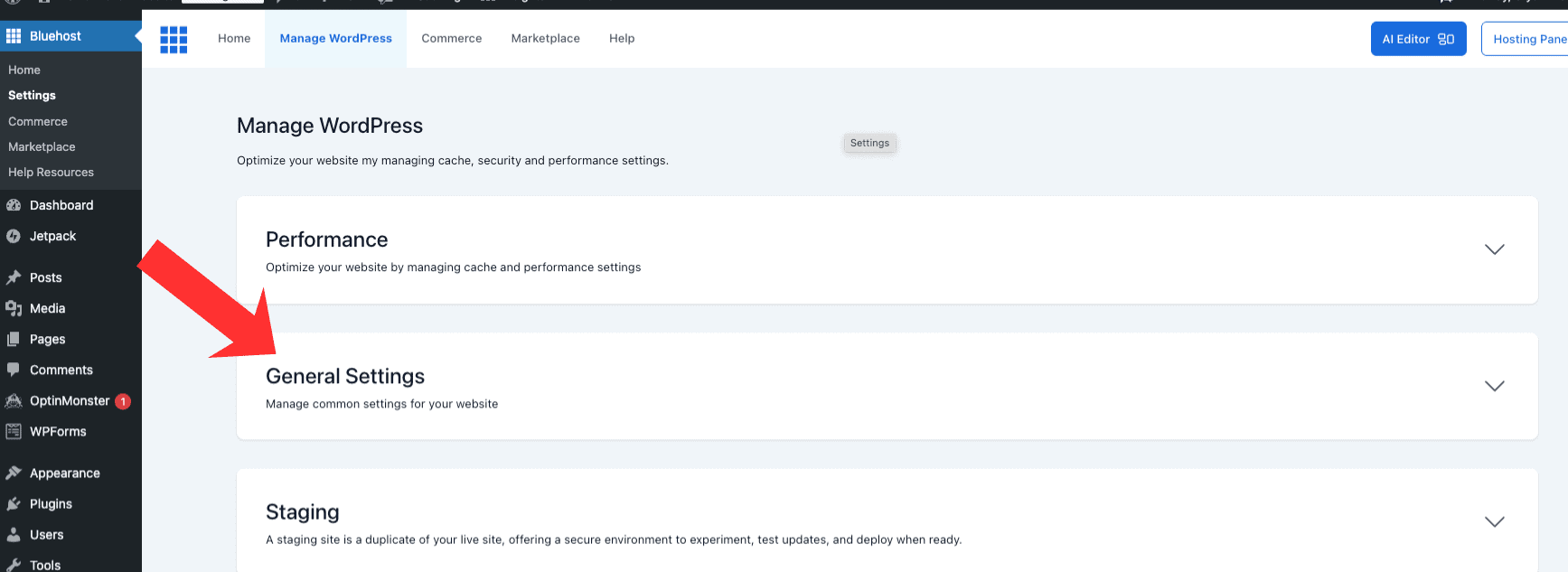
Click the General Settings tab.
Toggle the Coming Soon option to be disabled to remove the WordPress site coming soon page.
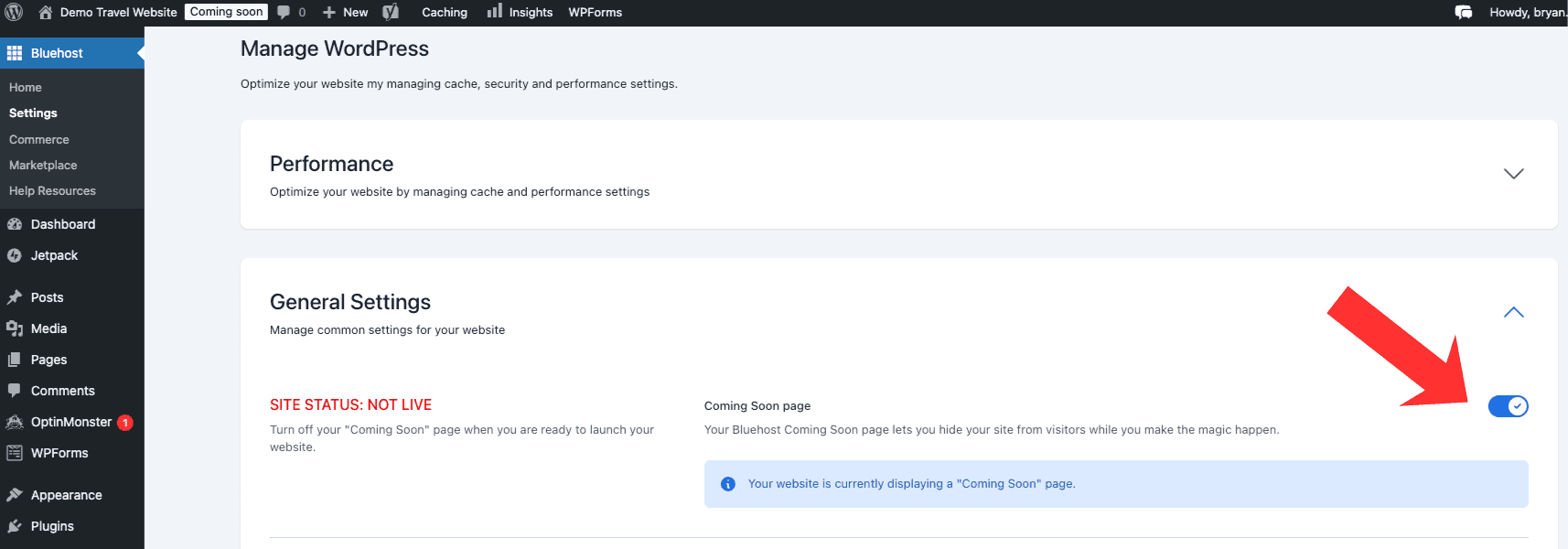
The transition is smooth, the change is immediate, and your website is now showing live for its audience.
The simplicity of the process means you can focus on what’s truly important—creating personalized content and building your website with Bluehost.
Note: To enable the coming soon page toggle it back to on and the coming soon page will be added.
Frequently Asked Questions
How do I add coming soon page to Bluehost?
To enable the Coming Soon page on Bluehost, you can access your Bluehost control panel, go to the My Sites section, click on Manage Site, and then find the Coming Soon section in the Settings. Toggle this to on to add the coming soon page to your website built with Bluehost.
How do I remove Bluehost coming soon page?
To disable Bluehost coming soon page, you can do so via the Bluehost control panel or within WordPress. To do so via Bluehost, start by logging in. Go to the My Sites section, click on Manage Site, and then find the Coming Soon section in the Settings. Toggle this to off to remove the coming soon page to your website built with Bluehost.
Why does my WordPress site say coming soon?
Your WordPress site says “coming soon” because it’s not yet live. This message is normal for sites under construction or maintenance, letting users and search engines know. You can use a coming soon plugin to manage this process easily.
How can I tell if my Bluehost Coming Soon page is active?
If you visit your website and see a message saying it’s not available to the public, then your Bluehost Coming Soon page is active.
Will my site go live immediately after I remove the Bluehost Coming Soon page?
Yes, once you turn off the Coming Soon feature in Bluehost or WordPress, your site will be accessible to the public right away.
Do I need to be tech-savvy to remove the Coming Soon page?
No, you don’t need to be tech-savvy to remove the Coming Soon page. The process is designed to be user-friendly and straightforward.
Final Thoughts
As we conclude this guide, you have now mastered the process of disabling the Bluehost Coming Soon page from both the Bluehost and WordPress dashboards.
While you cannot directly schedule the automatic removal of the Bluehost coming soon page within either the Bluehost or WordPress dashboard, you can manually disable the coming soon page whenever you are ready for your WordPress site to go live.
With this knowledge, your WordPress site is prepared to go live, ensuring that it is ready for public access and engagement.
Your website is now active, inviting interaction and visitation from users across the globe.
Here are some related Bluehost posts that you might find helpful:
- how to start a WordPress blog on Bluehost
- is Bluehost good for blogging?
- is Bluehost good for Elementor?
- how to add addon domain in Bluehost
- how to install WordPress on Bluehost
- how to point Namecheap domain to Bluehost

- Shopify Black Friday Checklist: Prepare Your Store for BFCM 2026 - October 16, 2026
- How to Build a One-Product Shopify Store (Step by Step) - October 16, 2026
- Shopify Product Photography Ideas for Beginners - October 16, 2026

Leave a Reply
Want to join the discussion?Feel free to contribute!