
How to Start an Online Store in 2026 (Step by Step)
Last Updated on September 17, 2026
Learning how to start an online store is easier when you separate the project into three jobs: choosing something people want, building a trustworthy storefront, and creating a reliable way to attract and serve customers. Shopify handles the website, hosting, checkout, inventory, and order system, but the business still needs a viable product, healthy margins, clear policies, and a launch plan.
This guide walks through the complete process—from validating an idea and calculating costs to building the Shopify store, configuring payments and shipping, testing checkout, launching, and working toward the first sale.
Key Takeaways
- Validate demand and profit margin before buying a large amount of inventory.
- Start with a small, focused catalog that solves a clear customer problem.
- Shopify is the recommended platform for beginners because hosting, security, checkout, products, and orders are integrated.
- Shopify Basic currently costs $39 monthly or $29 per month with annual billing in the U.S.
- Budget for the platform, domain, samples or inventory, packaging, payment processing, apps, and marketing.
- Never launch before testing a complete mobile order, shipping, taxes, notifications, fulfillment, cancellation, and refund.
- A store is ready when customers can understand the offer, trust the business, pay successfully, and receive what was promised.
Prefer to watch? In this video, I’ll show you how to start an online store with Shopify step by step.

Ready to follow along? Create your Shopify account now so you can build your store as you work through each step.
What Do You Need to Start an Online Store?
You do not need a warehouse, custom-coded website, premium theme, huge catalog, or perfect logo. You do need a product or offer, a defined customer, a way to fulfill orders, realistic pricing, basic business information, product content, and a platform.
| Essential | Can wait |
|---|---|
| Clear product and customer | Large catalog |
| Supplier or fulfillment process | Custom theme |
| Price and margin calculation | Many paid apps |
| Store policies and contact information | Complex automation |
| Payment, shipping, tax, and test order | Every possible sales channel |
| Initial traffic plan | Perfect branding |
Keep the first version narrow enough to finish. One well-presented product or a focused collection is better than dozens of unfinished listings. The purpose of the first launch is to create a complete buying experience and begin learning from real behavior.
How Much Does It Cost to Start an Online Store?
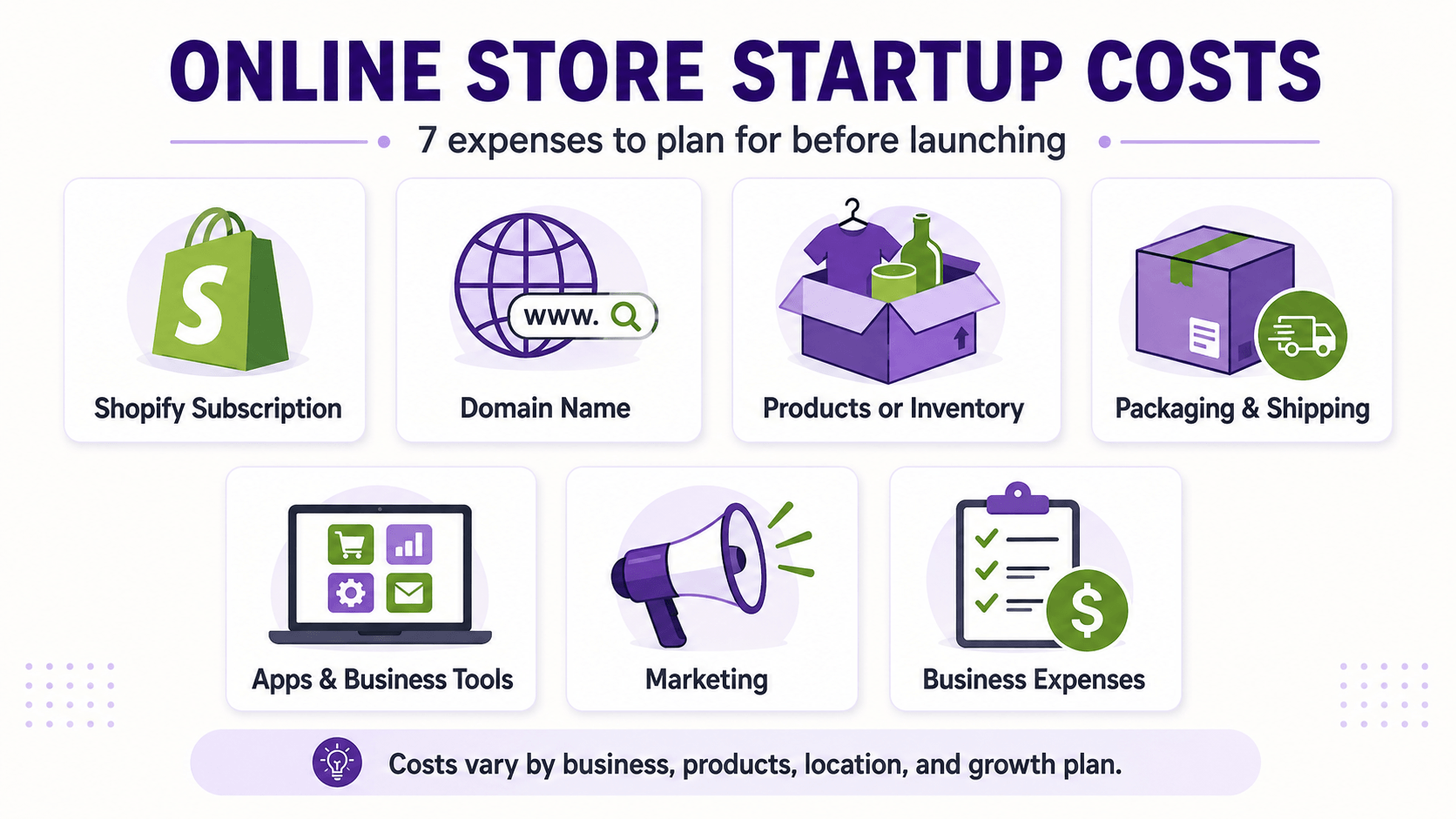
The platform is only one part of the budget. A lean store might begin with a free theme, a domain, samples, basic packaging, and a small marketing test. A private-label business with inventory, professional photography, custom packaging, and advertising can require much more.
| Cost | Lean starting approach |
|---|---|
| Shopify | Basic: $39 monthly or $29 per month annually in current U.S. pricing |
| Domain | Usually an annual registration; price varies by extension and registrar |
| Theme | Begin with a suitable free Shopify theme |
| Products | Samples, a small inventory order, or a no-inventory model |
| Packaging and shipping | Test materials, labels, and representative shipments |
| Apps | Install only when a required workflow is missing |
| Marketing | Content, outreach, email capture, or a controlled paid test |
| Business requirements | Registration, permits, tax, insurance, and professional advice vary by location |
Shopify currently offers a three-day free trial followed by $1 per month for the first three months for eligible new users. Offers, eligibility, country pricing, taxes, and plan features can change.
Before signing up, read my Shopify free trial guide to understand what’s included and how the introductory offer works. For ongoing plan costs, transaction fees, and additional expenses, review my complete Shopify pricing guide.
Begin with a customer and a problem, not a random product list. The strongest product ideas usually improve an existing task, serve a recognizable group, express an identity, replace an inconvenient option, or bundle related items into a simpler solution.
Consider whether the product is easy to explain, photograph, price, ship, support, and reorder. Fragile, regulated, perishable, oversized, easily returned, or low-margin products can work, but they require more operational planning.
| Business model | Advantage | Main risk |
|---|---|---|
| Owned inventory | Control over product and fulfillment | Cash tied up in stock |
| Handmade | Distinctive products and story | Production capacity |
| Print on demand | Low inventory risk | Margin and fulfillment control |
| Dropshipping | No warehouse required | Supplier quality and delivery |
| Digital products | No physical shipping | Competition and unauthorized sharing |
| Private label | Brand and product control | Minimum orders and upfront cost |
If the product decision is still open, use the best products to sell on Shopify guide to evaluate demand, margins, repeat-purchase potential, shipping difficulty, competition, and differentiation.
Step 2: Validate Demand Before Investing Heavily
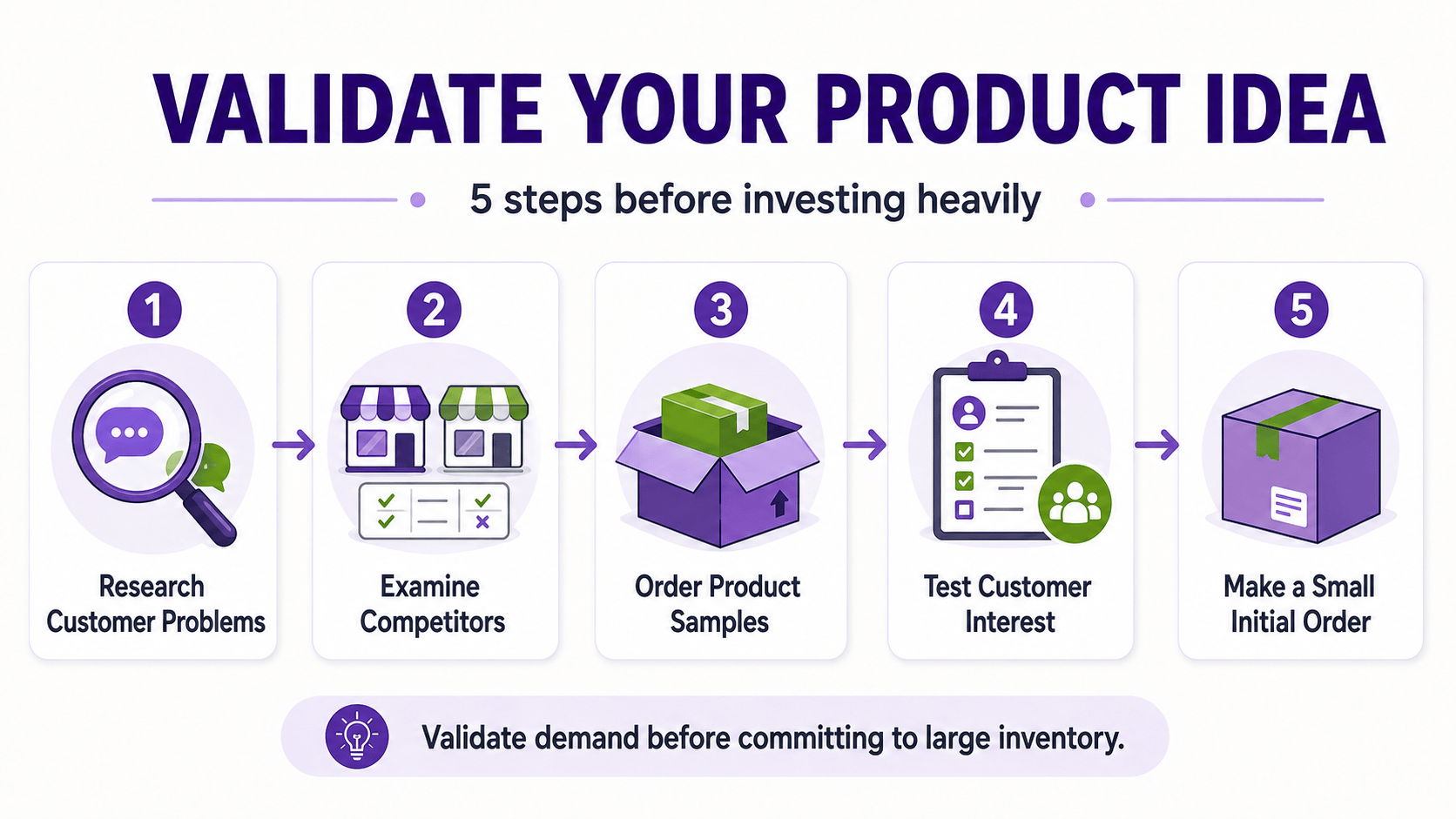
Validation means collecting evidence that the intended customer notices the problem and is willing to pay for the solution. Search volume and social-media views can show interest, but neither proves profitable demand.
- Read customer reviews for competing products and record repeated complaints.
- Study marketplace results, pricing, review counts, positioning, and product gaps.
- Speak with prospective customers without leading them toward the answer.
- Create a simple offer or waitlist and measure qualified interest.
- Order samples and evaluate quality, packaging, delivery, and support.
- Start with the smallest practical order and define a stop-loss amount.
Avoid treating friends’ encouragement as proof. The useful signals are actions: email signups from the target audience, sample requests, preorders where legally and operationally appropriate, repeat questions, and purchases at a price that supports the business.
Step 3: Calculate Price, Margin, and Break-Even Sales
Revenue is not profit. Before building the store, calculate what remains after the product, inbound freight, packaging, pick-and-pack work, outbound shipping subsidy, payment processing, platform and app costs, returns, damaged orders, discounts, advertising, and taxes paid by the business.
Contribution per order: selling price − product cost − variable fulfillment, packaging, shipping, processing, returns allowance, and marketing cost.
Break-even orders: monthly fixed costs ÷ contribution per order.
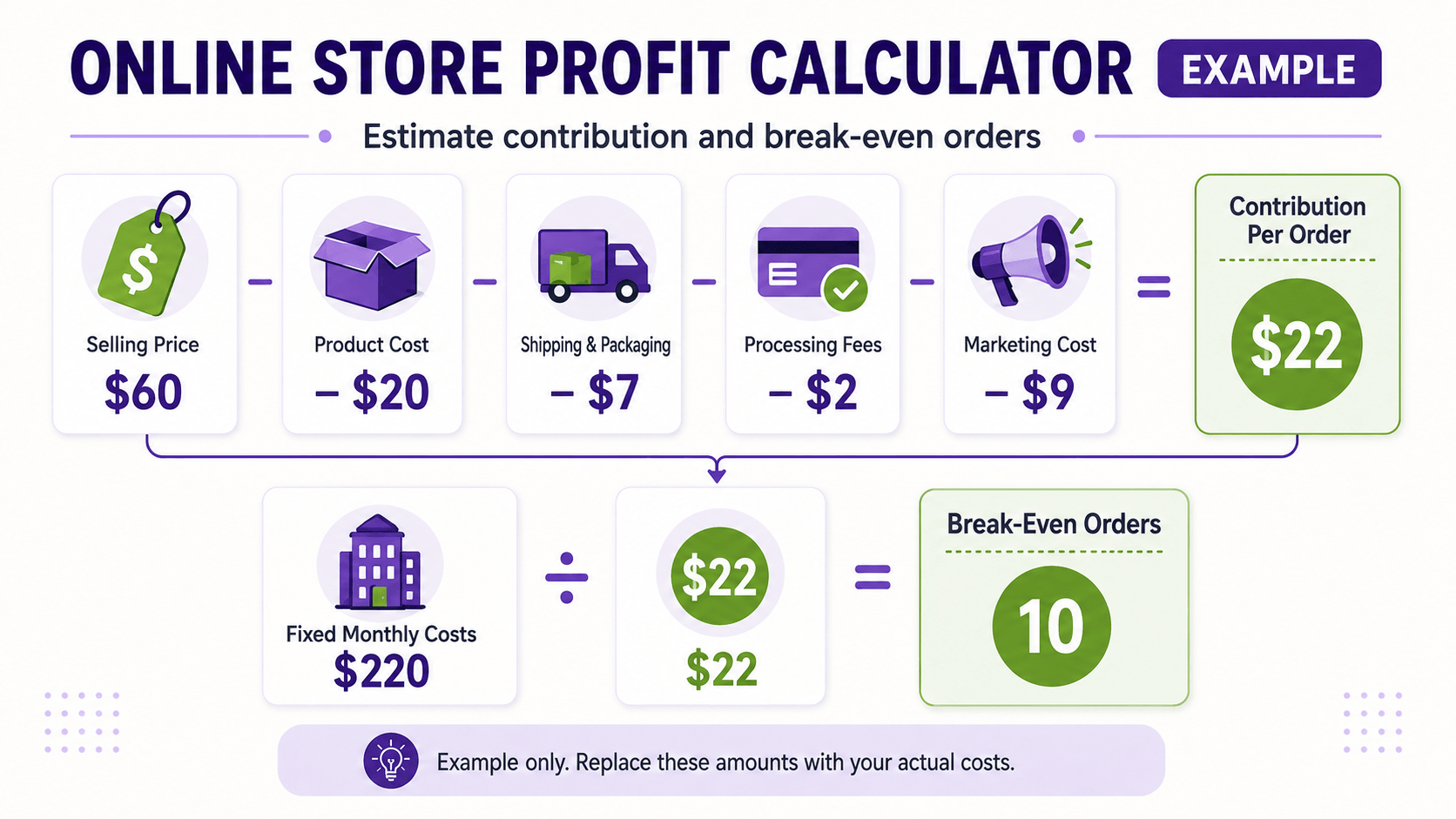
For example, a $60 order with $20 in product cost and $18 in other variable costs contributes $22 before fixed expenses and tax. If fixed monthly costs are $220, the store needs ten similar orders to cover them. Replace every example number with supplier quotes and the business’s real assumptions.
Run a base case, a lower-sales case, and a higher-return or higher-advertising-cost case. A product that works only under perfect assumptions is not ready for a large investment.
Step 4: Choose a Name and Handle the Business Basics
Choose a name that is easy to pronounce, spell, remember, and use in a domain. Search the web, domain registries, social platforms, business registries, and relevant trademark databases before investing in branding. Domain availability does not create trademark rights.
Business registration, seller permits, sales tax registration, product rules, privacy obligations, insurance, bookkeeping, and licenses depend on the location, products, and customers. Separate personal and business finances when appropriate, retain expense records, and use qualified legal and tax professionals for requirements specific to the business.
Prepare a business name, address, support email, return address, customer-service process, supplier information, product costs, weights, package dimensions, and bank details before configuring payments and delivery.
Step 5: Create the Shopify Store
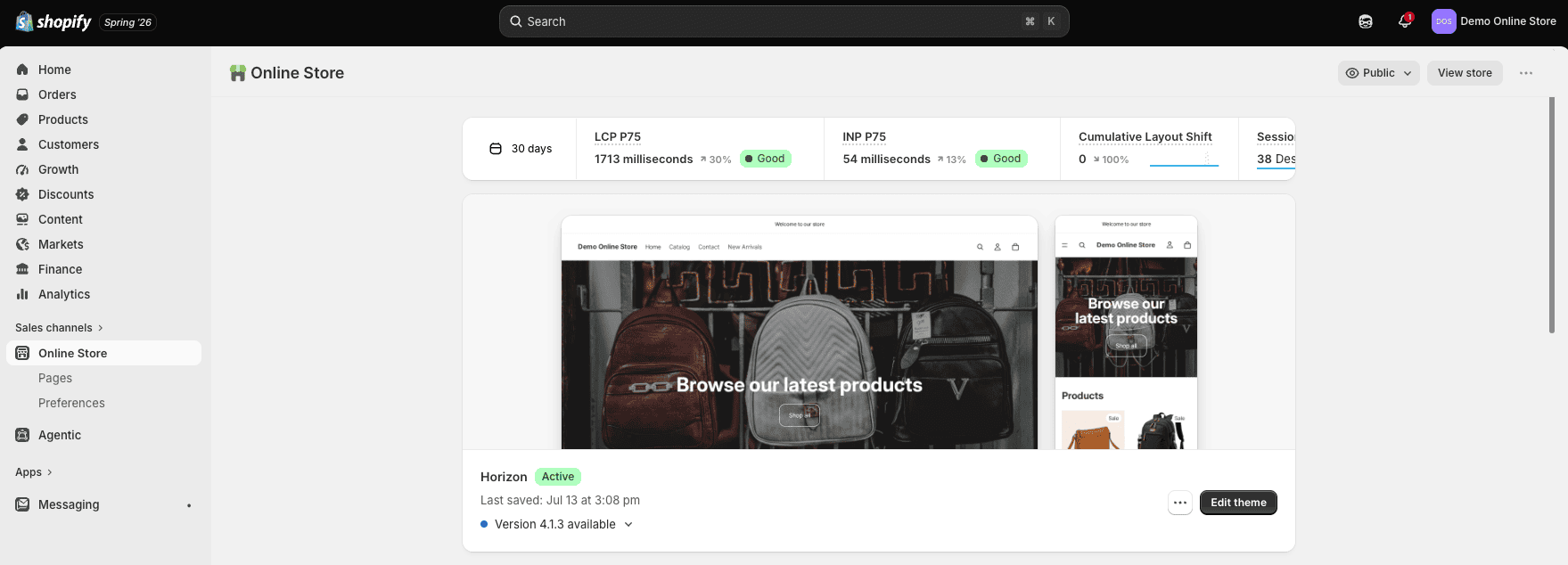
Start the Shopify free trial and create the store account. Shopify currently lets a new user sign up with an email address and password or another supported sign-in method, and the customized setup questions can be skipped or completed.
Use the trial to build before committing to a longer billing term. Add business details carefully, use an email address the business will control, enable strong account security, and grant each collaborator only the access required.
If you are still deciding which platform to use, read my Shopify vs WordPress comparison to compare ecommerce features, setup, costs, customization, maintenance, ownership, and the types of websites each platform handles best.
After creating the account, you can use Shopify’s AI Store Builder to generate personalized storefront designs from a short description of the business. Read my Shopify AI Store Builder review to see what the tool creates, how the generated designs can be customized, its limitations, and which parts of building the store still require manual work.
This article focuses on the business-to-launch roadmap. For the detailed dashboard sequence, theme screens, collections, navigation, and settings, follow the step-by-step Shopify store tutorial. Shopify also maintains an official setup guide.
If WordPress is also under consideration, read my Shopify vs WooCommerce comparison to compare setup, costs, design, checkout, SEO, ownership, maintenance, and scalability before choosing your ecommerce platform.
Step 6: Add Products That Are Ready to Buy
In the Shopify admin, go to Products and add a product. At minimum, Shopify requires a title and price, but a launch-ready listing should answer the questions a customer would ask before purchasing.
- A clear product name that describes the item
- Original benefits-focused description
- Accurate price and genuine compare-at pricing, if used
- Consistent original images from useful angles
- Variants such as size, color, material, or quantity
- SKU, barcode, inventory, weight, and customs information where applicable
- Shipping, delivery, returns, care, safety, and compatibility details
- Accurate search title, description, URL, and image alt text
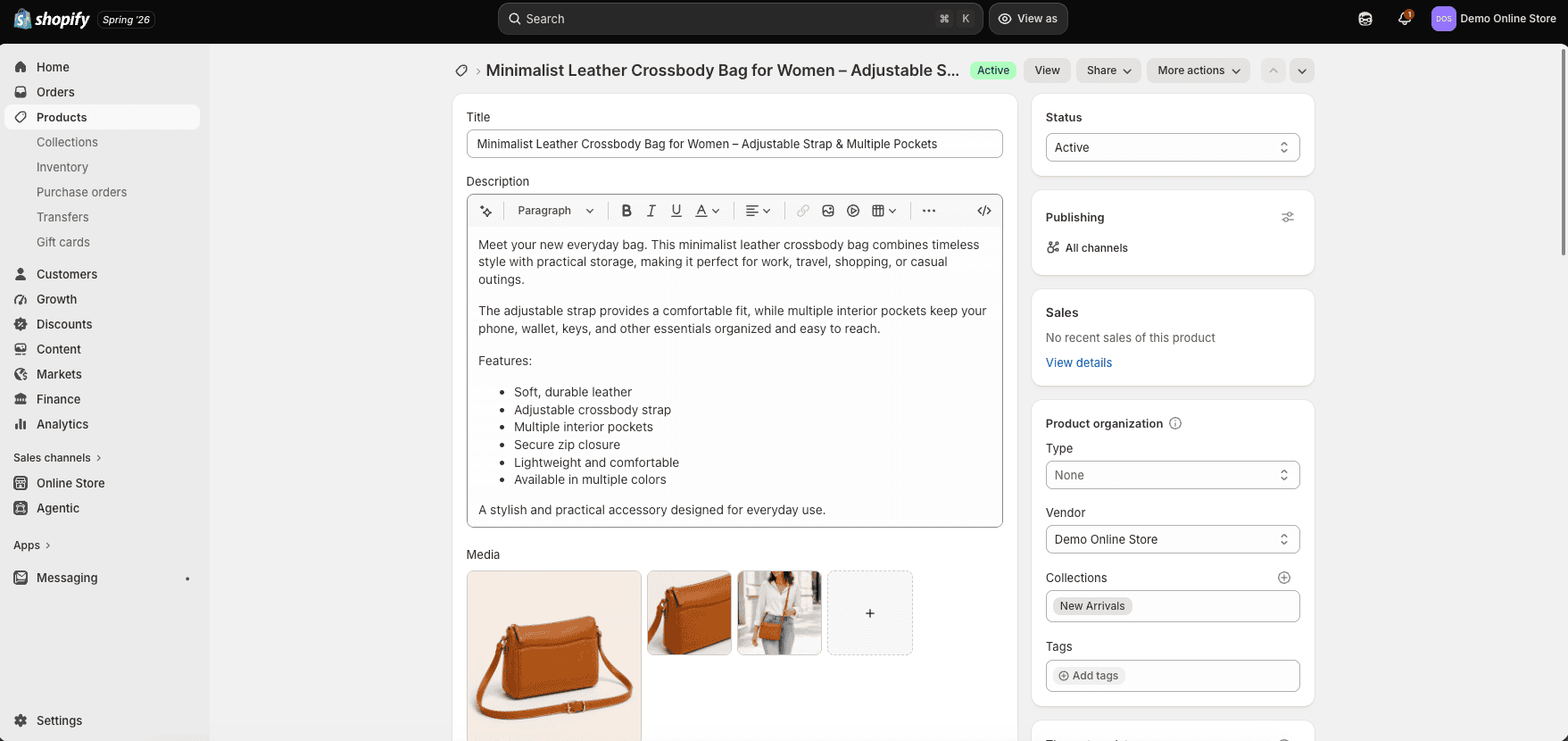
Do not copy a supplier description without improving and verifying it. Original text should explain who the product is for, what problem it solves, what is included, how it differs, and what the buyer should expect. Claims about results, materials, origin, sustainability, safety, warranties, and discounts must be supportable.
Organize related products into collections and use filters only when they help customers narrow a meaningful catalog. A small store can begin with a simple Shop collection and expand its structure as inventory grows.
Step 7: Design a Simple, Trustworthy Storefront
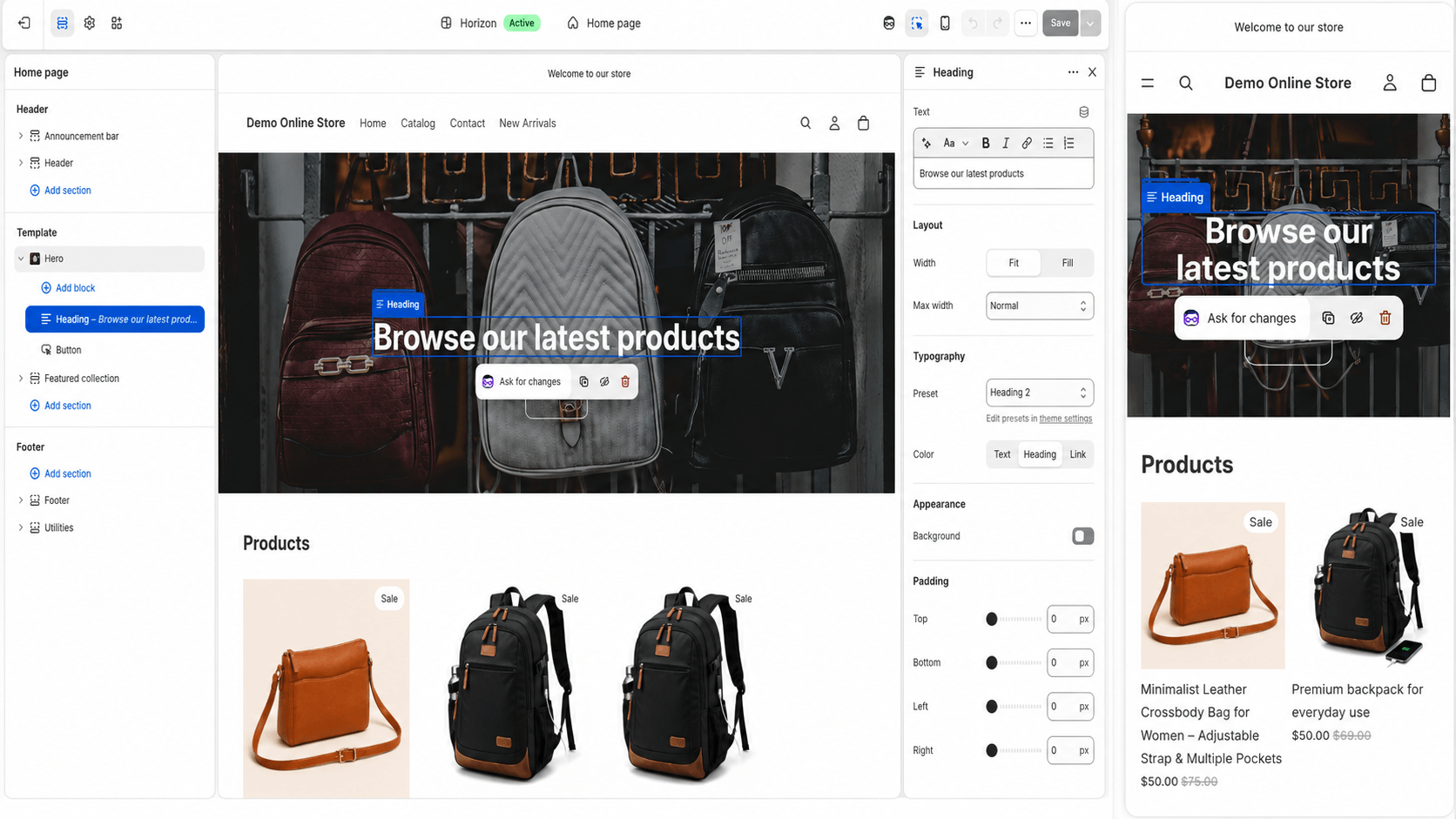
Begin with a free Shopify theme that supports the catalog and essential features. A premium theme is not automatically faster or more persuasive. Product photography, offer clarity, mobile usability, navigation, and trust usually matter more than elaborate effects.
Before deciding on the layout, review the 25 best Shopify store examples to see how different stores approach branding, homepage structure, product photography, navigation, product pages, trust, and conversions. Use these examples for inspiration while building around your own products and customers.
The homepage should explain what the store sells, who it serves, why the offer is different, and what the visitor should do next. A practical structure is an outcome-focused headline, primary call to action, featured collection, best products, core benefits, proof, helpful content, email signup, and footer.
Create About, Contact, FAQ, shipping, return/refund, privacy, and terms pages that accurately reflect the business. Add them to clear header or footer navigation. Templates can provide a starting point, but they must be reviewed for the products, practices, jurisdiction, and promises being made.
Check every important template on a phone. Buttons should be easy to tap, text readable, images compressed, menus understandable, forms usable, and product options unambiguous. Avoid popups and announcement bars that cover the main action or make checkout difficult.
Step 8: Configure Payments, Shipping, and Taxes
Payments
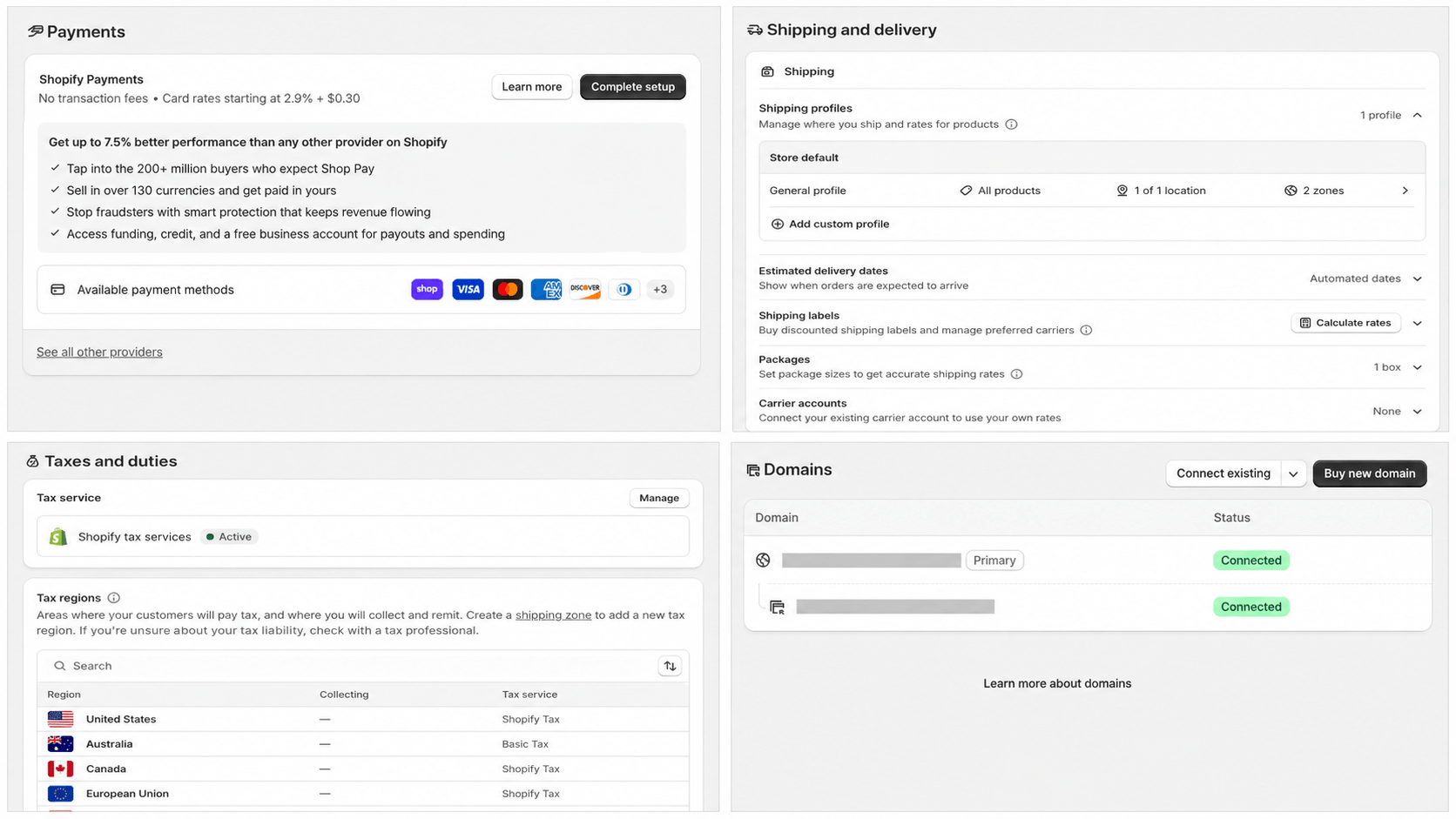
Go to Settings and review Payments. Shopify Payments is integrated where available, while supported external providers vary by business country. Confirm eligibility, identity and banking requirements, card and method rates, payout timing, reserves, refunds, disputes, fraud tools, currency, and any additional platform fee before accepting orders.
Shipping and delivery
Decide where the store ships, which products require special rules, who fulfills each order, which packaging is used, how long handling takes, what customers pay, and how tracking and returns work. Shopify can use flat, price-based, weight-based, free, and eligible calculated rates.
Weigh and measure packed samples. Compare multiple realistic destinations, including remote or expensive zones. Ensure the highest price or weight tier has coverage so a valid customer does not reach checkout with no available shipping rate.
Taxes and duties
Review Settings, Taxes and duties, and the markets where the store sells. Software can calculate amounts from configuration, but it does not decide where the business has registration, collection, filing, invoicing, exemption, or customs obligations. Confirm those requirements with qualified professionals.
Step 9: Connect the Domain and Essential Business Tools
Connect a domain the business controls and make it the primary storefront address. A third-party domain remains registered and renewed through that provider even after its DNS points to Shopify. DNS changes can take time, so connect and verify the domain before the planned launch hour.
Set up a professional support address on the domain, authenticate the sending domain where required, and test store notifications. Configure analytics and advertising pixels only when they are needed and compatible with the store’s consent and privacy obligations.
Install as few apps as possible. Record the owner, price, permissions, data collected, storefront impact, support contact, renewal, and uninstall/export process for each app. Remove unused trial apps before they create charges or unnecessary access.
Step 10: Test the Entire Customer Journey
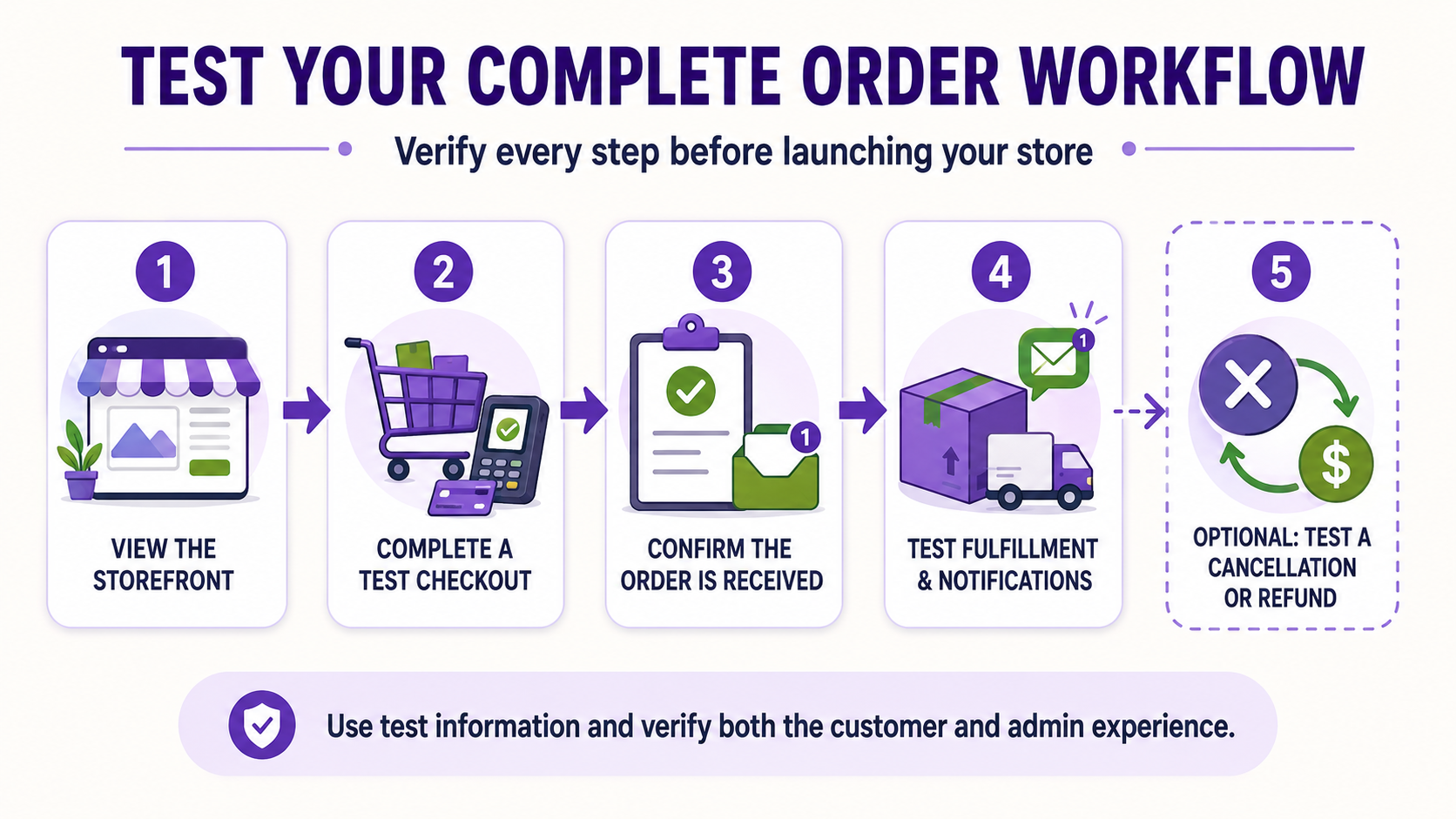
A homepage preview is not a store test. Shopify recommends placing at least one test order to verify checkout, processing settings, inventory, shipping, email notifications, and taxes. Test mode and the Bogus Gateway can simulate supported transactions after an eligible paid plan is selected; a small real order may create processing costs even when immediately refunded.
- Browse, search, filter, and choose variants on mobile and desktop.
- Add, change, and remove cart items.
- Test valid and invalid addresses, shipping zones, discounts, tax, and payment outcomes.
- Confirm order, shipping, cancellation, refund, and customer emails.
- Fulfill and partially fulfill a test order.
- Cancel, restock, refund, and archive an order.
- Submit every form and verify who receives the message.
- Check policies, contact information, social links, domain, SSL, favicon, metadata, and broken links.
- Review accessibility with keyboard navigation, readable contrast, form labels, headings, and image alt text.
Use the full Shopify store launch checklist before removing the password. During payment test mode, customers cannot place live orders, so deactivate it before launch.
Step 11: Launch the Online Store
Choose the Shopify plan that supports the required features, complete the final test, back up or export important business data where appropriate, and remove storefront password protection. Shopify requires a subscription plan before the password can be removed during the free trial.
Launch to a small controlled audience first. Ask testers to browse and purchase without coaching, then watch where they hesitate or fail. Correct checkout blockers, unclear product details, broken forms, missing delivery information, and mobile issues before sending a large campaign.
Once your product, pricing, fulfillment, and launch plan are ready, you can begin creating the store and testing the complete customer experience. Keep the opening catalog manageable enough to support every customer well.
Step 12: Get the First Customers
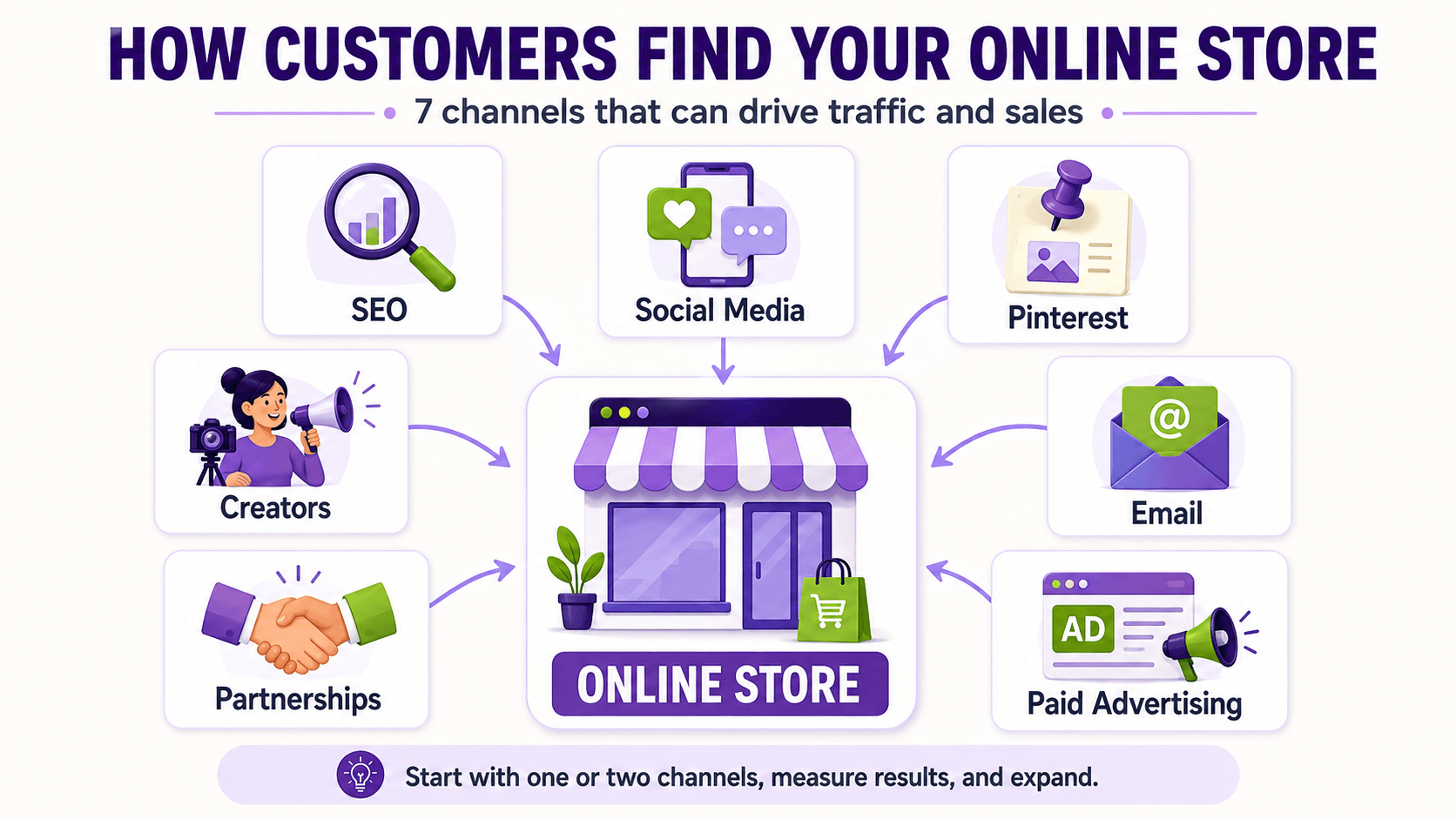
Do not wait until launch day to decide how people will find the store. Choose one primary channel that matches the customer and product, then build a repeatable weekly process around it.
| Channel | Best starting use |
|---|---|
| SEO and content | Products customers research or search for |
| Short-form social | Demonstrable, visual, or identity-driven products |
| Visual products with planning and discovery intent | |
| Creators and affiliates | Products that benefit from trusted demonstration |
| Follow-up, education, launches, and repeat purchases | |
| Paid search or social | Measured offer tests with defined economics |
| Communities and partnerships | Focused niches where genuine participation is possible |
Create useful material around customer questions, comparisons, use cases, problems, and buying decisions. For organic search, use the Shopify SEO guide for beginners. For the immediate launch period, follow the first Shopify sale plan.
Track the path from visitor to product view, add to cart, checkout, purchase, fulfillment, delivery, support, review, and repeat order. Traffic without qualified product interest is not the goal. Use the data to improve the offer and customer experience rather than changing everything at once.
A Realistic Online Store Timeline
| Stage | Primary outcome |
|---|---|
| Days 1–3 | Customer, product, competitor, and margin research |
| Days 4–7 | Samples, supplier checks, name, domain, and business requirements |
| Week 2 | Shopify account, products, theme, pages, navigation, and policies |
| Week 3 | Payments, shipping, taxes, domain, email, analytics, and testing |
| Week 4 | Controlled launch, first traffic campaign, fixes, and measurement |
A simple digital-product or print-on-demand store may launch faster. Inventory manufacturing, regulated products, international selling, complex shipping, or custom integrations can take much longer. Do not trade legal compliance, product safety, truthful claims, or checkout testing for an arbitrary launch date.
Common Online Store Mistakes
- Buying large inventory before validating demand
- Pricing from competitors without calculating complete cost
- Launching too many unrelated products
- Copying supplier descriptions and images without differentiation
- Spending heavily on design before improving the offer and product media
- Installing apps without a specific requirement
- Hiding delivery, return, or contact information
- Testing only the homepage instead of completing orders
- Launching without a customer-acquisition plan
- Changing many variables before learning what caused the result
The most expensive mistake is building around assumptions that were inexpensive to test. Validate the riskiest parts first: whether customers care, whether the product is good, whether the numbers work, and whether fulfillment can keep the promise.
If Shopify is your chosen platform, use the complete Shopify mistakes to avoid guide to review products, design, apps, checkout, shipping, SEO, mobile usability, and ongoing maintenance before launch.
Frequently Asked Questions
Can I start an online store with no money?
You can research, validate ideas, create content, and begin building during a free trial with little money. A public operating store normally has costs such as a platform plan, domain, payment processing, products or samples, fulfillment, and marketing. No-inventory models can reduce upfront cost but do not remove business expenses.
How much money should I have before starting?
There is no universal minimum. Calculate the first platform and domain payments, samples or opening inventory, packaging, representative shipping, business requirements, returns reserve, and a controlled marketing test. Set a maximum amount the business can risk without harming household finances.
Do I need an LLC to start an online store?
Not every jurisdiction requires an LLC, and that structure is not available everywhere. Registration, tax, license, liability, and insurance needs depend on the owner, location, products, and customers. Consult appropriate local professionals rather than treating platform setup as legal formation.
Can I start without holding inventory?
Yes. Print on demand, dropshipping, digital products, made-to-order goods, and some supplier or fulfillment arrangements reduce inventory requirements. The owner remains responsible for product accuracy, customer experience, delivery promises, refunds, and applicable law.
How long does it take to build an online store?
A basic storefront can be assembled in days, but a reliable business may require weeks or longer for research, samples, product content, business requirements, shipping, payment approval, policies, testing, and marketing. Launch when the complete order promise works, not when the homepage looks finished.
Is Shopify good for beginners?
Yes. Shopify combines hosting, SSL, themes, products, inventory, checkout, orders, analytics, and support in one platform. Beginners still need to learn ecommerce operations, but they do not need to configure a conventional hosting stack.
How many products should I launch with?
Launch with the smallest catalog that clearly represents the offer and can satisfy the target customer. One strong product can be enough; a category store may need a focused collection. Do not add weak products solely to make the store look larger.
How do online stores get their first sale?
Most first sales come from deliberately reaching a relevant audience through content, search, creators, communities, email, partnerships, personal outreach, or controlled advertising. Choose the channel that matches the customer and measure the entire path to purchase.
For the complete process, follow my guide to getting your first sale on Shopify, which includes customer research, offer preparation, audience building, outreach, launch activities, funnel analysis, and a practical 30-day plan.
Final Checklist
Before removing your storefront password, use the complete Shopify store launch checklist to review every launch requirement in greater detail.
- Product, customer, demand evidence, supplier, and economics verified
- Business, tax, product, privacy, and insurance requirements reviewed
- Shopify account secured and business settings accurate
- Products, collections, images, descriptions, variants, inventory, and SEO complete
- Theme, mobile design, navigation, contact details, and policies complete
- Payments, shipping, taxes, domain, email, analytics, and app permissions verified
- Successful and failed orders, fulfillment, cancellation, return, refund, and notifications tested
- Initial audience, channel, launch offer, measurement, and support plan ready
Final Verdict
Shopify is my recommended platform for most beginners starting an online store because it provides a cohesive system for the storefront, checkout, products, inventory, orders, and growth. The platform makes implementation easier; it does not replace validation, margins, accurate product information, fulfillment, customer support, or marketing.
For a closer look at Shopify itself, read my complete Shopify review covering its features, pricing, advantages, limitations, and who it is best for.
Start small, finish the complete buying experience, test every promise, and learn from real customers before making the operation more complex. When those foundations are ready, you can begin building the store.

- Shopify vs WordPress (2026): Which Is Better for Your Website? - September 15, 2026
- Shopify SEO for Beginners: Complete Guide (2026) - September 17, 2026
- Shopify vs WooCommerce (2026): Which Is Better? - September 17, 2026

Leave a Reply
Want to join the discussion?Feel free to contribute!