
Shopify Print on Demand: Complete Guide (2026)
A Shopify print-on-demand store lets you sell products featuring your designs without purchasing a large amount of inventory before you know what customers want. When someone orders, a connected print-on-demand provider produces the item and ships it to the customer.
That low-inventory model makes print on demand approachable, but it is not automatic income. You still need an identifiable audience, original designs, reliable samples, accurate pricing, clear delivery expectations, useful product pages, and a plan for attracting customers.
This guide explains how Shopify print on demand works, how to choose a provider, what products to consider, how to calculate a sustainable price, and how to launch without making the mistakes that cause many new stores to lose money.
Key Takeaways
- Print-on-demand products are produced after a customer orders, so sellers do not need to buy bulk inventory first.
- The provider normally handles production, packing, and shipping, while the seller remains responsible for the customer relationship.
- Order samples before launch to check the product, print, packaging, delivery, and complete customer experience.
- Calculate profit after product cost, printing, shipping, platform expenses, payment costs, replacements, returns, and marketing.
- A specific audience and recognizable brand are usually more defensible than a store filled with unrelated designs.
- Use original or properly licensed artwork and investigate relevant intellectual-property rights before selling.
- Start with a small, testable collection and expand from actual sales and customer feedback.
What Is Shopify Print on Demand?
Print on demand, often shortened to POD, is an order-fulfillment model. You create or license a design, apply it to a provider’s product, and publish the resulting item in your Shopify store. The provider waits until an order arrives before producing it.
Shopify’s current print-on-demand guide describes a six-part flow: create the design, select products, list them, receive an order, send the order to the provider, and have the provider print, pack, and ship it. A compatible app can automate the transfer of order information.
You own the storefront and customer relationship. The print provider is a fulfillment partner, not a replacement for product research, marketing, support, bookkeeping, or legal compliance.
How the Order Process Works
- You add a print-on-demand app or integration to Shopify.
- You choose a blank product and upload an original or licensed design.
- You create the product listing, mockups, variants, price, and shipping information.
- A customer orders and pays through your Shopify checkout.
- The order details move to the provider automatically or after your approval, depending on your settings.
- The provider charges you for production and shipping, then makes and sends the product.
- You communicate with the customer and resolve any delay, damage, return, or replacement issue.
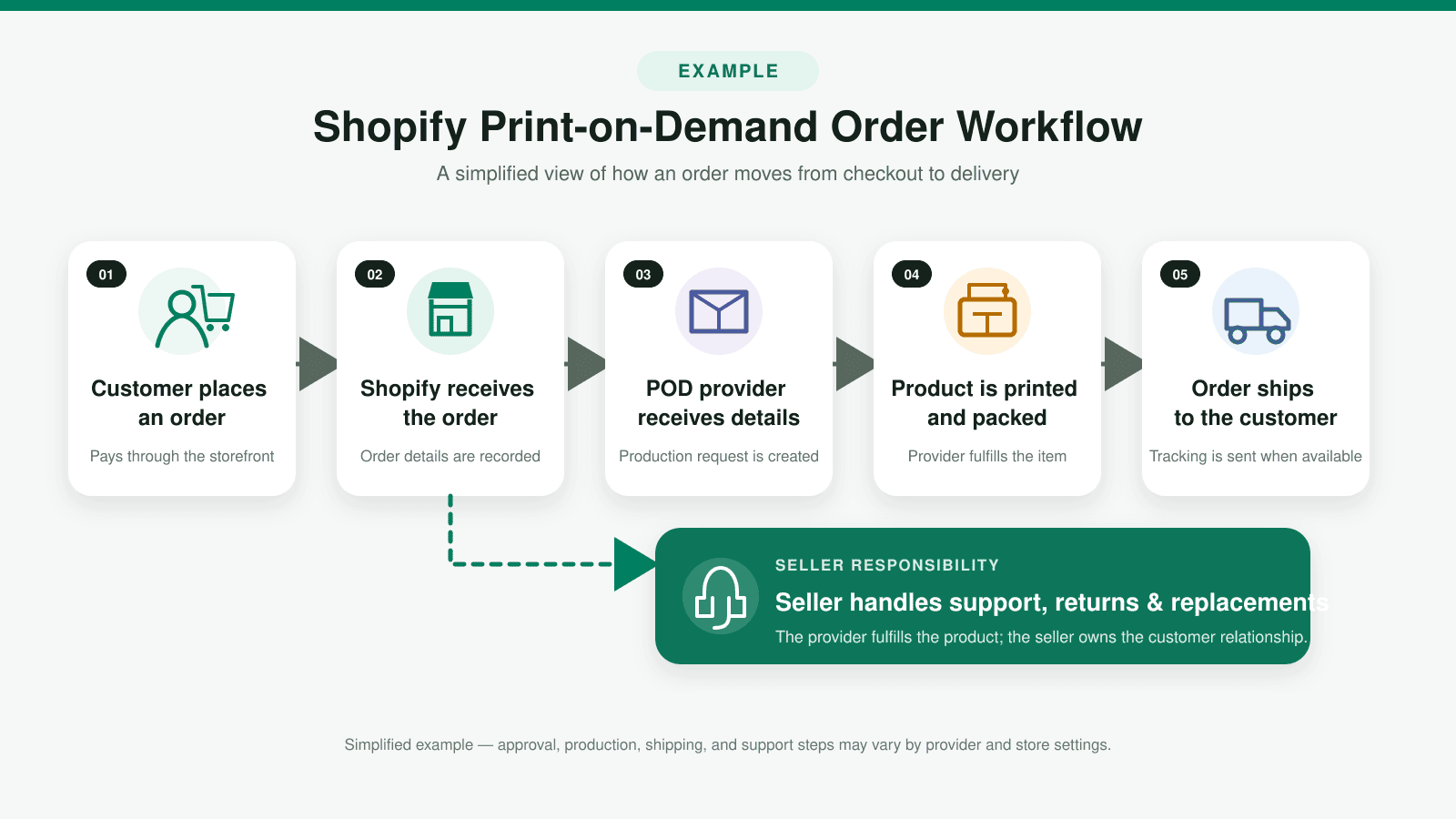
The difference between what the customer pays and your total expenses determines whether the sale is profitable. Cash flow matters because the provider may charge your payment method before Shopify makes the customer’s payout available to you.
Print on Demand vs. Dropshipping vs. Inventory
| Model | What You Sell | Inventory Risk | Control |
|---|---|---|---|
| Print on demand | A provider’s product customized with your design | Low before a sale | Moderate brand control; limited production control |
| Traditional dropshipping | A supplier’s existing product | Low before a sale | Limited product and fulfillment control |
| Wholesale or self-held inventory | Products bought or produced in advance | Higher | More control over product, packaging, and shipping |
Print on demand makes sense when customization is central to the offer. Traditional dropshipping may fit a store testing existing products. Buying inventory can create better unit economics and more control after demand becomes predictable, but it also requires capital, storage, and inventory management. Choosing a sales channel is separate from choosing a fulfillment model. If you are deciding between an independent storefront and a marketplace, the Shopify vs. Etsy comparison explains the differences in control, fees, traffic, and customer ownership.
If you would rather sell a product that requires no physical production or shipping, read my Shopify digital-products guide to learn how downloads are prepared, delivered, priced, tested, and supported.
Shopify Print-on-Demand Pros and Cons
| Pros | Cons |
|---|---|
| No large inventory purchase before launch | Higher unit cost than many bulk orders |
| Provider handles production and shipping | Less control over fulfillment speed and packaging |
| Products and designs can be tested with less inventory risk | Mockups may not show every real-world difference |
| Large catalogs can support several product types | Too many products can make the brand unfocused |
| Orders can flow from Shopify to a connected provider | You still handle customer expectations and support |
In my experience reviewing ecommerce setup flows, the most important mindset shift is understanding that outsourced fulfillment does not outsource responsibility. The customer purchased from your store. Your name appears on the order, so you need a documented response when a package is late or the print arrives damaged.
Who Is Shopify Print on Demand Best For?
- Artists and designers testing original work on physical products
- Creators selling merchandise to an existing audience
- Organizations needing event or community merchandise
- Niche brands that can speak to a clearly defined customer
- Existing stores testing a new category before buying inventory
It is a weaker fit when you require complex custom manufacturing, extremely fast delivery, complete control over unboxing, or very low unit costs. It is also risky when the entire strategy depends on unlicensed characters, logos, slogans, celebrities, or artwork. If you are still evaluating which business model to use, the how to start an online store guide walks through validation, costs, platforms, fulfillment, and launch planning.
If you are also deciding which website system should support the business, read my Shopify vs WordPress comparison before committing to a platform.
How to Start Shopify Print on Demand
1. Choose a specific audience
Begin with people, not blank products. Define the audience, what they identify with, what they buy, where they gather, and why your design would mean something to them. “Pet owners” is broad. “French bulldog owners who enjoy camping” gives you clearer product, design, and content ideas.
Talk with potential customers and review the language they use in communities, search results, reviews, and support questions. Do not assume a phrase is safe to sell merely because people repeat it online.
2. Select a small product collection
If you are comparing print on demand with other business models, review my 30 product ideas to sell on Shopify for additional physical, digital, subscription, and service-based options plus a practical validation process.
Choose products that fit the audience and the design. A new store rarely needs dozens of unrelated items. Start with a small hero collection that you can sample, photograph, describe, price, and support properly.
Common print-on-demand categories include shirts, sweatshirts, hats, tote bags, mugs, drinkware, notebooks, stickers, phone cases, wall art, blankets, and books. The related products-to-sell guide explains how to evaluate demand and operating difficulty before committing.
3. Create original, production-ready designs
Follow the provider’s file dimensions, resolution, color profile, transparency, safe area, and embroidery requirements. A design that looks sharp on a laptop can still print poorly if the source file is too small or important details sit outside the printable area.
Keep records showing who created each asset and which license allows commercial use on merchandise. Do not rely on an image generator, marketplace download, or template label without reading the actual terms.
4. Compare print-on-demand providers
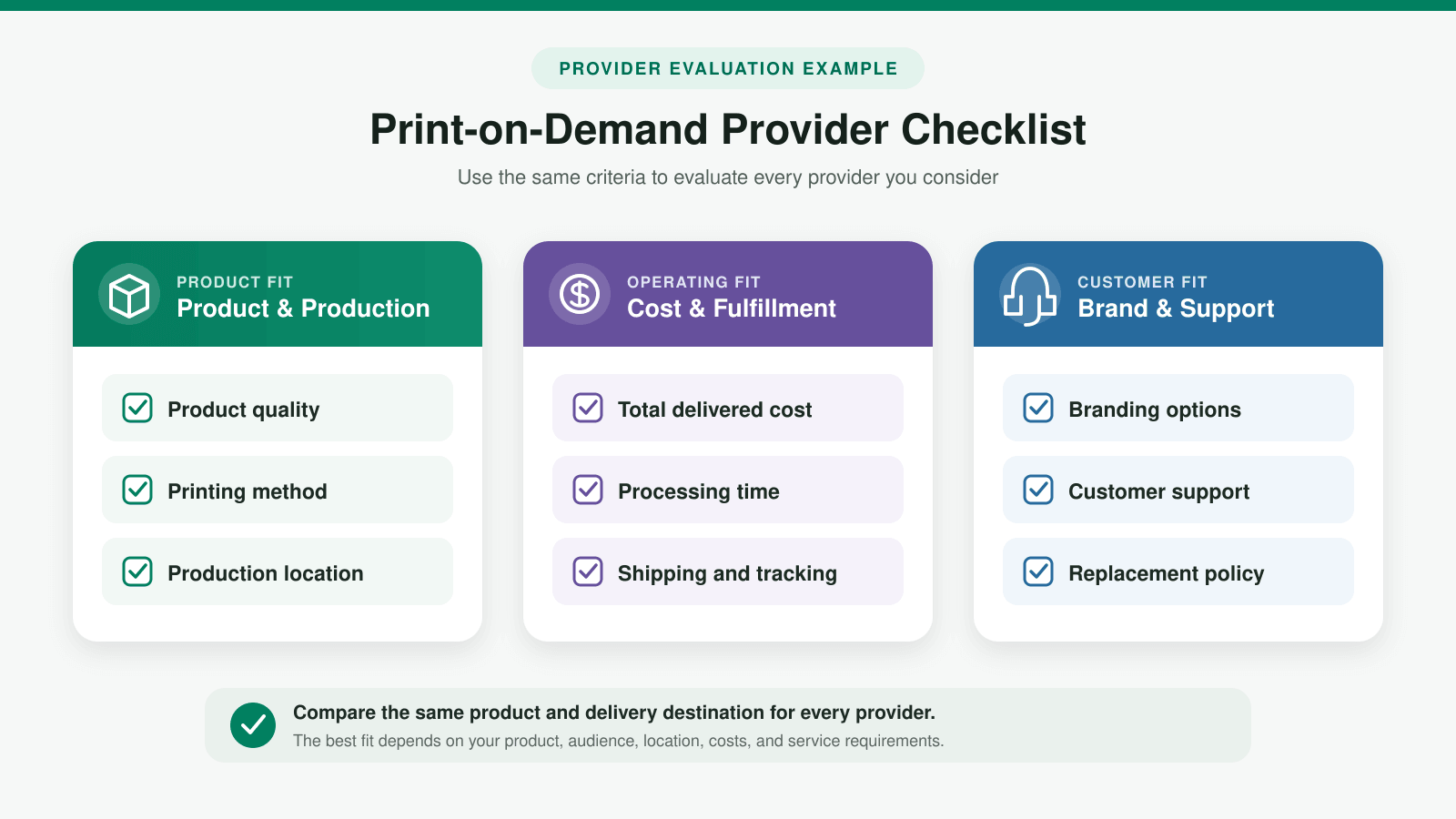
Compare the exact product, print method, production location, average processing time, shipping options, tracking, branding choices, replacement policy, support, app reviews, and total delivered cost. A provider that is best for posters may not be best for embroidered apparel.
| Provider | Useful Starting Point | What to Verify |
|---|---|---|
| Printful | Broad catalog and direct Shopify integration | Product-specific cost, branding, production location, and delivery estimate |
| Printify | Network of print providers and product choices | Performance can vary by selected print provider |
| Gelato | Global production network with stationery and wall-art options | Availability, routing, branding, and destination-specific delivery |
Shopify’s current POD provider comparison lists 11 services that integrate with Shopify. Treat any roundup as a research starting point. Verify the provider and specific product yourself before publishing a listing.
5. Build the Shopify store
Use the Shopify store setup tutorial to create the account, theme, navigation, essential pages, domain, products, payments, and shipping foundation. When you are ready to begin, build your print-on-demand store with Shopify and keep it password-protected while you connect the provider and test orders. The Basic plan will usually cover the core needs of a new single-store business, but compare current features and costs before selecting any plan.
If you want an AI-generated storefront as a starting point, read the Shopify AI Store Builder review to see what it creates and what still requires manual setup before launch.
If you are also considering a WordPress-based store, read my Shopify vs WooCommerce comparison before choosing which platform will operate your print-on-demand business.
6. Connect the POD app carefully
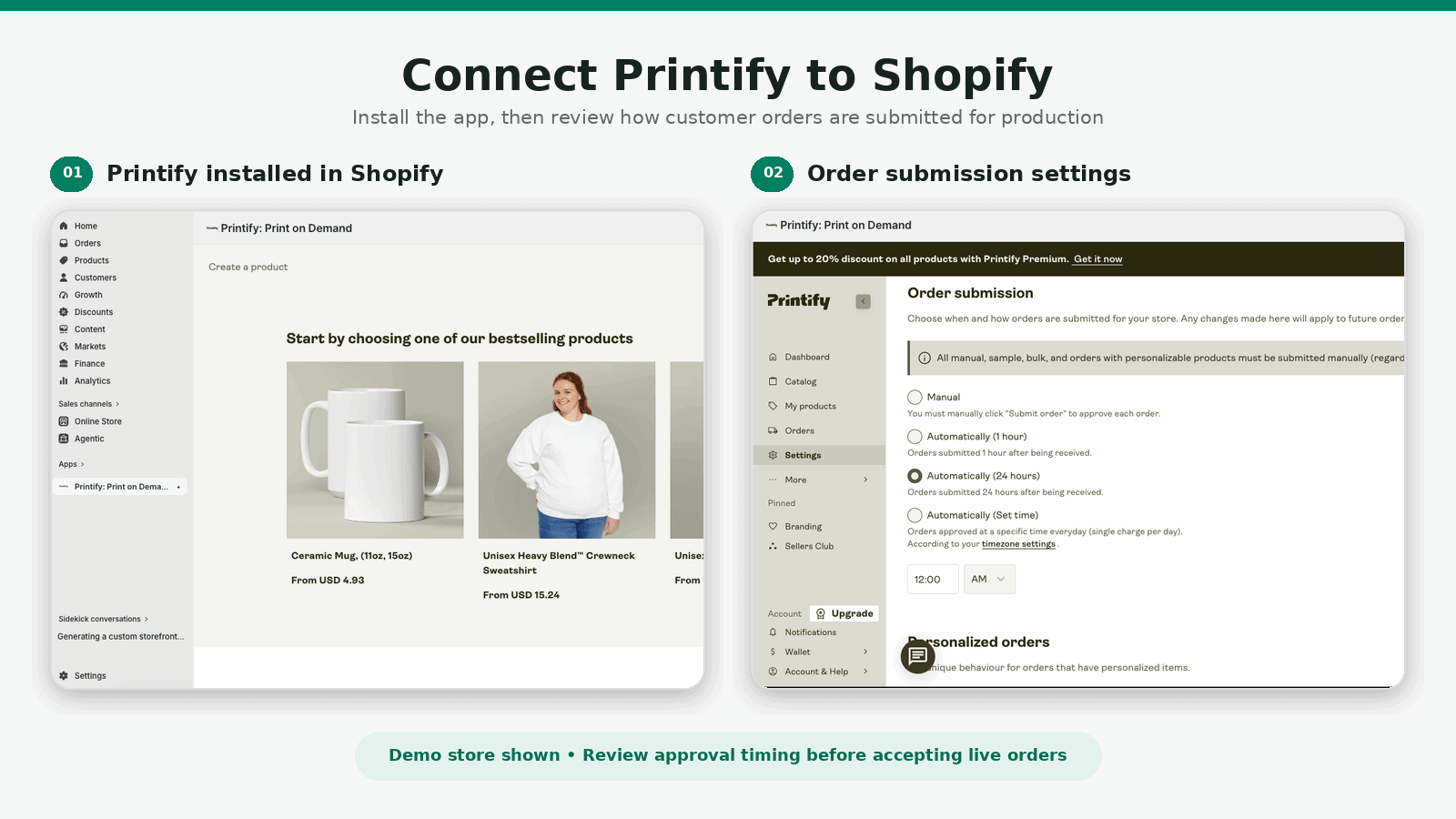
Install the selected provider’s current Shopify app and review its permissions, billing, order approval, fulfillment, notification, and inventory settings. Decide whether orders should be submitted automatically or held for manual review. Manual approval can be helpful during testing, while automation reduces work once the process is reliable.
7. Order samples before launch
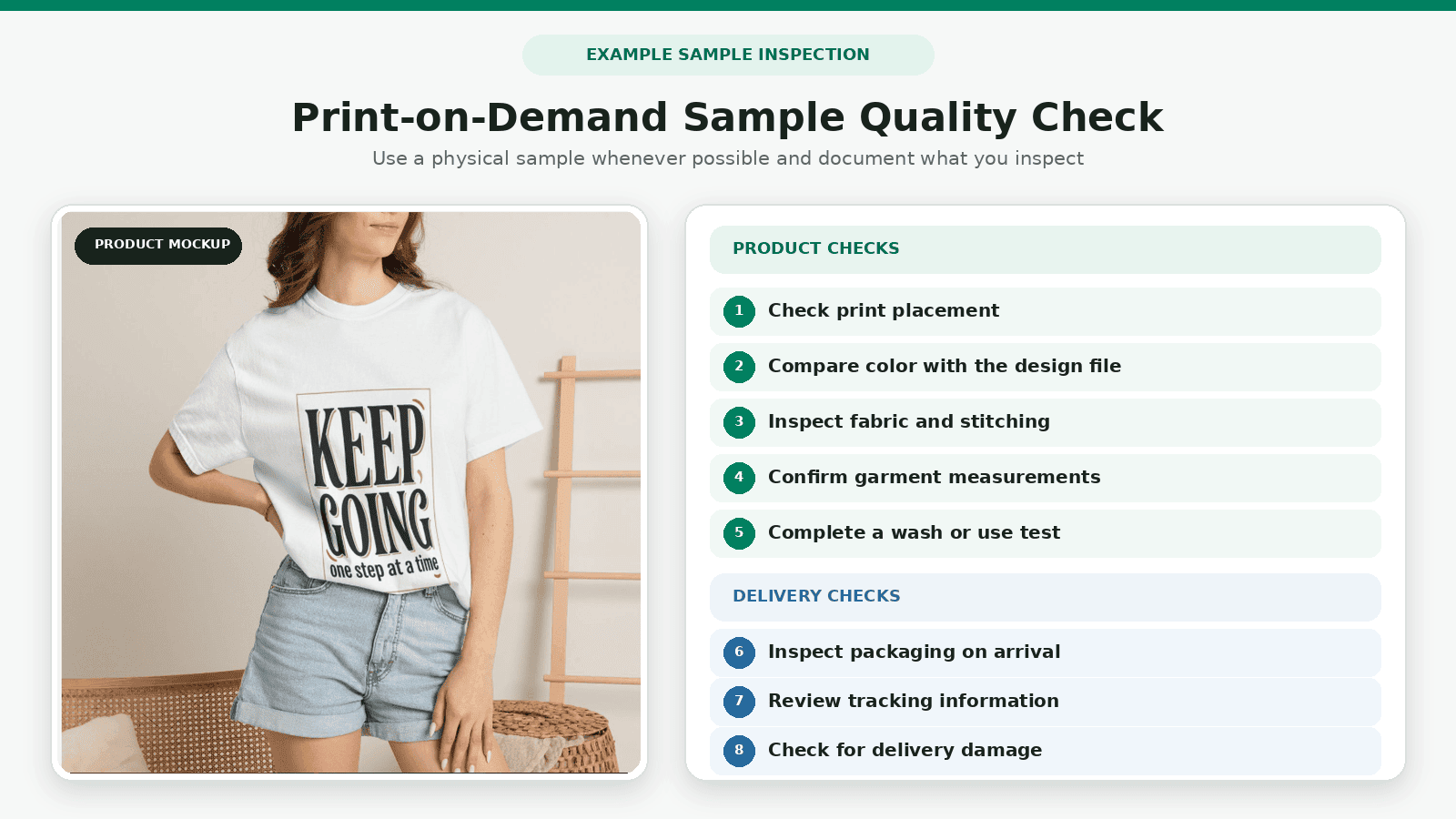
Place samples for every product and print method that represents a meaningful part of the launch. Check garment fit, fabric, print placement, color, fine details, smell, packaging, tracking, production time, and delivery condition. Wash or use the item as a customer would.
What I found when reviewing launch workflows is that samples serve two jobs: quality control and content production. Photograph the real sample in useful settings so the product page is not supported only by generated mockups.
8. Calculate the complete price
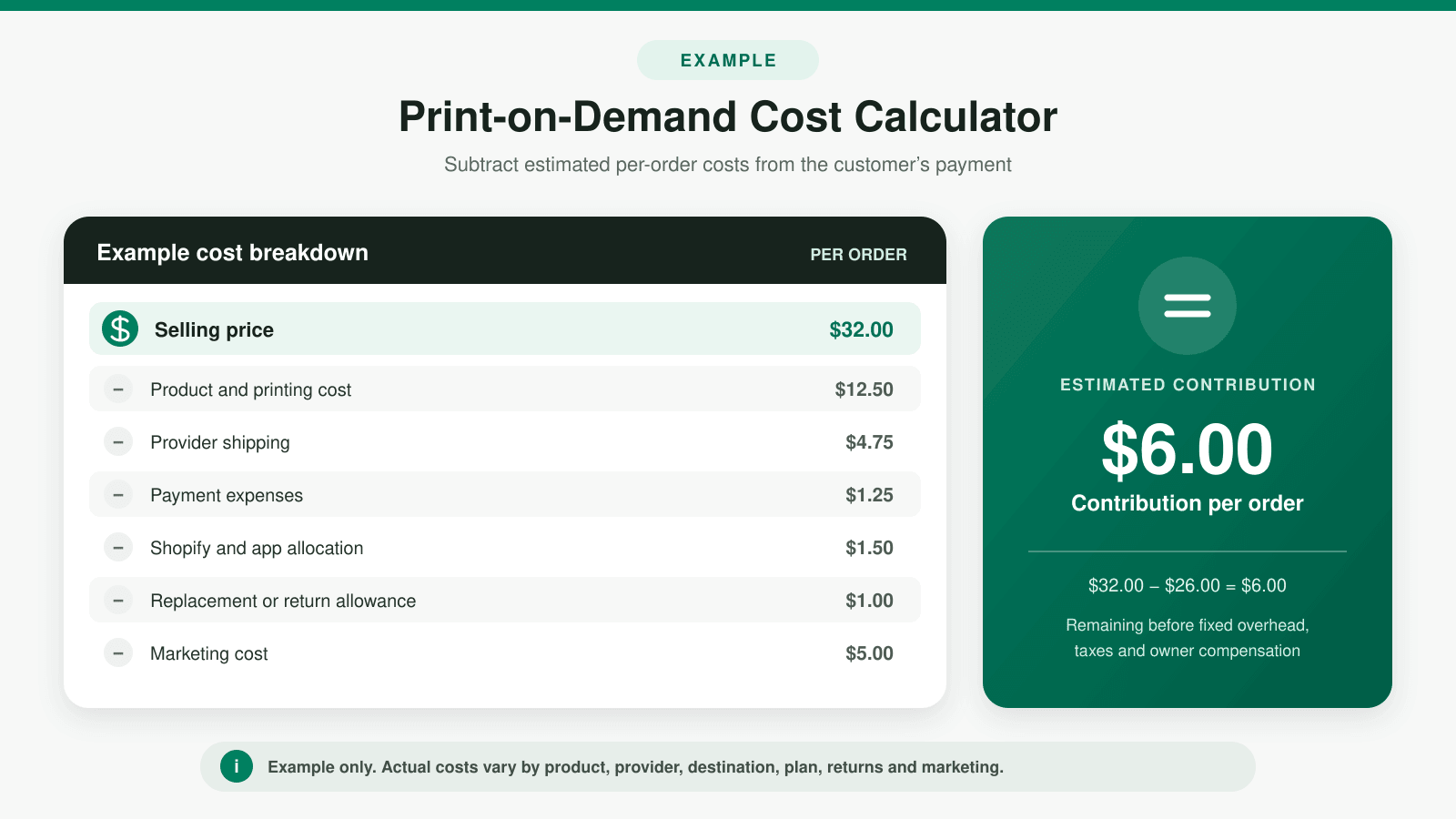
Your price must account for more than the blank product. Build a per-order worksheet that includes production, printing, shipping, transaction and payment expenses, discounts, taxes you absorb, replacement allowance, returns, apps, Shopify, marketing, and the profit required to operate.
Simple contribution formula: customer payment minus product cost, provider shipping, store and payment expenses, discount, and estimated replacement or return cost equals the amount available for marketing, overhead, and profit.
Do not copy a competitor’s price without knowing its product, volume, shipping arrangement, return rate, and acquisition cost. Review the current Shopify pricing guide when estimating the store portion of your monthly expenses.
9. Create trustworthy product pages
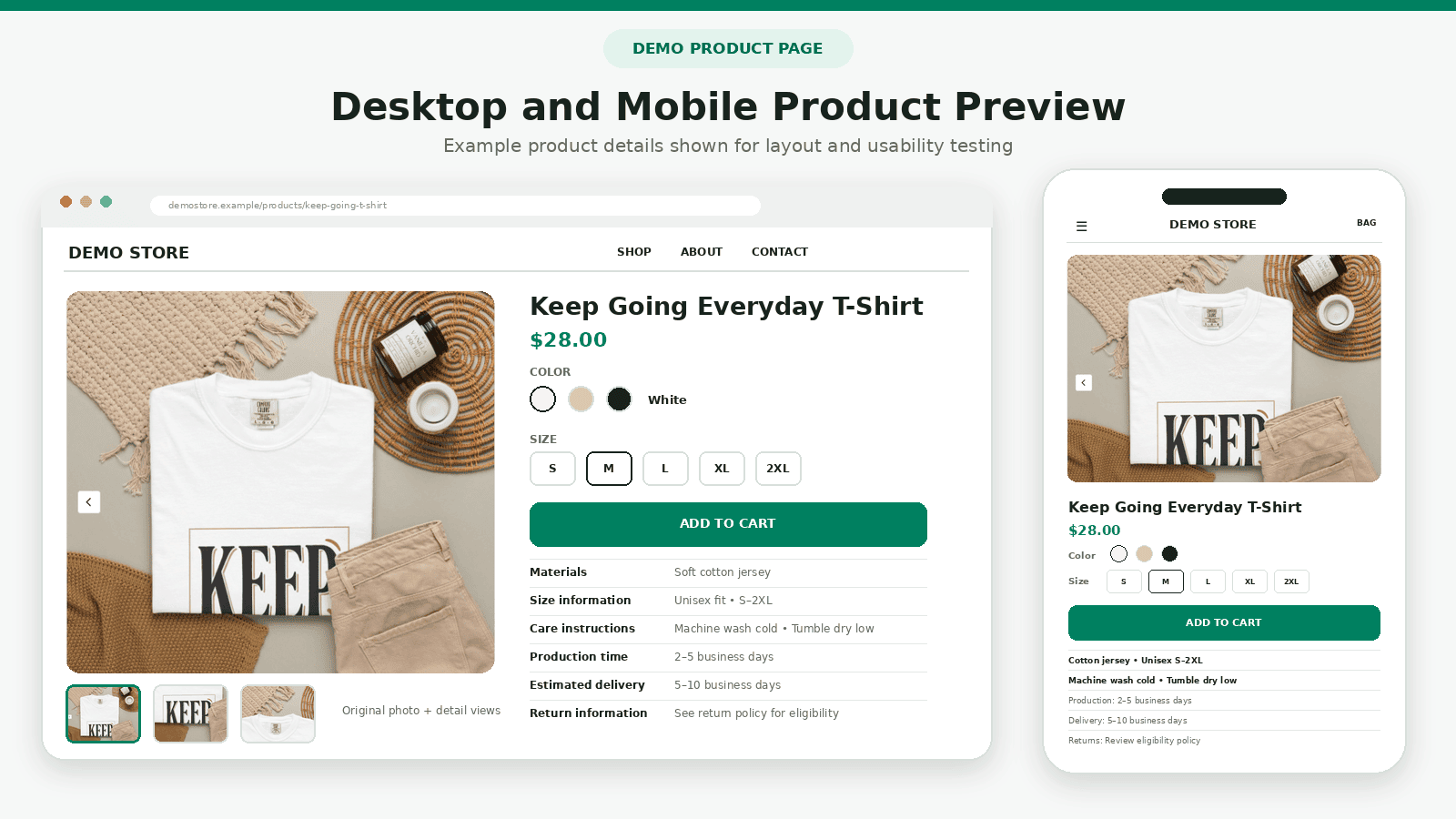
Use your samples to create original photographs showing print quality, color, fit, scale, and important details instead of relying only on provider mockups. The Shopify product-photography guide explains how beginners can plan and produce a complete product-image set.
Replace generic supplier descriptions with original copy explaining the design, product, fit, material, measurements, care, production method, fulfillment time, estimated delivery, returns, and what may vary. State whether the item is made after ordering when that affects delivery or cancellation.
Use real sample photos along with accurate mockups. Label lifestyle mockups when they are illustrative, and do not edit them so heavily that the color or print size becomes misleading. For branding and merchandising ideas, study the best Shopify store examples, then adapt the useful principles to your audience instead of copying another store’s design.
10. Test fulfillment and launch
Place a complete test order through the storefront and verify variant selection, discount behavior, tax, shipping, payment, order routing, confirmation emails, provider approval, tracking, delivery, cancellation, and support. Use the Shopify store launch checklist before removing the password.
How to Market a Print-on-Demand Store
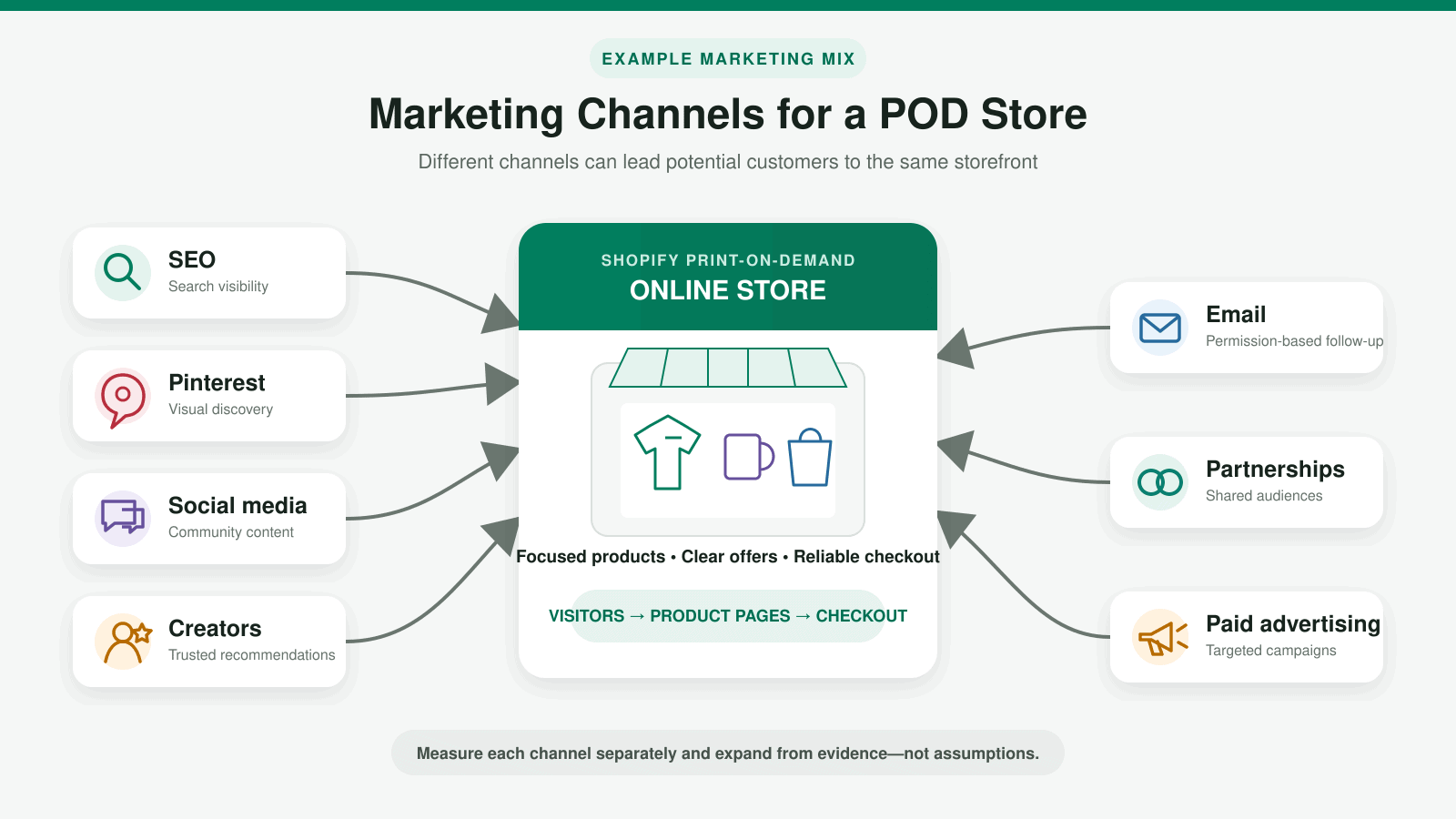
- Create for an existing community: use the audience’s real interests and language without copying protected brands.
- Show the actual product: film the sample, fit, texture, print, packaging, and use instead of relying on a flat mockup.
- Build searchable content: answer questions and create collections around real buying intent.
- Capture email permission: offer useful updates or early access rather than depending on one social platform.
- Test small campaigns: validate the product page and economics before increasing ad spending.
- Ask for honest feedback: use early customer questions, reviews, returns, and photos to improve the offer.
The Shopify SEO guide can help organize products, collections, and supporting articles for search. SEO is a long-term channel, so pair it with a realistic launch audience instead of waiting for immediate rankings.
For a structured customer-acquisition plan, follow my guide to getting your first sale on Shopify to validate your offer, reach a qualified audience, test promotional channels, and measure the sales funnel.
For products with strong visual or gift appeal, use my Shopify Pinterest guide to connect the catalog, optimize Product Pins, plan content, and test conversion tracking.
Plan for Cash Flow, Returns, and Provider Problems
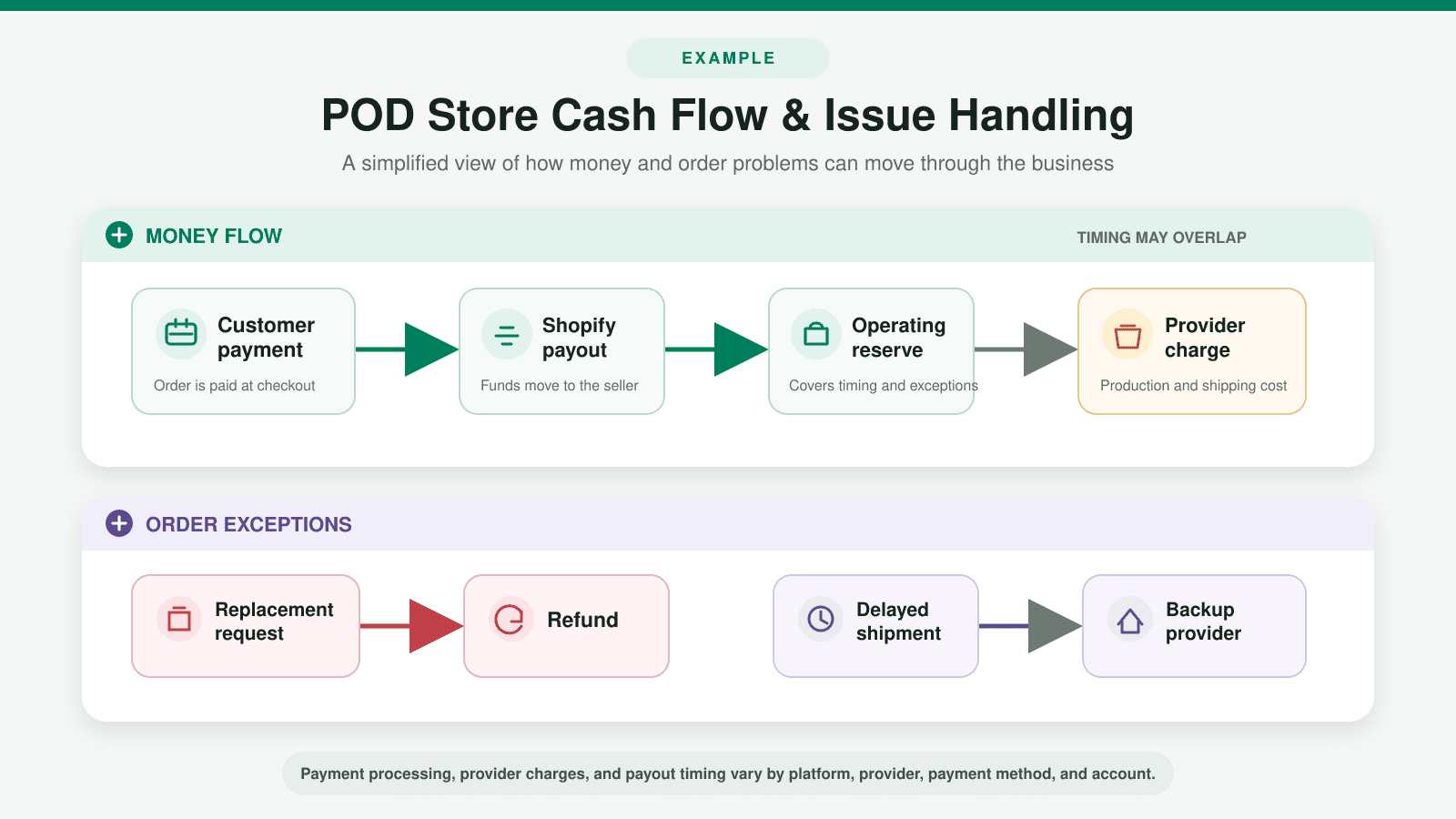
Keep enough available cash or credit to pay the provider when several orders arrive together, even if the Shopify payout has not reached the bank. Model a strong sales day, a delayed payout, and several replacements at once. Keep a separate operating reserve based on realistic order volume. Growth can create a cash shortage when every new order requires an immediate supplier charge.
Write separate procedures for buyer remorse, wrong size, address error, lost package, late delivery, damaged product, and manufacturing defect. The provider may replace only certain problems within a stated reporting window. Your store policy must still comply with applicable law and match the experience you promise customers.
Maintain the original order details, photos, tracking, provider ticket, customer communication, and resolution. Review recurring issues by product and provider instead of treating every complaint as isolated. For a product that becomes important, investigate a qualified backup rather than waiting for the primary provider to discontinue a color, size, print method, or production location. Test any replacement before routing customer orders to it.
Common Shopify Print-on-Demand Mistakes
- Launching untested products using only provider mockups
- Selling unrelated designs without a clear audience or brand
- Using art, phrases, characters, logos, or likenesses without sufficient rights
- Calculating margin before shipping, marketing, replacements, and payment expenses
- Promising delivery times the provider does not guarantee
- Assuming the provider will handle customer complaints
- Adding too many apps and products before validating the first collection
- Scaling ads before the product page and contribution margin work
These print-on-demand problems can overlap with broader store setup issues, so review the complete Shopify mistakes to avoid guide before launching.
Copyright and Trademark Considerations
Print-on-demand sellers should understand that copyright and trademark address different rights. The USPTO’s intellectual-property overview explains that trademarks can protect source-identifying names and logos, while copyright protects original artistic and literary expression.
Do not assume that changing a few elements makes someone else’s design safe to sell. Search relevant trademark records, retain licenses, read platform terms, and consult a qualified attorney when the rights are unclear. This article provides general business information, not legal advice.
Before promoting made-to-order products during BFCM, use my Shopify Black Friday checklist to review margins, provider capacity, shipping deadlines, checkout, and customer communication.
Frequently Asked Questions
Does Shopify do the printing?
No. Shopify provides the ecommerce storefront and connects with print-on-demand apps. The selected provider produces and ships the product according to its services and your settings.
Is Shopify print on demand free?
You can find POD apps that are free to install, but running the business is not cost-free. Expect Shopify expenses, product and shipping charges when orders arrive, samples, design costs, marketing, taxes, and possible app upgrades or replacements. Before creating an account, read the Shopify free trial guide to understand the current trial structure, introductory offer, and when billing begins.
Is print on demand profitable?
It can be profitable when the selling price covers the complete cost and the product reaches customers efficiently. Profit is not guaranteed. Design demand, competition, supplier cost, shipping, returns, marketing, and repeat purchases all affect the result.
What is the best Shopify POD app?
There is no single best provider for every product and destination. Compare the exact catalog item, print method, production location, sample, delivered cost, average fulfillment time, branding, support, and replacement policy.
Do I need to order samples?
Yes. A sample lets you assess quality, create original photos, test delivery, and find differences between the mockup and finished product before a customer does.
Can customers return print-on-demand products?
Your customer-facing policy and the provider’s replacement policy are not necessarily the same. Review applicable consumer laws and decide how you will handle wrong sizes, buyer remorse, damage, misprints, delivery failures, and personalized items.
How many products should I launch?
There is no required number. A small, related collection that you have sampled and can market clearly is usually more useful than a large catalog of untested products.
Is Shopify good for print on demand?
Shopify is a strong option when you want a hosted store, checkout, product management, and integrations with POD providers. Read the complete Shopify review to compare its advantages, costs, and limitations with your needs.
Print on demand is one form of supplier-direct fulfillment. For a broader look at selling products from third-party suppliers, compare the process with my Shopify dropshipping guide.
Final Verdict
Shopify print on demand is a practical way to test customized physical products without committing to bulk inventory. Its greatest strength is flexibility; its greatest weakness is the reduced margin and control that come with third-party production.
Start with one audience, a small related collection, original designs, verified samples, complete cost calculations, and honest delivery terms. Start Shopify’s free trial when you are ready to build the store, but keep it password-protected until you have tested the order and fulfillment process from beginning to end.
If your print-on-demand business will center on one flagship design or product, follow my one-product Shopify store guide to sharpen the positioning, organize the storefront, calculate profit, and test the buying experience.