
15 Shopify Mistakes to Avoid Before Launching
The most expensive Shopify mistakes are rarely dramatic technical failures. They are usually smaller decisions that make a store confusing, untrustworthy, slow, hard to discover, or expensive to operate. A weak value proposition, generic product copy, unnecessary apps, unclear shipping, and an untested checkout can quietly reduce sales before you know what went wrong.
Shopify makes it possible to build a functional online store quickly, but speed can encourage new sellers to launch before the business details are ready. A polished theme does not replace product research, clear policies, accurate margins, useful content, or customer support.
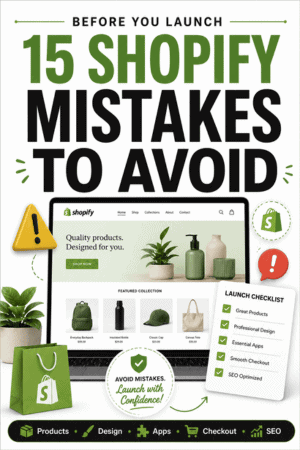
This guide covers 15 common Shopify mistakes, why each one matters, and what to do instead. Use it while building the store and again before removing the storefront password.
Key Takeaways
- Start with a defined customer and problem instead of designing a generic store for everyone.
- Choose a Shopify plan and apps based on current needs, margins, and workflow—not imagined future growth.
- Original product information, strong photography, clear navigation, and mobile usability create trust.
- Shipping, returns, contact information, taxes, and policies should be reviewed before launch.
- Complete a test order on both desktop and mobile before accepting real customers.
- Do not depend entirely on paid ads or social media; build email, content, SEO, and repeat-customer channels.
- Launch with measurement in place so you can improve from real behavior instead of guessing.
Shopify Mistakes at a Glance
| Mistake | Better Approach |
|---|---|
| No defined audience | Choose a specific customer and problem |
| Wrong plan or too many apps | Pay only for current requirements |
| Generic positioning | Explain what you sell and why it matters |
| Weak product pages | Answer buying questions with original content |
| Ignoring mobile and speed | Test key journeys on real devices |
| Unclear operations | Configure shipping, returns, taxes, and support |
| No test order | Test checkout, emails, refunds, and fulfillment |
| No traffic system | Build SEO, email, partnerships, and retention |
Shopify’s current ecommerce mistakes guide also emphasizes audience insight, checkout, web design, mobile users, product pages, content, technical SEO, and customer service. The lessons below turn those broad risks into a practical Shopify launch review.
1. Starting Without a Defined Customer
A clearer product direction starts with matching a specific offer to a specific customer. My 30 product ideas to sell on Shopify explains how to compare product models and validate an idea instead of choosing solely because it appears popular.
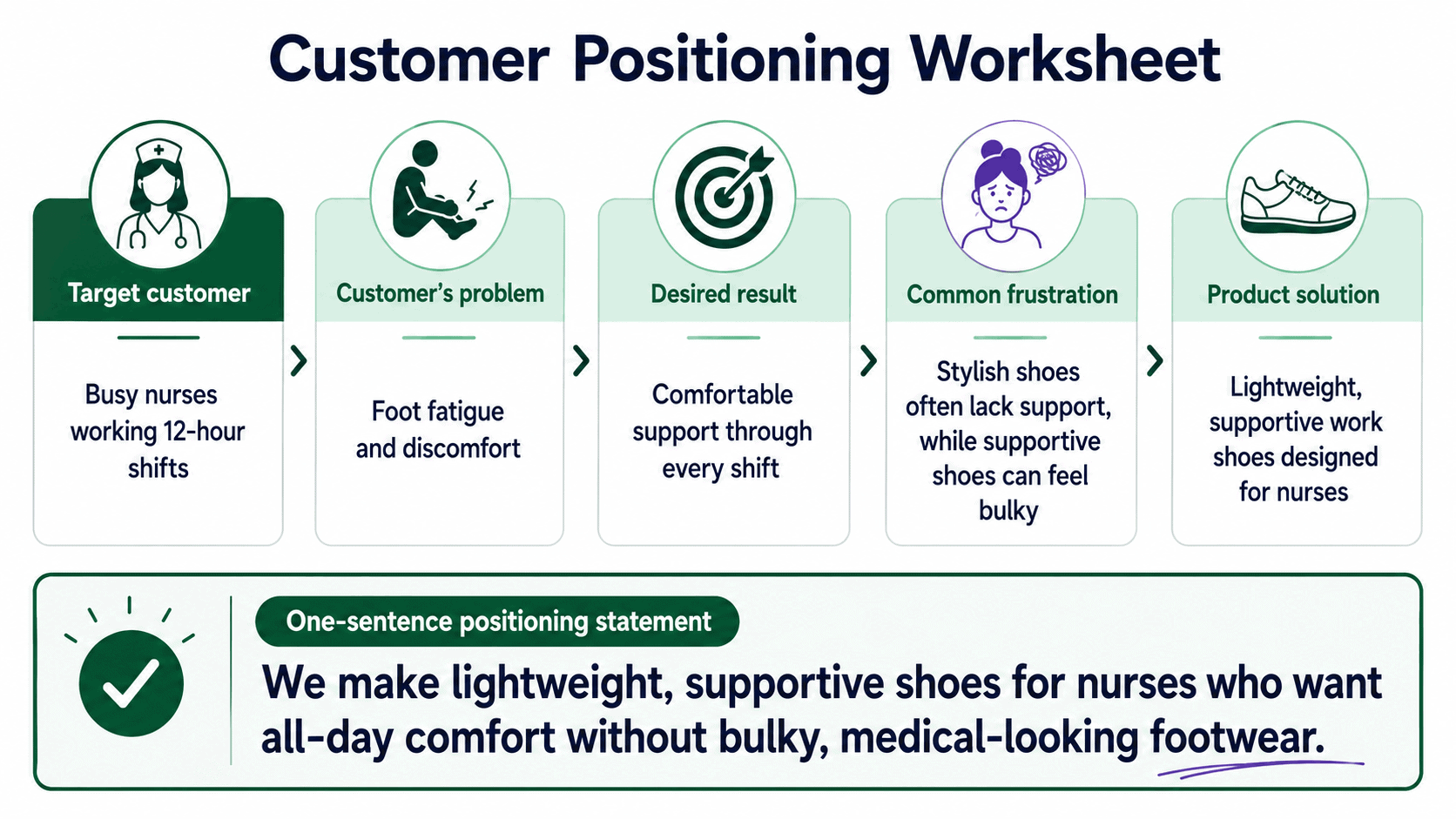
A store designed for “anyone who might buy” usually communicates nothing specific. The products, photography, copy, pricing, navigation, and marketing become disconnected because there is no clear customer problem guiding the decisions.
Before building, define who the customer is, what they want, what prevents them from buying, where they already shop, and why your offer is meaningfully different. Talk to potential customers, read reviews of competing products, study common complaints, and document the language people use.
What to do instead: Write a one-sentence positioning statement: “We sell [product] for [specific customer] who wants [result] without [common frustration].” Use it as a filter for every major store decision.
If the store idea still needs validation, follow the complete guide to starting an online store. It covers product research, startup costs, profit margins, fulfillment, testing, launch, and customer acquisition.
2. Choosing a Plan Based on Guesswork
New sellers sometimes pay for advanced features because they expect rapid growth, while others choose only by the lowest price and later discover they need staff access, shipping tools, or lower fees. Neither approach begins with actual requirements.
List the features needed now, the number of people who require access, expected payment methods, shipping workflow, locations, and realistic sales volume. Compare the subscription difference with any fee savings and operational value.
Use the current Shopify pricing comparison to make that decision. Prices and promotions can change, so confirm the checkout total before committing to annual billing.
3. Installing Apps Before Identifying a Problem
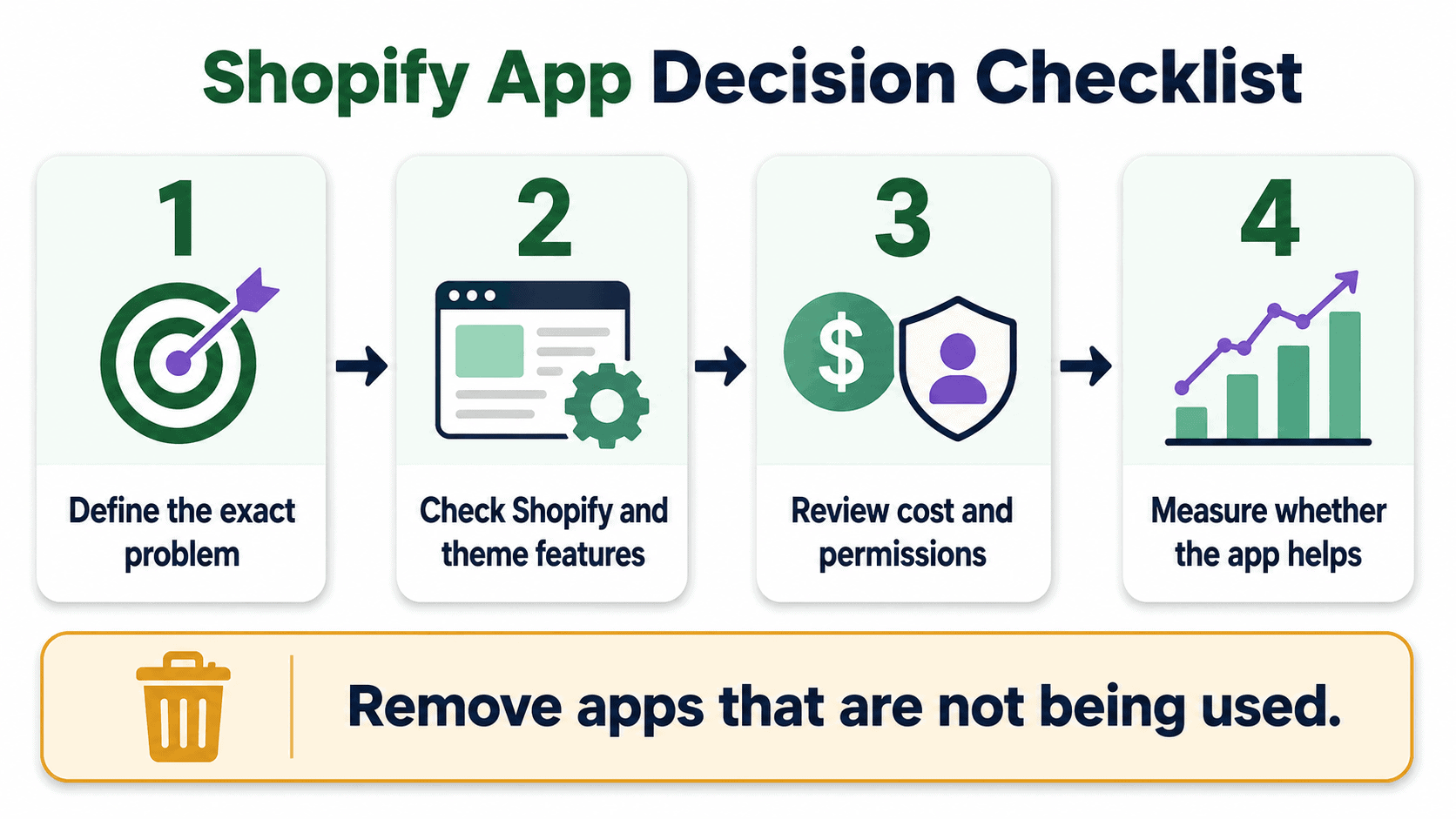
The Shopify App Store makes experimentation easy. That convenience can lead to overlapping review widgets, popups, upsells, countdown timers, page builders, analytics scripts, and marketing tools. Every app adds another cost, dependency, permission set, and possible performance issue.
After testing store setups, one thing I noticed is that beginners often install an app before checking whether Shopify or the theme already includes the feature. This can create duplicate controls and make later troubleshooting more difficult.
What to do instead: Write down the exact problem, estimate its business impact, check built-in features, test one solution, and review app charges monthly. Remove apps that are not producing measurable value.
If you are considering an automated design starting point, read the Shopify AI Store Builder review to see what the tool generates and which store details still require manual work.
4. Using a Generic Homepage Message
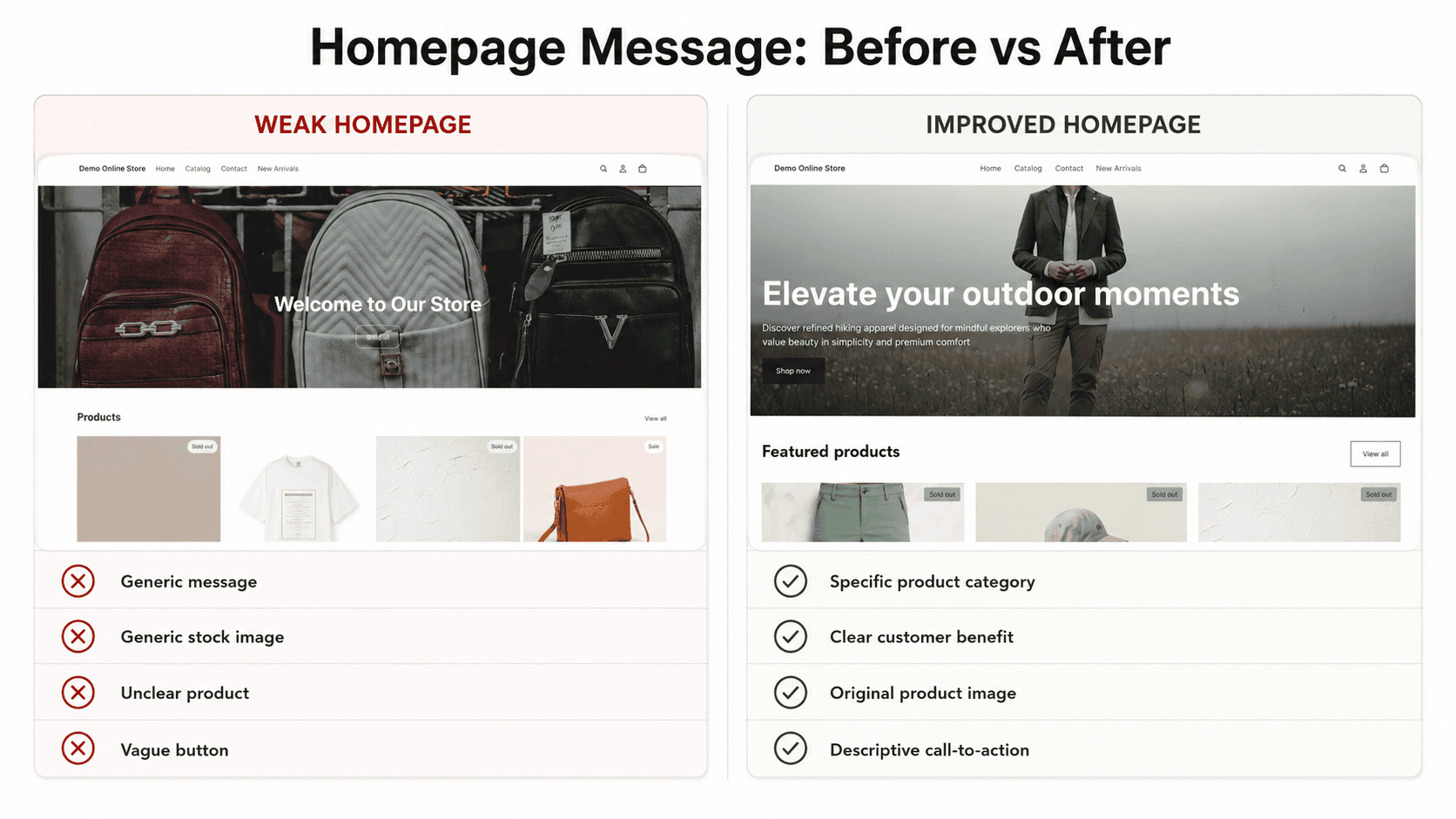
A beautiful hero image with phrases such as “Quality You Can Trust” or “Welcome to Our Store” does not tell shoppers what the business sells or why they should continue. Visitors should not need to scroll several screens to understand the offer.
Use the first screen to show the product category, key benefit, target customer or use case, and a clear path to shop. Support the message with original product imagery rather than a stock photo that could belong to any brand.
For practical ideas you can adapt without copying another brand, study the lessons in these successful Shopify store examples.
If you need help constructing the full site, follow the Shopify store setup tutorial from account creation through launch preparation.
5. Publishing Thin or Copied Product Descriptions
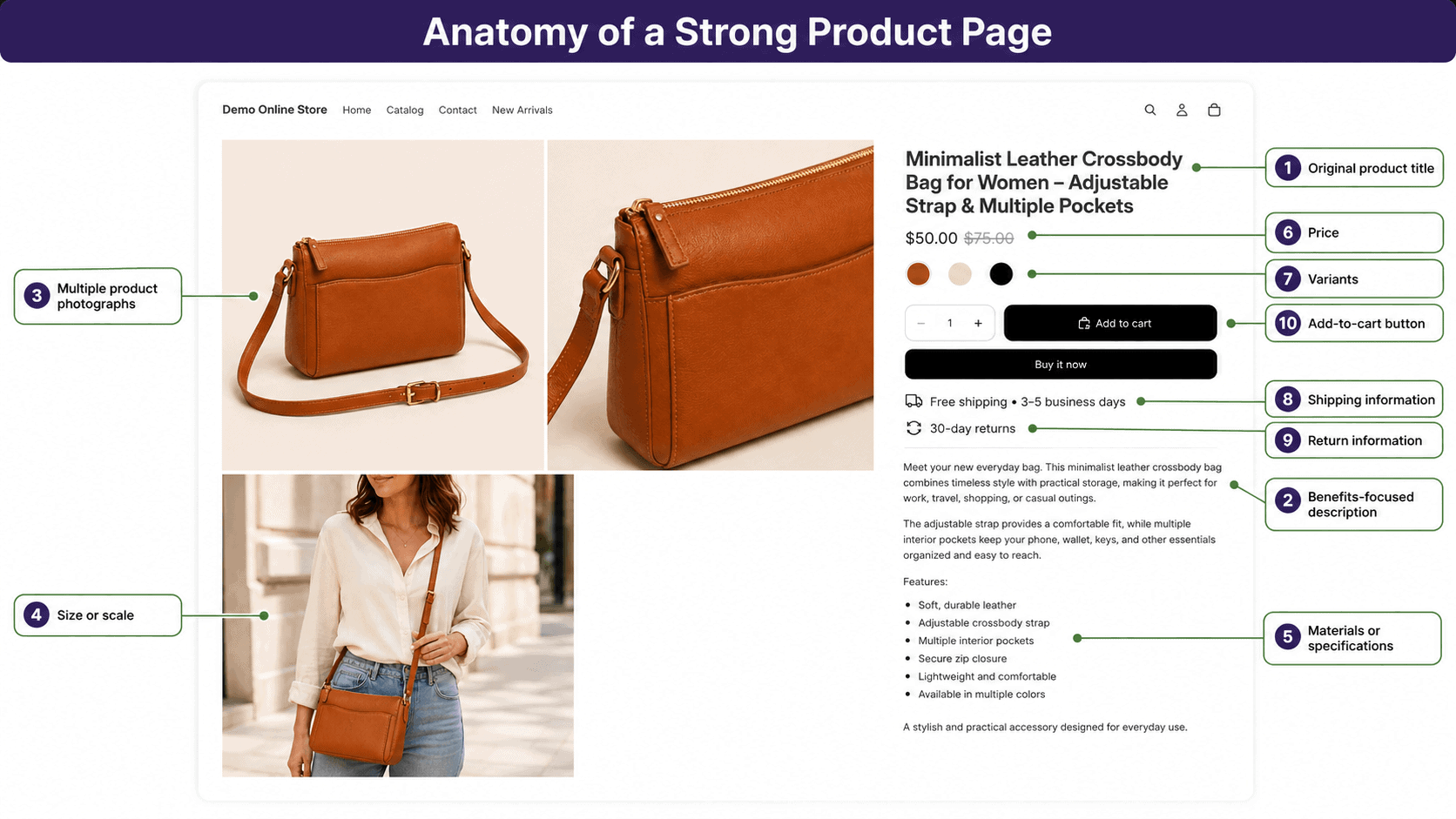
Supplier descriptions are often generic, incomplete, and reused by many sellers. Copying them gives customers little reason to trust your store and makes it difficult to differentiate the page in search results.
- Explain the problem and practical benefit.
- List relevant materials, dimensions, compatibility, ingredients, or care instructions.
- Address sizing, shipping, returns, warranties, and common objections.
- Describe who the product is and is not for.
- Use bullets for scanning and paragraphs for context.
Do not invent claims, reviews, scarcity, certifications, or results. Accurate limitations can increase trust because customers understand what they are buying.
6. Treating Product Photography as an Afterthought
If this is an area your store needs to improve, follow my Shopify product-photography guide for beginner equipment, lighting and background ideas, a complete shot list, editing steps, alt text, and Shopify image optimization.
Customers cannot touch or inspect an online product. Dark, inconsistent, pixelated, or incomplete images increase uncertainty. One attractive hero photo is not enough when size, texture, color, fit, or operation matters.
Use consistent lighting and backgrounds, show several angles, include scale, demonstrate the product in context, and add video when movement or setup needs explanation. Compress media to protect speed, and verify that cropping works on mobile collection grids.
7. Overcomplicating Navigation
Too many top-level menu items, clever labels, overlapping collections, and deep dropdowns make browsing harder. Customers should understand the categories without learning internal brand terminology.
Group products according to how shoppers look for them. Use descriptive menu labels, keep important categories close to the homepage, and provide filters that matter for the catalog. Search should return useful results and tolerate common product language.
Simple test: Ask someone unfamiliar with the store to find a specific product, the return policy, shipping information, and contact page without guidance. Watch where they hesitate.
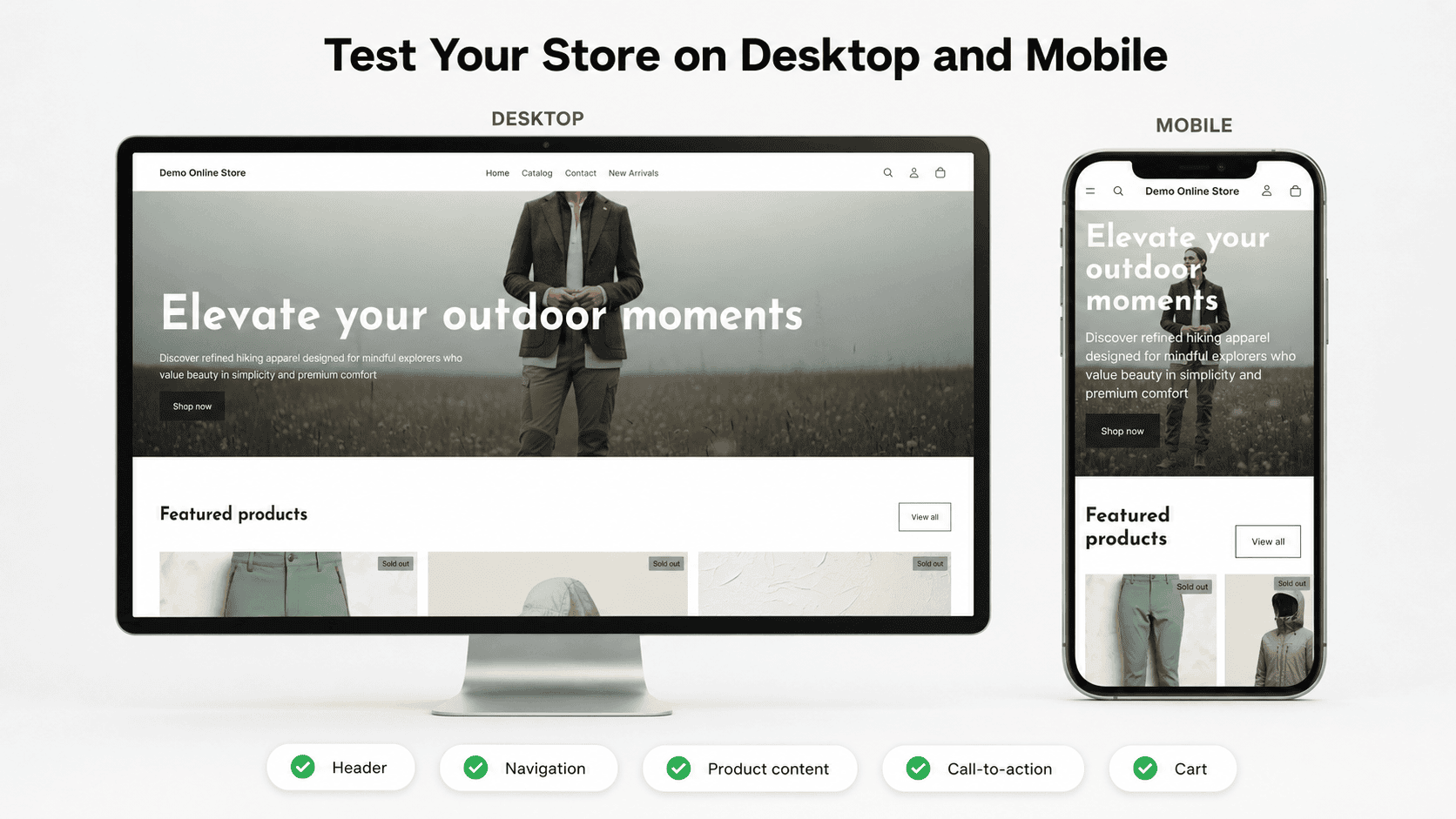
8. Designing Only for Desktop
A layout can look impressive on a large monitor while buttons overlap, text becomes tiny, images crop poorly, filters hide, and popups block the screen on a phone. Mobile preview inside the editor is helpful, but it is not a substitute for testing on real devices.
- Check the announcement bar, header, menu, and search.
- Open collection filters and sort controls.
- Select variants and add an item to the cart.
- Read policy pages and complete the contact form.
- Begin checkout and review error messages.
Test with Wi-Fi disabled as well. A store that works only on a fast connection may lose mobile shoppers before the product page becomes usable.
9. Ignoring Page Speed Until After Launch
Large videos, uncompressed photos, multiple tracking scripts, app widgets, custom fonts, and animation can make important pages feel slow. Speed affects usability and can undermine both conversions and search performance.
Begin with a supported theme, resize images before uploading, limit autoplay media, and avoid installing several tools that do the same job. Measure the homepage, a collection, and a representative product page. Those templates may behave differently.
10. Leaving Shipping, Returns, and Taxes Unclear
Unexpected shipping prices and vague delivery estimates create hesitation at checkout. A return policy copied from another business can promise procedures you cannot actually support. Tax responsibilities also depend on the business and jurisdictions involved.
- Set realistic processing and transit expectations.
- Test rates for representative addresses and cart sizes.
- Explain free-shipping thresholds accurately.
- Define return windows, product conditions, exclusions, and refund timing.
- Get qualified tax or legal advice for the actual business location and markets.
Policies should match the store’s real operations. Clear terms can prevent customer frustration and support disputes later.
If you use made-to-order fulfillment, the Shopify print-on-demand guide explains provider selection, sample testing, pricing, shipping expectations, fulfillment, and backup planning.
11. Skipping a Complete Test Order
Previewing pages is not the same as testing the business. A complete test order reveals problems with variants, inventory, discounts, shipping, payment settings, confirmation emails, order status, taxes, fulfillment, refunds, and customer notifications.
Test at least one successful purchase and common failure paths. Try an invalid discount, out-of-stock item, incorrect card entry in a supported test environment, mobile checkout, and a refund or cancellation workflow. Confirm that support information appears in customer emails.
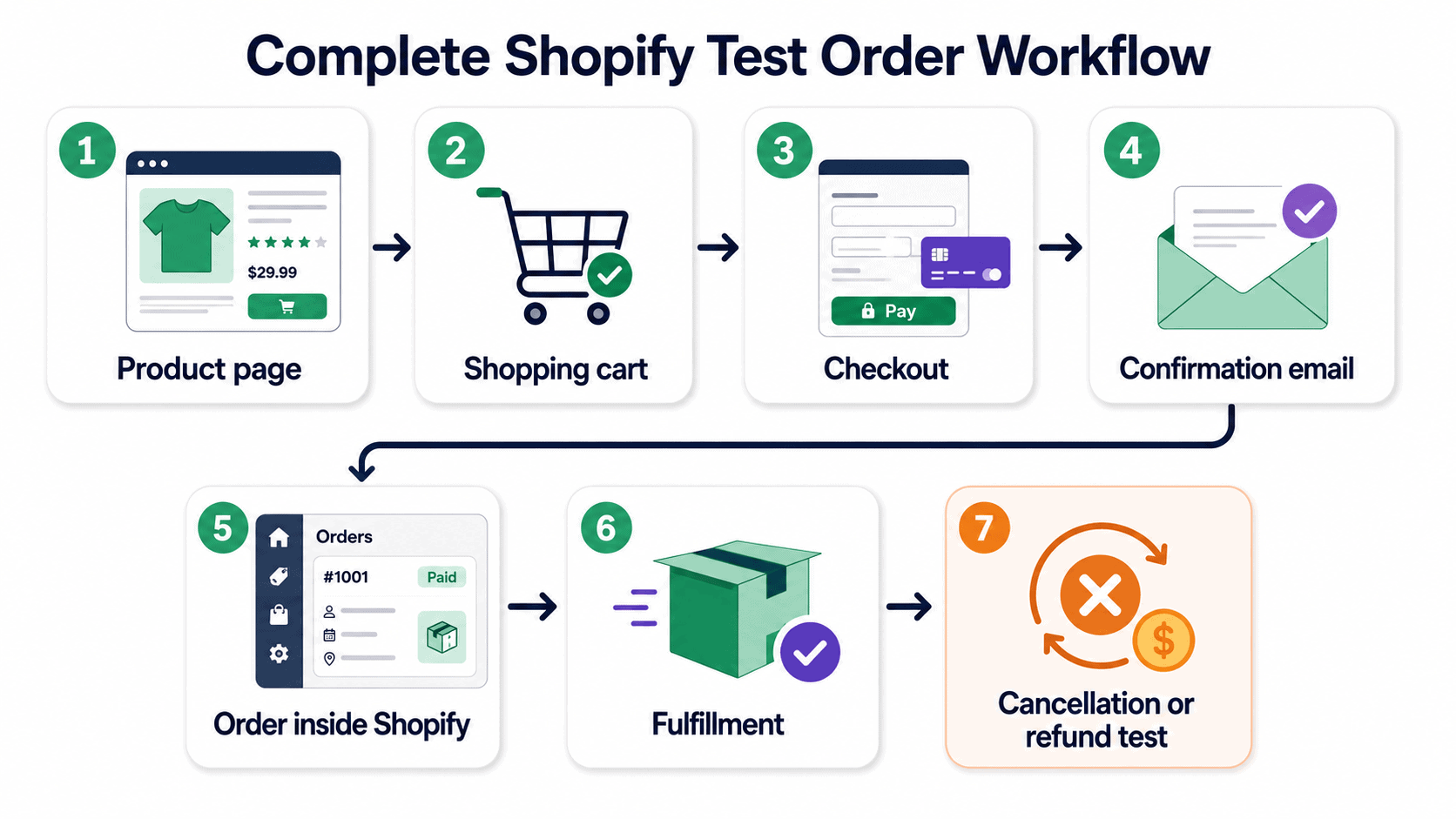
Digital-product sellers should also test the delivery email, download link, file permissions, mobile access, customer account experience, cancellation, and refund workflow. My Shopify digital-products guide covers the complete setup and testing process.
12. Hiding Trust and Support Information
A new store without an About page, contact method, policies, business story, reviews, or clear product details can look disposable. Trust is especially important when the brand is unfamiliar, and customers are being asked to enter payment information.
Add a useful About page, contact page, shipping and return information, privacy and terms pages, and honest social proof. Use a branded email address when practical. Make support expectations realistic instead of promising instant responses around the clock.
13. Treating SEO as a Launch-Day Checkbox
Editing a homepage title once is not an SEO strategy. Stores need keyword mapping, original commercial pages, logical categories, useful internal links, technical monitoring, supporting content, and ongoing improvements based on search data.
Build a complete Shopify SEO process that covers products, collections, titles, descriptions, URLs, images, sitemaps, Search Console, and supporting content in the right order.
Do not publish dozens of thin articles solely to target keywords. A smaller library of useful content that supports real products is a stronger foundation.
14. Relying on One Traffic Source
A store dependent entirely on one advertising platform, marketplace, social account, influencer, or search ranking is vulnerable. Costs, algorithms, account access, and customer behavior can change.
Create a balanced acquisition and retention plan using the channels that fit the audience. That may include search content, email, organic social, partnerships, affiliates, public relations, marketplaces, referrals, and paid campaigns. Collect permission-based customer relationships instead of depending only on rented audiences.
If you need a focused starting plan instead of trying every marketing channel, follow my guide to getting your first sale on Shopify to validate the offer, identify a qualified audience, plan outreach, and measure your results.
Pinterest can be one supporting discovery channel for suitable products. My Shopify Pinterest guide explains how to connect the catalog, publish Product Pins, test tracking, and measure results.
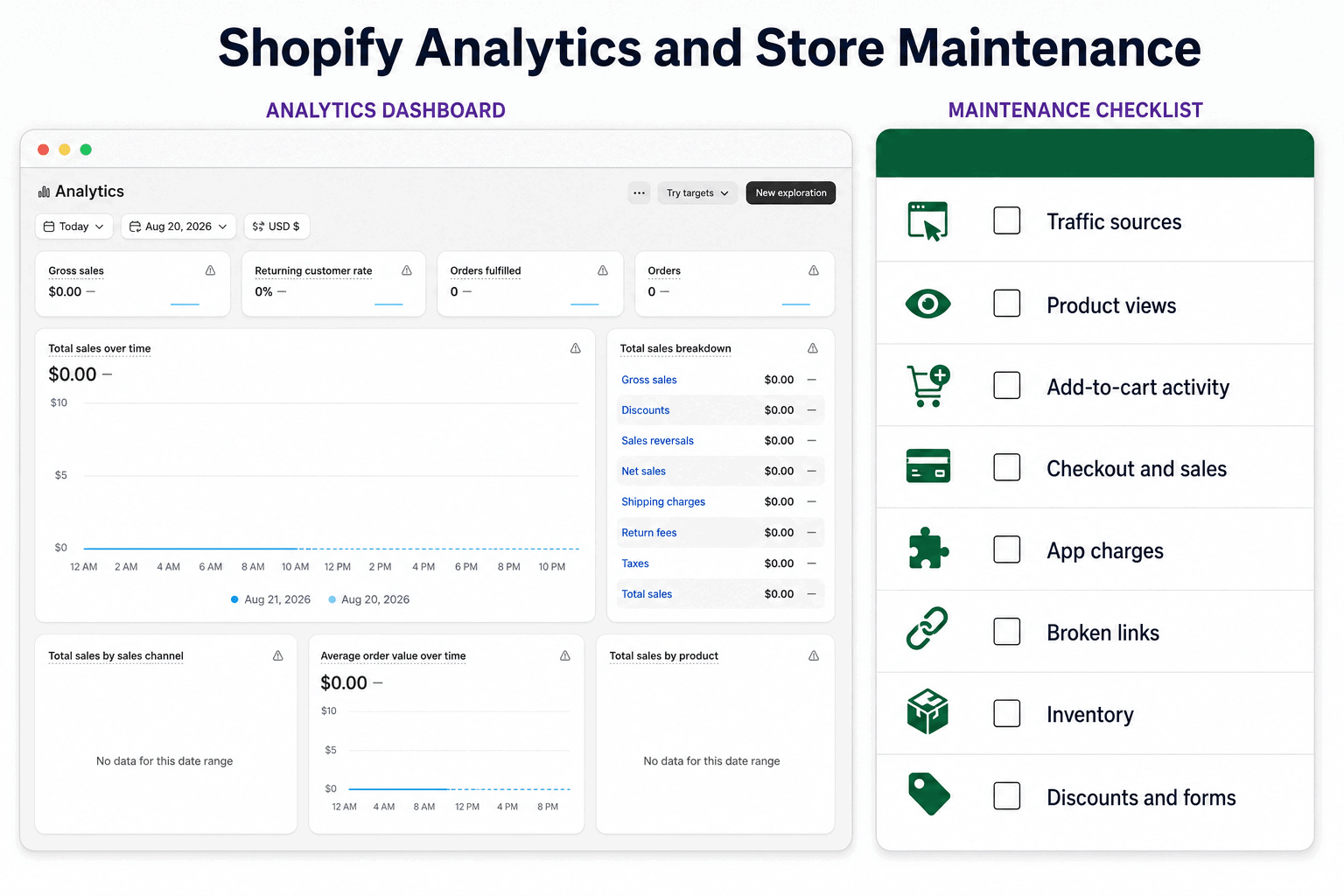
15. Launching Without Analytics or a Maintenance Plan
Without measurement, every design or marketing decision becomes a guess. Configure Shopify analytics, verify necessary advertising or analytics integrations, connect Search Console, and record a baseline before major campaigns.
- Review traffic sources and landing pages.
- Monitor product views, add-to-cart activity, checkout, and sales.
- Check search queries, indexing, and click-through rates.
- Audit app charges and permissions.
- Test forms, discounts, navigation, policies, and checkout periodically.
- Review inventory, broken links, discontinued products, and redirects.
A launch is the beginning of store operations, not the end of website work. Set a simple weekly and monthly review schedule before the first order arrives.
How to Prioritize Shopify Fixes
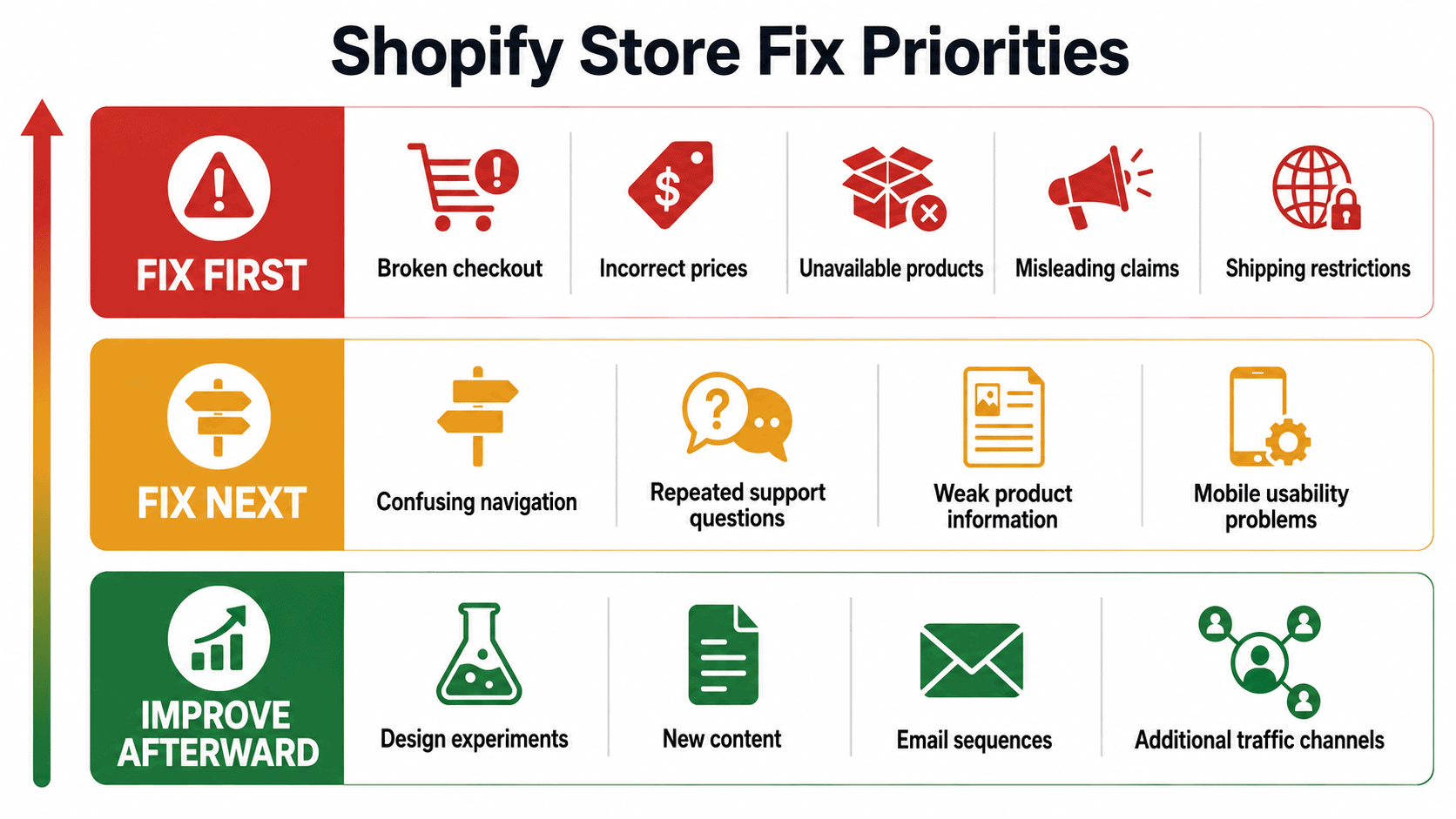
Do not treat all 15 mistakes as equally urgent. Fix anything that can prevent or misrepresent a purchase first: broken checkout steps, incorrect prices, unavailable variants, missing delivery restrictions, inaccurate claims, inaccessible controls, and unclear refund terms. These issues can affect customers immediately and may create financial or compliance risk.
Next, address the problems that create repeated confusion. Use test orders, support messages, search terms, abandoned-cart feedback, and recorded usability sessions to identify them. A navigation label that confuses every test shopper deserves attention before a decorative homepage change.
Finally, improve growth and presentation in small, documented experiments. Change one meaningful element, record the date and reason, and compare relevant results over a reasonable period. This makes it easier to learn whether a new description, image set, offer, email sequence, or traffic channel helped.
A Final Shopify Prelaunch Checklist
For a more detailed final review, work through the complete Shopify store launch checklist before removing the storefront password and accepting orders.
- Confirm the audience, offer, pricing, and margins.
- Review every product title, description, image, variant, price, and inventory setting.
- Check the homepage message, navigation, search, collections, and filters.
- Verify the domain, branded email, contact page, and required policies.
- Test shipping rates, taxes, discounts, checkout, emails, fulfillment, and refunds.
- Test desktop, tablet, and mobile layouts on real devices.
- Review page speed and remove unnecessary apps or media.
- Connect analytics and Search Console.
- Create a customer-acquisition plan for the first 90 days.
- Ask someone unfamiliar with the store to complete a purchase test.
If you are still deciding where to sell, compare the business models in Shopify vs Etsy. Shopify is better suited to building an independent branded store, while Etsy can provide marketplace discovery but operates under a different fee and customer relationship structure.
Before creating your account, read the Shopify free trial guide to understand the current offer, what you can build during the trial, and what to complete before selecting a paid plan.
You can prevent many seasonal campaign problems by following my Shopify Black Friday checklist before publishing discounts, urgency messages, shipping promises, or advertisements.
Frequently Asked Questions
What is the biggest mistake new Shopify sellers make?
The biggest mistake is building a store before defining the customer, problem, product value, margins, and traffic plan. A theme can make pages attractive, but it cannot create product-market fit or customer demand.
How many products should a Shopify store have at launch?
There is no required number. A focused store with a few well-presented products can be stronger than a large catalog with thin descriptions and confusing categories. Launch when the offer feels complete enough for the intended customer.
Should I buy a premium Shopify theme immediately?
Not necessarily. A supported free theme can be enough to validate products and begin selling. Consider a premium theme when its built-in features and design genuinely reduce the need for apps or custom development.
Can too many Shopify apps slow a store?
Apps can add scripts, requests, interface elements, and ongoing costs. The effect varies by app, but overlapping or poorly chosen tools can hurt performance and complicate management. Install only what solves a defined problem.
Do I need to place a real test order?
You should test the complete order process using Shopify’s supported testing options. Verify products, variants, discounts, shipping, taxes, payment behavior, confirmation emails, order management, fulfillment, refunds, and the mobile experience.
Is Shopify suitable for a first online store?
Shopify is a strong beginner option for sellers who want hosting, security, checkout, product management, and store tools in one platform. Read the full Shopify review to understand the tradeoffs, fees, apps, and best use cases.
Before selecting your platform, read my Shopify vs WooCommerce comparison to determine whether a hosted Shopify store or a self-managed WordPress store better fits your technical resources and business needs.
If you are comparing Shopify with WordPress more broadly—not only WooCommerce—read my complete Shopify vs WordPress guide.
Can Shopify guarantee that my store will make sales?
No. Shopify provides ecommerce tools, but sales depend on the product, market, offer, pricing, trust, traffic, customer experience, fulfillment, and many other business factors.
Can I fix these mistakes after launching?
Yes. Prioritize problems that block purchases, mislead customers, create operational risk, or waste money. Make one documented improvement at a time and use customer feedback and performance data to evaluate the result.
Dropshipping stores also need careful supplier testing, realistic shipping promises, accurate margins, and enough cash to cover fulfillment. My Shopify dropshipping guide walks through those requirements before launch.
Final Verdict
The goal is not to build a flawless store before launch. It is to remove preventable confusion and risk, confirm that the buying process works, and create a foundation you can improve. A focused offer, trustworthy product pages, clear operations, mobile testing, and a realistic traffic plan matter more than adding every possible feature.
Start Shopify’s free trial and use the trial period to build products, policies, navigation, shipping, and checkout before committing. Review this checklist before launch and again after the first customer feedback arrives.
A focused catalog can reduce complexity, but the offer still needs careful validation and testing. My one-product Shopify store guide covers the positioning, economics, page structure, sourcing, and customer journey.