
Shopify vs WooCommerce (2026): Which Is Better?
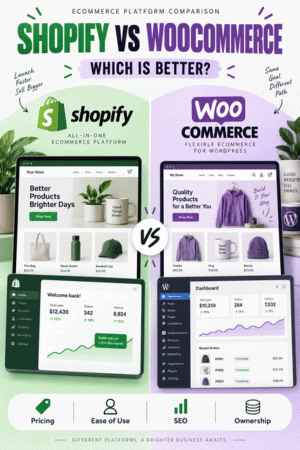
Shopify is better for most beginners and merchants who want one company to host, secure, update, and operate the ecommerce platform. WooCommerce is better for WordPress users who want deeper ownership, hosting choice, plugin flexibility, and control over the application.
Neither is universally cheaper or more scalable. Shopify charges a predictable platform subscription and can add app and payment costs. WooCommerce’s core software is free, but the live store requires hosting, maintenance, extensions, payment processing, backups, security, and technical work.
If you are starting from the business idea rather than comparing two finished platforms, begin with my guide to starting an online store. It covers product validation, costs, profit margins, fulfillment, store setup, testing, launch, and customer acquisition.
Key Takeaways
- Choose Shopify for the fastest route to a dependable hosted store.
- Choose WooCommerce for maximum WordPress control and customization.
- Shopify begins at $39 per month or $29 per month with annual billing in the U.S.
- WooCommerce is free to install, but official guidance estimates hosting at $25–$350 per month for many stores and extensions at $29–$299 per year each.
- Shopify handles more infrastructure; WooCommerce makes the owner responsible for more of the stack.
- Compare the same real store and three-year ownership cost before choosing.
Shopify vs WooCommerce at a Glance
| Factor | Shopify | WooCommerce |
|---|---|---|
| Platform | Hosted ecommerce service | Open-source WordPress plugin |
| Starting software cost | From $39 monthly or $29 annually | Core plugin free |
| Hosting | Included | Choose and pay separately |
| Maintenance | Platform-managed core | Owner/host/developer-managed |
| Customization | Themes, apps, APIs | Themes, plugins, code, hosting stack |
| Checkout | Integrated hosted checkout | Configurable through WordPress stack |
| Best for | Commerce-first businesses | WordPress-first businesses |
If you want to evaluate the hosted option directly, start a Shopify free trial and build a representative product, shipping rule, and test checkout before choosing.
Pricing and Total Cost
Shopify pricing
Shopify’s U.S. prices verified July 14, 2026 are Basic at $39 monthly or $29 per month paid yearly, Grow at $105 or $79, Advanced at $399 or $299, and Plus from $2,300 per month. Hosting, SSL, unlimited products, themes, and the core commerce platform are included.
Payment processing, premium themes, apps, POS, domains, email, development, and external-provider transaction fees can add cost. Review the complete Shopify pricing breakdown and verify the official Shopify plan page before buying.
WooCommerce pricing
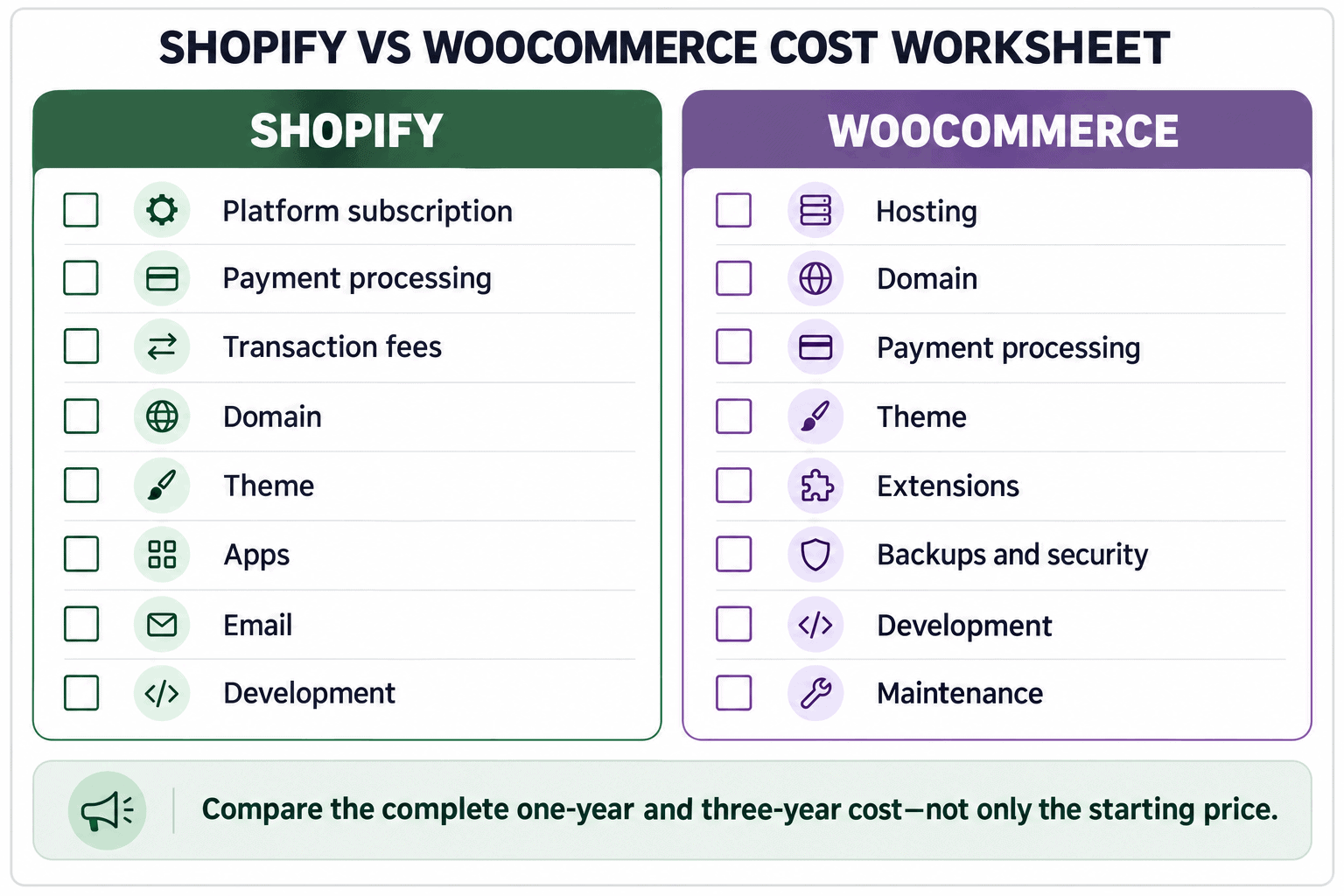
WooCommerce is free, open-source software with no platform fee or revenue share. The store still needs WordPress hosting and a domain. Official WooCommerce guidance currently estimates hosting at $25–$350 per month for many stores and paid extensions at $29–$299 per year each.
Payment, theme, backup, security, email, development, maintenance, performance, accessibility, and migration costs vary widely. WooPayments is pay as you go without setup or monthly fees, but its transaction rates vary by country, customer location, currency, and method. Use the official WooCommerce cost guide as a starting point.
Three-year cost formula: subscription or hosting + domain + payment and transaction fees + theme + apps/extensions + email + development + maintenance + backups + migration and staff time.
Ease of Use
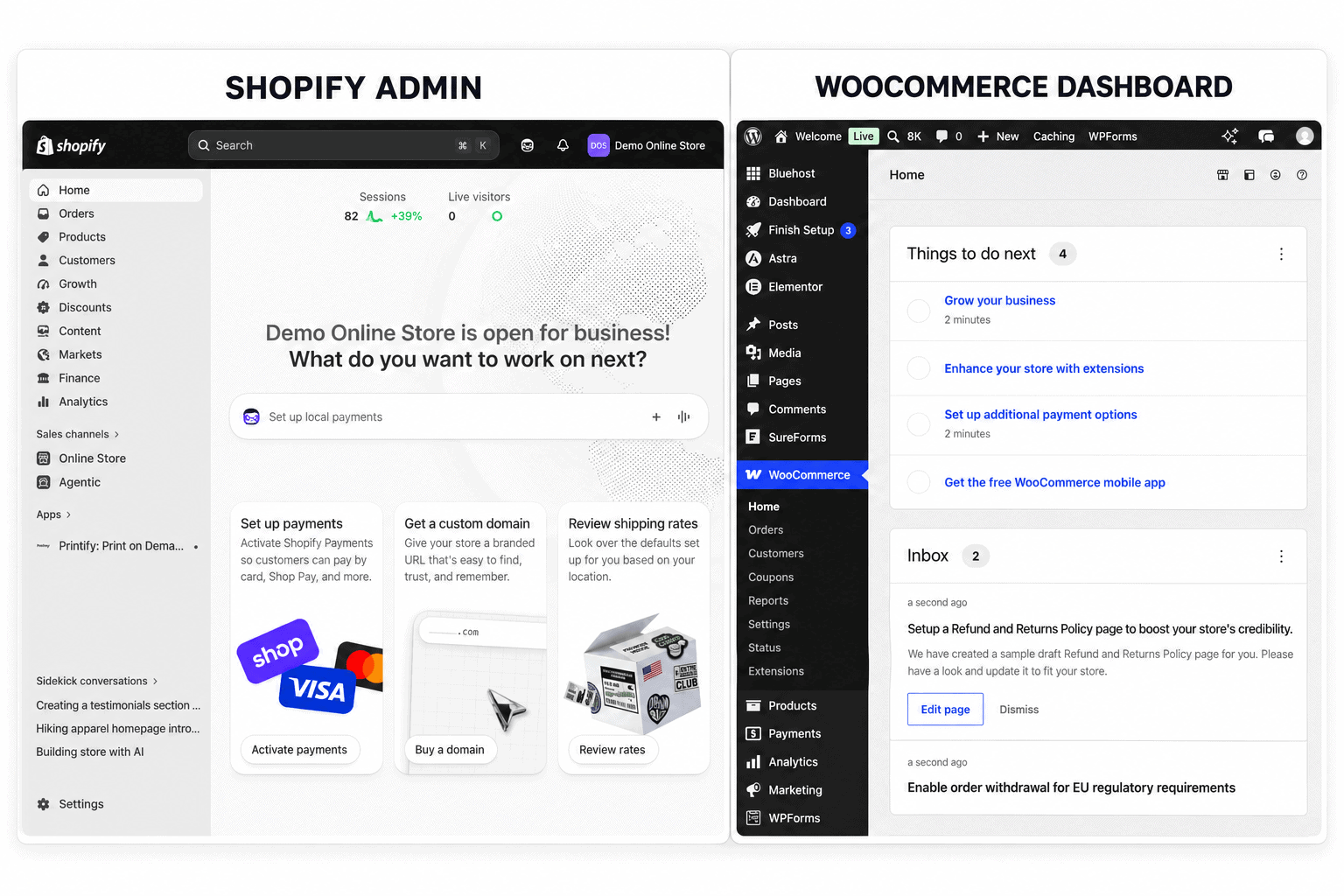
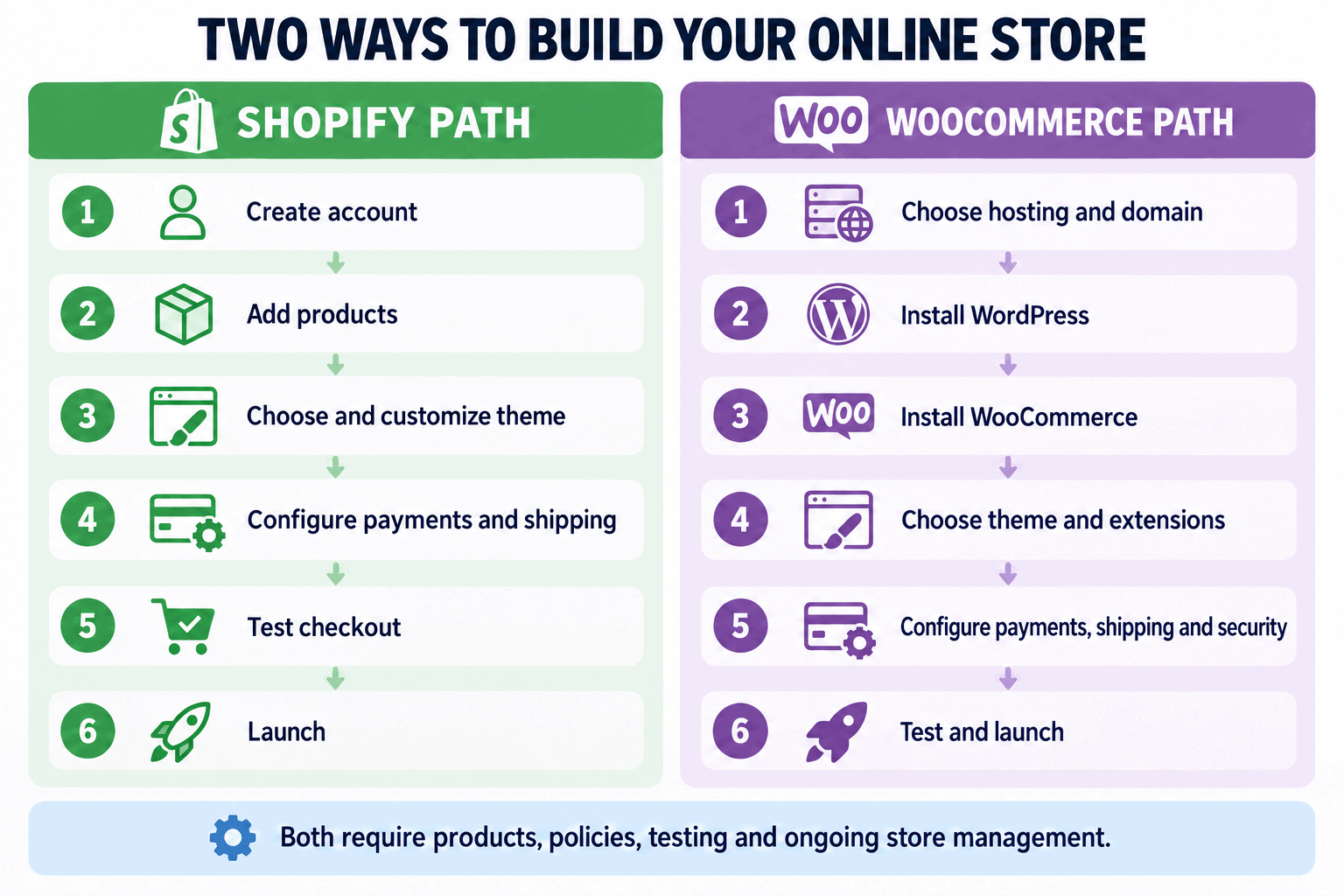
Shopify provides a guided account setup, product editor, theme editor, payment configuration, shipping, tax settings, analytics, app marketplace, and hosted checkout in one admin. A beginner still has work to do, but fewer infrastructure decisions block the launch.
For a beginner walkthrough of products, themes, settings, payments, shipping, testing, and launch, follow the step-by-step Shopify store tutorial.
WooCommerce begins with WordPress, hosting, DNS, SSL, the plugin, a theme, and configuration. A managed WooCommerce host can simplify those steps. The number of choices is an advantage for an experienced owner and a source of risk for someone who does not know which parts require maintenance.
For a simple first store, Shopify wins on ease of use. For a business already fluent in WordPress, WooCommerce can feel more natural because content, products, users, and site administration remain together.
Before committing to a paid Shopify plan, read the Shopify free trial guide to understand the current offer, what you can build during the trial, and when billing begins.
Design and Customization
The platform controls the layout, but your product photography largely determines how professional and informative the finished store feels. Use my Shopify product-photography guide for beginner setup ideas, shot planning, editing, and image optimization.
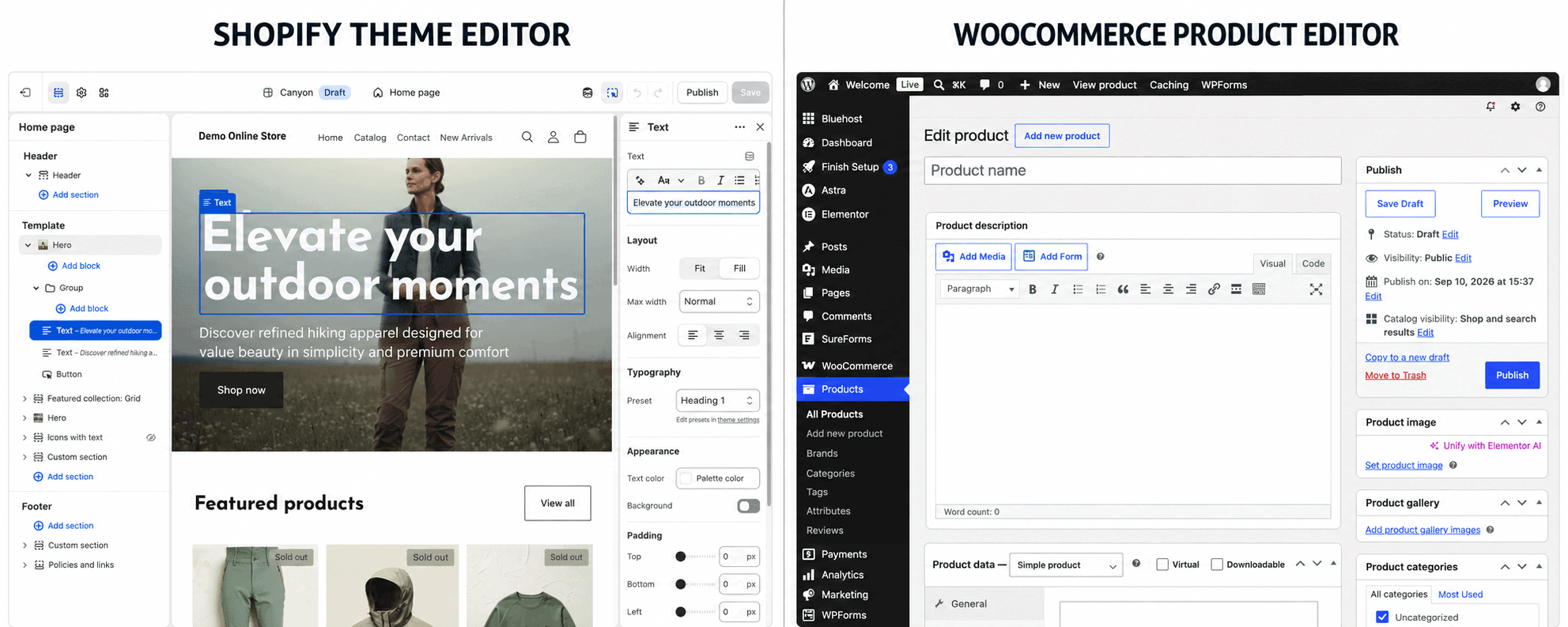
Shopify themes use sections, blocks, templates, settings, and Liquid-based customization. Apps and APIs extend the store. This provides meaningful flexibility while preserving a controlled platform and checkout.
If you want Shopify to generate an initial storefront design from a business description, read my Shopify AI Store Builder review to see what it creates and what still requires manual work.
WooCommerce can use the WordPress block editor, themes, builders, plugins, custom templates, hooks, and application code. The host and server stack can also change. It wins maximum flexibility, but every additional component introduces compatibility, performance, security, and maintenance considerations.
Do not choose from demo design alone. Build the real navigation, product, variant, collection, cart, checkout, account, policy, search, and mobile flows. A beautiful homepage cannot compensate for an unreliable buying experience.
For practical design and merchandising ideas, study these successful Shopify store examples and adapt the underlying principles to your own customers instead of copying another store.
Products, Inventory, and Operations
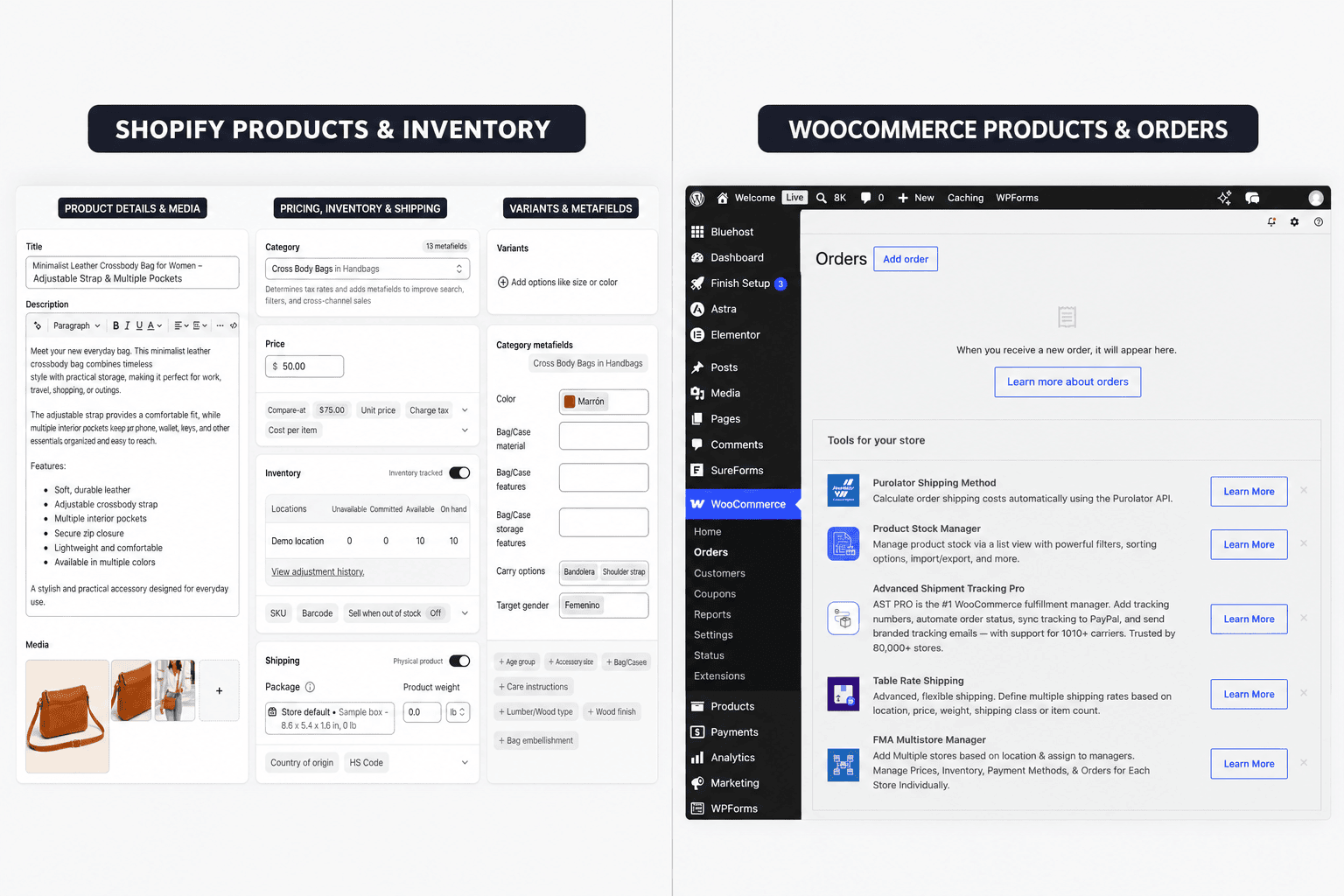
Shopify is commerce-first. Products, variants, inventory, collections, discounts, orders, customer accounts, shipping, analytics, POS, and channels are integrated. Apps expand subscriptions, bundles, marketplaces, wholesale, and specialized fulfillment.
If made-to-order products are part of the business model, my Shopify print-on-demand guide covers provider selection, samples, product creation, pricing, fulfillment, shipping expectations, and launch preparation.
WooCommerce supports core products and orders while extensions add advanced workflows. This lets an owner assemble a tailored system, including unusual product types or integrations. The quality of that system depends on extension selection, compatibility, data design, and technical ownership.
Map the difficult workflows: partial fulfillment, backorders, returns, exchanges, subscriptions, gift cards, multi-location inventory, international tax, staff permissions, accounting, and customer service. Choose the platform that handles the actual operation with the fewest fragile workarounds.
Both systems can sell downloadable products, but the files, delivery controls, product access, licensing terms, and support process still require setup. My guide to selling digital products on Shopify demonstrates how that workflow is handled on Shopify.
Payments and Checkout
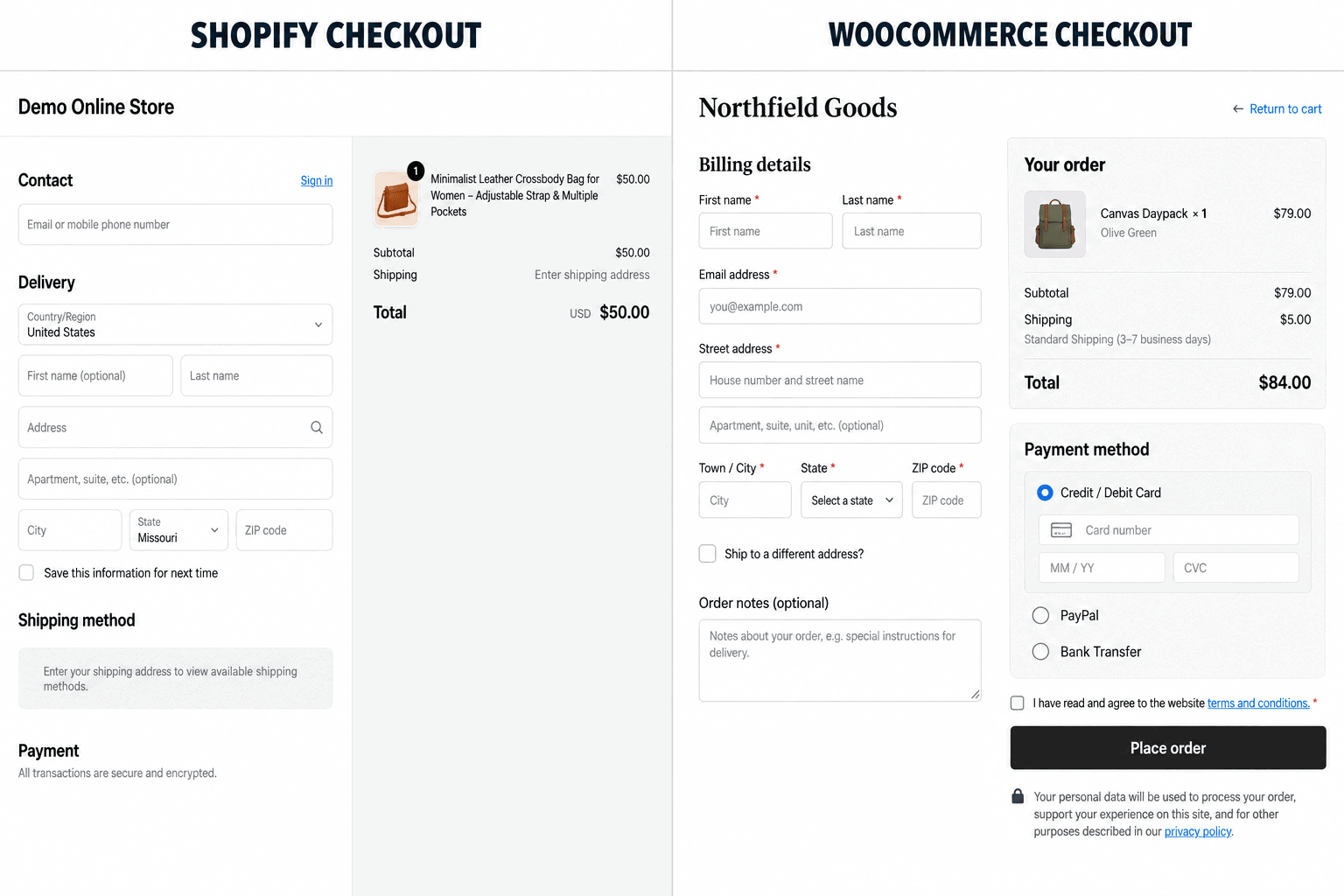
Shopify Payments integrates processing with the admin and removes Shopify’s third-party provider fee for eligible Shopify Payments transactions. Using an external provider can add a plan-dependent Shopify transaction fee in addition to the provider’s charges.
WooCommerce lets the owner choose supported payment extensions and control more of the checkout environment. WooPayments integrates payments, refunds, disputes, and payouts into WordPress. Other gateways create their own fees, terms, regional coverage, support, and technical requirements.
Test successful and failed payments, refunds, chargebacks, taxes, shipping, wallets, subscriptions, fraud controls, payout timing, and transactional email. Processing availability and fees depend on business location and customer market.
Before accepting live orders on Shopify, work through the complete Shopify store launch checklist to verify products, payments, shipping, taxes, notifications, analytics, checkout, fulfillment, cancellations, refunds, and support.
Performance, Security, and Reliability
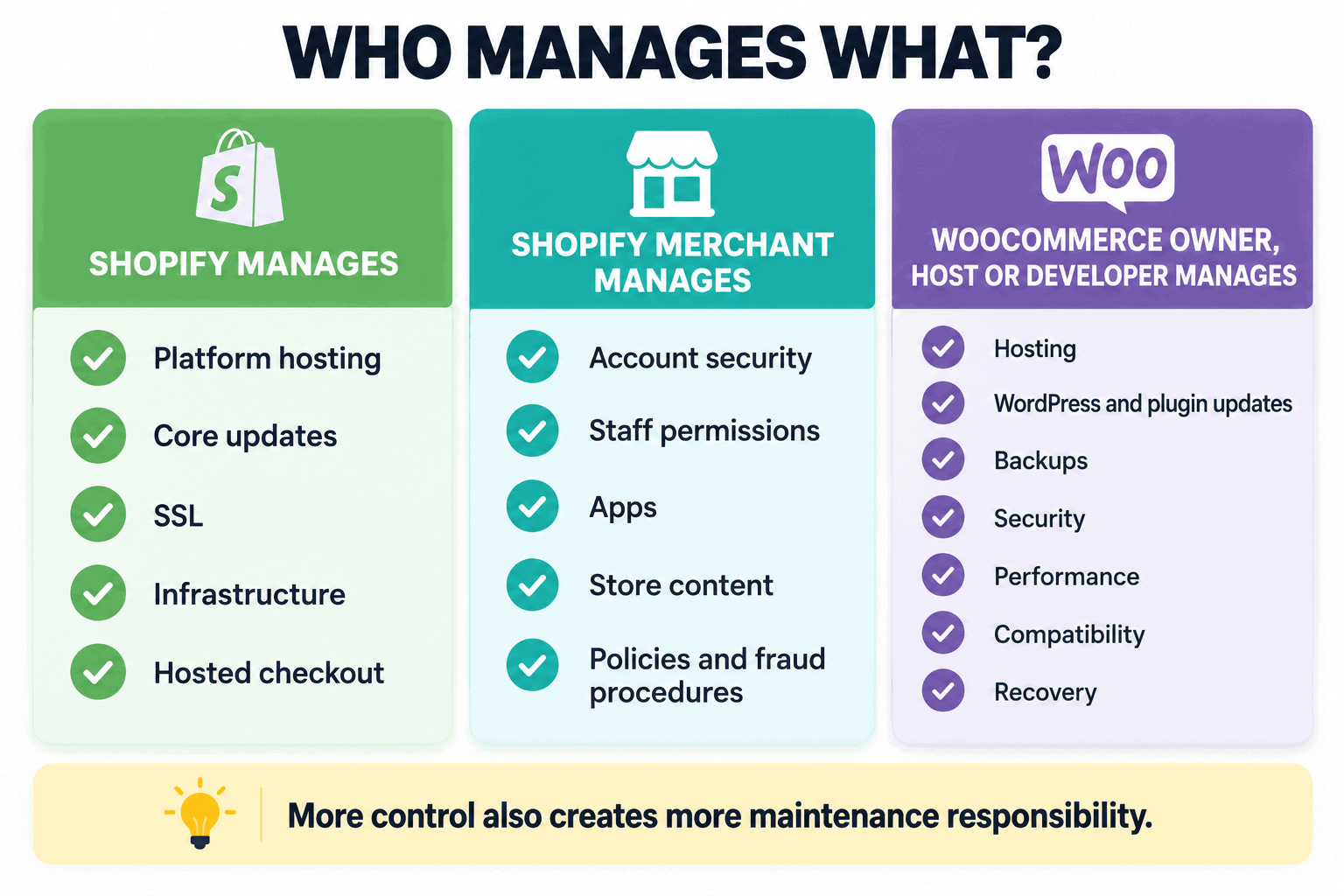
Shopify operates the platform, hosting, core updates, SSL, infrastructure, and checkout. Merchants remain responsible for account access, staff permissions, app choices, content, policies, fraud procedures, and business continuity.
WooCommerce performance and security depend on the host, theme, plugins, database, caching, CDN, updates, access control, monitoring, and developer practices. More control can produce an excellent store, but the owner must define who is accountable for every layer.
Compare repeated mobile and desktop storefront tests, uncached responses, checkout, admin work, imports, scheduled jobs, backup restores, uptime, and traffic bursts. A cached homepage score does not describe the full store.
SEO and Content
Shopify provides editable titles, descriptions, URLs, redirects, sitemaps, structured commerce data, blogging, image alt text, and apps. Its controlled URL patterns and platform boundaries can frustrate advanced users, but they do not prevent a useful store from ranking.
WooCommerce inherits WordPress’s content system and large SEO ecosystem. Custom post types, plugins, templates, schema, internal-link tools, editorial workflows, and server control provide more advanced options. Poor plugin use or technical configuration can also create duplicate content and performance problems.
WooCommerce wins SEO flexibility; Shopify wins operational simplicity. Search results depend on intent satisfaction, original evidence, authority, crawlability, internal links, performance, and reputation—not the platform name alone.
If you choose the hosted platform, use my Shopify SEO guide for beginners to complete keyword mapping, optimize products and collections, improve internal linking, handle technical checks, and measure organic-search performance.
Neither platform creates demand automatically. If the Shopify store is ready but still needs customers, follow my guide to getting your first sale on Shopify to strengthen the offer, reach a qualified audience, plan promotion, and measure the sales funnel.
Support and Maintenance
Shopify offers platform support, while app and theme developers support their products. The advantage is a clear starting point. Complex issues can still cross platform, app, gateway, domain, and custom-code boundaries.
WooCommerce support is distributed among the host, WooCommerce, payment provider, theme, extension developers, and hired professionals. That enables choice but can complicate responsibility. A production store needs a documented maintainer and escalation path.
Scalability and International Growth
Shopify scales by moving the merchant through plans, adding apps and services, and using the platform’s infrastructure. It is designed to keep the commerce admin familiar while order volume, staff, markets, locations, and channels grow. Plan upgrades do not solve every operational problem, but they avoid a server migration for ordinary platform growth.
WooCommerce can scale from a small store to a large custom application. That path may involve better hosting, database work, object caching, CDN configuration, search infrastructure, background-job management, observability, and experienced developers. The flexibility is real, but so is the need for architecture and capacity planning.
For international selling, compare currency presentation, payment availability, duties, taxes, local domains, languages, translations, regional catalogs, shipping, returns, legal content, and data handling. Availability and cost vary by market on both platforms. Test the actual country combination rather than assuming a feature label covers every region.
Shopify Pros and Cons
| Pros | Cons |
|---|---|
| Hosting, SSL, core updates, and checkout are integrated | Ongoing platform, app, and possible transaction costs |
| Commerce-focused admin and broad app ecosystem | Less server and application control |
| Strong path for channels, POS, and growing operations | Platform conventions can limit advanced customization |
| Clearer support starting point | Some app-specific data and behavior are difficult to move |
WooCommerce Pros and Cons
| Pros | Cons |
|---|---|
| Open-source application with hosting and code control | Owner must coordinate hosting, updates, security, and recovery |
| Deep WordPress content and plugin flexibility | Plugin conflicts and maintenance can add risk |
| Broad payment and infrastructure choice | Total cost is less predictable without a detailed stack |
| Strong portability of files and database | Scaling and custom work require technical ownership |
Ownership and Portability
WooCommerce gives the owner access to the WordPress application, database, files, and host. Moving still requires technical work, but the stack is more portable and inspectable.
Shopify can export important store data, and its APIs and migration tools support transitions. The theme, apps, checkout behavior, customer credentials, subscriptions, gift cards, and some historical or app-specific data may not reproduce on another platform.
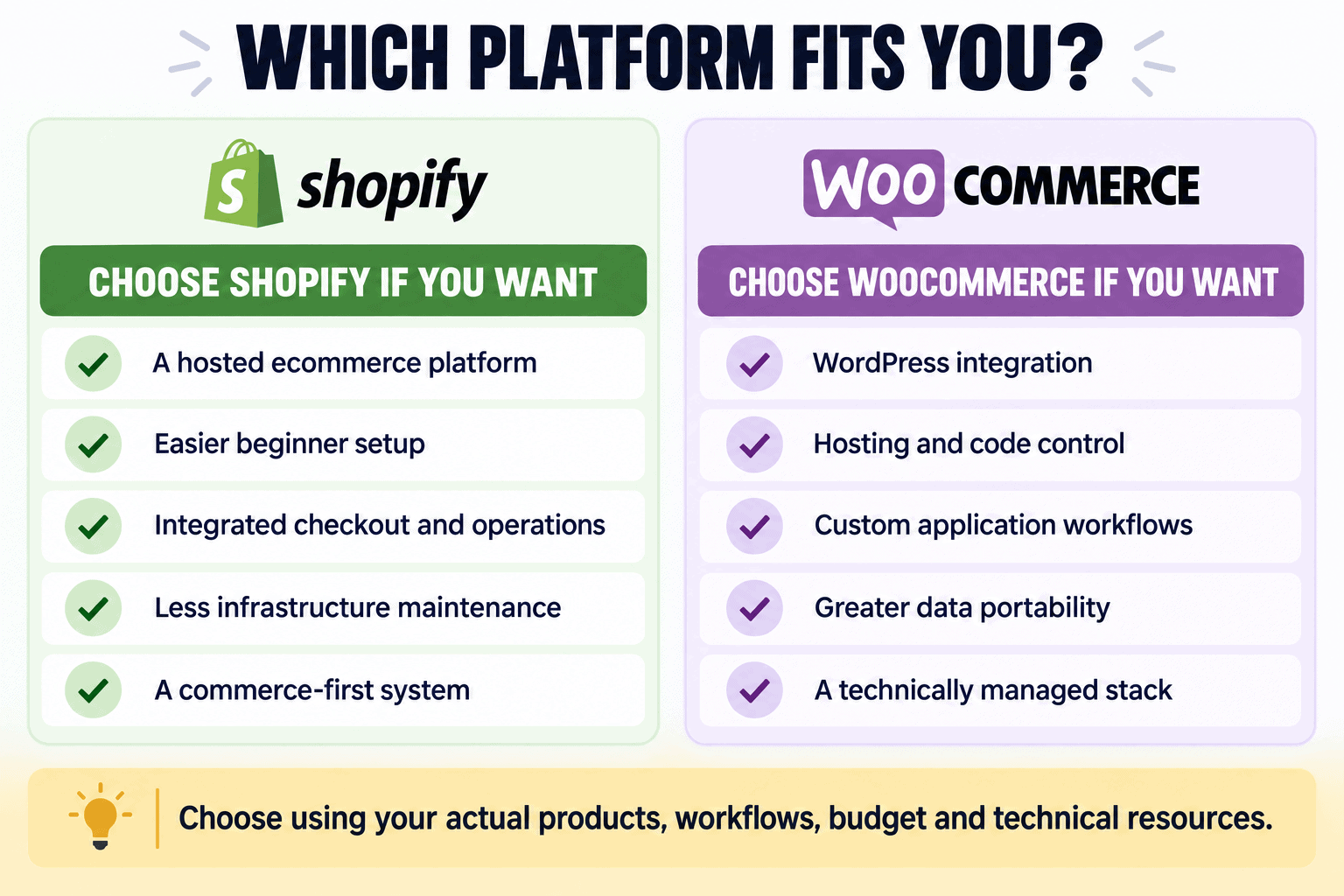
Who Should Choose Shopify?
Shopify may be the stronger fit when you already have—or plan to validate—a product-focused ecommerce business. If you are still exploring offers, my Shopify product-ideas guide compares 30 options, sourcing approaches, margins, and validation steps.
- Beginners who want a guided hosted platform
- Commerce-first businesses that value operational consistency
- Sellers who need multichannel tools and a large app ecosystem
- Teams without a WordPress maintenance owner
- Businesses willing to accept platform boundaries for less infrastructure work
Read the detailed Shopify review. If the fit is clear, start Shopify’s free trial and test a real store workflow before committing.
If your main alternative is an established marketplace rather than a self-hosted WordPress store, read my Shopify vs Etsy comparison to compare audience access, fees, branding, control, marketing responsibility, and product rules.
Who Should Choose WooCommerce?
- Established WordPress sites adding ecommerce
- Businesses requiring custom application logic or data access
- Owners who want hosting and payment-provider choice
- Content-heavy stores with advanced editorial requirements
- Teams with qualified WordPress development and maintenance support
If WooCommerce is the better architecture, compare Hostinger for WooCommerce hosting and apply WPCUPID. Confirm resources, backups, renewal, support boundaries, and the complete stack before purchase.
How to Test Both Platforms
- Create the same representative catalog, variants, images, collections, and customers.
- Configure the same tax, shipping, discount, payment, refund, email, analytics, and staff scenarios.
- Record setup time, paid additions, technical help, errors, and workarounds.
- Test mobile browsing, checkout, fulfillment, return, inventory, backup, and export.
- Calculate one-year and three-year ownership cost using the same order volume.
- Choose from evidence and documented business priorities.
If Shopify remains in consideration, review these Shopify mistakes to avoid before launching so product, pricing, app, mobile, shipping, checkout, SEO, and maintenance problems do not undermine the test.
If neither platform fits, document the missing business requirements and compare other options against the same catalog, checkout, operating, ownership, and cost criteria. Do not migrate an active store until data, redirects, transactions, customer communication, and rollback are verified.
Decision Checklist
- Is the business commerce-first or WordPress-content-first?
- Who owns updates, monitoring, security, backups, restores, and incidents?
- Which product, checkout, payment, tax, shipping, and fulfillment workflows are nonnegotiable?
- Which apps or extensions hold business-critical data, and how can that data be exported?
- What is the complete cost over three years at realistic order volume?
- Can the team support the chosen architecture without depending on one unavailable person?
If the answers point toward speed, consistency, and one hosted system, Shopify is the practical choice. If they point toward WordPress integration, custom logic, data access, and an accountable technical team, WooCommerce is the stronger foundation.
Because WooCommerce is only one way to add ecommerce to WordPress, read my broader Shopify vs WordPress comparison if you also need to evaluate blogging, publishing, non-store websites, and WordPress as a complete content-management system.
If Shopify is your preferred ecommerce platform, use my Shopify Black Friday checklist to prepare and test the complete holiday campaign before customers arrive.
Frequently Asked Questions
Is Shopify better than WooCommerce?
Shopify is better for most beginners and teams wanting a hosted commerce platform. WooCommerce is better for WordPress control, custom development, and hosting choice.
Is WooCommerce cheaper than Shopify?
It can be, but free core software is not a free store. Include hosting, extensions, development, maintenance, payments, email, backups, security, and staff time.
Which platform is easier?
Shopify is generally easier because hosting and core commerce are integrated. WooCommerce becomes easier for someone already experienced with WordPress and supported by a good host or developer.
Which is better for SEO?
WooCommerce offers more technical and editorial flexibility. Shopify provides sufficient fundamentals with less maintenance. Content quality, authority, crawlability, and execution matter more than the platform alone.
Can WooCommerce handle a large store?
Yes, with suitable architecture, hosting, development, caching, database work, monitoring, and operations. Scale is a system-design question, not simply a plugin limit.
Can I migrate between Shopify and WooCommerce?
Yes, but not every theme, app, credential, subscription, gift card, URL, or historical record transfers perfectly. Inventory all data and test before changing DNS or closing the original store.
Final Verdict
Shopify is the better default for a new commerce-first business because it removes infrastructure work and provides a cohesive buying and operating system. WooCommerce is the better strategic choice for WordPress-first businesses that value control and can own the technical stack.
Try Shopify and build a test store, or test WooCommerce on suitable hosting. Whichever platform you choose, judge it by real products, workflows, complete cost, and the team’s ability to operate it safely.
If dropshipping is the business model you plan to use, my Shopify dropshipping guide explains supplier selection, store setup, pricing, fulfillment, cash flow, and launch preparation.
If Shopify is the better fit and you want to start with one flagship item, my one-product Shopify store guide covers validation, sourcing, profit, positioning, page structure, and testing.